1. Producte acabatview
The AINAVI Qualcomm 665 Car Radio is an advanced Android 11 infotainment system designed to seamlessly integrate with specific BMW models. It enhances your driving experience with modern features while retaining the original vehicle functionalities.

Image: The AINAVI 10.25-inch Android Car Radio Unit, showcasinpel seu disseny elegant i la seva gran pantalla.
Característiques principals:
- Qualcomm Snapdragon 665 Processor: Octa-core, 2.0 GHz, 64-bit with Adreno 610 GPU for smooth and stable performance.
- Sistema operatiu Android 11: Modern and intuitive user interface.
- Pantalla tàctil IPS d'10.25 polzades: 1920x720 resolution with 178° full-viewAngle d'inclinació per a unes imatges clares.
- Apple CarPlay i Android Auto sense fil: Integració perfecta amb telèfons intel·ligents per a navegació, trucades, missatges i música.
- Built-in 4G LTE Module: Integrated connectivity without extra parts (check regional service support).
- Navegació GPS: Supports online and offline maps.
- Dual Band WiFi (2.4Ghz & 5Ghz) & Bluetooth 5.0: High-speed internet access and stable wireless connections.
- Retains Original BMW Features: Compatible with iDrive controller, steering wheel controls, factory TPMS, backup camera, parking sensors, 360 cameras, radio, DAB+, and OEM microphone.

Imatge: Una imatge detallada view of the Qualcomm Snapdragon 665 processor chip, highlighting its advanced technology.
2. Compatibilitat
This head unit is specifically designed for the following BMW models with the CIC System:
- BMW X5 E70 (2011-2013)
- BMW X6 E71 (2011-2013)
Important: Please identify if your BMW car has a CIC System LVDS Plug (4 pins) before purchase. This unit is not compatible with NBT or CCC systems.
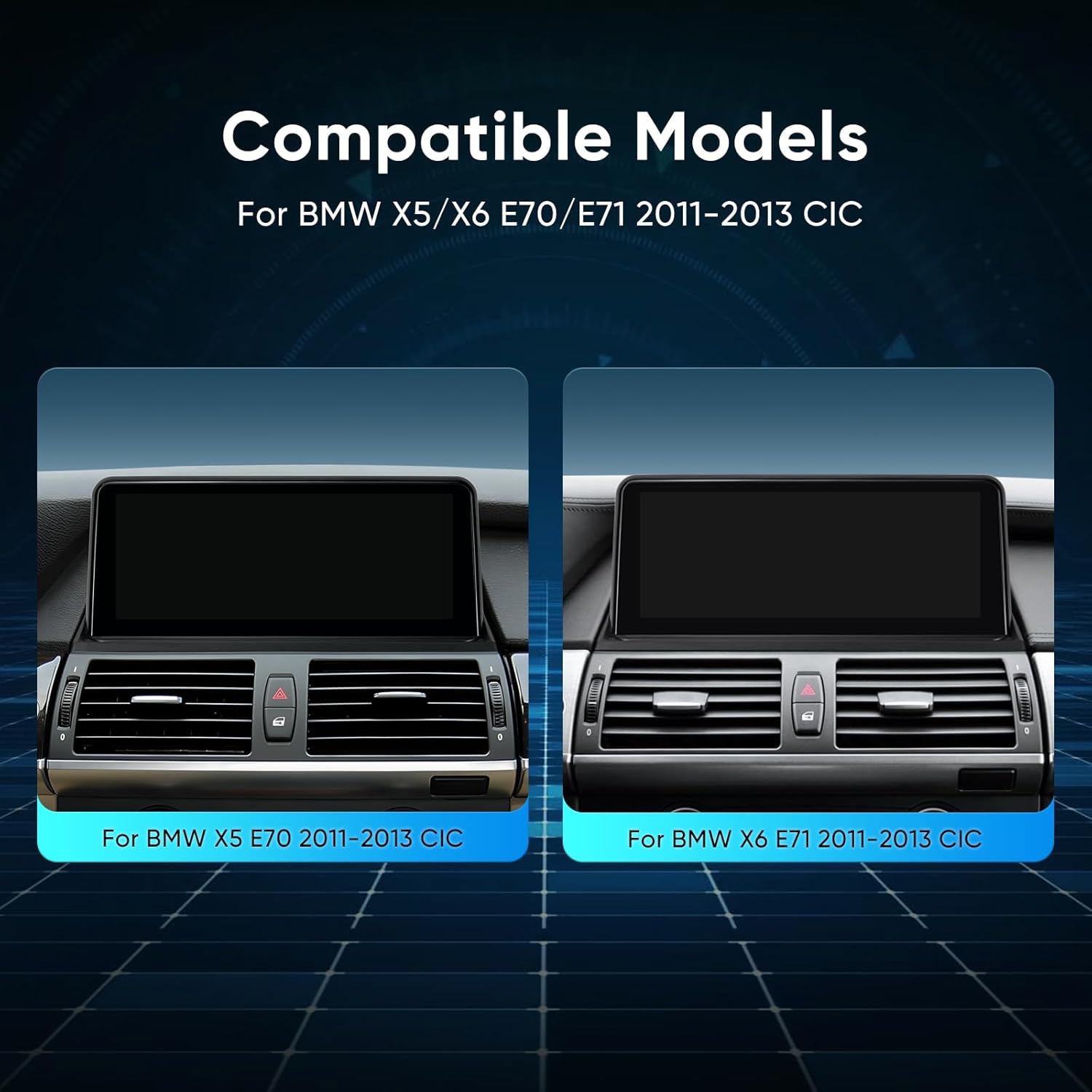
Image: Visual representation of compatible BMW X5 E70 and X6 E71 dashboards, showing where the unit integrates.

Image: Diagram illustrating how to identify your BMW's iDrive system by checking the LVDS plug type (NBT, CIC, CCC).
3. Configuració i instal·lació
Es recomana la instal·lació per part d'un professional. Assegureu-vos que el vehicle estigui desconnectat abans de començar la instal·lació.
3.1. What's in the Box:
- 1x 10.25" Android Head Unit
- SO Wiring Harness
- 4G LTE Antenna, GPS Antenna
- 4G LTE SIM Slot & USB Cable
- User Manual, Audio Cable

Image: A visual guide to the components included in the package, along with the dimensions of the head unit.
3.2. Diagrama de cablejat:
Refer to the following diagram for proper wiring connections. Ensure all connections are secure to prevent malfunctions.

Image: A detailed wiring diagram showing the connections for the SO Wiring Harness, USB ports, 4G LTE SIM slot, GPS antenna, and LVDS port.
- Desconnecta la bateria: Before starting, disconnect the vehicle's negative battery terminal.
- Elimina la pantalla original: Carefully remove the original BMW screen and trim pieces.
- Connecteu l'arnès de cablejat: Connect the provided SO Wiring Harness to the vehicle's original harness. Ensure the LVDS plug (4 pins for CIC system) is correctly connected.
- Connecteu les antenes: Attach the 4G LTE antenna and GPS antenna to their respective ports on the head unit. Position them for optimal signal reception.
- Connect USB & SIM Slot: Connect the USB cable and 4G LTE SIM slot cable. Route them to a convenient location for access.
- Unitat principal de muntatge: Securely mount the new AINAVI head unit in the dashboard.
- Torneu a connectar la bateria: Un cop fetes i assegurades totes les connexions, torneu a connectar la bateria del vehicle.
- Funcionalitat de prova: Power on the unit and test all functions, including touch screen, audio, GPS, CarPlay/Android Auto, and original BMW features.
4. Instruccions de funcionament
4.1. System Navigation:
The unit operates on Android 11. Navigate through menus using the touch screen or the original iDrive controller. Swipe gestures and tap actions are similar to a smartphone or tablet.

Image: The AINAVI head unit seamlessly integrated into a BMW dashboard, displaying its user interface.
4.2. Wireless Apple CarPlay & Android Auto:
Connect your iPhone or Android smartphone wirelessly for an integrated experience.
- Ensure Bluetooth is enabled on your phone and the head unit.
- Pair your phone with the head unit via Bluetooth.
- Follow the on-screen prompts to activate Wireless CarPlay or Android Auto.
- Use voice commands ("Hey Siri" or "Hey Google") for hands-free operation.

Image: A split image demonstrating the interfaces of Wireless Apple CarPlay and Wired Android Auto on the head unit, with smartphones connected.
4.3. Navegació GPS:
The unit comes with built-in GPS. You can use pre-installed navigation apps or download others from the Google Play Store.
- Navegació en línia: Connect to WiFi or use the 4G LTE module for real-time traffic updates.
- Mapes fora de línia: Download maps for your region to use navigation without an internet connection.

Imatge: Una mostra de collageasing the Bluetooth 5.0 interface, GPS navigation, original car information display, and 2K video playback capabilities of the unit.
4.4. 4G LTE Connectivity:
Insert a compatible 4G SIM card into the provided slot to enable mobile data connectivity directly on the head unit. This allows for online streaming, real-time navigation updates, and app downloads without relying on your phone's hotspot.
4.5. Retaining Original BMW Features:
The system is designed to work alongside your original BMW infotainment system. You can switch between the Android interface and the original BMW interface seamlessly. All original functions like iDrive, steering wheel controls, and factory cameras will continue to operate.

Image: A grid of images demonstrating the unit's compatibility with various original BMW features, including the iDrive system, amplifier, car information display, backup camera, steering wheel controls, CD player, radio, and Bluetooth.

Image: A visual representation emphasizing the seamless integration of the AINAVI system with the original BMW infotainment system, showing the retained functionalities.
4.6. Multiple UI Themes:
Customize the look and feel of your head unit with various user interface themes available in the settings.

Image: A collage displaying several different user interface themes that can be selected on the head unit, offering customization options.
5. Manteniment
- Neteja de pantalla: Use a soft, lint-free cloth to clean the touch screen. For stubborn smudges, dampNetegeu lleugerament el drap amb aigua o un netejador de pantalles. Eviteu productes químics agressius.
- Actualitzacions de programari: Comproveu periòdicament si hi ha actualitzacions de programari a través de la configuració de la unitat o del fabricant. weblloc per garantir un rendiment òptim i l'accés a noves funcions.
- Eviteu temperatures extremes: Do not expose the unit to extreme heat or cold for prolonged periods, as this can affect its lifespan and performance.
- Connexions segures: Ensure all cables and connections remain secure to prevent intermittent issues.
6. Solució De Problemes
| Problema | Causa possible | Solució |
|---|---|---|
| La unitat no s'encén. | Connexió d'alimentació fluixa, fusible fundit, cablejat incorrecte. | Check all power connections. Inspect vehicle fuses. Verify wiring against the diagram. |
| Sense so o àudio distorsionat. | Incorrect audio cable connection, volume too low, ampproblemes de vida. | Ensure audio cables are properly connected. Adjust volume. Check original BMW ampfuncionalitat de lifier. |
| El CarPlay/Android Auto no es connecta. | Bluetooth not paired, phone settings, app issues. | Ensure Bluetooth is on and paired. Restart phone and head unit. Check phone's CarPlay/Android Auto settings. |
| Senyal GPS feble o imprecis. | Antena GPS no instal·lada correctament o obstruïda. | Ensure GPS antenna is securely connected and placed in a clear location (e.g., dashboard, not under metal). |
| Original BMW features not working. | Incorrect LVDS connection, system switch issue. | Verify the LVDS plug connection. Ensure you are switching to the original BMW interface correctly. |
If you encounter issues not listed here or require further assistance, please contact AINAVI customer support.
7. Especificacions
| Característica | Detall |
|---|---|
| Sistema operatiu | Android 11 |
| Processador | Qualcomm Snapdragon 665, Octa-core, up to 2.0 GHz |
| RAM | 4 GB (LPDDR4X) |
| ROM | 64 GB (eMMC) |
| Mida de la pantalla | 10.25 polzades |
| Resolució | 1920 x 720 IPS |
| Connectivitat | 4G LTE (Built-in Module), Dual Band WiFi (2.4Ghz & 5Ghz), Bluetooth 5.0 |
| Navegació | GPS integrat |
| Integració del telèfon intel·ligent | Apple CarPlay sense fil, Android Auto sense fil |
| Mode de sortida d'àudio | estèreo |
| Pes de l'article | 4.4 lliures (aprox. 2 kg) |
| Dimensions del paquet | 14.02 x 13.11 x 5.16 polzades |
8. Garantia i Suport
8.1. Informació de la garantia:
Aquest producte ve amb un Garantia del fabricant de 1 anys des de la data de compra. Si us plau, conserveu el comprovant de compra per a reclamacions de garantia. La garantia cobreix defectes de materials i fabricació en condicions d'ús normal.
8.2. Atenció al client:
For technical assistance, installation queries, or troubleshooting, please contact AINAVI customer support. You can typically reach us through the seller's contact page on the platform where you purchased the product, or visit the official AINAVI store for contact information.

Image: A friendly customer support representative, symbolizing assistance available for product inquiries.
AINAVI is committed to providing high-performance car multimedia components and excellent customer service. We encourage you to follow our store for more information and product updates.
Thank you for choosing AINAVI.


