Introducció
This manual provides comprehensive instructions for the safe and efficient operation of your Xiaomi Poco F5 Pro smartphone. Please read this manual thoroughly before using your device to ensure optimal performance and longevity. The Poco F5 Pro is designed for high performance, featuring a powerful processor, a vibrant AMOLED display, and an advanced camera system.
Dispositiu acabatview
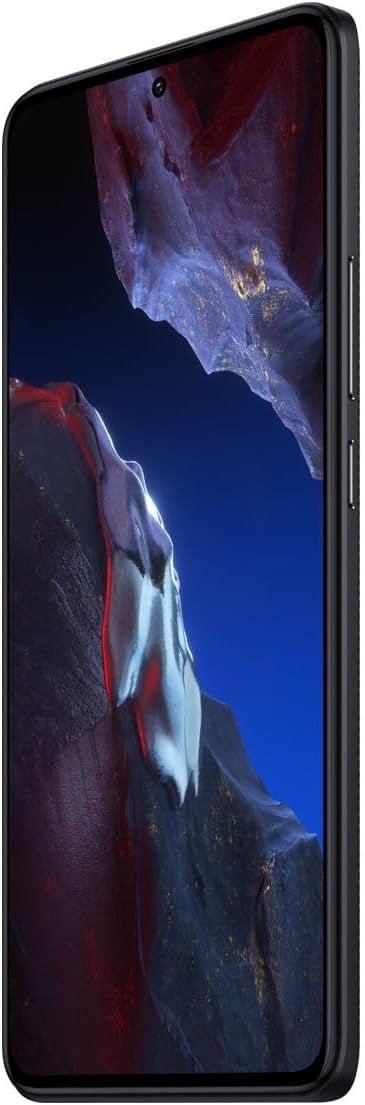
Davant View: The device features a large 6.67-inch AMOLED DotDisplay with a punch-hole camera at the top center. The display offers WQHD+ resolution and a 120Hz refresh rate for smooth visuals.

lateral View: On the right side of the device, you will find the power button and volume rocker. The power button may also integrate a fingerprint sensor for secure unlocking.

Enrere View: The rear of the device showcases the prominent triple camera module, including the 64MP main camera, along with the LED flash. The back panel has a textured finish for better grip.
Configuració
1. Inserció de la targeta SIM
- Localitza la safata de la targeta SIM al lateral del dispositiu.
- Introduïu l'eina d'expulsió de la SIM al forat petit que hi ha al costat de la safata i premeu suaument fins que la safata surti.
- Col·loqueu la targeta o targetes nano-SIM a les ranures designades de la safata. Assegureu-vos que els contactes daurats estiguin mirant cap avall.
- Empenyeu amb cura la safata cap al telèfon fins que encaixi al seu lloc.
2. Càrrega inicial
Before first use, it is recommended to fully charge your Poco F5 Pro. Use the provided USB Type-C cable and power adapter. The device supports 30W wired fast charging and 51W wireless fast charging.
- Connecteu el cable USB tipus C al port de càrrega de la part inferior del telèfon.
- Connecteu l'altre extrem del cable a l'adaptador de corrent i, a continuació, endolleu l'adaptador a una presa de corrent.
- L'indicador de càrrega apareixerà a la pantalla.
3. Engegada i configuració inicial
- Mantingueu premut el botó d'engegada fins que aparegui el logotip de Xiaomi.
- Segueix les instruccions que apareixen a la pantalla per completar la configuració inicial, inclosa la selecció d'idioma, la connexió Wi-Fi, la configuració del compte de Google i la configuració de seguretat.
Funcionament del vostre dispositiu
Visualització i navegació
The Poco F5 Pro features a 6.67-inch WQHD+ AMOLED DotDisplay with a 120Hz refresh rate. Navigate the interface using touch gestures.
- Toca: Seleccioneu un element o obriu una aplicació.
- Llisca: Desplaçar-se per pantalles o llistes.
- Pessigar: Apropar o allunyar les imatges i web pàgines.
- Premsa llarga: Access contextual menus or rearrange icons.
Ús de la càmera
The device is equipped with a 64MP ultra-clear main camera, an 8MP ultra-wide camera, and a 2MP macro camera. Optical Image Stabilization (OIS) and Electronic Image Stabilization (EIS) ensure steady shots.
- Obriu el Càmera aplicació.
- Select your desired mode (e.g., Photo, Portrait, Video).
- Toqueu el botó de l'obturador per capturar una foto o iniciar/aturar la gravació de vídeo.
- Canvieu entre objectius tocant les icones de la pantalla (per exemple, 0.6x per a ultra gran angular, 1x per a principal).
Performance and Gaming
Powered by the Snapdragon® 8+ Gen 1 processor and 12GB of RAM, the Poco F5 Pro delivers hyperpower efficiency and smooth performance for demanding applications and games. LiquidCool Technology 2.0 helps manage heat during intensive use.
- For optimal gaming, ensure your device is sufficiently charged.
- Tanqueu les aplicacions innecessàries en segon pla per alliberar memòria RAM.
- FEAS 2.2 technology optimizes power consumption for stable game frame rates.
Manteniment
Cura de la bateria
- Eviteu exposar el dispositiu a temperatures extremes.
- Feu servir només carregadors i cables oficials o certificats.
- Do not let the battery completely drain frequently; charge it before it reaches very low levels.
Actualitzacions de programari
Comproveu i instal·leu regularment si hi ha actualitzacions de programari per assegurar-vos que el dispositiu tingui les darreres funcions, pegats de seguretat i millores de rendiment.
- Vés a Configuració > Sobre el telèfon > Versió MIUI.
- Toqueu Comproveu si hi ha actualitzacions.
- Baixeu i instal·leu les actualitzacions disponibles. Assegureu-vos que el dispositiu tingui prou bateria i una connexió a Internet estable durant el procés d'actualització.
Neteja del teu dispositiu
- Use a soft, lint-free cloth to clean the screen and back panel.
- Eviteu utilitzar productes químics o materials abrasius.
- No ruixeu productes de neteja directament sobre el dispositiu.
Resolució de problemes
- El dispositiu no s'encén: Ensure the battery is charged. Connect the charger and wait a few minutes before attempting to power on again. If it still doesn't turn on, try a forced restart by holding the power button for 10-15 seconds.
- Les aplicacions es bloquegen o es bloquegen: Close the problematic app and reopen it. If the issue persists, clear the app's cache and data in Configuració > AplicacionsCom a últim recurs, desinstal·leu i torneu a instal·lar l'aplicació.
- Poca durada de la bateria: Comprova l'ús de l'aplicació en segon pla a Configuració > Bateria. Reduce screen brightness, disable unnecessary features like GPS or Bluetooth when not in use, and ensure all apps are updated.
- Problemes de connectivitat de xarxa: Toggle Airplane Mode on and off. Restart the device. Check your SIM card insertion. If using Wi-Fi, restart your router.
- Sobreescalfament: Avoid using the device in direct sunlight or during heavy charging/gaming sessions. Close background apps. If overheating persists, reduce usage and allow the device to cool down.
Especificacions
| Característica | Detall |
|---|---|
| Número de model | M11A |
| Dimensions | 7.01 x 3.54 x 2.4 polzades |
| Pes | 6 unces |
| Sistema operatiu | MIUI 12 |
| Processador | Qualcomm Snapdragon® 8+ Gen 1 (3.2 GHz) |
| RAM | 12 GB |
| Emmagatzematge intern | 512 GB |
| Mostra | 6.67-inch WQHD+ (2560 x 1440) AMOLED DotDisplay, 120Hz Refresh Rate |
| Càmera posterior | 64MP Main (OIS), 8MP Ultra-wide, 2MP Macro |
| Capacitat de la bateria | 5160 mAh |
| Carregant | 30W Wired Fast Charging, 51W Wireless Fast Charging |
| Connectivitat | 5G Cellular, USB Type-C, GPS, Wireless Display |
| Jack d'àudio | 3.5 mm |
Garantia i Suport
Your Xiaomi Poco F5 Pro comes with a standard manufacturer's warranty. Please refer to the warranty card included in your product packaging for specific terms and conditions, including warranty period and coverage details.
Atenció al client
For technical assistance, troubleshooting, or warranty claims, please contact Xiaomi customer support through their official website or the contact information provided in your warranty documentation. You can also visit the official Xiaomi Store on Amazon for product information and support resources:
Visita la botiga Xiaomi a Amazon
Please have your device's model number (M11A) and serial number ready when contacting support.


