1. Introducció
This manual provides comprehensive instructions for the setup, operation, and maintenance of your DELUX GM905DB Wireless Ergonomic Keyboard. Designed for comfort and efficiency, this keyboard features a split ergonomic structure, dual-mode connectivity (2.4G wireless and Bluetooth), and a built-in wrist rest to support natural typing posture and reduce strain.

Image 1.1: The DELUX GM905DB Wireless Ergonomic Keyboard, showcasing el seu disseny dividit i el reposacanell integrat.
2. Contingut del paquet
Si us plau, verifiqueu que tots els elements siguin presents al vostre paquet:
- DELUX GM905DB Wireless Ergonomic Keyboard
- Receptor USB 2.4G
- Manual d'usuari
3. Producte acabatview
The DELUX GM905DB keyboard is engineered to provide a comfortable typing experience. Its key features include:
- Disseny ergonòmic dividit: The keyboard is divided into two sections, allowing for a more natural hand and wrist position.
- Reposa-canell integrat: A soft, pillowed wrist rest made of skin-friendly synthetic leather supports your palms during typing.
- Connectivitat de mode dual: Connect wirelessly via 2.4G USB receiver or Bluetooth 5.0 (BT1, BT2 channels).
- Suport multidispositiu: Seamlessly switch between up to three connected devices.
- Tecles multimèdia dedicades: Easy access to volume, brightness, and other media controls.
- Adjustable Kickstands: Customize the keyboard's tilt angle for optimal comfort.

Image 3.1: Illustration of the split ergonomic structure promoting a natural arm angle for comfortable typing.

Image 3.2: The full-size layout of the keyboard, featuring 112 keys and an ergonomic form factor.
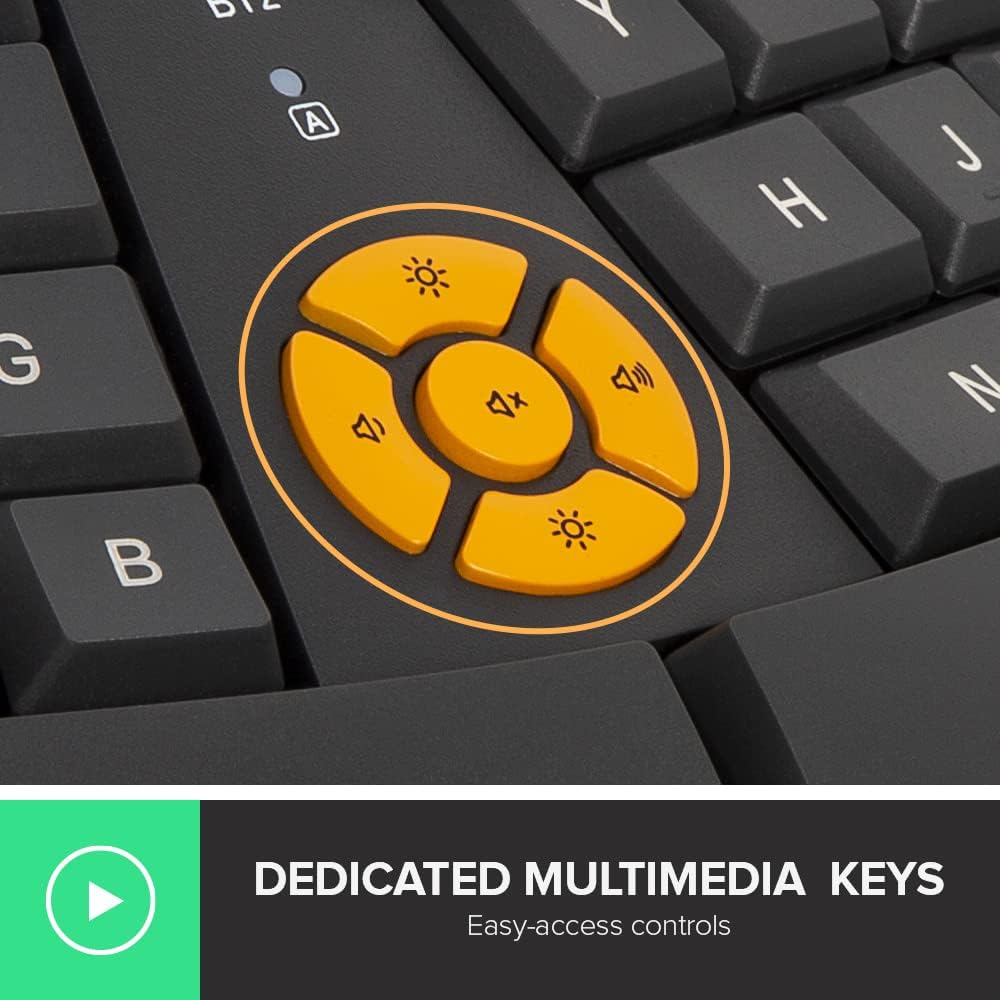
Imatge 3.3: Un primer pla view of the dedicated multimedia control keys located on the keyboard.
4. Configuració
4.1. Instal·lació de la bateria
The keyboard requires two AAA batteries (not included). To install:
- Localitzeu el compartiment de la bateria a la part inferior del teclat.
- Obriu la tapa del compartiment de la bateria.
- Introduïu dues piles AAA, assegurant-vos de la polaritat correcta (+/-).
- Tanqueu bé la tapa del compartiment de la bateria.

Image 4.1: The underside of the keyboard showing the battery compartment and two AAA batteries.
4.2. Connecting via 2.4G Wireless
To connect using the 2.4G USB receiver:
- Insert the USB 2.4G receiver into an available USB port on your computer.
- Enceneu el teclat.
- Press the '2.4G' button on the keyboard. The indicator light will illuminate, confirming the connection.
4.3. Connexió mitjançant Bluetooth
The keyboard supports two Bluetooth channels (BT1 and BT2). To connect:
- Enceneu el teclat.
- Press and hold either the 'BT1' or 'BT2' button for 3-5 seconds until the corresponding indicator light flashes rapidly. This indicates pairing mode.
- On your device (computer, tablet, etc.), navigate to Bluetooth settings and search for new devices.
- Select 'DELUX Keyboard' (or similar name) from the list of available devices to pair.
- Once paired, the indicator light will stop flashing and remain solid for a few seconds, then turn off.

Image 4.2: The keyboard demonstrating multi-device connectivity with a laptop (2.4G), tablet (BT1), and monitor (BT2).
5. Instruccions de funcionament
5.1. Canviar entre dispositius connectats
To switch between devices connected via 2.4G, BT1, or BT2, simply press the corresponding button ('2.4G', 'BT1', or 'BT2') on the keyboard. The keyboard will connect to the selected device.
5.2. Using Multimedia Keys
The keyboard features dedicated multimedia keys for quick access to various functions:
- Control de volum: Use the dedicated volume up, volume down, and mute buttons.
- Control de brillantor: Adjust screen brightness with the dedicated brightness keys.
- FN Lock: Some function keys (F1-F12) may have secondary functions. Use the Fn key in combination with these keys, or use an Fn-lock feature if available, to toggle between primary and secondary functions.

Image 5.1: A close-up of the keyboard highlighting the multimedia controls and function keys.
5.3. Adjusting Keyboard Angle
The keyboard is equipped with adjustable kickstands to modify its tilt angle for personalized comfort. There are four kickstands located at the corners of the keyboard. Adjust them to achieve 0°, 3°, or 5° tilt as preferred for seated or standing postures.

Imatge 5.2: Lateral view illustrations showing the keyboard at 0°, 3°, and 5° tilt angles using the adjustable kickstands.
6. Manteniment
6.1. Neteja
Per netejar el teclat:
- Ensure the keyboard is turned off before cleaning.
- Utilitzeu un drap suau i sense pelusa lleugerament dampamb aigua o una solució de neteja suau.
- Eviteu la humitat excessiva i no ruixeu productes de neteja directament sobre el teclat.
- Per a la pols i les restes entre les tecles, feu servir aire comprimit.
6.2. Substitució de la bateria
When the keyboard's performance degrades or the connection becomes unstable, it may be time to replace the AAA batteries. Follow the battery installation steps in Section 4.1.
7. Solució De Problemes
| Problema | Causa possible | Solució |
|---|---|---|
| El teclat no es connecta via 2.4G | USB receiver not properly inserted; low keyboard battery; incorrect mode selected. | Ensure USB receiver is fully inserted. Replace batteries. Press the '2.4G' button. Try a different USB port. |
| El teclat no es connecta per Bluetooth | Keyboard not in pairing mode; device Bluetooth off; low keyboard battery. | Press and hold 'BT1' or 'BT2' to enter pairing mode. Ensure Bluetooth is enabled on your device. Replace batteries. Remove and re-pair the keyboard in device settings. |
| Keys are unresponsive or laggy | Low keyboard battery; interference; distance from receiver/device. | Replace batteries. Move closer to the receiver/device. Ensure no large metal objects are between the keyboard and receiver/device. |
| Les tecles multimèdia no funcionen | Software conflict; driver issue. | Ensure your operating system is up to date. Check for specific keyboard drivers if available from the manufacturer's weblloc. |
8. Especificacions
| Característica | Detall |
|---|---|
| Marca | DeLUX |
| Model | GM905-XXX |
| Tecnologia de connectivitat | Sense fil de 2.4 GHz, Bluetooth 5.0 |
| Descripció del teclat | Membrana |
| Nombre de claus | 112 |
| Característiques especials | Ergonomic, Full Size, Wrist Rest |
| Dispositius compatibles | Portàtil, PC |
| Sistemes operatius | Mac OS, Windows 10, Windows 7, Windows 8 |
| Font d'alimentació | Alimentat per piles (2 x AAA, no incloses) |
| Tipus de material | Synthetic Leather (for wrist rest) |
| Dimensions del producte | 48.54 x 25.49 x 4.66 cm |
| Pes de l'article | 980 g |
9. Garantia i Suport
For warranty information and technical support, please refer to the documentation included with your product packaging or visit the official DeLUX weblloc. Conserveu el rebut de compra per a reclamacions de garantia.


