1. Introducció
This manual provides detailed instructions for the Y&H 100A MPPT Solar Charge Controller (Model SY10048-JP). It covers installation, operation, maintenance, and troubleshooting to ensure safe and efficient use of your solar power system. This controller is designed to manage power flow from solar panels to batteries, supporting 12V, 24V, 36V, and 48V systems with automatic voltage reconeixement.
2. Producte acabatview
The Y&H 100A MPPT Solar Charge Controller combines advanced technology with user-friendly features to optimize your solar charging experience.
Característiques principals:
- Alta eficiència: Integrates MPPT and PWM charging technologies for high charging efficiency and cost-effectiveness. Offers at least 99.5% tracking efficiency.
- Compatibilitat de la bateria: Automatically adjusts for 12V, 24V, 36V, and 48V systems. Compatible with various battery types including sealed lead-acid, GEL, lithium, and LiFePO4 batteries.
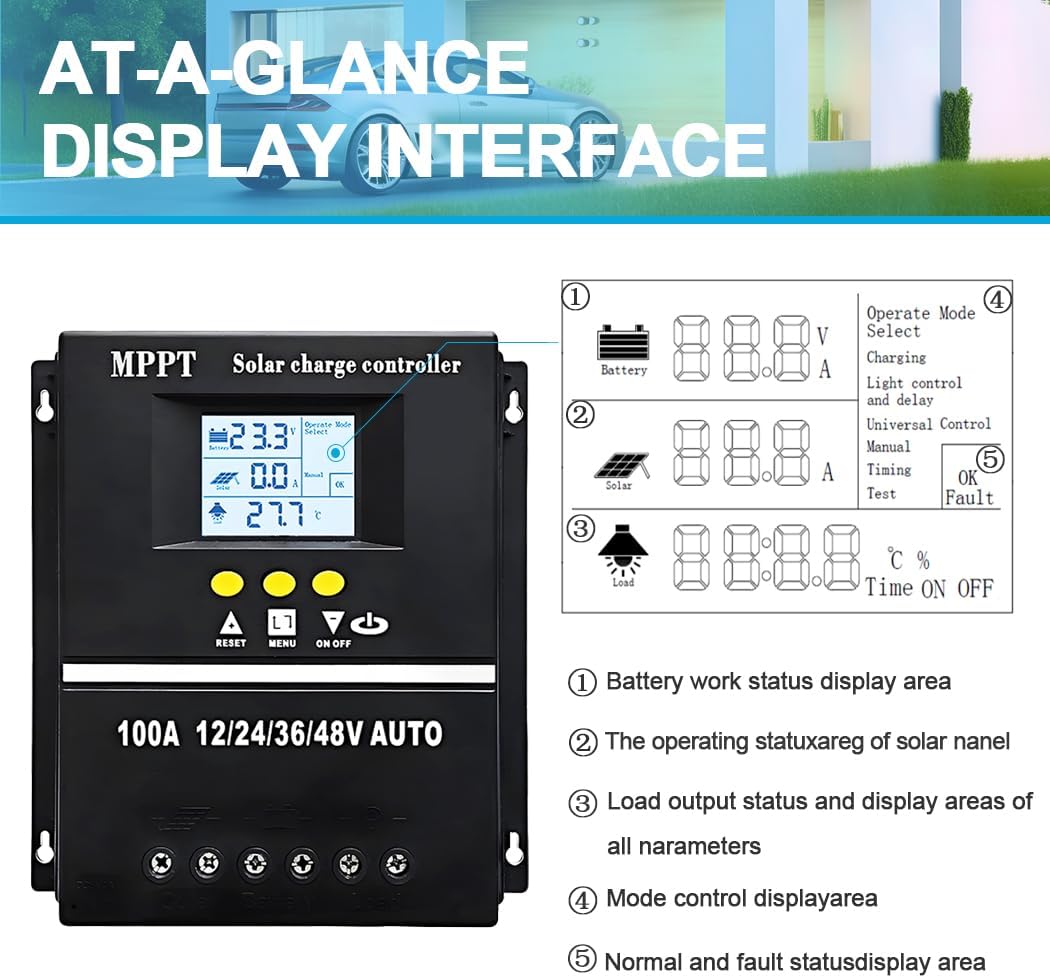
- Pantalla LCD clara: Features a multi-functional LCD screen with backlight and clock display. Clearly shows charging status, operating modes, and other information, ensuring visibility even in low light.
- Advanced Multi-functional Design: Offers 7 operating modes (charging mode, light control mode, light control + delay control mode, universal control mode, manual control mode, timer control mode) to adapt to various usage scenarios.
- Seguretat sòlida: Includes multiple protection functions such as overcharge, over-discharge, overload protection, reverse connection protection, and overheat protection. The aluminum alloy casing and portable size ensure the safety of both the battery and the device.
- Ports USB dobles: Equipped with dual 5V USB charging ports for simultaneous charging of smartphones and tablets.
Visuals del producte:



3. Configuració
Proper installation is crucial for the safe and efficient operation of your solar charge controller. Follow these steps carefully:
- Preparació per a la instal·lació: Ensure the installation location is dry, well-ventilated, and protected from direct sunlight and moisture. Leave sufficient space around the controller for heat dissipation.
- Connecteu la bateria: Connect the battery to the controller first. Ensure correct polarity (positive to positive, negative to negative). The controller will automatically detect the battery voltage (12 V, 24 V, 36 V o 48 V).
- Connecteu el panell solar: Connect the solar panel to the controller. Again, observe correct polarity. The controller will begin charging the battery if sufficient sunlight is available.
- Connect the Load: Connect your DC load to the controller's load terminals. Ensure the load current does not exceed the controller's rated current.
- Seleccioneu el tipus de bateria: After initial connection, use the controller's menu to select the appropriate battery type (Sealed, GEL, Lithium, LiFePO4) for optimal charging. Refer to the 'Operating' section for detailed instructions on menu navigation.


4. Instruccions de funcionament
The Y&H Solar Charge Controller features an intuitive LCD display and three control buttons for easy operation.
Pantalla LCD:
The LCD screen provides real-time information about your solar system. Key indicators include:
- Bateria voltage i estat de càrrega
- Solar panel current and voltage
- Load output status and current
- Temperatura ambient
- Selecció del mode de funcionament
- Time and fault status
Funcions del botó:
- RESET (▲): Used to increase values when setting parameters or to navigate upwards through menu options.
- MENU (L1): Used to enter the menu settings, cycle through different display screens, and confirm selections.
- ON/OFF (▼): Used to decrease values when setting parameters or to navigate downwards through menu options. Also used to manually turn the load on or off.
Paràmetres de configuració:
To adjust settings such as high voltage disconnection, low voltage disconnection, or operating modes, follow these general steps:
- Entra al mode de configuració: Press and hold the 'MENU' button for 5 seconds to enter the parameter setting interface.
- Paràmetres de navegació: Use the '▲' and '▼' buttons to scroll through different parameters.
- Ajusta els valors: Once the desired parameter is selected, press and hold '▲' or '▼' to modify its value. Briefly press '▲' or '▼' to fine-tune the adjustment.
- Confirmeu la configuració: Press the 'MENU' button to confirm the new setting and move to the next parameter, or press 'OK' (if available on screen) to save and exit.
Load Working Modes:
The controller supports various load working modes, which can be configured via the menu:
- Mode manual (24 h): The load can be manually turned on or off using the ON/OFF button.
- Mode de control de la llum solar (posta de sol-sortida del sol): La càrrega s'encén automàticament a la posta de sol i s'apaga a la sortida del sol.
- Control del temps de la llum solar: The load turns on at sunset and stays on for a set duration.

Vídeo de demostració de l'operació:
This video demonstrates how to set the high voltage disconnection protection and adjust the light control mode on the Y&H 100A MPPT Solar Charge Controller. It shows the button presses and corresponding display changes.
5. Manteniment
Un manteniment regular garanteix la longevitat i el rendiment òptim del vostre controlador de càrrega solar.
- Comproveu les connexions: Periodically inspect all wiring connections (battery, solar panel, load) for tightness and corrosion. Loose connections can cause voltaggotes de líquids i sobreescalfament.
- Netegeu el controlador: Keep the controller's exterior clean and free from dust and debris. Use a dry cloth for cleaning. Do not use liquids or abrasive cleaners.
- Assegureu-vos de la ventilació: Verify that the controller's ventilation openings are not obstructed. Proper airflow is essential to prevent overheating, especially in warm environments.
- Pantalla del monitor: Regularly check the LCD display for any unusual readings or error codes. Refer to the troubleshooting section if any issues are observed.
- Inspecció de la bateria: Follow the manufacturer's maintenance guidelines for your specific battery type.
6. Solució De Problemes
Si teniu problemes amb el vostre controlador de càrrega solar Y&H, consulteu els següents problemes i solucions habituals:
| Problema | Causa possible | Solució |
|---|---|---|
| Controller display is off / No power | Loose battery connection, low battery voltage, reverse polarity. | Check battery wiring and ensure connections are secure. Verify battery voltage is above the minimum operating voltage. Correct any reverse polarity. |
| La bateria no es carrega | No solar input, low solar panel voltage, incorrect battery type setting, faulty solar panel. | Ensure solar panels are exposed to sunlight. Check solar panel connections and voltage. Verify the correct battery type is selected in the settings. Test solar panel output. |
| La càrrega no funciona | Load disconnected, low battery voltage, incorrect load control mode, overload protection activated. | Check load wiring. Ensure battery voltage està per sobre del baix voltage disconnection threshold. Adjust load control mode settings. Reduce load to prevent overload. |
| Overcharge/Over-discharge protection frequently activates | System components (solar panel, battery) are mismatched, incorrect voltage configuració. | Review your solar panel wattage and battery capacity to ensure they are appropriately sized for each other. Adjust high/low voltage disconnection settings if necessary, ensuring they align with your battery's specifications. |
7. Especificacions
| Característica | Especificació |
|---|---|
| Model | SY10048-JP |
| Corrent màxim | 100A |
| Volum del sistematage | 12V/24V/36V/48V (Auto-detection) |
| Max Solar Input (Voc) for 12V Battery | 15-25V |
| Max Solar Input (Voc) for 24V Battery | 30-50V |
| Max Solar Input (Voc) for 36V Battery | 45-75V |
| Max Solar Input (Voc) for 48V Battery | 60-100V |
| Sortida USB | Dual 5V |
| Fabricant | Y&H |
| Mida del paquet | 19.5 x 18.4 x 6.6 cm |
| Pes del paquet | 0.89 kg |
| Color | Negre |
| Tipus de visualització | LCD |
| UPC | 716963254700 |
8. Garantia i Suport
For warranty information and technical support, please refer to the product packaging or contact Y&H customer service directly. You can also visit the Y&H store on Amazon for additional resources and contact options. Your satisfaction is our priority.


