1. Introducció
The Lowrance S3100 Sonar Module is an advanced sonar processing unit designed to enhance the capabilities of compatible Lowrance displays, including HDS LIVE, HDS Carbon, and Elite FS series. This module provides high-resolution imaging of underwater structures and fish, offering superior clarity and detail for a more effective fishing experience. It features two independent 1kW sonar channels for outstanding fish-finding and bottom tracking, along with support for Active Imaging HD and FishReveal SideScan technologies.
2. Included Components and Product Overview
The Lowrance S3100 Sonar Module package typically includes the following items:
- S3100 Sonar Module Unit
- Cable Ethernet
- Cable d'alimentació
Producte Views
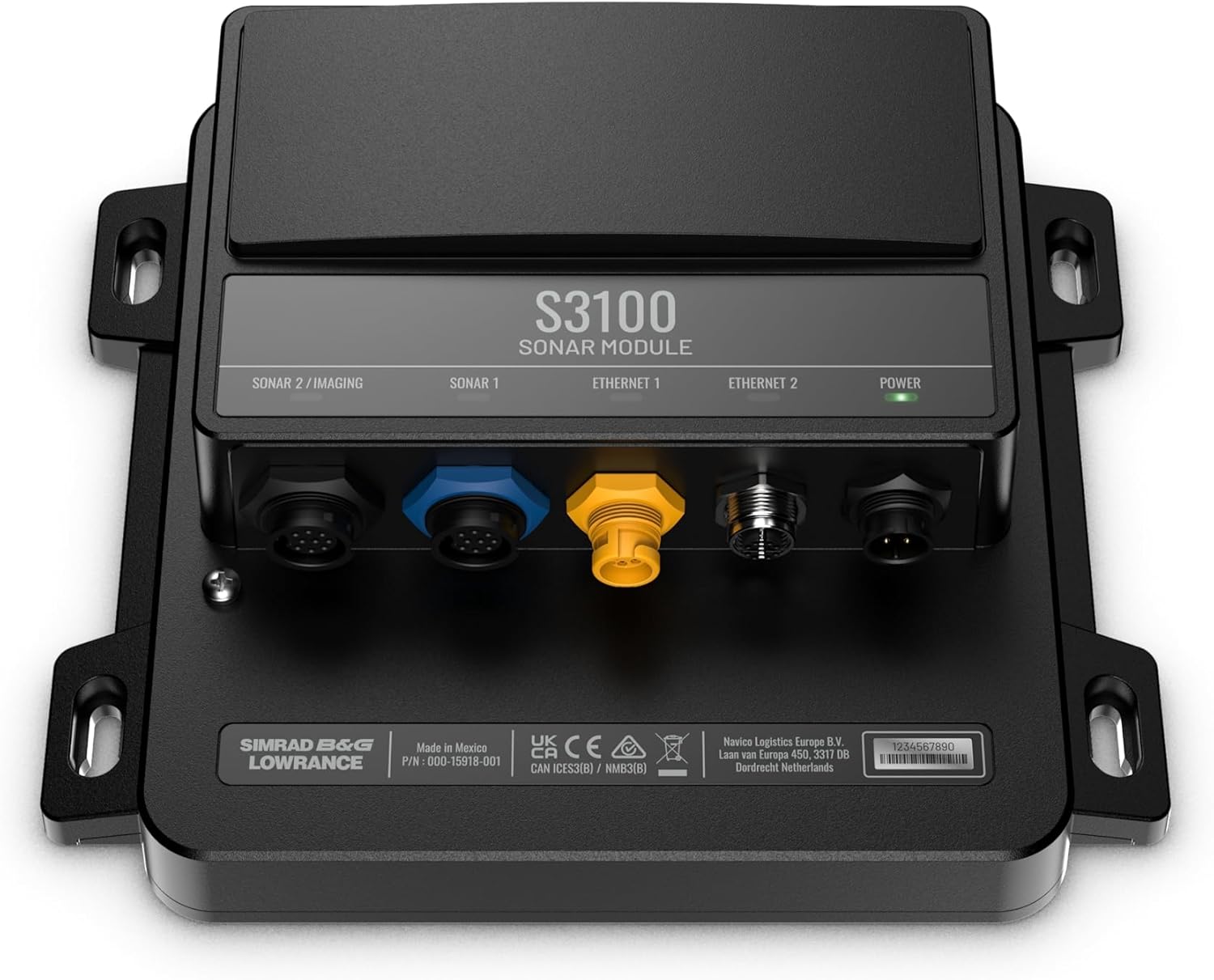
This image displays the top surface of the S3100 Sonar Module, clearly showing the various connection ports. From left to right, these include Sonar 2/Imaging, Sonar 1, Ethernet 1, Ethernet 2, and the Power input. A green LED indicator for power is also visible.

El davant view provides a closer look at the durable connectors for the sonar transducers, Ethernet network, and power supply. These connections are designed for secure and reliable operation in marine environments.

Aquest costat view highlights the sturdy mounting tabs located on both sides of the module, which facilitate secure installation using screws or bolts. The design allows for multiple mounting orientations.

The back of the module features a label with important product information, including the brand (Simrad B&G Lowrance), manufacturing location (Made in Mexico), part number (P/N: 000-15918-001), and regulatory compliance marks (UKCA, CE, RCM). It also includes details for Novico Logistics Europe B.V.
3. Configuració i instal·lació
Proper installation of the S3100 Sonar Module is crucial for optimal performance. Ensure all connections are secure and waterproof.
3.1 Muntatge
The S3100 Sonar Module supports multiple mounting types. Choose a dry, protected location on your vessel, away from direct sunlight and excessive heat. Use appropriate fasteners to secure the module through its integrated mounting tabs. Ensure adequate ventilation around the unit.
3.2 Connexió d'alimentació
Connect the supplied power cable to the 'POWER' port on the S3100 module. The module operates on a 12/24 Volt DC power source. Ensure the power source is stable and provides sufficient current for the module and connected transducers. Refer to your vessel's electrical system diagram for proper wiring.
3.3 Connexió Ethernet
Connect the supplied Ethernet cable from the S3100 module's 'ETHERNET 1' or 'ETHERNET 2' port to a compatible Lowrance display (HDS LIVE, HDS Carbon, Elite FS) or an Ethernet network switch if multiple devices are being connected. This connection facilitates data transfer between the sonar module and your display unit.
3.4 Transducer Connection
Connect your compatible sonar transducers to the 'SONAR 1' and 'SONAR 2 / IMAGING' ports. Ensure the correct transducer type is connected to the appropriate port for optimal performance of traditional sonar, SideScan, and DownScan Imaging functionalities.
4. Instruccions de funcionament
Once installed and powered on, the S3100 Sonar Module will integrate with your compatible Lowrance display. All sonar settings and viewing options will be accessible through the display's interface.
4.1 Key Features and Capabilities
- Active Imaging HD Support: Brings advanced Active Imaging HD capabilities to HDS LIVE, HDS Carbon, and Elite FS displays, providing incredibly detailed views of fish and structure.
- Imatges d'alta resolució: Delivers the highest resolution images of fish and structure with high-frequency (up to 1 Megahertz) SideScan/DownScan Imaging.
- FishReveal SideScan: Enables FishReveal SideScan for HDS PRO, HDS LIVE, and Elite FS displays, combining traditional sonar fish arches with high-resolution SideScan imagery for easier fish identification.
- Dual 1kW Sonar Channels: Features two fully independent 1kW sonar channels for outstanding fish-finding and bottom tracking capability, allowing for simultaneous use of different sonar frequencies or transducer types.
- Wide-Angle Transducer Compatibility: Compatible with wide-angle transducers for greater coverage, enhancing your ability to locate fish and structure over a broader area.
4.2 Funcionalitat del sonar
Navigate to the sonar pages on your Lowrance display to view the output from the S3100 module. You can adjust settings such as frequency, sensitivity, range, and color palette to optimize your view. The module processes raw sonar data, providing crisp and clear images for interpretation.
4.3 Display Compatibility
The S3100 Sonar Module is designed to work seamlessly with Lowrance HDS LIVE, HDS Carbon, and Elite FS displays. Ensure your display's software is up to date to ensure full compatibility and access to all features.
5. Manteniment
To ensure the longevity and optimal performance of your S3100 Sonar Module, follow these maintenance guidelines:
- Neteja: Regularly wipe the module's exterior with a soft, damp cloth. Avoid using abrasive cleaners or solvents that could damage the plastic housing.
- Connexions: Periodically check all cable connections (power, Ethernet, transducer) to ensure they are secure and free from corrosion. Apply dielectric grease to connectors if operating in harsh marine environments.
- Emmagatzematge: If storing the module for an extended period, ensure it is clean, dry, and stored in a temperature-controlled environment.
- Actualitzacions de programari: Keep your connected Lowrance display's software updated. Firmware updates for the S3100 module are typically delivered through display software updates, which can improve performance and add new features.
6. Solució De Problemes
If you encounter issues with your S3100 Sonar Module, consider the following common troubleshooting steps:
- Sense energia: Check the power cable connection to the module and the power source. Verify the 12/24 Volt DC supply is active and fuses are intact. The green power LED on the module should be illuminated.
- Sense imatge de sonar: Ensure transducers are correctly connected to the 'SONAR 1' and 'SONAR 2 / IMAGING' ports. Verify that the correct transducer type is selected in your display's sonar settings. Check for any physical damage to the transducer or cable.
- Sense connexió de xarxa: Confirm the Ethernet cable is securely connected between the S3100 module and your display or network switch. Restart both the display and the module.
- Mala qualitat d'imatge: Adjust sonar settings on your display, such as sensitivity, range, and noise rejection. Ensure the transducer is clean and free from marine growth. Verify the transducer is properly mounted and submerged.
- Mòdul no reconegut: Ensure your Lowrance display's software is up to date. A factory reset of the display or module (if supported) may resolve communication issues.
For persistent issues, refer to the comprehensive troubleshooting guide available on the official Lowrance support weblloc o contacteu amb el servei d'atenció al client.
7. Especificacions tècniques
| Característica | Detall |
|---|---|
| Marca | Lowrance |
| Nom del model | S3100 Sonar Module |
| Número de part | 000-15918-001 |
| Font d'alimentació | 12/24 volts DC |
| Pes de l'article | 4 lliures (1.81 kg) |
| Dimensions de l'article (LxWxH) | 10.4 x 13.4 x 5.6 polzades (26.4 x 34.0 x 14.2 cm) |
| Material | Plàstic |
| Color | Negre |
| Tipus de muntatge | Múltiples |
| Components inclosos | Module, Ethernet Cable, Power Cable |
8. Informació de la garantia
The Lowrance S3100 Sonar Module comes with a standard 2 any de garantia from the date of purchase. This warranty covers defects in materials and workmanship under normal use. For detailed terms and conditions, including limitations and exclusions, please refer to the official Lowrance warranty policy available on their website or contact Lowrance customer support.
Conserveu el comprovant de compra per a reclamacions de garantia.
9. Atenció al client
For further assistance, technical support, or service inquiries regarding your Lowrance S3100 Sonar Module, please visit the official Lowrance support website or contact their customer service department. You can typically find contact information and a knowledge base at www.lowrance.com/support/.
When contacting support, please have your product model number (000-15918-001) and serial number (if applicable) ready to expedite the process.


