Generico Drone 998 PRO User Manual
Model: Drone 998 PRO
1. Introducció
Gràcies per la compraasing the Generico Drone 998 PRO. This drone is designed for ease of use and provides an immersive flying experience with its 720P HD camera and various intelligent flight modes. Please read this manual thoroughly before operating the drone to ensure safe and optimal performance.

Image 1.1: Generico Drone 998 PRO packaging and drone.
2. Contingut del paquet
Assegureu-vos que el paquet inclogui tots els elements següents:
- Drone 998 PRO Quadcopter
- Control remot
- Rechargeable Battery (1 unit)
- Cable de càrrega USB
- Hélices de recanvi
- Guàrdies d'hèlix
- Screwdriver (for assembly/maintenance)
- Manual d'usuari (aquest document)
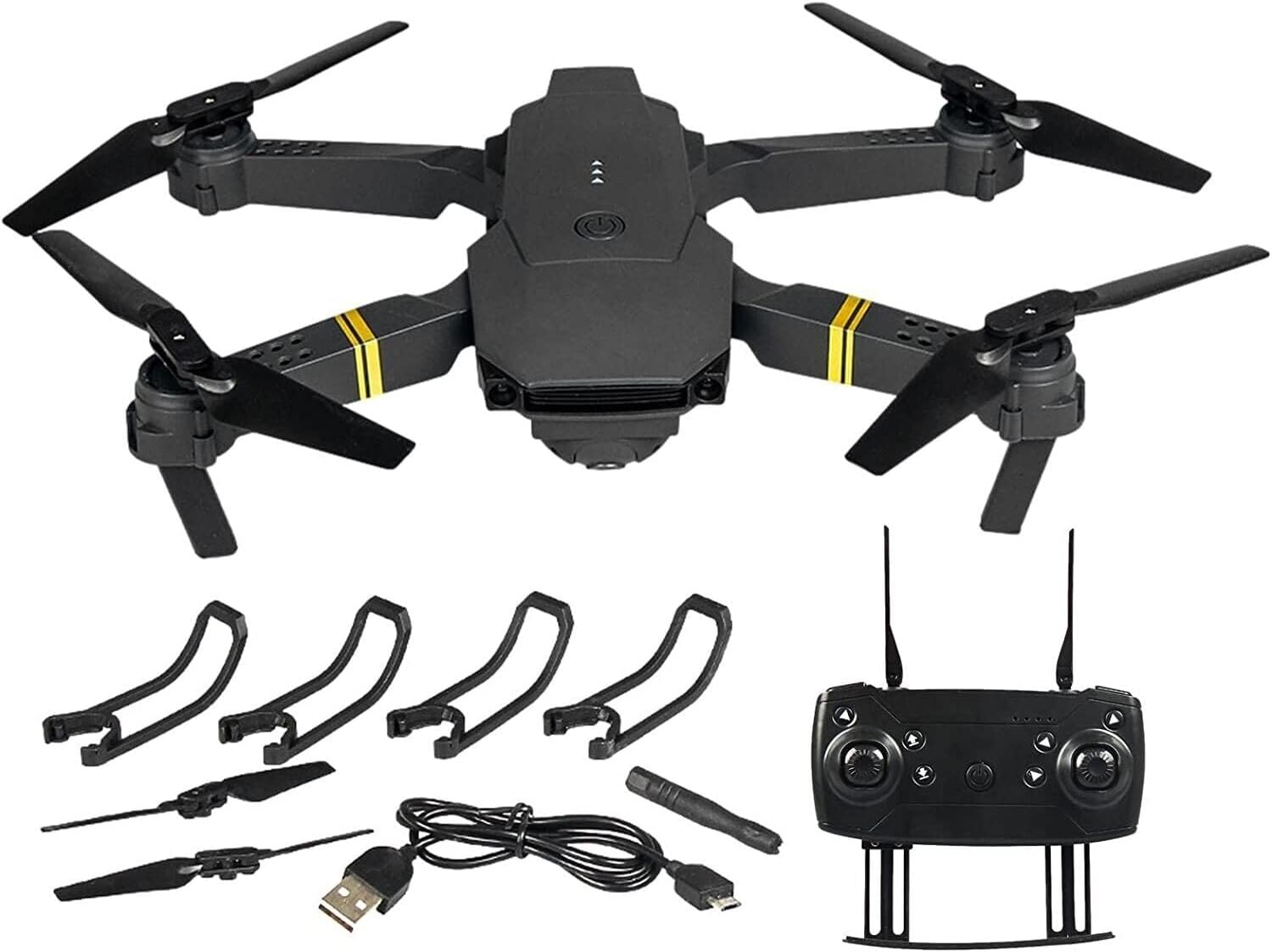
Image 2.1: All components included in the Generico Drone 998 PRO package.
3. Característiques del producte
- 720P HD WIFI Camera: Equipped with a camera that can rotate 360 degrees for optimal viewing and live FPV feed to your smartphone.
- Transmissió FPV en temps real: View viu footage directly on your phone with a video transmission distance of up to 60m.
- One-Button Takeoff/Landing: Simplifies operation for beginners.
- Mode de manteniment d'altitud: Maintains a consistent altitude for stable hovering.
- Mode sense cap: Eliminates the need to adjust the position of the aircraft before flying, making it easier to control.
- 3D Flip Function: Perform exciting aerial stunts with a single button.
- Velocitats ajustables: Three adjustable speed modes (low, medium, high) to suit different skill levels and environments.
- Control de gestos: Supports palm or fist gestures for taking photos and videos.
- Control del sensor de gravetat: Control flight direction by moving your phone.
- Proteccions de l'hèlix: Four protective propeller guards ensure safer flight.

Image 3.1: Real-time FPV experience.

Image 3.2: 120-degree wide-angle lens for broader vision.

Image 3.3: Altitude Hold Mode for stable flight.

Image 3.4: Key features and flight stability.
4. Configuració
4.1 Càrrega de la bateria
- Connect the drone battery to the USB charging cable.
- Plug the USB cable into a USB power adapter (e.g., computer USB port, phone charger).
- The indicator light on the USB cable will show charging status (refer to cable instructions for specific light behavior).
- Charging typically takes 60-90 minutes. A full charge provides approximately 19 minutes of flight time.
4.2 Instal·lació de la bateria
- Assegureu-vos que el drone estigui apagat.
- Localitzeu el compartiment de la bateria del drone.
- Insert the fully charged battery into the compartment, ensuring it clicks into place securely.
- Tanqueu la tapa del compartiment de la bateria.
4.3 Installing Propeller Guards
- Identify the four propeller guards.
- Attach each guard to the corresponding motor arm of the drone. Ensure they are firmly secured to prevent detachment during flight.
4.4 Configuració del control remot
- Obriu el compartiment de la bateria a la part posterior del comandament a distància.
- Introduïu 3 piles AA (no incloses), respectant la polaritat correcta (+/-).
- Tanqueu el compartiment de la bateria.
4.5 Emparellar el dron i el comandament a distància
- Col·loqueu el drone sobre una superfície plana i plana.
- Power on the drone. The drone's indicator lights will flash.
- Enceneu el comandament a distància.
- Push the left joystick (throttle) all the way up, then pull it all the way down. The drone's lights will stop flashing and remain solid, indicating successful pairing.
4.6 App Installation and WIFI Connection (FPV)
- Scan the QR code provided in the quick start guide (or search for the app name, usually 'WIFI_CAM' or similar, in your device's app store) to download and install the companion app on your smartphone.
- Enceneu el drone.
- On your smartphone, go to WIFI settings and connect to the drone's WIFI network (e.g., 'WIFI_DRONE_XXXXXX').
- Open the installed app. You should see the live video feed from the drone's camera.
5. Instruccions de funcionament
5.1 Llista de verificació prèvia al vol
- Assegureu-vos que les bateries del dron i del comandament a distància estiguin completament carregades.
- Comproveu que les hèlixs estiguin ben fixades i no estiguin danyades.
- Ensure propeller guards are installed.
- Choose an open, clear area free from obstacles, people, and animals.
- Verify successful pairing between drone and remote control.
5.2 Enlairament i aterratge
- One-Button Takeoff: After pairing, press the One-Button Takeoff/Landing button on the remote control. The drone will automatically ascend to a stable hovering height.
- Enlairament manual: Push both joysticks simultaneously outwards and downwards to start the motors. Then, slowly push the left joystick (throttle) upwards to ascend.
- Aterratge amb un sol botó: Press the One-Button Takeoff/Landing button again. The drone will slowly descend and land automatically.
- Aterratge manual: Slowly pull the left joystick (throttle) downwards until the drone lands. Once landed, push both joysticks simultaneously outwards and downwards to stop the motors.
5.3 Controls de vol
- Joystick esquerre (accelerador): Up/Down for altitude control (ascend/descend). Left/Right for yaw (rotate left/right).
- Right Joystick (Direction): Up/Down for forward/backward movement. Left/Right for left/right sideward movement.
- Botó de canvi de velocitat: Press to cycle through low, medium, and high-speed modes.
5.4 Modes de vol especials
- Mode sense cap: To activate, press and hold the Headless Mode button for 2 seconds. In this mode, the drone's front direction is irrelevant; it will move relative to the pilot's position. Press again to exit.
- Flip 3D: Fly the drone to a height of at least 2 meters. Press the 3D Flip button, then push the right joystick in the desired flip direction (forward, backward, left, or right).
- Control del sensor de gravetat: With the app connected, enable gravity sensor mode. Tilt your smartphone to control the drone's flight direction.
5.5 Funcionament de la càmera
- Fent fotos: In the app interface, tap the camera icon to take a photo. Alternatively, use the designated button on the remote control (refer to remote diagram).
- Gravació de vídeo: In the app interface, tap the video icon to start/stop recording. Alternatively, use the designated button on the remote control.
- Control de gestos: While in the app, make a palm gesture to take a photo or a fist gesture to start/stop video recording. Ensure your hand is within the camera's view.

Image 5.1: The 720P HD aerial camera can be rotated.
6. Manteniment
- Neteja: Use a soft, dry cloth to clean the drone body and camera lens. Do not use liquid cleaners.
- Substitució de l'hèlix: If propellers are damaged or bent, replace them immediately using the spare propellers provided. Ensure the correct propeller (A or B) is installed on the corresponding motor.
- Cura de la bateria: Store batteries in a cool, dry place. Do not overcharge or over-discharge. If storing for extended periods, charge to about 50% capacity.
- Emmagatzematge: When not in use, store the drone and remote control in a dry, cool environment, away from direct sunlight and extreme temperatures.
7. Solució De Problemes
| Problema | Causa possible | Solució |
|---|---|---|
| El dron no s'encén | Bateria no carregada o instal·lada incorrectament | Charge battery fully; ensure it is correctly inserted. |
| Drone does not respond to remote | Not paired; remote batteries low | Re-pair drone and remote; replace remote batteries. |
| El dron es desvia durant el vol | Calibration needed; uneven surface at takeoff | Perform gyroscope calibration (refer to remote instructions); ensure drone is on a flat surface for takeoff. |
| Poor camera feed or no FPV | WIFI not connected; app issue; interference | Reconnect to drone's WIFI; restart app/phone; move to an area with less interference. |
| Temps de vol curt | Battery not fully charged; old battery | Ensure battery is fully charged; consider replacing old batteries. |
8. Especificacions
| Característica | Detall |
|---|---|
| Nom del model | Drone 998 PRO |
| Marca | Genèric |
| Dimensions | 15 x 15 x 10 cm (desplegat) |
| Resolució de la càmera | 720p (Video Capture), 7.2E+2 Pixels (Still Image) |
| Tecnologia de connectivitat | Wifi |
| Mètode de control | Control remot |
| Temps de vol | Aprox. 19 minuts (per bateria) |
| Característiques especials | 4K 1080P Camera, FPV, One-Button Takeoff/Landing, 360-degree Roll, 3 Speed Levels |
| Nivell d'habilitat | Principiant |

Image 8.1: Drone dimensions (unfolded and folded).
9. Pautes de seguretat
To ensure safe operation and prevent damage or injury, please adhere to the following guidelines:
- Always operate the drone in open areas, away from people, animals, buildings, and trees.
- No voli amb vents forts, pluja o altres condicions meteorològiques adverses.
- Maintain a safe distance from the drone during flight.
- Never attempt to catch the drone while it is flying.
- Mantingueu els dits i la roba solta allunyats de les hèlixs giratòries.
- No voli a prop d'aeroports o espais aeris restringits.
- Superviseu els nens mentre operen el dron.
- Follow all local laws and regulations regarding drone operation.
- No modifiqueu el dron ni els seus components.
- Utilitzeu només peces de recanvi originals o homologades.
10. Garantia i Suport
This product comes with a standard manufacturer's warranty. Please refer to the warranty card included in your package for specific terms and conditions. For technical support, troubleshooting assistance, or inquiries about replacement parts, please contact the retailer or manufacturer directly through their official support channels.


