1. Introducció i finalview
The iKF Fkids Pro headphones are specifically designed for children, integrating safety, educational features, and versatile connectivity. These over-ear headphones prioritize hearing protection while offering functionalities that support learning and entertainment.
- Protecció auditiva: Volume is consistently controlled below 94dB, with a 3-speed safe volume mode to suit various age groups and environments.
- Recitation Mode: Utilizes an external microphone to capture high-definition original sound, optimizing it for real-time transmission back to the ear, enhancing memory and pronunciation during learning.
- Timed Playback Reminder: A built-in 60-minute playback duration voice reminder helps prevent excessive ear usage, customizable via the dedicated app.
- Connectivitat Bluetooth 5.3: Offers stable, lag-free wireless connection, supporting simultaneous connection to two devices for seamless switching. Compatible with mobile phones, computers, tablets, and learning machines.
- Mode per cable: Includes a 3.5mm AUX audio cable for continued use when the battery is depleted. A complimentary sharing plug allows two headphones to connect to one device.

Image: iKF Fkids Pro Over-Ear Headphones in a blue and orange color scheme, showcasing el seu disseny.
2. Què hi ha a la caixa
Si us plau, comproveu el contingut del paquet per assegurar-vos que hi hagi tots els elements:
- iKF Fkids Pro Headphone (x1)
- Cable de càrrega (x1)
- Manual d'usuari (x1)
- 3.5mm AUX Audio Cable (x1)
- External Microphone (x1)

Image: A flat lay of the iKF Fkids Pro headphones and all included accessories, such as the charging cable, AUX cable, and external microphone.
3. Guia de configuració
3.1 Càrrega dels auriculars
- Connecteu el cable de càrrega proporcionat al port de càrrega dels auriculars.
- Plug the other end of the charging cable into a compatible USB power source (e.g., computer USB port, USB wall adapter).
- The indicator light on the headphones will show charging status. Once fully charged, the light will change or turn off.
3.2 Engegada/apagada
- Per encendre: Premeu i manteniu premut el botó d'engegada durant aproximadament 3 segons fins que l'indicador lluminós s'il·lumini.
- Per apagar: Premeu i manteniu premut el botó d'engegada durant aproximadament 5 segons fins que l'indicador lluminós s'apagui.
3.3 Vinculació Bluetooth
- Assegureu-vos que els auriculars estiguin apagats.
- Press and hold the Power button for about 5-7 seconds until the indicator light flashes rapidly (usually blue and red), indicating pairing mode.
- Al dispositiu (telèfon intel·ligent, tauleta, ordinador), activeu el Bluetooth i cerqueu els dispositius disponibles.
- Select "iKF Fkids Pro" from the list of found devices.
- Once connected, the indicator light on the headphones will typically show a steady blue light or flash slowly.
3.4 Connexió per cable (mode AUX)
- Locate the 3.5mm audio jack on the headphones.
- Plug one end of the provided 3.5mm AUX audio cable into the headphone jack.
- Connecteu l'altre extrem del cable a la presa de sortida d'àudio del vostre dispositiu.
- Els auriculars canviaran automàticament al mode amb cable.
3.5 Attaching the External Microphone
- Identify the microphone port on the left earcup of the headphones.
- Gently insert the external microphone's plug into the port until it clicks into place.
- Ajusteu la posició del micròfon per a una captació de veu òptima.
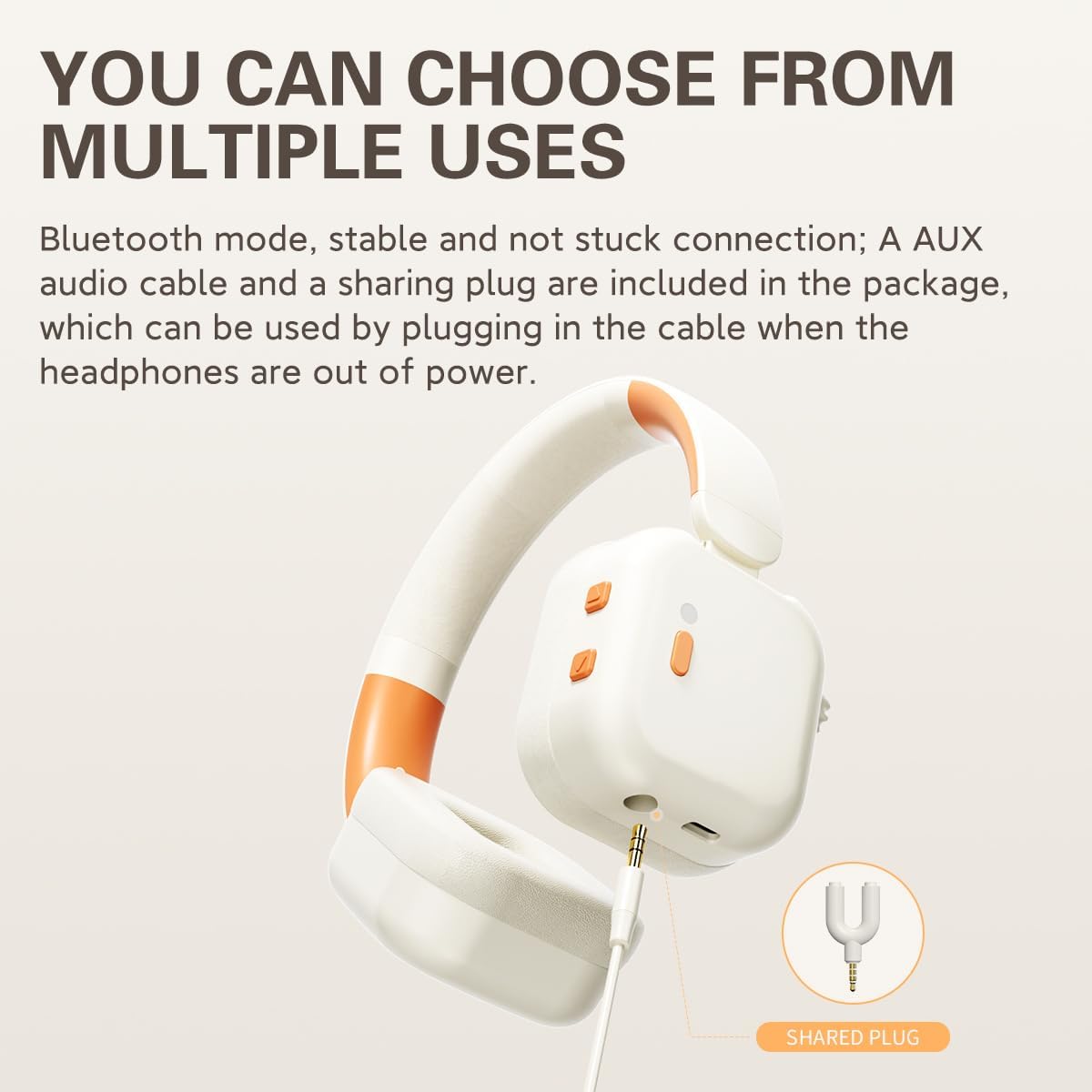
Image: A close-up of the iKF Fkids Pro headphones demonstrating the wired connection via the 3.5mm AUX cable and the included sharing plug.
4. Instruccions de funcionament
4.1 Volume Control and Hearing Protection
The iKF Fkids Pro headphones feature a 3-speed safe volume mode, ensuring audio levels remain below 94dB to protect children's hearing. You can adjust the volume using the dedicated volume controls on the earcup or through your connected device.
4.2 Recitation Mode
When the external microphone is attached, the headphones can enter Recitation Mode. This mode picks up your voice in high-definition, processes it for clarity, and transmits it back to your ears in real-time. This synchronization helps enhance memory, correct pronunciation, and improve reading comprehension.

Image: A child wearing iKF Fkids Pro headphones with the external microphone, illustrating the use of recitation mode for learning.
4.3 Timed Playback Reminder
To promote healthy listening habits, the headphones include a built-in 60-minute playback duration voice reminder. After 60 minutes of continuous use, a voice prompt will remind the user to take a break. This feature can be customized further using the iKF companion app.

Image: A child wearing iKF Fkids Pro headphones while studying, with an overlay indicating the timed playback reminder feature.
4.4 Dual Device Connection (Bluetooth)
The upgraded Bluetooth 5.3 technology allows the iKF Fkids Pro headphones to connect to two devices simultaneously. This enables seamless switching between, for example, a tablet for learning and a smartphone for calls, without needing to re-pair.
4.5 Compartir àudio
The included sharing plug allows two pairs of iKF Fkids Pro headphones to connect to a single audio source. This is ideal for shared learning experiences or enjoying media together.
4.6 iKF Companion App
For enhanced personalization and control, download the iKF companion app. The app allows you to:
- Customize the timed playback reminder settings.
- Ajusta el so professionalfiles (EQ).
- Manage device connections.
- Accedeix a funcions i actualitzacions addicionals.
Video: This video demonstrates the key features and design of the iKF Fkids Pro headphones, including unboxing, adjustable and foldable design, microphone attachment, and app personalization.
5. Característiques i disseny
5.1 Comoditat i ajust
- Soft Headband: The headband features soft padding for comfortable wear over extended periods.
- Diadema ajustable: An easy-to-use adjustable slider ensures a perfect fit for various head sizes.
- Ultra-soft Ear Cushions: Made from soft and plush synthetic leather, the earcups provide comfort and a gentle seal.
5.2 Disseny portàtil
The iKF Fkids Pro headphones are designed to be foldable, allowing for compact storage and easy portability, making them convenient for school, travel, or home use.

Imatge: Una imatge detallada view highlighting the soft headband, adjustable headband mechanism, ultra-soft ear cushions, and the foldable nature of the iKF Fkids Pro headphones.
6. Manteniment
Proper care will extend the life and performance of your iKF Fkids Pro headphones:
- Neteja: Use a soft, dry cloth to wipe the headphones. Avoid using harsh chemicals or abrasive materials.
- Emmagatzematge: Quan no els feu servir, plegueu els auriculars i guardeu-los en un lloc net i sec, allunyat de la llum solar directa i de temperatures extremes.
- Cura de la bateria: For optimal battery longevity, avoid fully discharging the battery frequently and try to keep it charged between 20% and 80%.
- Exposició líquida: No exposeu els auriculars a l'aigua ni a una humitat excessiva.
7. Solució De Problemes
If you encounter issues with your iKF Fkids Pro headphones, refer to the following common solutions:
| Problema | Causa possible | Solució |
|---|---|---|
| Els auriculars no s'engeguen. | Low or no battery. | Charge the headphones using the provided charging cable. |
| No hi ha so en mode Bluetooth. | Not paired, volume too low, or incorrect audio output. | Ensure headphones are paired correctly. Increase headphone and device volume. Check device's audio output settings. |
| No es pot emparellar per Bluetooth. | Headphones not in pairing mode, or device Bluetooth is off. | Ensure headphones are in pairing mode (flashing indicator light). Turn off and on your device's Bluetooth. Move closer to the device. |
| No hi ha so en mode amb cable (AUX). | AUX cable not fully inserted, or cable is faulty. | Ensure the AUX cable is securely plugged into both the headphones and the audio source. Try a different AUX cable if available. |
| El micròfon extern no funciona. | Microphone not fully inserted, or device settings. | Ensure the microphone is securely plugged into the headphone port. Check your device's audio input settings to ensure the external microphone is selected. |
8. Especificacions
| Característica | Detall |
|---|---|
| Nom del model | iKF Kids Pro |
| Tecnologia de connectivitat | Amb cable, sense fil (Bluetooth) |
| Tecnologia de comunicació sense fils | Bluetooth 5.3 |
| Components inclosos | 3.5mm AUX audio cable, Charging cable, External microphone, Headphone, User Manual |
| Interval d'edat (descripció) | Children (3-15 years old, as per product description in video) |
| Material | Plàstic |
| Tipus de control | Buttons, App, Touch |
| Característica especial | Recitation mode, Hearing protection (Volume limit & 3-speed safe volume mode), Timed playback reminder, Foldable design, Dual device connection |
| Fabricant | iKF |
| Dimensions del paquet | 7.87 x 4.72 x 3.15 polzades |
| Número de model de l'article | iKF Kids |
| Bateries | Necessita 1 bateria CR123A (inclosa) |
| Col·locació de l'orella | Sobre l'orella |
| Factor de forma | Sobre l'orella |
| Conector d'auriculars | 3.5 mm Jack |
9. Garantia i Suport
For warranty information, product support, or to contact customer service, please visit the official iKF store on Amazon or their official weblloc web. Conserveu el rebut de compra com a comprovant de compra.
iKF Official Store: Visit the iKF Store on Amazon


