Introducció
This manual provides essential instructions for setting up, operating, maintaining, and troubleshooting your TTfone TT220 mobile phone. Please read it carefully to ensure proper use and to maximize the phone's features.
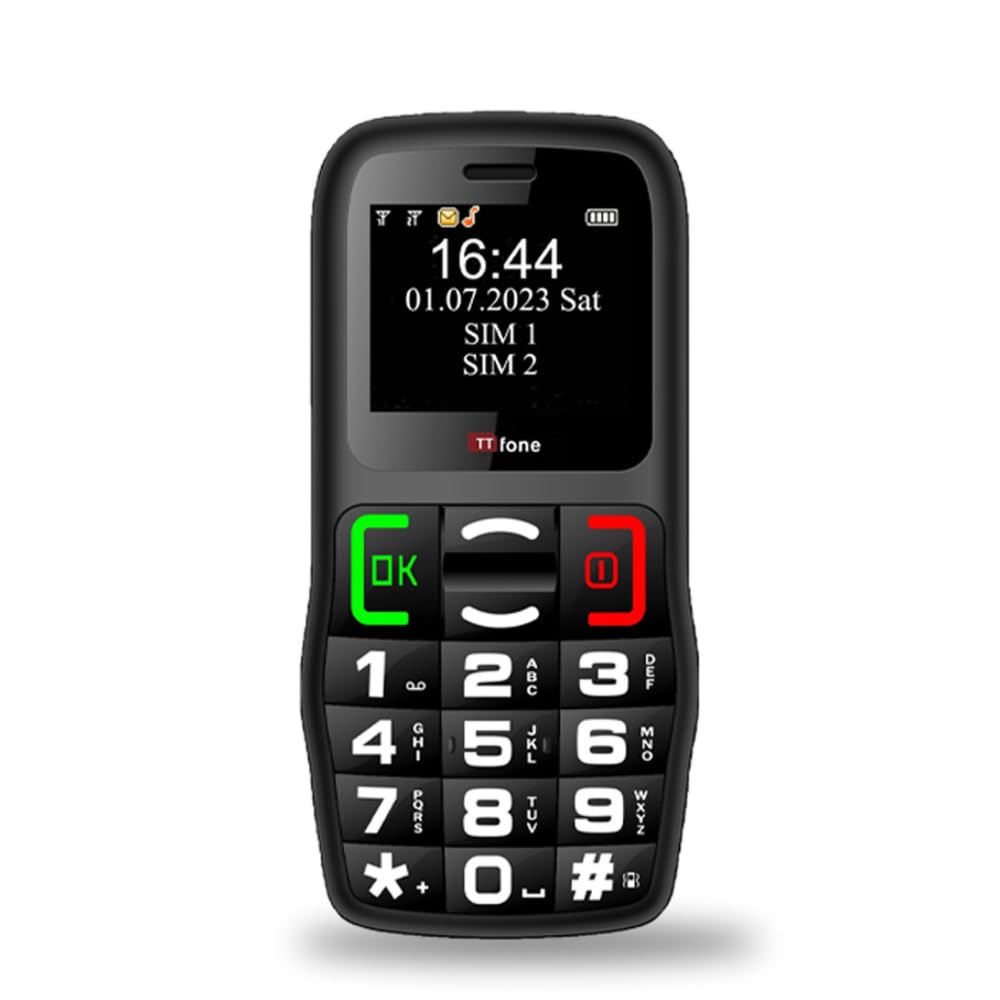
Figure 1: TTfone TT220 Mobile Phone
1. Configuració
1.1 Contingut del paquet
Comproveu que el vostre paquet contingui els elements següents:
- Telèfon mòbil TTfone TT220
- Bateria recarregable d'ions de liti
- Cable de càrrega USB
- Manual d'usuari (aquest document)
1.2 Instal·lació de la bateria
- Traieu la tapa posterior del telèfon fent palanca suaument per obrir-la des de l'osca.
- Insert the Lithium-ion battery into the compartment, ensuring the gold contacts align with the phone's terminals.
- Torneu a col·locar la coberta posterior, prement fermament fins que encaixi al seu lloc.
1.3 Instal·lació de la targeta SIM
The TTfone TT220 is unlocked and compatible with all 2G networks. It will not work with 3G-only networks such as Three, Smarty, and ID Mobile.
- With the battery removed, locate the SIM card slot(s).
- Insert your 2G compatible SIM card(s) into the designated slot(s) with the gold contacts facing down and the cut corner aligned as shown in the diagram (refer to phone for specific orientation).
- Torneu a instal·lar la bateria i la coberta posterior.
1.4 Càrrega del telèfon
Before first use, fully charge the phone's battery. The TT220 comes with a USB charging cable. You can use this cable with any existing USB wall charger or by connecting it to a PC or laptop.
- Connect the small end of the USB cable to the phone's charging port.
- Connecteu l'extrem més gran del cable USB a un adaptador de corrent USB (no inclòs) o al port USB d'un ordinador.
- L'indicador de bateria a la pantalla mostrarà l'estat de càrrega.

Figure 2: TTfone TT220 with optional Dock Charger (sold separately)
A dock charger can be purchased separately for convenient charging.
2. Instruccions de funcionament
2.1 Encès/Apagat
- Per engegar: premeu i manteniu premut el botó Call/OK botó fins que la pantalla s'il·lumini.
- Per apagar: premeu i manteniu premut el botó Finalitzar trucada/Engegar button until the phone shuts down.
2.2 Fer i rebre trucades
The TT220 features large, clear, backlit buttons for easy dialing.
- Fer una trucada: Dial the number using the keypad and press the Call/OK botó.
- Recepció d'una trucada: Quan soni el telèfon, premeu la tecla Call/OK botó per respondre.
- Finalització d'una trucada: Premeu el botó Finalitzar trucada/Engegar botó.

Figure 3: Large Buttons and Clear Display for Easy Readability
2.3 Enviament i recepció de missatges de text
Use the keypad to type messages. The phone supports basic text messaging functions.
- Navegueu fins al menú "Missatges".
- Select "Write Message" to compose a new text.
- Enter the recipient's number and your message.
- Press the appropriate key (usually OK or a soft key) to send.
2.4 Keypad Lock Switch
The TT220 features a dedicated keypad lock switch on the side of the phone to prevent accidental calls or messages.
- To lock the keypad: Slide the switch downwards. The screen will display "Keypad locked".
- To unlock the keypad: Slide the switch upwards.

Figure 4: Dedicated Keypad Lock Switch
2.5 Emergency Assistance Button (SOS)
The TT220 includes an emergency SOS button on the back. This feature can be programmed to send a text message and call up to five emergency contacts when pressed and held for 1.5 seconds.
- Programming SOS Contacts: Access the "SOS Settings" menu to add up to five emergency contact numbers.
- Activació de SOS: In an emergency, press and hold the SOS button on the back of the phone for 1.5 seconds.
- The phone will automatically send a pre-set emergency text message to the programmed contacts and then begin calling them in sequence until one answers.

Figure 5: Emergency Assistance Button (SOS)
2.6 Característiques especials
The TT220 offers several additional features for convenience:
- Torxa: Activate the built-in torch for illumination in dark environments.
- 0.3 Megapixel Camera: Capture basic photos.
- Bluetooth: Connect to compatible Bluetooth devices such as headsets.
- De marcatge ràpid: Assign frequently called numbers to specific keys for quick dialing.

Figure 6: Special Features Overview
3. Manteniment
- Neteja: Use a soft, dry cloth to clean the phone's exterior. Avoid liquid cleaners.
- Cura de la bateria:
- Eviteu les temperatures extremes, que poden reduir la durada de la bateria.
- Do not leave the phone uncharged for extended periods.
- Utilitzeu només el cable USB proporcionat per carregar.
- Emmagatzematge: Store the phone in a cool, dry place when not in use.
4. Solució De Problemes
| Problema | Causa possible | Solució |
|---|---|---|
| El telèfon no s'encén. | La bateria està esgotada o no està instal·lada correctament. | Carregueu la bateria. Assegureu-vos que la bateria estigui inserida correctament. |
| No es poden fer ni rebre trucades. | No SIM card, incorrect SIM card, or no network signal. | Ensure SIM card is correctly inserted and is 2G compatible. Check for network coverage. |
| El teclat no respon. | El bloqueig del teclat està actiu. | Slide the keypad lock switch upwards to unlock. |
| Short ringing time before voicemail. | Network provider setting. | Contact your service provider to adjust the ringing duration settings. |
| El telèfon no es carrega. | Faulty cable, charger, or connection. | Check cable and charger connections. Try a different USB power source. |
5. Especificacions
| Característica | Detall |
|---|---|
| Marca | TTfone |
| Nom del model | TT220 |
| Color | Negre |
| Sistema operatiu | TTfone OS |
| Mida de la pantalla | 1.8 polzades |
| Connectivitat | Bluetooth, mòbil (2G) |
| Tecnologia cel·lular | 2G (GSM 900/1800 MHz) |
| Memòria (RAM) | 32 MB |
| Característiques especials | Camera, Bluetooth, Emergency SOS Button, Text/Messaging, Torch, Basic Phone Functions |
| Composició de la bateria | Ió de liti (1 inclòs) |
| Dimensions (aprox.) | 11.7 cm (alt) x 5.7 cm (ample) x 1.5 cm (profunditat) |

Figure 7: TTfone TT220 Dimensions
6. Informació de la garantia
The TTfone TT220 comes with a manufacturer's warranty of 2 AnysSi us plau, conserveu el comprovant de compra per a reclamacions de garantia.

Figure 8: 2-Year Manufacturer's Warranty
7. Suport i contacte
For further assistance, technical support, or warranty inquiries, please contact TTfone customer service. Refer to the packaging or the official TTfone weblloc web per obtenir la informació de contacte més actualitzada.
Weblloc: www.ttfone.com (Exampl'enllaç, l'enllaç real pot variar)


