Introducció
Thank you for choosing the Baseus K01B Tri-Mode Wireless Multi-Device Keyboard. This ultra-slim keyboard is designed for seamless connectivity across various devices and operating systems, offering a comfortable and efficient typing experience. Please read this manual carefully to ensure proper use and maintenance of your new keyboard.
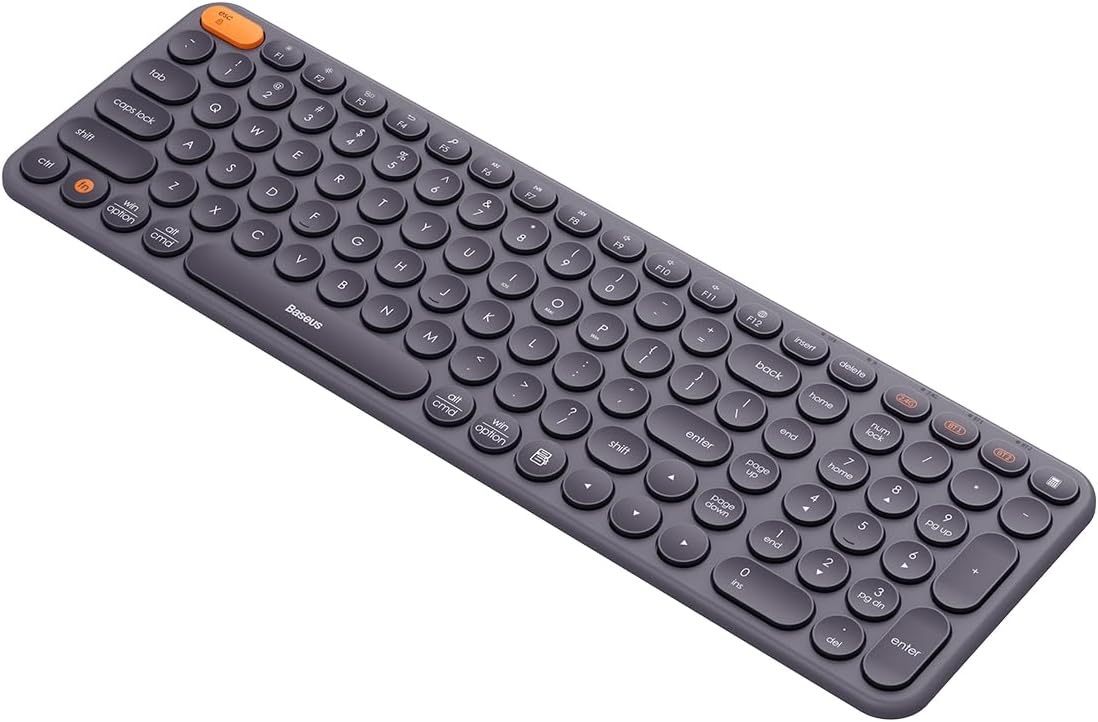
Image: The Baseus K01B Tri-Mode Wireless Keyboard, showcasing its compact design and round keycaps.
Característiques del producte
- Connexió trimodal: Supports Bluetooth 3.0, Bluetooth 5.0, and 2.4GHz wireless modes for versatile connectivity.
- Vinculació de diversos dispositius: Connects to up to 3 devices simultaneously, allowing for convenient switching.
- Àmplia compatibilitat: Compatible with Windows, iOS, Linux, Harmony OS, and Android operating systems.
- Functional Keys: Includes 12 function keys for quick access to volume, screen brightness, and other controls, along with a numeric keypad.
- Smart Auto-Sleep: Enters standby mode after 30 minutes of inactivity to conserve power.
- Disseny ergonòmic: Engineered for comfortable typing, reducing wrist strain.
- Durable Key Markings: Key legends are resistant to wear and fading.

Image: Diagram highlighting the multi-connection capabilities and high portability of the Baseus K01B keyboard.
Guia de configuració
1. Instal·lació de la bateria
The Baseus K01B keyboard is powered by two AAA batteries.
- Localitzeu el compartiment de la bateria a la part inferior del teclat.
- Obriu la tapa del compartiment de la bateria.
- Introduïu dues piles AAA, assegurant-vos de la polaritat correcta (+/-).
- Tanqueu bé la tapa del compartiment de la bateria.
Nota: If the indicator light flashes red, it means the battery is low and needs to be replaced.
2. Connexió del teclat
The keyboard supports three connection modes: 2.4GHz wireless, Bluetooth 3.0, and Bluetooth 5.0. You can connect up to three devices simultaneously.

Image: Illustration showing the Baseus K01B keyboard connecting simultaneously to a laptop, smartphone, and tablet.
2.1. Connexió sense fil de 2.4 GHz
- Locate the 2.4G USB receiver, usually stored in the battery compartment or a dedicated slot on the keyboard.
- Connecteu el receptor USB a un port USB disponible de l'ordinador o dispositiu.
- Turn on the keyboard using the power switch (usually on the side or back).
- Premeu el botó 2.4G key on the keyboard. The indicator light will confirm the connection.
- Your keyboard should now be connected and ready to use.
2.2. Connexió Bluetooth (BT1 / BT2)
- Enceneu el teclat amb l'interruptor d'alimentació.
- Manteniu premuda la tecla BT1 or BT2 key for 3-5 seconds until the indicator light starts flashing, indicating pairing mode.
- Al dispositiu (ordinador, tauleta, telèfon intel·ligent), aneu a la configuració de Bluetooth.
- Cerca new devices and select "Baseus K01B" (or similar name) from the list.
- Follow any on-screen prompts to complete the pairing process. The indicator light on the keyboard will stop flashing once connected.
- Repeat the process with the other Bluetooth key (BT1 or BT2) to connect a second Bluetooth device.
Instruccions de funcionament
1. Canviar entre dispositius connectats
To switch between your connected devices, simply press the corresponding connection key:
- Premeu 2.4G to switch to the device connected via the USB receiver.
- Premeu BT1 per canviar al primer dispositiu connectat per Bluetooth.
- Premeu BT2 per canviar al segon dispositiu connectat per Bluetooth.
2. Switching Between Operating Systems
The keyboard is designed to work seamlessly across different operating systems. Use the following key combinations to optimize keyboard layout and functions for your specific OS:
- For Windows: Press Fn + Win
- For iOS/macOS: Press Fn + Mac
- For Android/Harmony OS: Press Fn + Android

Image: Close-up of the Baseus K01B keyboard highlighting the Fn key and mode switch keys for iOS, Mac OS, and Windows.
3. Using Function Keys (F1-F12)
The keyboard features 12 multimedia function keys. By default, these keys perform their multimedia functions (e.g., volume control, media playback). To use them as standard F-keys (F1-F12), press Fn + Esc per canviar entre els modes.
Common multimedia functions include:
- F1-F3: Brightness adjustment
- F4-F6: Media controls (Previous, Play/Pause, Next)
- F7-F9: Volume controls (Mute, Volume Down, Volume Up)
- F10-F12: Other system functions
4. Mode de repòs automàtic intel·ligent
To conserve battery life, the keyboard will automatically enter standby mode after 30 minutes of inactivity. To wake the keyboard, simply press any key. The keyboard will reconnect to the last active device.

Image: Visual representation of the keyboard's smart auto-sleep mode, showing it in a vertical, inactive state.
Manteniment
Un manteniment adequat garanteix la longevitat i el rendiment òptim del teclat.
1. Neteja
- Apagueu el teclat abans de netejar-lo.
- Utilitzeu un drap suau i sense pelusa lleugerament dampesbandida amb aigua o una solució netejadora suau per netejar la superfície.
- Per a la pols i les restes entre les tecles, feu servir aire comprimit.
- Eviteu l'ús de productes químics agressius, netejadors abrasius o humitat excessiva.
2. Substitució de la bateria
When the battery indicator flashes red, replace the two AAA batteries as described in the "Battery Installation" section of the Setup Guide.
Resolució de problemes
| Problema | Causa possible | Solució |
|---|---|---|
| El teclat no es connecta/no respon. |
|
|
| Keys are not responding or typing is not smooth. |
|
|
| Cmd and Option keys are switched (macOS). |
|
|
| El teclat entra en mode de repòs massa ràpid. |
|
|
Especificacions
| Característica | Detall |
|---|---|
| Marca | Baseus |
| Model | K01B (Item model number: B00955504833-00) |
| Connectivitat | Sense fil de 2.4 GHz, Bluetooth 3.0, Bluetooth 5.0 |
| Compatibilitat | Windows, iOS, Linux, Harmony OS, Android |
| Font d'alimentació | 2 x piles AAA |
| Dimensions del producte | 10 x 5 x 1.27 cm |
| Pes | 650 g |
| País d'origen | Xina |
| Llengua | Anglès |

Image: The retail packaging for the Baseus K01B Wireless Tri-Mode Keyboard.
Garantia i Suport
Baseus products are manufactured to the highest quality standards. For warranty information and customer support, please refer to the warranty card included with your product or visit the official Baseus weblloc web. Conserveu el rebut de compra com a comprovant de compra per a qualsevol reclamació de garantia.
For technical assistance or further inquiries, please contact Baseus customer service.


