1. Producte acabatview
The Ruijie Reyee RG-EW1200R, also known as RAP1261, is an AX3000 Wi-Fi 6 dual-band Gigabit in-wall Access Point (AP) designed to extend and enhance wireless network coverage. It features built-in antennas and supports both 2.4GHz (300Mbps) and 5GHz (867Mbps) dual-radio frequencies, adhering to 802.11a/b/g/n/ac Wave1/Wave2/ax protocols. This device includes a 10/100/1000 Base-T port and supports both AP and routing modes, along with layer 2 and layer 3 roaming capabilities. Management is facilitated through Reyee unified networking and the Ruijie Cloud app.
The unit is designed for wall-mounted installation and supports 802.3at Power over Ethernet (PoE) input, with a maximum power consumption of less than 18W. When using a non-standard PoE adapter, it is essential to configure the "PoE settings" to "IEEE 802.3at" via the device's web interface to ensure proper operation.
2. Configuració i instal·lació
This section outlines the general steps for installing and setting up your Ruijie Reyee RAP1261 in-wall AP. Professional installation by a qualified technician is recommended due to the in-wall nature of the device and its power requirements.
2.1 Desembalatge i components
Verifiqueu que tots els components siguin presents al paquet:
- Ruijie Reyee RAP1261 In-wall AP unit
- Mounting hardware (if included, typically for in-wall installation)
- Guia d'inici ràpid (consulteu aquest manual per obtenir instruccions detallades)
2.2 Instal·lació física
The RAP1261 is designed for in-wall installation. This typically involves:
- Power Source Preparation: Ensure a suitable 802.3at PoE-enabled network switch or injector is available to provide power to the AP. The power supply output must exceed the AP's maximum power consumption of 18W.
- Muntatge a la paret: Carefully follow the provided mounting instructions to secure the AP within a standard wall outlet box.
- Connexió de xarxa: Connect an Ethernet cable from your PoE source to the WAN/PoE port on the back of the RAP1261.
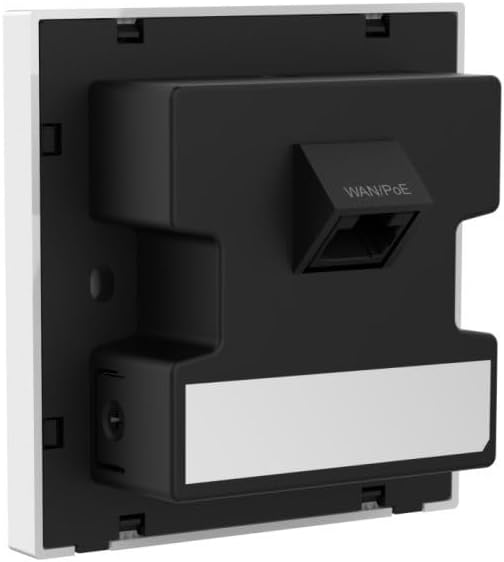
Figura 1: posterior view of the Ruijie Reyee RAP1261 In-wall AP. This image displays the back panel of the device, highlighting the WAN/PoE Ethernet port for network and power connection, and the mounting tabs for in-wall installation. A label area is also visible at the bottom.
2.3 Configuració inicial
After physical installation and power-up:
- Encès: The device will power on automatically when connected to a PoE source. Observe the LED indicators for status.
- Accés a la xarxa: Connect a device (e.g., laptop, smartphone) to the default Wi-Fi network broadcast by the AP (SSID and password typically found on a label on the device or in the quick start guide).
- Web Accés a la interfície: Obre a web browser and navigate to the default IP address of the AP (e.g., 192.168.1.1 or similar, refer to the quick start guide). Log in using the default credentials.
- PoE Settings (if applicable): If using a non-standard PoE adapter, navigate to the "PoE settings" in the web interface and set the "PoE mode" to "IEEE 802.3at".
- Basic Wi-Fi Configuration: Configure your desired Wi-Fi network name (SSID), password, and security settings for both 2.4GHz and 5GHz bands.
- Mode de funcionament: Select between AP mode or routing mode based on your network requirements.
- Gestió d'aplicacions: Download the Ruijie Cloud app or Reyee Router App from your device's app store. Follow the in-app instructions to add and manage your RAP1261.
3. Instruccions de funcionament
The Ruijie Reyee RAP1261 offers various functionalities to optimize your wireless network.
Connectivitat Wi-Fi 3.1
- Funcionament de doble banda: The AP broadcasts Wi-Fi on both 2.4GHz and 5GHz frequencies. Connect your devices to the appropriate band for optimal performance. The 5GHz band offers higher speeds but shorter range, while 2.4GHz provides wider coverage.
- Mesh Functionality: If deployed as part of a Reyee Mesh network, the AP will seamlessly integrate to provide extended and unified Wi-Fi coverage.
3.2 Management via Reyee App / Ruijie Cloud
The dedicated mobile application provides comprehensive control over your AP:
- Monitorització de la xarxa: View connected devices, network traffic, and AP status.
- Canvis de configuració: Modify Wi-Fi settings, operating modes, and other network parameters.
- Actualitzacions de firmware: Check for and apply the latest firmware to ensure optimal performance and security.
- Control LED: Adjust or disable the LED indicators on the device for discreet operation.
3.3 Funcions avançades
Depending on your configuration and network setup, the RAP1261 supports:
- Mode AP: Functions as a wireless access point, extending an existing wired network wirelessly.
- Mode d'encaminament: Can act as a basic router for smaller networks.
- Layer 2 and Layer 3 Roaming: Facilitates seamless transitions for wireless clients between multiple APs in a larger network.
4. Manteniment
Regular maintenance ensures the longevity and optimal performance of your Ruijie Reyee RAP1261.
- Mantenir net: Gently wipe the exterior of the device with a soft, dry cloth. Avoid using liquid cleaners or aerosols.
- Actualitzacions de firmware: Periodically check for and install firmware updates via the Ruijie Cloud app or web interfície. Les actualitzacions de firmware sovint inclouen millores de rendiment, pegats de seguretat i noves funcions.
- Condicions ambientals: Ensure the device is operating within its specified temperature and humidity ranges to prevent overheating or damage.
5. Solució De Problemes
This section addresses common issues you might encounter with your RAP1261.
5.1 Sense alimentació / El dispositiu no s'encén
- Comprovació de la connexió PoE: Ensure the Ethernet cable is securely connected to the WAN/PoE port and to a functioning 802.3at PoE source.
- Verify PoE Source: Confirm that your PoE switch or injector is powered on and providing sufficient power (output > 18W).
- Non-Standard PoE: If using a non-standard PoE adapter, ensure the "PoE mode" is set to "IEEE 802.3at" in the device's web interfície.
5.2 No Wi-Fi Signal or Connectivity Issues
- Comproveu els indicadors LED: Refer to the device's LED status lights (if visible) to determine its operational state. Consult the quick start guide for LED meanings.
- Verify Configuration: Inicieu sessió a web interface or Ruijie Cloud app to ensure Wi-Fi settings (SSID, password, security type) are correctly configured and enabled.
- Reinicieu el dispositiu: Power cycle the AP by disconnecting and reconnecting the PoE cable.
- Interferència: Ensure there are no major sources of interference (e.g., microwaves, cordless phones) near the AP.
5.3 Velocitat Wi-Fi lenta
- Selecció de la banda: Ensure high-bandwidth devices are connected to the 5GHz band if possible.
- Interferència de canal: Use the Ruijie Cloud app or web interface to perform a channel scan and select less congested Wi-Fi channels.
- Firmware: Assegureu-vos que el punt d'accés tingui instal·lat el firmware més recent.
- Càrrega de xarxa: Check if other devices on your network are consuming significant bandwidth.
5.4 No es pot accedir Web Interfície o aplicació
- Adreça IP: Confirm you are using the correct IP address for the AP. If the AP is in routing mode, its IP might be different from the default.
- Connexió de xarxa: Ensure your device is connected to the AP's network (either wired or wirelessly).
- Tallafocs/Antivirus: Desactiveu temporalment qualsevol tallafocs o programari antivirus de l'ordinador que pugui estar bloquejant l'accés.
- Restablir: As a last resort, perform a factory reset (refer to the quick start guide for the reset procedure). This will revert all settings to default.
6. Especificacions
| Característica | Detall |
|---|---|
| Marca | Ruijie |
| Nom del model | RAP1261 (RG-EW1200R Series) |
| Estàndard sense fils | 802.11ax (Wi-Fi 6), 802.11a/b/g/n/ac Wave1/Wave2 |
| Classe de banda de freqüència | Doble banda (2.4 GHz, 5 GHz) |
| Velocitat de transferència de dades | Up to 1200 Mbps (300 Mbps at 2.4GHz, 867 Mbps at 5GHz) |
| Tipus d'antena | Interna |
| Tipus de connector | Ethernet (WAN/PoE) |
| Nombre de Ports | 1 (WAN/PoE) |
| Entrada de potència | 802.3at PoE-in (57 Volts DC) |
| Consum màxim d'energia | <18W |
| Característiques especials | Access Point Mode, Routing Mode, Mesh Wi-Fi, LED Control, Reyee App Management |
| Dispositius compatibles | Gaming Console, Personal Computer, Printer, Security Camera, Smart Television, Smart Thermostat, Smartphone, Tablet |
| Dimensions del producte | 8.6 x 0.16 x 4.24 cm |
| Pes de l'article | 160 g |
| Sistema operatiu (intern) | Cisco IOS (Note: This refers to the internal operating system, not user-facing) |
7. Garantia i Suport
For warranty information, please refer to the documentation provided with your purchase or contact your reseller. Support resources, including FAQs and further technical assistance, may be available through the Ruijie official website or the Reyee Cloud app.


