1. Introducció
Welcome to the user manual for your new THOMSON 50UA5S13 50-inch 4K UHD Smart Android TV. This manual provides essential information for setting up, operating, and maintaining your television. Please read it thoroughly to ensure optimal performance and safe use of your device.
Your THOMSON TV offers a stunning 4K UHD display, providing four times the detail of Full HD. It features the Android TV operating system, granting access to a vast array of applications, intelligent voice control via Google Assistant, and seamless content streaming with Chromecast built-in. Enjoy immersive audio with Dolby Audio technology and versatile content reception through its integrated triple tuner (DTT, cable, or satellite).

Figura 1: Frontal view of the THOMSON 50UA5S13 4K UHD Smart Android TV displaying various streaming app icons.
2. Informació de seguretat
Before operating your television, please read all safety instructions carefully. Keep this manual for future reference.
- Font d'alimentació: Assegureu-vos que el televisor estigui connectat a una presa de corrent amb el volum correctetage tal com s'indica a l'etiqueta del producte.
- Ventilació: No bloquegeu les obertures de ventilació. Deixeu prou espai al voltant del televisor per a un flux d'aire adequat per evitar el sobreescalfament.
- Col·locació: Place the TV on a stable, level surface. Avoid placing it in direct sunlight, near heat sources, or in environments with high humidity or dust.
- Aigua i humitat: No exposeu el televisor a la pluja ni a la humitat. No col·loqueu objectes plens de líquids, com ara gerros, a sobre del televisor.
- Neteja: Desendolleu el televisor abans de netejar-lo. Feu servir un drap suau i sec. No utilitzeu netejadors líquids ni en aerosol.
- Manteniment: No intenteu fer la reparació del televisor vosaltres mateixos. Envieu totes les tasques de manteniment a personal de servei qualificat.
3. Contingut del paquet
Verifiqueu que tots els elements siguin presents al paquet:
- THOMSON 50UA5S13 50-inch 4K UHD Smart Android TV
- Remote Control (Premium backlit)
- Cable d'alimentació
- Suport de TV (2 peces) i cargols
- Targeta de garantia
- Guia d'inici ràpid (es pot incloure per separat)
4. Configuració física
4.1 Fixació del suport de TV
- Col·loqueu amb cura el televisor cara avall sobre una superfície suau i neta per evitar que es facin malbé la pantalla.
- Alineeu les peces del suport amb les ranures corresponents a la part inferior del televisor.
- Fixeu els suports amb els cargols proporcionats. Assegureu-vos que estiguin ben ajustats.
4.2 Muntatge a la paret (opcional)
This TV supports VESA wall mounts with a 200x200 pattern. A wall mount bracket is not included and must be purchased separately. Follow the instructions provided with your wall mount bracket for proper installation. Ensure the wall can support the weight of the TV and the mount.
4.3 Dimensions i col·locació
Consider the TV's dimensions for optimal placement in your viewzona d'ing.

Figure 2: Diagram showing the dimensions of the THOMSON 50UA5S13 TV: 112 cm width, 69 cm height (with stand), 26 cm depth (with stand).
5. Connexions
Connect your TV to various external devices using the ports located on the back and side panels.

Figure 3: Illustration of the back panel ports including HDMI, LAN, USB, Audio Out, Satellite, Antenna, AV In, and Common Interface.
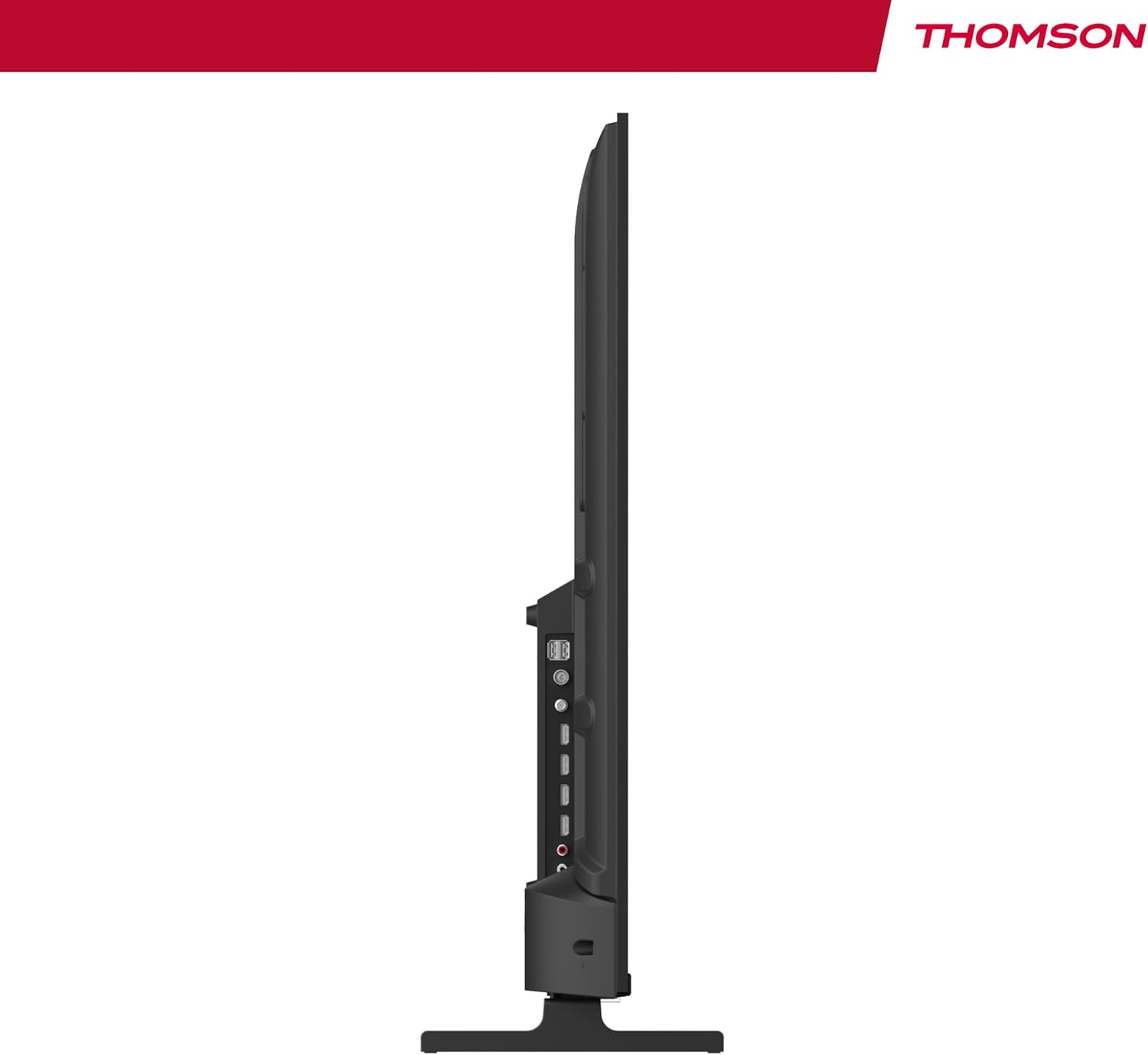
Figura 4: Pro lateralfile view of the TV, showing accessible ports on the side.
- Potència: Connecteu el cable d'alimentació al televisor i a una presa de corrent.
- Antenna/Cable/Satellite: Use the appropriate input for your broadcast signal (DTT, cable, or satellite).
- HDMI (x4): Connecteu dispositius externs com ara reproductors de Blu-ray, consoles de jocs o descodificadors.
- USB (x2): Connecteu dispositius d'emmagatzematge USB per a la reproducció de contingut multimèdia.
- LAN: Connecteu un cable Ethernet per a una connexió a Internet per cable.
- Sortida d'àudio (òptica digital): Connect to an external sound system for enhanced audio.
- Entrada AV: Connecteu dispositius antics mitjançant cables de vídeo compost i àudio estèreo.
- Interfície comuna (CI+): Insert a CI+ module and smart card for encrypted digital services.
- Bluetooth: Pair wireless headphones, speakers, or other compatible Bluetooth devices.
6. Initial Setup and Android TV
6.1 First-Time Power On
- After connecting all necessary cables, plug the TV into a power outlet.
- Premeu el botó d'engegada del comandament a distància o del televisor.
- Segueix les instruccions que apareixen a la pantalla per seleccionar l'idioma que prefereixis.
6.2 Configuració de la xarxa
Connect your TV to the internet for access to Android TV features and apps.
- Wi-Fi: Seleccioneu la vostra xarxa Wi-Fi de la llista i introduïu la contrasenya.
- Cablejat (LAN): Si heu connectat un cable Ethernet, el televisor hauria de detectar automàticament la connexió amb cable.
6.3 Google Account Sign-in
Sign in with your Google Account to access the Google Play Store, Google Assistant, and personalized recommendations.
Escaneig de canals 6.4
After network setup, the TV will guide you through scanning for available channels based on your antenna, cable, or satellite connection.
7. Funcionament del televisor
7.1 Control remot
The premium backlit remote control allows easy navigation, even in low light. Key features include:
- Botó d'encesa: Encén o apaga el televisor.
- Botons de navegació: Per a la navegació pel menú.
- Botons de volum/canal: Ajusta el volum i canvia de canal.
- Botó de l'Assistent de Google: Activa el control per veu.
- Botó de preferits: Quickly launch your designated favorite application.
- Botons de drecera d'aplicacions: Accés directe a serveis de streaming populars.
7.2 Funcions d'Android TV
Your THOMSON TV runs on Android TV, providing a smart and intuitive user experience.

Figure 5: The Android TV home screen displaying various applications and content recommendations.
- Aplicacions: Access over 400,000 movies and TV shows from apps like Netflix, Prime Video, Disney+, YouTube, Spotify, and Apple TV.
- Assistent de Google: Use your voice to control the TV, search for content, get answers, and manage smart home devices. Simply press the Google Assistant button on your remote and speak your command.

Figure 6: A user interacting with the Google Assistant via the TV remote control.
- Chromecast integrat: Wirelessly stream movies, music, and videos from compatible smartphones, tablets, or computers directly to your TV.
7.3 Configuració de la imatge
Optimitzeu el vostre viewexperiència amb tecnologies d'imatge avançades:
- 4K UHD: Enjoy ultra-high definition resolution with 8 million pixels for incredibly detailed and precise images.
- HDR (High Dynamic Range) & Dolby Vision: These technologies enhance contrast, brightness, and color accuracy, providing a more realistic and vibrant picture.

Figure 7: Visual comparison illustrating the enhanced detail of 4K UHD (3840x2160) over Full HD (1920x1080).

Figure 8: Comparison showing the improved contrast and color depth with Dolby Vision compared to Standard Dynamic Range (SDR).
7.4 Configuració de so
Experience dynamic and immersive audio:
- Dolby Audio / Dolby Atmos: Creates a rich, room-filling sound experience. (Note: Dolby Atmos requires compatible sound equipment).

Figure 9: Visual representation of Dolby Atmos sound creating an immersive audio experience around viewers
8. Manteniment
8.1 Neteja del televisor
- Desendolla sempre el televisor abans de netejar-lo.
- Use a soft, lint-free cloth to gently wipe the screen and TV body.
- Per a marques difícils, esbandiu lleugeramentampen the cloth with water or a specialized screen cleaner (ensure it's safe for TV screens) and wipe gently. Never spray liquid directly onto the screen.
8.2 Actualitzacions de programari
Your Android TV may receive periodic software updates to improve performance and add new features. Ensure your TV is connected to the internet to receive these updates. You can usually check for updates in the TV's settings menu.
9. Solució De Problemes
Si teniu problemes amb el televisor, consulteu les solucions habituals següents:
| Problema | Possible solució |
|---|---|
| Sense poder | Comproveu si el cable d'alimentació està ben connectat al televisor i a la presa de corrent. Proveu una altra presa de corrent. |
| Sense imatge/so | Ensure the correct input source is selected. Check cable connections to external devices. For sound, check volume levels and external audio system connections. |
| El comandament a distància no funciona | Revisa o substitueix les piles. Assegura't que no hi hagi cap obstrucció entre el comandament a distància i el sensor d'infrarojos del televisor. |
| No es pot connectar a la Wi-Fi | Assegureu-vos que el vostre encaminador Wi-Fi estigui activat i funcioni. Torneu a introduir la contrasenya del Wi-Fi. Proveu de reiniciar el televisor i l'encaminador. |
| Slow performance or apps | Close unused applications. Clear cache for problematic apps in settings. Restart the TV. Ensure a stable internet connection. |
10. Especificacions
Detailed technical specifications for the THOMSON 50UA5S13 TV:
| Característica | Especificació |
|---|---|
| Marca | Thomson |
| Número de model | 50UA5S13 |
| Mida de la pantalla | 50 polzades (126 cm) |
| Tecnologia de visualització | UHD (LED LCD) |
| Resolució | 3840 x 2160 (4K UHD) |
| Freqüència d'actualització | 60 Hz |
| Característiques especials | Flat Screen, Android TV, Google Assistant, Chromecast built-in, HDR, Dolby Vision, Dolby Audio |
| Connectivitat | Bluetooth, Wi-Fi, 4x HDMI, 2x USB, LAN, Digital Optical Audio Out, AV In, CI+ |
| Sintonitzador | Triple Tuner (ATSC for Antenna, Cable, Satellite) |
| Configuració de so | 2.0 |
| Dimensions (L x A x A) | 111.1 x 26 x 69.2 cm (amb suport) |
| Pes | 8.5 quilograms |
| Muntatge de paret VESA | 200x200 mm (suport no inclòs) |
| Classe d'eficiència energètica | E |
For detailed energy information, please refer to the EU EPREL database:
Fitxa informativa del producte EPREL

Figure 10: The EU Energy Label for the THOMSON 50UA5S13 TV, indicating its energy efficiency class and consumption.
11. Garantia i Suport
Your THOMSON 50UA5S13 TV comes with a full 3-year manufacturer's warranty, demonstrating its reliability and quality. For warranty claims or technical support, please refer to the warranty card included in your package or visit the official THOMSON support weblloc web per a la teva regió. Conserva el comprovant de compra per validar la garantia.


