Producte acabatview
The Miracase 3-in-1 Cell Phone Holder is a versatile mounting solution designed for your car. It offers three different installation methods: dashboard, air vent, and windshield, providing flexibility to suit various vehicle interiors and user preferences. This holder is engineered for secure grip and easy adjustability, ensuring your smartphone remains stable and accessible during your travels.

Figure 1: Miracase 3-in-1 Cell Phone Holder components.
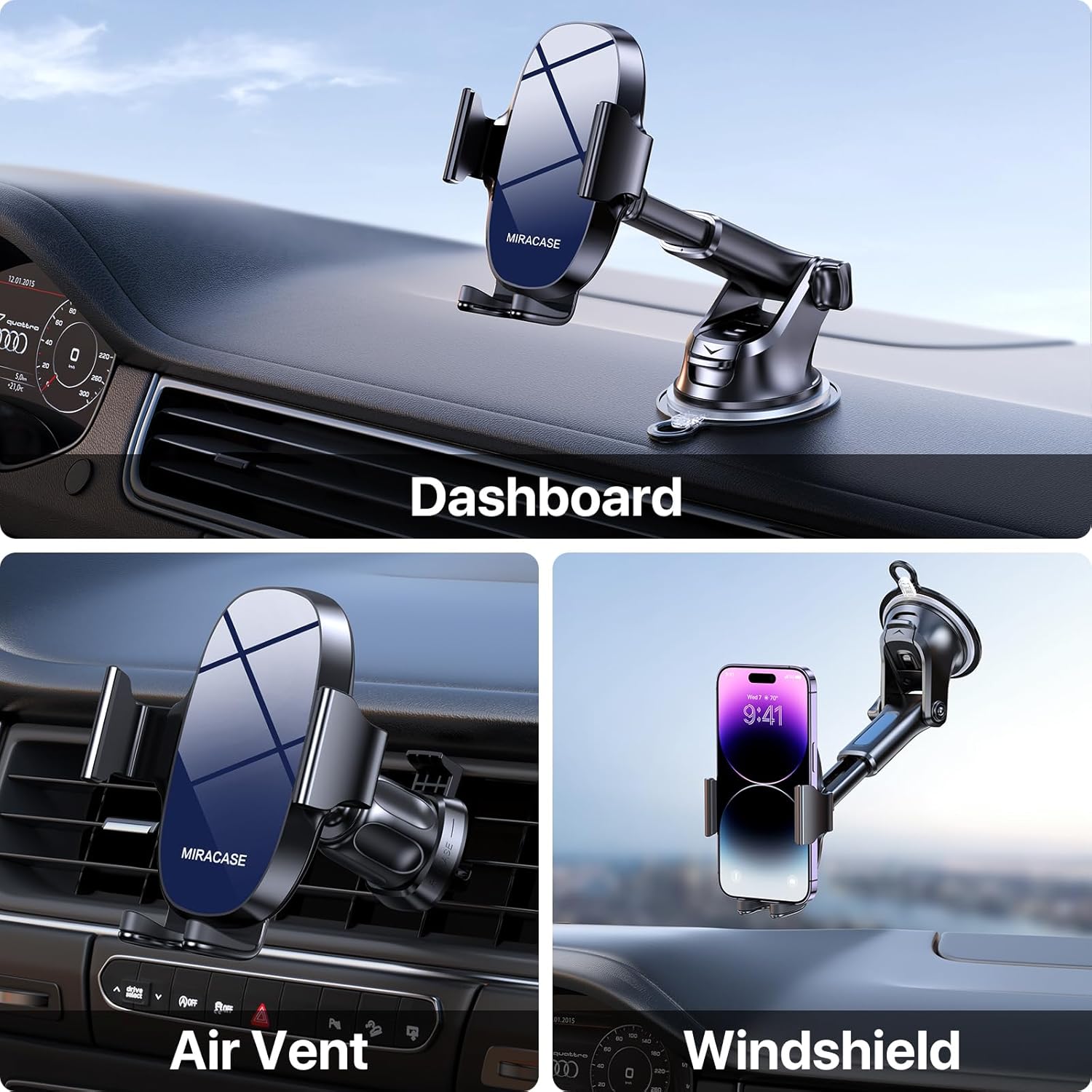
Figure 2: Demonstrating the three mounting options: Dashboard, Air Vent, and Windshield.
Configuració i instal·lació
1. Choosing Your Mounting Location
This holder provides options for dashboard, windshield, or air vent installation. Select the location that offers the best visibility and accessibility without obstructing your driving view o controls del vehicle.
2. Dashboard/Windshield Mount Installation
- Netegeu la superfície: Ensure the chosen dashboard or windshield area is clean and free of dust or oils. Use an alcohol wipe if necessary and let it dry completely.
- Col·loqueu la ventosa: Press the suction cup firmly onto the desired smooth, flat surface.
- Lock the Suction: Push down the locking lever located at the base of the suction cup to create a strong vacuum seal.
- Ajustar l'angle del braç: Loosen the adjustment knob on the arm to set the desired angle, then tighten it securely.

Figure 3: The robust suction cup provides a secure hold, capable of withstanding various temperatures.
3. Air Vent Mount Installation
- Attach Vent Clip: Slide the upgraded metal hook of the vent clip onto one of your car's air vent blades.
- Assegureu el clip: Tighten the screw on the vent clip to firmly clamp it onto the vent blade, preventing wobbling.
- Garantir l'estabilitat: Gently tug on the installed vent clip to confirm it is securely attached before mounting the phone holder.

Figure 4: Close-up of the upgraded vent clip with metal hook for enhanced stability.

Figure 5: Dimensions of the air vent clip for compatibility reference.
4. Attaching Phone Holder to Mount
Once your chosen mount (suction cup or vent clip) is securely installed, attach the phone holder cradle to the spherical joint on the mount. Tighten the collar around the joint to lock the cradle in place.
Instruccions de funcionament
1. Placing and Removing Your Phone
- Obrir Clamps: Press the release button located on the back of the phone holder to open the side clampen braços.
- Inseriu el telèfon: Place your smartphone into the holder, ensuring it rests on the bottom support. The side clamps will automatically close to secure the phone.
- Remove Phone: Press the release button again to open the clamps and carefully remove your phone.
2. Ajust Viewangle ing
The Miracase phone holder features multiple adjustment points for optimal viewing:
- Rotació de 360°: The phone cradle can rotate a full 360 degrees, allowing for both portrait and landscape viewmodes de funcionament.
- Ajust d'angle de 270°: The arm of the holder can be adjusted up to 270 degrees, enabling you to find the perfect vertical angle.

Figure 6: The holder offers extensive adjustability for optimal viewangles d'ajust.
3. Compatibilitat amb telèfons
This holder is designed to accommodate a wide range of smartphones, typically those with screen sizes between 4.0 and 7.0 inches. It is also compatible with various phone cases, including battery cases, wallet cases, OtterBox, and MagSafe cases, ensuring a secure fit without needing to remove your phone's protective cover.

Figure 7: Compatibility with various phone sizes and case types.
Manteniment
- Neteja de la ventosa: If the suction cup loses its stickiness, rinse it with warm water and let it air dry. Do not use harsh chemicals or abrasive materials.
- Neteja general: Wipe the phone holder with a soft, damp cloth to remove dust and grime. Avoid excessive moisture.
- Emmagatzematge: When not in use for extended periods, store the holder in a cool, dry place away from direct sunlight to preserve the integrity of the materials.
Resolució de problemes
- Ventosa que no s'enganxa:
Solució: Ensure the mounting surface is clean, smooth, and dry. Re-wet the suction cup slightly with water, press firmly, and then engage the locking lever. Avoid porous or textured surfaces. - El telèfon no es subjecta correctament:
Solució: Ensure the side clamping arms are fully closed around your phone. Press the release button and re-insert the phone, allowing the arms to auto-clamp. Check for any obstructions. - Vent Clip Wobbles:
Solució: Make sure the metal hook is fully inserted into the vent blade and the tightening screw is securely fastened. Some vent designs may not provide optimal stability. - Dificultat per ajustar l'angle:
Solució: Loosen the adjustment knobs sufficiently before attempting to change the angle or rotation. Tighten them firmly once the desired position is achieved.
Especificacions
| Característica | Detall |
|---|---|
| Marca | Miracase |
| Número de model | 8ad21a1b-09de-4df8-8689-16518fb3ae13 |
| Tipus de muntatge | Dashboard / Air Vent / Windshield |
| Dispositius compatibles | Smartphones (4.0-7.0 inch) |
| Pes de l'article | 9.1 unces |
| Dimensions del paquet | 5.04 x 4.76 x 2.64 polzades |
| Característiques especials | Adjustable, Upgraded Metal Hook Vent Clip |
| Color | Blau |
| País d'origen | Xina |
| Data de primera disponibilitat | 1 d'agost de 2023 |
Garantia i Suport
For warranty information and customer support, please refer to the official Miracase website or contact their customer service directly. Specific warranty terms may vary by region and purchase date.


