1. Producte acabatview
The ION Audio Highlander is a high-powered, all-weather portable Bluetooth speaker designed to deliver rich sound and deep bass even at high volumes. Its durable construction makes it suitable for various environments, ensuring your music can accompany you wherever you go.
Característiques principals:
- High-Power Audio: Delivers 120 Watts of speaker maximum output power for impactful sound.
- Intensificació dels sons més greus: Enhances low frequencies for maximum impact.
- Bluetooth 5.0 habilitat: Allows wireless streaming and control of your music from compatible devices.
- Resistent a l'aigua IPX5: Designed to withstand splashes and rain, making it safe for outdoor use.
- Rechargeable 50-Hour Battery: Provides extended playtime on a single charge.
- Built-in Handles and Wheels: Facilitates easy transportation.
2. Contingut del paquet
Assegureu-vos que tots els elements que s'enumeren a continuació estiguin presents al vostre paquet:
- ION Audio Highlander Portable Speaker
- Cable d'alimentació
3. Guia de configuració
3.1 Càrrega de la bateria
Before first use, fully charge the Highlander speaker. The battery life is approximately 50 hours, but initial charging may take several hours.
- Connect the included power cable to the power input on the back of the Highlander speaker.
- Plug the other end of the power cable into a standard wall outlet.
- The charging indicator light will illuminate. The light will change or turn off once charging is complete.
3.2 Engegada/apagada
To power the speaker on or off, locate the power button on the control panel.
- Per encendre: Press and hold the Power button for a few seconds until the display illuminates.
- Per apagar: Press and hold the Power button again for a few seconds until the display turns off.
3.3 Vinculació Bluetooth
Follow these steps to connect your Bluetooth device to the Highlander speaker:
- Ensure the Highlander speaker is powered on and in Bluetooth mode. The Bluetooth indicator on the display will flash, indicating it's ready to pair.
- On your Bluetooth device (smartphone, tablet, laptop), go to its Bluetooth settings.
- Cerca available devices. Select "ION Highlander" from the list.
- Once paired, the Bluetooth indicator on the speaker will stop flashing and remain solid. You can now play audio through the speaker.
- To disconnect, turn off Bluetooth on your device or select "Forget This Device" in your device's Bluetooth settings.
4. Instruccions de funcionament
4.1 Tauler de control acabatview
The top panel of the Highlander speaker features various controls for managing audio playback and settings.

- Botó d'encesa: Activa o desactiva l'altaveu.
- Pom de volum: Ajusta el nivell de volum general.
- Botó Bluetooth: Inicia el mode d'emparellament Bluetooth.
- Botó de reforç dels baixos: Activates or deactivates the bass boost feature.
- Pantalla de visualització: Shows current mode, battery status, and other information.
4.2 Adjusting Volume and Bass Boost
- Volum: Rotate the main volume knob clockwise to increase volume and counter-clockwise to decrease it.
- Intensificació dels sons més greus: Press the "Bass Boost" button to enhance the bass output. Press it again to return to normal audio.
4.3 Portability Features
The Highlander is designed for easy transport:
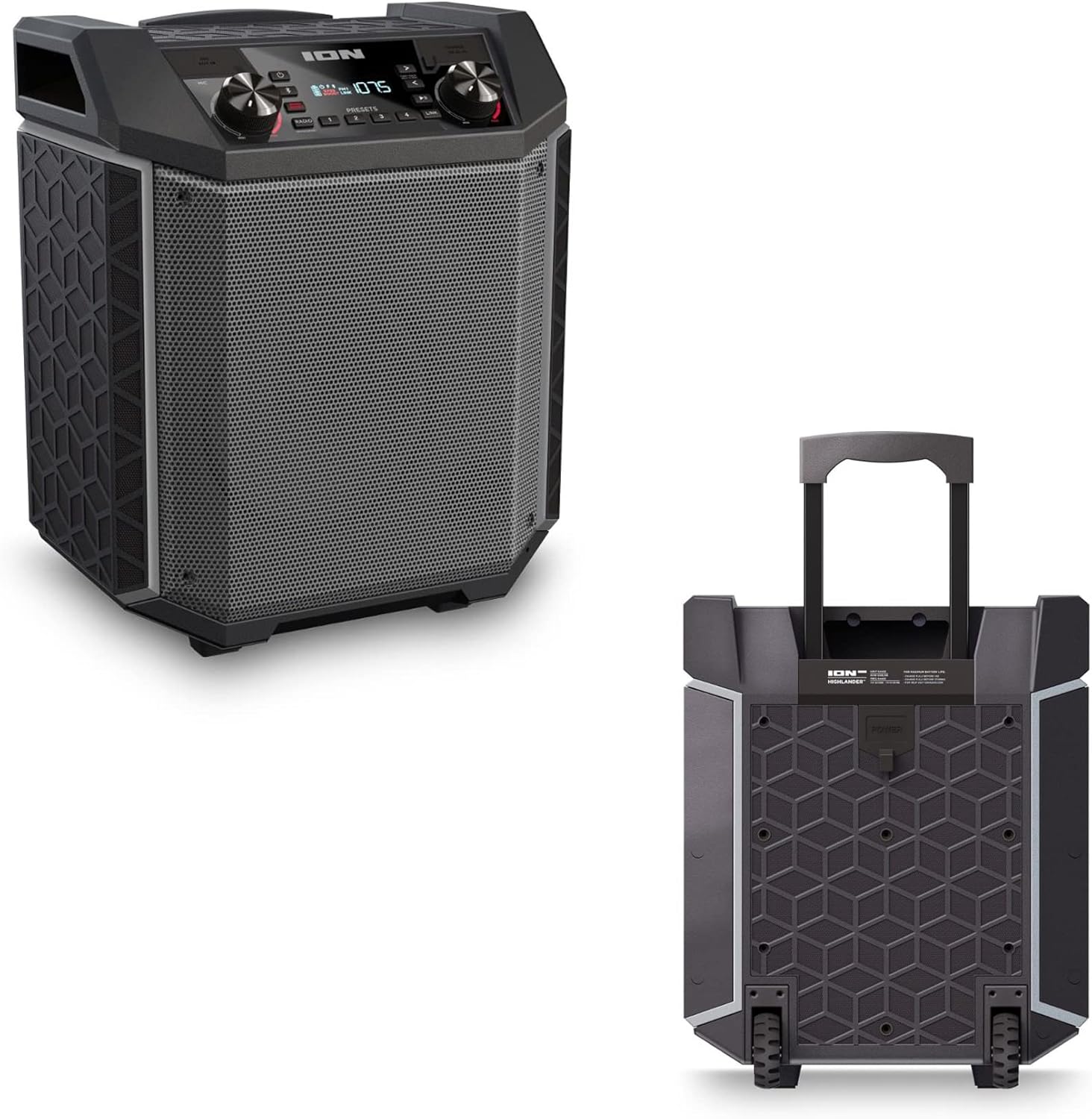

- Mànec retractable: Pull up the integrated handle to roll the speaker like luggage.
- Rodes: Use the built-in wheels for smooth movement across various surfaces.
4.4 Resistència a l'aigua (IPX5)
The Highlander speaker is IPX5 water-resistant, meaning it can withstand splashes of water from any direction. It is suitable for use by the pool or in light rain.

Important: Do not submerge the speaker in water. Ensure all port covers are securely closed when exposed to water.
5. Manteniment
5.1 Neteja
- Always power off the speaker and disconnect it from the power source before cleaning.
- Feu servir un drap suau i sec per netejar les superfícies exteriors.
- Per a la brutícia tossuda, lleugerament dampRenta el drap amb aigua. Evita fer servir productes químics agressius, dissolvents o netejadors abrasius.
- Do not spray cleaning liquids directly onto the speaker.
5.2 Emmagatzematge
- Guardeu l'altaveu en un lloc fresc i sec, allunyat de la llum solar directa i de temperatures extremes.
- If storing for an extended period, ensure the battery is partially charged (around 50%) to maintain battery health. Recharge every few months if not in use.
5.3 Cura de la bateria
- Eviteu esgotar completament la bateria amb freqüència.
- No exposeu la bateria a una calor o fred excessiu.
- If the battery performance significantly degrades, contact customer support for assistance.
6. Solució De Problemes
If you encounter issues with your Highlander speaker, refer to the table below for common problems and solutions.
| Problema | Possible solució |
|---|---|
| L'altaveu no s'encén. |
|
| No es pot emparellar amb un dispositiu Bluetooth. |
|
| Sense so o amb un volum baix. |
|
| Distorsió del so. |
|
7. Especificacions
| Característica | Detall |
|---|---|
| Nom del model | Highlander |
| Marca | ION |
| Tipus d'altaveu | A l'aire lliure |
| Tecnologia de connectivitat | Bluetooth 5.0 |
| Font d'alimentació | Funciona amb bateria |
| Durada de la bateria | 50 hores |
| Nivell de resistència a l'aigua | IPX5 (resistent a l'aigua) |
| Potència de sortida màxima dels altaveus | 120 watts |
| Dimensions del producte | 19.5 "P x 19.5" W x 14" H |
| Pes de l'article | 23.2 lliures |
| Material | Water-resistant plastic or rubber, with a black coating |
| Components inclosos | Cable d'alimentació |
| UPC | 657768542732 |
8. Garantia i Suport
The ION Audio Highlander speaker comes with a Limited Warranty. For specific details regarding warranty coverage, duration, and terms, please refer to the warranty information provided with your purchase or visit the official ION Audio weblloc.
For technical support, troubleshooting assistance beyond this manual, or warranty claims, please contact ION Audio customer support through their official channels. Keep your proof of purchase handy when contacting support.