1. Introducció
This manual provides detailed instructions for the installation, operation, and maintenance of your JOYING JY-UZS80N8 Single DIN Car Stereo. This advanced head unit features an 8-inch detachable touchscreen, integrated Apple CarPlay and Android Auto, a 48-band equalizer, AM/FM radio, and subwoofer output, designed to enhance your in-car audio and navigation experience.
Please read this manual thoroughly before using the device to ensure proper functionality and safety.

Image 1.1: The JOYING JY-UZS80N8 car stereo displaying the Apple CarPlay interface with navigation and media playback.
2. Components del producte i mésview
2.1 Què hi ha a la caixa
El paquet inclou els articles següents:
- 8" Car Radio Unit x 1
- Universal ISO Harness x 1
- Antena 4G x 2
- Cable USB x 2
- External Microphone x 1
- GPS Antenna x 1
- Manual d'usuari x 1
- Kit d'instal·lació x 1

Image 2.1: All included accessories and the main unit of the JOYING JY-UZS80N8 car stereo.
2.2 Característiques clau
- 8-inch Detachable Touchscreen: High-resolution 1280x800 display with a full-fit design for clear visuals and wide viewangles d'ajust.
- Apple CarPlay i Android Auto sense fil: Seamless smartphone integration for navigation, calls, and media.
- Built-in 4G Module: Supports SIM card for internet access (data only, no calls/SMS).
- Processament d'àudio avançat: 48-band EQ, built-in DSP, optical fiber and coaxial digital output for superior sound quality.
- Arrencada ràpida: Quick startup in approximately 2 seconds after the initial boot.
- Navegació GPS: Precise positioning with included GPS antenna and offline map support.
- Sortida HDMI: Supports external display for passenger entertainment.
3. Configuració i instal·lació
3.1 Notes prèvies a la instal·lació
- Installation may require an additional installation frame kit, special ISO harness, amplifier adapter, or CANbus decoder depending on your vehicle model.
- The unit does not support factory car GPS antenna, backup camera, Bluetooth, USB, or microphone.
- Only JOYING accessories (DAB+ digital radio adapter, DVR, OBDII scanner, reverse camera, TPMS, steering wheel controller) are supported and must be ordered separately.
3.2 Connexions de cablejat
Refer to the wiring diagram for proper connection of power, speakers, antennas, and other peripherals. Ensure all connections are secure before powering on the unit.

Imatge 3.1: Detallada view of the rear panel connections for the JOYING JY-UZS80N8 head unit.
3.3 Detachable Screen Adjustment
The 8-inch screen is detachable and can be adjusted vertically by 2.5cm up or down from its middle position, in 0.7cm increments, to suit your installation requirements.

Image 3.2: Illustration of the detachable screen's vertical adjustment capability.
4. Instruccions de funcionament
4.1 Interfície d'usuari (UI)
The unit features a deep-optimized user interface tailored for in-car use. It allows for customization of widgets, display of current applications, and split-screen functionality.
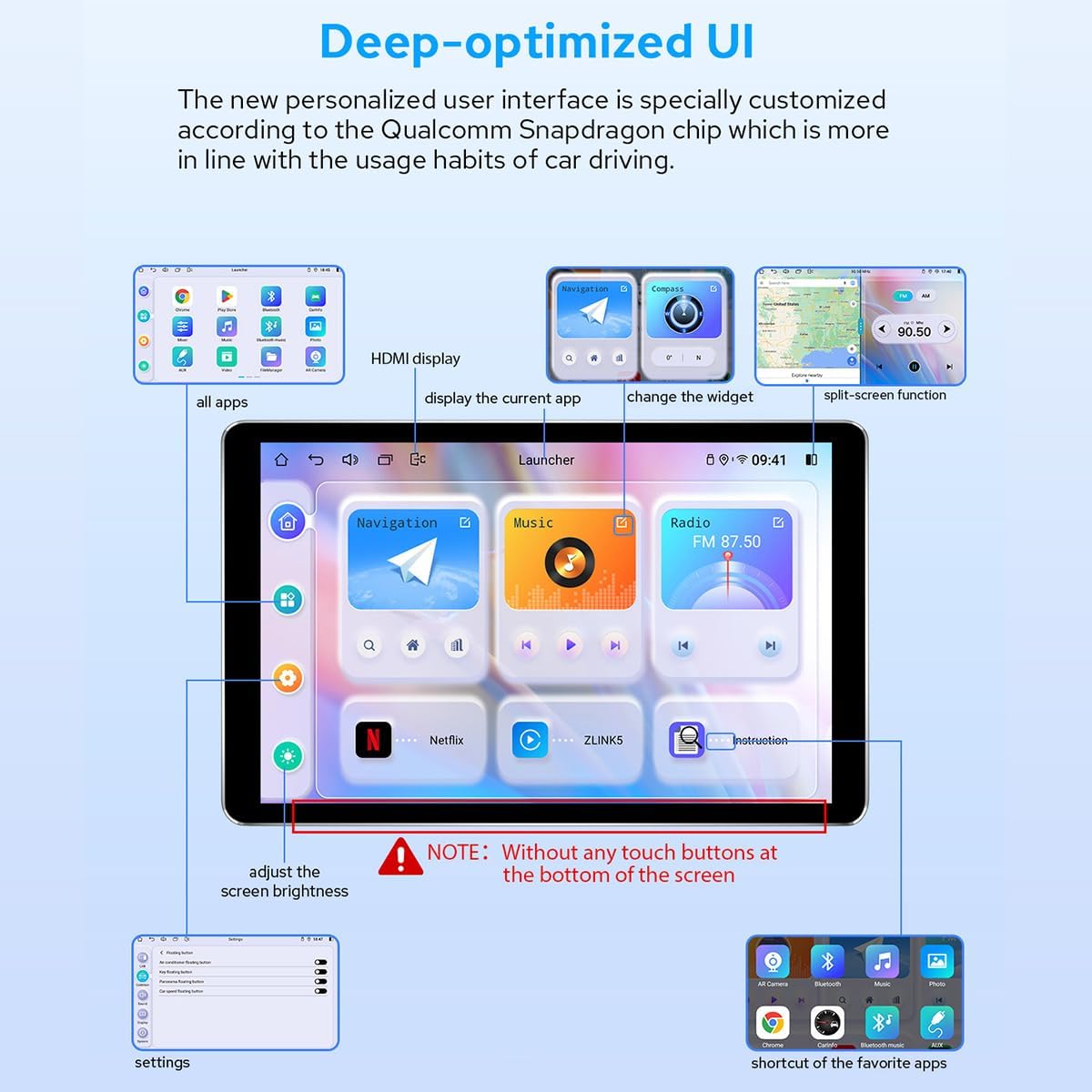
Imatge 4.1: acabatview of the personalized user interface with key features highlighted.
4.2 Gesture Control
Control the screen using intuitive two-finger gestures:
- Llisca cap amunt: Performs a specific action (configurable).
- Lliscar: Performs a specific action (configurable).
- Llisca cap a l'esquerra: Performs a specific action (configurable).
- Slide Right: Performs a specific action (configurable).
4.3 Floating Shortcut Key
Activate the floating shortcut key in the settings for easy access to frequently used functions while driving.

Image 4.2: Visual representation of Day & Night Mode, Gesture Control, and Floating Shortcut Key.
5. Connectivitat
Apple CarPlay i Android Auto sense fil 5.1
Connect your smartphone via USB cable or Bluetooth to access Apple CarPlay or Android Auto. This allows you to use navigation, make calls, send messages, and listen to music directly from your phone's apps on the car stereo's display.

Image 5.1: Illustration of smartphone connectivity with Wireless CarPlay and Android Auto.
5.2 Mòdul 4G
Insert a SIM card into the dedicated slot for direct internet access. The built-in 4G module supports FDD-LTE and TDD-LTE bands. Note that this feature is for internet data only and does not support phone calls or SMS messages.

Image 5.2: Instructions for inserting a 4G SIM card into the module.
5.3 Navegació GPS
The unit includes precise GPS engines and an antenna for accurate positioning and faster real-time navigation. Offline maps can be downloaded and saved to the car stereo for use in areas without internet connectivity.
6. Configuració d'àudio
6.1 Built-in DSP and EQ
The JY-UZS80N8 features a built-in Digital Signal Processor (DSP) and a 48-band equalizer with 20 preset sound effects. This allows for high-precision digital processing of audio signals, including reverberation, delay, distortion, and filtering, to achieve optimal sound quality.

Image 6.1: DSP and EQ interface for sound customization.
6.2 Subwoofer and DTS Scenes
The subwoofer output can be amplified and adjusted independently. The unit also supports DTS 5.1 panoramic surround sound effects and sound field correction for an immersive audio experience.

Image 6.2: EQ settings for subwoofer and DTS sound scene options.

Image 6.3: High-precision sound processing options.
7. Característiques de la pantalla
7.1 Ultra-thin Full-fit Screen
The 8-inch display features ultra-thin bezels and full-fit screen technology, which reduces reflection and enhances brightness and clarity. The screen offers a wide viewing angle, ensuring consistent color and image quality from various perspectives.

Image 7.1: The ultra-thin full-fit screen design.

Image 7.2: Screen appearance when off and demonstrating wide viewangles d'ajust.
7.2 Day & Night Mode
The display automatically adjusts between a bright daytime mode for clear visibility in sunlight and a softer night mode to reduce glare and eye strain during nighttime driving.
7.3 sortida HDMI
The unit provides an HDMI output for connecting to external displays, such as headrest monitors, allowing passengers to watch videos while the main screen is used for navigation or other functions. Note that a straight-head HDMI cable is not supported due to space constraints; an L-shaped or angled HDMI cable is required.

Image 7.3: HDMI output displaying content.
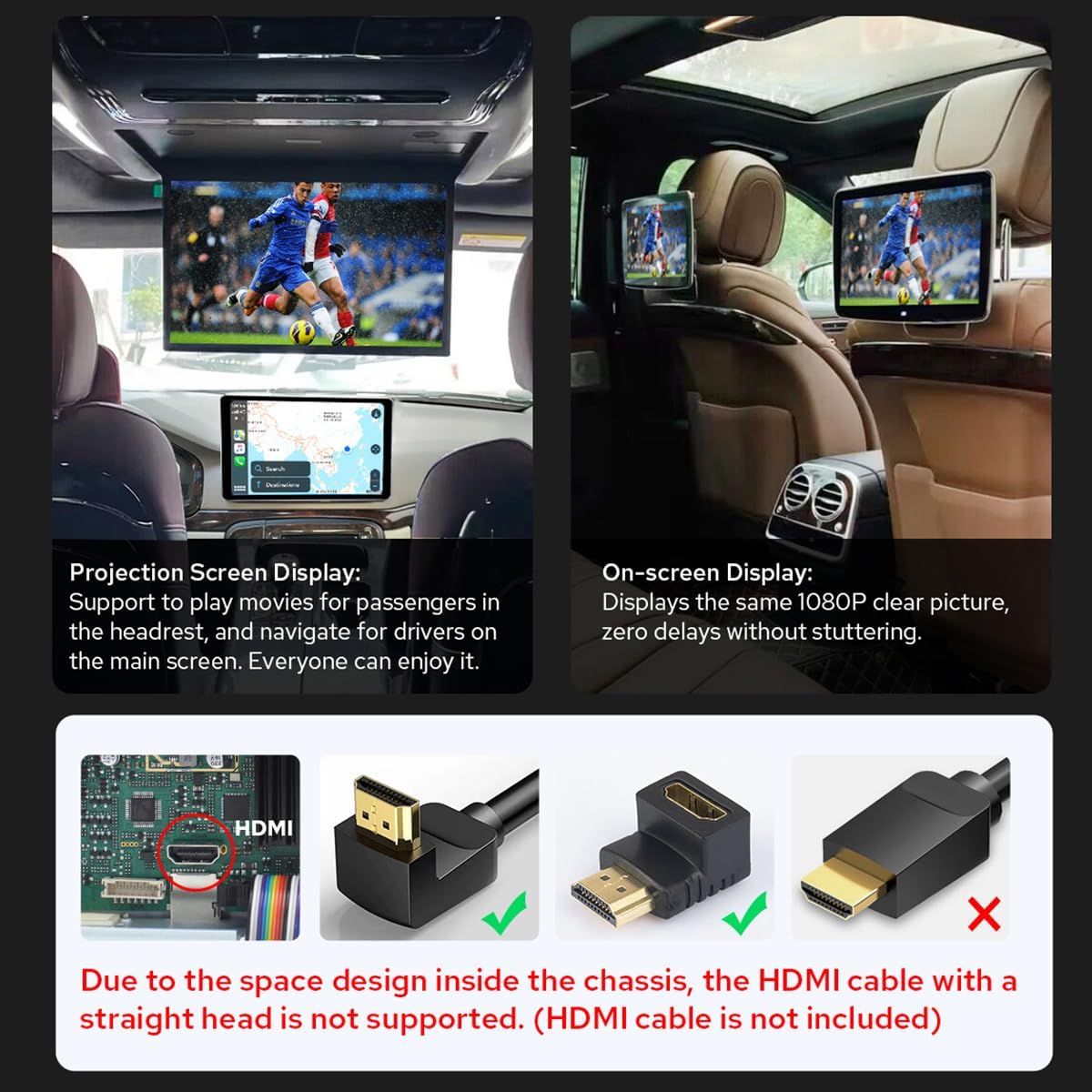
Image 7.4: HDMI output in use for passenger screens and compatible HDMI cable types.
8. Integració de la càmera
8.1 AR Camera Support
The unit supports Augmented Reality (AR) cameras, allowing you to switch between front and rear camera views while driving to observe your surroundings. For optimal performance, it is recommended to use JOYING's AR camera, which is optimized for compatibility and provides clearer, more stable images.

Image 8.1: Front and rear camera views from the AR camera.

Image 8.2: Recommended AR camera compatibility.
9. Especificacions
9.1 Paràmetres generals
| Característica | Detall |
|---|---|
| Marca | ALEGRANT |
| Número de model | JY-UZS80N8 |
| Pes de l'article | 4.29 lliures |
| Dimensions del paquet | 9.25 x 6.5 x 5.12 polzades |
| Data de primera disponibilitat | 6 de juliol de 2023 |
9.2 Paràmetres tècnics
| Categoria | Paràmetre | Detall |
|---|---|---|
| Processador | CPU | QCM6125 Octa Core 64bit ARM (4x A73@2.0GHz, 4x A53@1.8GHz) |
| GPU | Adreno™ 610@950 MHz | |
| Tecnologia de fabricació | 11 nanòmetres | |
| Memòria | Tipus de memòria | LPDDR4X |
| RAM i ROM | 8 GB + 128 GB | |
| Pantalla multimèdia | Resolució de pantalla | 1280 x 800 P |
| Densitat de pantalla | 273 ppi | |
| Freqüència d'actualització | 60 Hz | |
| DPI | 160 dpi (hdpi) | |
| Network & Connection | Sistema de posicionament | GPS / GLONASS / Beidou |
| Xarxa | 4G/3G/Bluetooth OBD (5.0) | |
| Wi-Fi | Wi-Fi 5 (Up to 600 Mbps DL 802.11ac Wi-Fi X12 LTE modem) | |
| Sortida d'àudio | Mode de sortida d'àudio | estèreo |
| So envoltant | 5.1 Configuració del canal | |
| Tipus de connector | Coaxial, Òptic | |
| Característica especial | Bluetooth integrat, pantalla tàctil | |
| Vídeo | Codificació de vídeo | Supports AVI, MKV, MP4, WMV, RMVB, MPG |
| Ports HDMI totals | 1 |

Image 9.1: Core technical parameters.

Image 9.2: Multimedia and network parameters.

Image 9.3: Internal motherboard structure.
10. Solució De Problemes
If you encounter issues with your JOYING JY-UZS80N8 car stereo, consider the following general troubleshooting steps:
- Sense energia: Comproveu totes les connexions d'alimentació i els fusibles. Assegureu-vos que el vehicle estigui engegat.
- Sense so: Verify speaker connections, volume levels, and audio source selection. Check EQ and DSP settings.
- Pantalla tàctil que no respon: Try restarting the unit. Ensure the screen is clean and free of debris.
- Problemes amb el senyal GPS: Assegureu-vos que l'antena GPS estigui instal·lada correctament i que tingui una vista clara view del cel.
- Connectivity Problems (CarPlay/Android Auto/4G/WiFi): Check cable connections for wired CarPlay/Android Auto. For wireless connections, ensure Bluetooth/WiFi is enabled on both devices and the unit. Verify SIM card insertion and data plan for 4G.
- Retard/Bloqueig del sistema: Close unnecessary applications. Perform a system reset if the issue persists.
For more specific issues or persistent problems, please refer to the online support resources or contact JOYING customer service.
11. Manteniment
To ensure the longevity and optimal performance of your JOYING JY-UZS80N8 car stereo, follow these maintenance guidelines:
- Neteja de la pantalla: Feu servir un drap suau i sense borrissol per netejar suaument la pantalla tàctil. Per a taques difícils, fregueu lleugeramentampNetegeu el drap amb aigua o un netejador de pantalles. Eviteu productes químics agressius o materials abrasius.
- Neteja general: Mantingueu la unitat i l'àrea circumdant nets de pols i deixalles. Feu servir un raspall suau o aire comprimit per netejar les reixetes de ventilació i els ports.
- Actualitzacions de programari: Periodically check for and install available software updates to ensure the unit has the latest features and bug fixes.
- Control de temperatura: Avoid exposing the unit to extreme temperatures for extended periods.
12. Garantia i atenció al client
For warranty information, technical assistance, or customer support, please refer to the warranty card included with your product or visit the official JOYING website. You can also contact JOYING customer service directly through their provided channels for any inquiries regarding your JY-UZS80N8 car stereo.
Please have your product model number (JY-UZS80N8) and purchase details ready when contacting support.


