Introducció
This manual provides comprehensive instructions for the Silvergear XL Smartwatch. It covers setup, operation, maintenance, and troubleshooting to ensure you get the most out of your device. The Silvergear XL Smartwatch features a large 2.41-inch IPS display, integrated cameras, 4G connectivity, and extensive fitness tracking capabilities.
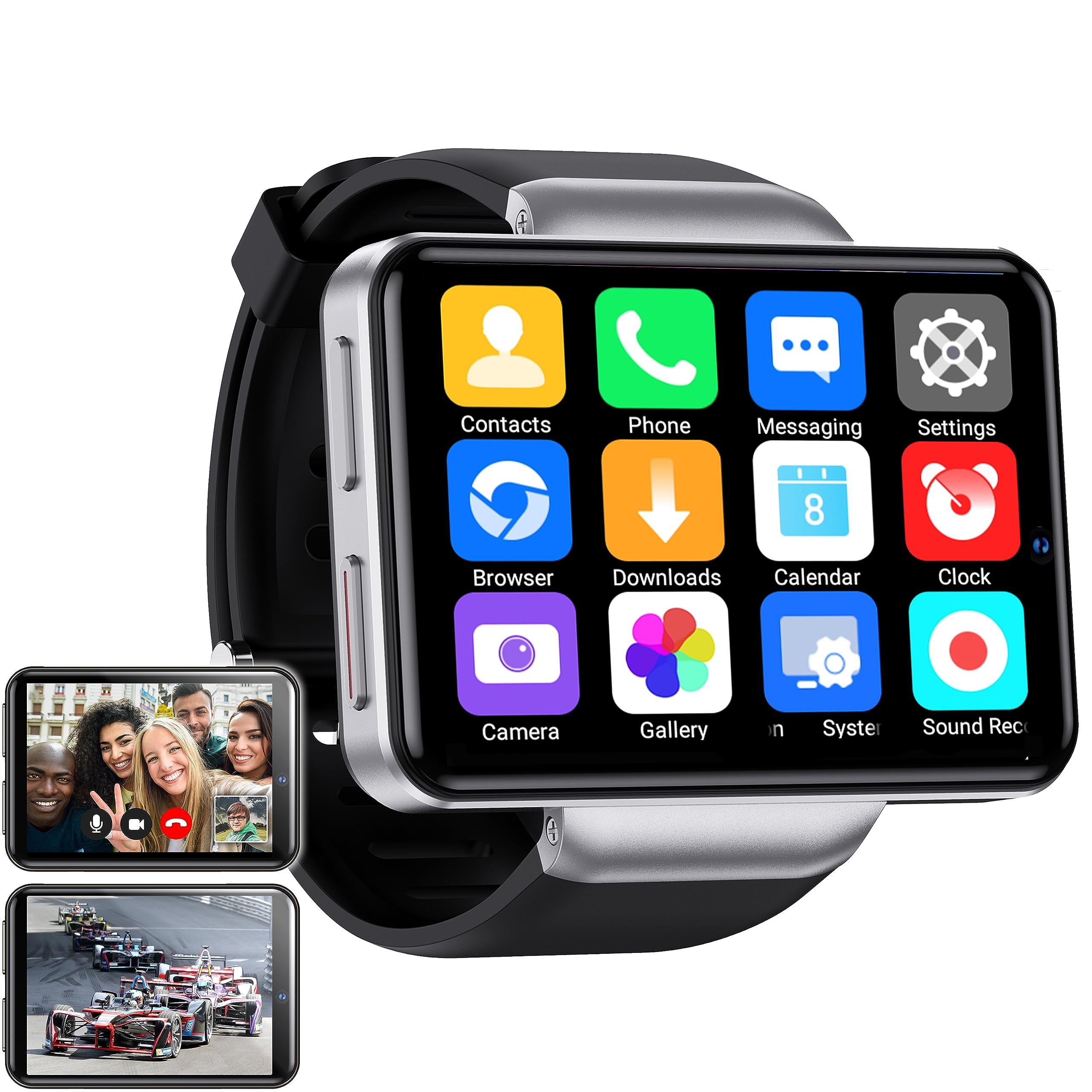
Figure 1: Silvergear XL Smartwatch overview.

Figure 2: The Silvergear XL Smartwatch offers a perfect balance of style, functionality, and advanced technology, including a 2.41-inch IPS display, live video streaming, app downloads, fitness tracking, and communication features.
1. Configuració
1.1 Desembalatge i contingut del paquet
Carefully unpack your Silvergear XL Smartwatch and verify all contents.

Figure 3: Package contents including the Smartwatch XL, charging base, screen protector, and two screwdrivers. Dimensions are also shown: 4.5 cm height, 6.5 cm width, 1.5 cm thickness for the watch body, and strap lengths of 8.5 cm and 12 cm. The watch weighs 120 grams.
- Silvergear XL Smartwatch
- Base de càrrega
- Protector de pantalla
- 2x Screwdrivers (for SIM card tray)
- Manual d'usuari (aquest document)
1.2 Càrrega del rellotge intel·ligent
Abans del primer ús, carrega completament el rellotge intel·ligent.
- Connect the charging base to a USB power adapter (not included) or a computer's USB port.
- Place the smartwatch onto the charging base, ensuring the charging pins align.
- La pantalla del rellotge indicarà l'estat de càrrega. Calculeu aproximadament de 2 a 3 hores per a una càrrega completa.
1.3 Instal·lació de la targeta SIM
To enable 4G connectivity, calls, and internet access, install a Nano SIM card.

Figure 4: Illustration of how to insert a Nano SIM card into the smartwatch. The image also shows the watch's ability to download apps from the Play Store.
- Locate the SIM card tray on the side of the smartwatch.
- Use the provided screwdriver to open the SIM card tray.
- Carefully insert a Nano SIM card into the tray, ensuring correct orientation.
- Close the SIM card tray securely with the screwdriver.
1.4 Engegada i configuració inicials
Press and hold the power button until the Silvergear logo appears. Follow the on-screen prompts to complete the initial setup, including language selection, time zone, and network connection.
2. Funcionament del rellotge intel·ligent
2.1 Navegació bàsica
- Pantalla tàctil: Llisca cap a l'esquerra, la dreta, amunt o avall per navegar pels menús i les pantalles. Toca per seleccionar elements.
- Botó d'encesa: Press to wake/sleep the screen. Press and hold to power on/off or restart.
- Back Button (if applicable): Some watches have a dedicated back button or gesture. Refer to on-screen prompts.
2.2 Característiques de comunicació
With a Nano SIM card installed, you can make and receive calls and messages directly from your smartwatch.
- Trucades: Tap the "Phone" icon to access the dialer or contacts.
- Missatgeria: Tap the "Messaging" icon to send and receive text messages.
- Aplicacions: Download communication apps from the Play Store for additional functionality.
Funcionalitat de càmera 2.3
The smartwatch is equipped with both front and side cameras for capturing photos and videos.

Figure 5: The smartwatch features a 5MP front camera and a 2MP side camera, allowing you to capture photos and videos directly from your wrist.
- Accés a la càmera: Tap the "Camera" icon on the home screen or app drawer.
- Canvia de càmeres: Use the on-screen icon to switch between the 5MP front camera and the 2MP side camera.
- Captura: Toqueu el botó de l'obturador per fer una foto o iniciar/aturar la gravació de vídeo.
2.4 Multimedia Entertainment
Enjoy videos, TV programs, series, and music directly on your smartwatch's extra-large screen.

Figure 6: The extra-large screen allows you to enjoy multimedia content such as sport competitions, TV programmes, series, videos, and music.
- Video/TV: Use pre-installed apps or download streaming services from the Play Store.
- Música: Play music stored on the device or stream from compatible apps.
2.5 Seguiment de l'aptitud física i la salut
Monitor your physical activity and health metrics with the integrated sensors.

Figure 7: The smartwatch offers pedometer and fitness tracking for various activities including running, hiking, cycling, basketball, football, jumping rope, and badminton.
- Podòmetre: Fa un seguiment dels passos, la distància i les calories cremades diàriament.
- Monitor de freqüència cardíaca: Provides accurate heart rate readings.
- Modes d'entrenament: Select from 9 pre-defined exercise types (e.g., running, walking, cycling, swimming) to track your performance.
- Seguiment del son: Monitors your sleep patterns (if supported by the device's software).
2.6 App Downloads
Expand your smartwatch's functionality by downloading applications from the Play Store.
- Ensure your smartwatch is connected to Wi-Fi or has an active 4G data connection.
- Tap the "Play Store" icon and browse or search for desired applications.
- Follow on-screen instructions to download and install apps.
3. Manteniment
3.1 Neteja
Per mantenir l'aspecte i la funcionalitat del teu rellotge intel·ligent:
- Netegeu la pantalla i el cos amb un drap suau i sense borrissol.
- Per a marques difícils, lleugerament dampRenta el drap amb aigua. Evita productes químics agressius o materials abrasius.
- Assegureu-vos que els contactes de càrrega estiguin nets i secs abans de carregar.
3.2 Resistència a l'aigua i la pols
The Silvergear XL Smartwatch is rated IP67 for water and dust resistance.

Figure 8: The smartwatch is IP67 water- and dustproof, designed to withstand various weather conditions. This includes IP67 splashproof and IP67 dustproof ratings.
- Classificació IP67: This means the device is protected from dust ingress and can withstand immersion in water up to 1 meter for up to 30 minutes.
- It is suitable for splashes, rain, and incidental exposure to water.
- Avoid prolonged immersion, hot water, or high-pressure water jets.
- Ensure the SIM card tray is properly sealed to maintain water resistance.
3.3 Actualitzacions de programari
Periodically check for software updates to ensure optimal performance and access to new features.
- Connect your smartwatch to Wi-Fi.
- Navigate to "Settings" > "About Watch" > "Software Update" (or similar path).
- Follow on-screen instructions to download and install any available updates.
4. Solució De Problemes
| Problema | Causa possible | Solució |
|---|---|---|
| Smartwatch does not power on. | Bateria baixa; dispositiu bloquejat. | Charge the device for at least 30 minutes. Press and hold the power button for 10-15 seconds to force restart. |
| No puc fer/rebre trucades. | No SIM card; SIM card not properly inserted; no network signal; incorrect network settings. | Ensure SIM card is correctly installed and activated. Check network signal strength. Verify network settings in the smartwatch. |
| La pantalla no respon. | Software glitch; screen protector interference. | Restart the smartwatch. Remove and reapply the screen protector if it's causing issues. |
| Fitness tracking data is inaccurate. | Improper fit; sensor obstruction; software calibration needed. | Ensure the watch is worn snugly on your wrist. Clean the sensor area. Check for software updates. |
| No es pot connectar a la Wi-Fi. | Contrasenya incorrecta; fora de l'abast; problema del router. | Verify Wi-Fi password. Move closer to the Wi-Fi router. Restart the router. |
If you encounter issues not listed here, or if the suggested solutions do not resolve the problem, please refer to the support section.
5. Especificacions
Below are the technical specifications for the Silvergear XL Smartwatch (Model: 8711568088660).

Figure 9: Key technical specifications of the Silvergear XL Smartwatch, including Android 7.1.1 OS, MT6739 Quad-Core CPU (1.5 GHz), 2.41-inch full screen, 640x480 resolution, and 4G & WiFi connectivity.
| Característica | Detall |
|---|---|
| Marca | Silvergear |
| Número de model | 8711568088660 |
| Sistema operatiu | Android (version 7.1.1 from image) |
| Mida de la pantalla | 2.41 polzades |
| Tipus de visualització | LCD (IPS from description) |
| Resolució | 640x480 (from image) |
| Processador | MT6739 Quad-Core CPU, 1.5 GHz (from image) |
| Connectivitat | 4G, Wi-Fi |
| Càmera frontal | 5 megapíxels |
| Càmera lateral | 2 megapíxels |
| Capacitat d'emmagatzematge de memòria | 500 MB |
| Resistència a l'aigua i a la pols | IP67 |
| GPS | Sense GPS |
| Dispositius compatibles | Smartphone |
6. Informació de la garantia
The Silvergear XL Smartwatch comes with a manufacturer's warranty.
- Garantia del fabricant: 2 anys.
- Aquesta garantia cobreix els defectes de materials i de mà d'obra en ús normal.
- It does not cover damage caused by misuse, accidents, unauthorized modifications, or normal wear and tear.
- Conserveu el vostre comprovant de compra per a reclamacions de garantia.
7. Suport
For further assistance, technical support, or warranty claims, please contact Silvergear customer service.
- Refer to the Silvergear official weblloc per obtenir dades de contacte.
- Have your product model number (8711568088660) and proof of purchase ready when contacting support.


