1. Introducció
The NOYAFA NF-8209 is an advanced network cable tester designed for comprehensive network maintenance and installation. It integrates multiple functions including cable length measurement, cable fault testing, Power over Ethernet (PoE) testing, hub blink, and Non-Contact Voltage (NCV) detection. This manual provides detailed instructions for the safe and effective use of your NF-8209 tester.

Figure 1.1: NOYAFA NF-8209 Network Cable Tester (Emitter, Receiver, and Remote)
2. Contingut del paquet
Si us plau, comproveu el contingut del paquet en desembalar-lo per assegurar-vos que tots els elements hi són i no estan danyats:
- NF-8209 Emitter (Main Unit)
- NF-8209 Receiver
- NF-8209 Remote Identifier
- Cable RJ45
- Cable de pinça de cocodril
- Auricular
- Manual d'usuari
- Bossa de transport
3. Informació de seguretat
To ensure safe operation and prevent damage to the device, please read and adhere to the following safety precautions:
- No utilitzeu el dispositiu en entorns amb gasos, vapors o pols explosius.
- Eviteu exposar el dispositiu a temperatures o humitat extremes.
- No intenteu desmuntar ni modificar el dispositiu. Encarregueu tot el manteniment a personal qualificat.
- Ensure proper battery installation and replacement. Remove batteries if the device will not be used for an extended period.
- When performing NCV tests, exercise caution and do not touch live wires directly.
- For cable length measurement, ensure the cable is de-energized and disconnected from all devices.
4. Product Components and Interface
Familiarize yourself with the main components and ports of the NF-8209 tester:

Figure 4.1: Emitter and Receiver Interface Overview
Emitter (Main Unit)
- Pantalla LCD: Displays test results and menu options.
- Botó d'encesa: Encén/apaga el dispositiu.
- Botó de llum: Activa la llum LED integrada.
- Botons de navegació (amunt/avall/esquerra/dreta): Used to navigate menu options.
- Botó D'acord: Confirma la selecció.
- Botó enrere: Torna al menú anterior.
- Port PoE: For PoE testing.
- Length/Flash Port: For cable length measurement and hub blink.
- CONT Port: For cable continuity testing.
- SCAN Port: For cable scanning/tracing.
Receptor
- Botó d'encesa: Encén/apaga el receptor.
- Indicador NCV: Lights up during NCV detection.
- Analog/Digital/PoE Mode Switch: Selects the scanning mode.
- SEN (Sensitivity) Adjustment: Adjusts tracing sensitivity.
- Presa per a auriculars: For connecting earphones during tracing.
- Lamp: Llum LED integrada.
Remote Identifier
- Port RJ45: Connects to the remote end of the cable for continuity and wiremap testing.
5. Configuració i funcionament bàsic
Before using the NF-8209, ensure batteries are installed in both the Emitter and Receiver units. Typically, 3 AAA batteries are required for each unit (batteries not included).
5.1 Engegada/apagada
- Emissor: Manteniu premut el botó Poder button for 2 seconds to turn on. Press and hold again to turn off.
- Receptor: Premeu el botó Poder button to turn on. Press again to turn off.
5.2 Navegació al menú principal
Upon powering on the Emitter, the main menu will appear on the LCD screen. Use the navigation buttons (Amunt/Abaix/Esquerra/Dreta) to select a function and press OK per entrar.
6. Modes i funcions de funcionament
The NOYAFA NF-8209 offers several powerful testing modes. Below are detailed instructions for each function.
Video 6.1: Official NOYAFA NF-8209 Network Cable Tester Demonstration. This video demonstrates the PoE test, continuity test, cable length measurement, and cable scanning functions.
6.1 PoE Information Testing
This function identifies which pins are providing power, detects the voltage, and identifies the type of Power Sourcing Equipment (PSE) (e.g., IEEE 802.3af/at standard).
- Connect one end of the network cable to the PoE port on the Emitter.
- Connect the other end of the cable to a PoE switch or device.
- On the Emitter's main menu, select the PoE testing function.
- The LCD screen will display information such as PoE standard (e.g., IEEE 802.3af), Endspan/Midspan, and voltage.

Figure 6.1.1: PoE Testing in progress, showing voltage and standard information.

Figure 6.1.2: Detailed display of PoE test results, including pin power and voltage.
Refer to Video 6.1 from 0:05 to 0:21 for a demonstration of PoE testing.
6.2 Cable Continuity Testing (Wiremap)
This function tests the physical status of STP and UTP LAN cables, detecting open circuits, short circuits, and cross-connections.
- Connect one end of the network cable to the CONT port on the Emitter.
- Connect the other end of the cable to the RJ45 port of the Remote Identifier.
- On the Emitter's main menu, select the Continuity testing function.
- Premeu OK to start testing. The screen will display the wiremap results (e.g., 1-1, 2-2, etc. for a good cable).

Figure 6.2.1: Setup for cable continuity testing using the remote unit.

Figura 6.2.2: Example of continuity test results for a correctly wired cable.
Refer to Video 6.1 from 0:22 to 0:40 for a demonstration of cable continuity testing.
6.3 Cable Length Measurement
The NF-8209 can accurately measure the length of LAN cables (Cat5, Cat6) up to 200 meters using Time Domain Reflectometry (TDR) technology. It can also locate the distance to a fault.
- Ensure the LAN cable to be tested is de-energized and disconnected from all network devices.
- Connect one end of the cable to the Length/Flash port on the Emitter. The other end should be open (not connected to anything).
- On the Emitter's main menu, select the Length measurement function.
- The LCD screen will display the cable length in meters. If a fault is detected, it will show the distance to the fault.

Figure 6.3.1: Setup for measuring cable length. The cable is coiled and disconnected.

Figure 6.3.2: Display showing the measured length of the network cable.
Refer to Video 6.1 from 0:41 to 1:05 for a demonstration of cable length measurement.
6.4 Digital Cable Scanning (Wire Tracking)
This function helps locate specific cables among a bundle, even in noisy environments, using digital, analog, or PoE scan modes.
- Connect one end of the target cable to the ESCANEAR port on the Emitter.
- On the Emitter's main menu, select the Scan function and choose your desired mode (Digital, Analog, or PoE).
- Ensure the Receiver's mode switch matches the Emitter's selected scan mode.
- Use the Receiver to trace the cable. The Receiver will emit an audible tone and/or visual indication when it detects the signal from the target cable. Adjust sensitivity (SEN) as needed.

Figure 6.4.1: Wire tracking in action within a complex cable environment.
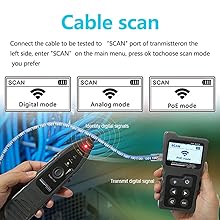
Figure 6.4.2: The Emitter's display showing the selectable scan modes.
Refer to Video 6.1 from 1:06 to 1:51 for a demonstration of cable scanning.
6.5 NCV (Volum sense contacte)tage) Funció
The Receiver unit features an NCV function to detect the presence of AC voltage (50V-1000V) without direct contact, enhancing safety.
- Engegueu la unitat receptora.
- Move the tip of the Receiver close to the suspected live wire or electrical outlet.
- Si AC voltage is detected, the NCV indicator light on the Receiver will illuminate, and an audible alarm may sound.
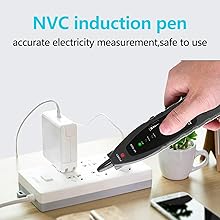
Figure 6.5.1: Using the NCV function to detect AC voltage per seguretat.
6.6 Hub Blink
The Hub Blink function helps locate the network port by causing the port light on a Hub/Switch to flash. This is available for 10M/100M Hub/Switches.
- Connect one end of the network cable to the Length/Flash port on the Emitter.
- Connect the other end of the cable to a port on the network switch.
- On the Emitter's main menu, select the Hub Blink function.
- The corresponding port light on the connected switch will begin to flash, allowing for easy identification.
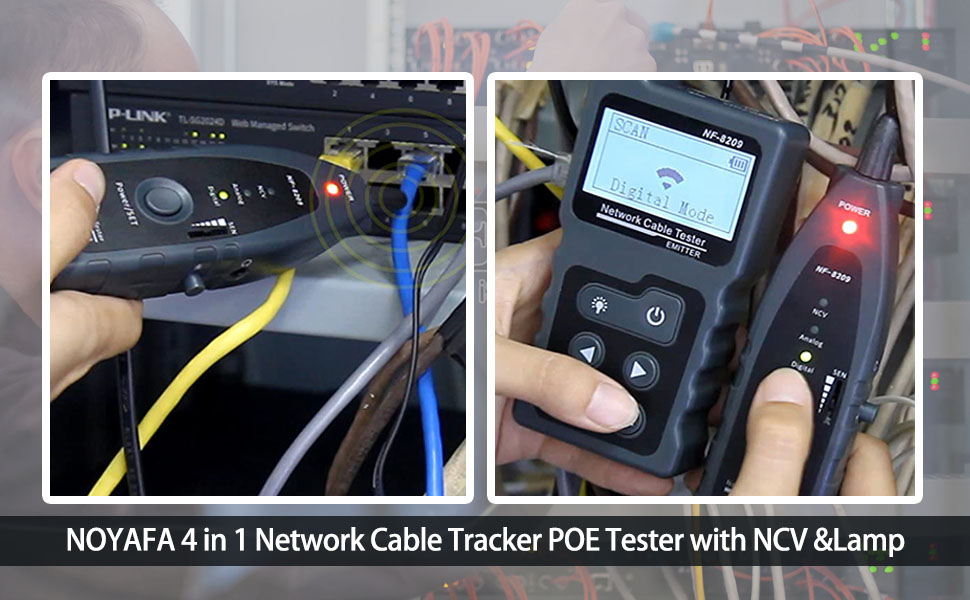
Figure 6.6.1: The Hub Blink function in use, identifying a specific port on a switch.
7. Manteniment
Proper maintenance ensures the longevity and accuracy of your NF-8209 tester.
7.1 Neteja
- Netegeu el dispositiu amb un drap suau i sec.
- No utilitzeu netejadors abrasius ni dissolvents.
7.2 Emmagatzematge
- Guardeu el dispositiu en un lloc fresc i sec, allunyat de la llum solar directa i de temperatures extremes.
- Si l'emmagatzemeu durant un període prolongat, traieu les piles per evitar fuites.
8. Solució De Problemes
Si teniu problemes amb el vostre NF-8209, consulteu els següents problemes i solucions habituals:
| Problema | Causa possible | Solució |
|---|---|---|
| El dispositiu no s'encén. | Piles baixes o gastades; instal·lació incorrecta de la bateria. | Replace batteries; Ensure batteries are installed with correct polarity. |
| Inaccurate cable length measurement. | Cable not de-energized; Other devices connected to the cable; Cable length outside range. | Disconnect cable from all devices; Ensure cable length is within 200m. |
| No signal during cable scanning. | Emitter and Receiver modes do not match; Low sensitivity on Receiver. | Set both Emitter and Receiver to the same scan mode; Increase Receiver sensitivity. |
| Continuity test shows 'Open' or incorrect wiremap. | Cable fault (open, short, cross); Remote not connected or faulty; Wrong port used. | Inspect cable for damage; Ensure remote is properly connected; Use the correct 'CONT' port. |
9. Especificacions
Technical specifications for the NOYAFA NF-8209 Network Cable Tester:
- Model: NF-8209
- Tipus de cable provats: Cat5, Cat5e, Cat6, Cat6a (RJ45), RJ11 (via adapter)
- Max. Length Measurement: 200 m
- Length Measurement Accuracy: Fins al 98%
- Proves PoE: Detects standard (802.3af/at) and non-standard PoE, voltage, polarity, endspan/midspan.
- Modes d'escaneig: Digital, Analog, PoE
- NCV Detection: 50V-1000V AC
- Font d'alimentació: Battery Powered (typically AAA batteries, not included)
- Visualització: Pantalla LCD
- Dimensions (Emitter): Aproximadament 10.16 x 6.61 x 1.85 polzades
- Pes: Aproximadament 15.2 unces
10. Garantia i Suport
NOYAFA products are designed for reliability and performance. For warranty information, technical support, or service inquiries, please refer to the warranty card included with your product or visit the official NOYAFA weblloc web. Conserveu el rebut de compra com a comprovant de compra per a reclamacions de garantia.


