1. Introducció
Aquest manual proporciona instruccions detallades per a la configuració, el funcionament i el manteniment del sensor de monitorització intel·ligent de temperatura i humitat LinknLink eTHS WiFi. Llegiu atentament aquest manual abans d'utilitzar el dispositiu per garantir-ne el funcionament i la seguretat adequats.
1.1 Informació de seguretat
- Mantingueu el dispositiu allunyat de l'aigua i d'ambients amb molta humitat.
- No exposeu el dispositiu a temperatures extremes ni a la llum solar directa.
- Feu servir només l'adaptador de corrent especificat (mini USB de 5 V) per evitar danys.
- Eviteu deixar caure o sotmetre el dispositiu a forts impactes.
- No intenteu desmuntar o reparar el dispositiu vosaltres mateixos. Contacteu amb l'assistència al client per obtenir assistència.
2. Producte acabatview
2.1 Característiques clau
- Lectura precisa i ràpida: Equipat amb un sensor Sensirion fabricat a Suïssa, que proporciona una precisió de temperatura de fins a ±0.54 °F/±0.3 °C i una precisió d'humitat de fins a ±2 % HR. Les dades s'actualitzen cada 2 segons.
- Connexió Wi-Fi sense concentrador: Es connecta directament a Wi-Fi 2.4G, eliminant la necessitat d'un concentrador separat.
- Estat i alerta en temps real de l'aplicació: View estat actual i corbes de dades de 24 hores. Establiu límits alts i baixos personalitzables per a alertes immediates al telèfon.
- Emmagatzematge i exportació de dades GRATUÏTS: Ofereix fins a 3 anys d'emmagatzematge de dades gratuït. Exporta totes les dades a Excel en qualsevol moment.
- Funciona amb Alexa/Google: Compatibilitat amb el control per veu d'Amazon Alexa i Google Home per a consultes de temperatura i humitat. Admet les rutines d'Alexa per a una automatització avançada.
- Assistent a domicili TH2MQTT: S'integra amb Home Assistant mitjançant el protocol MQTT per a una domòtica avançada basada en dades en temps real.
2.2 Què hi ha a la caixa
- Unitat de sensor LinknLink eTHS
- Cable de sensor (USB)
- Guia d'usuari
2.3 Diagrama del producte
A continuació es mostra una imatge del sensor LinknLink eTHS i la interfície de l'aplicació mòbil que l'acompanya.
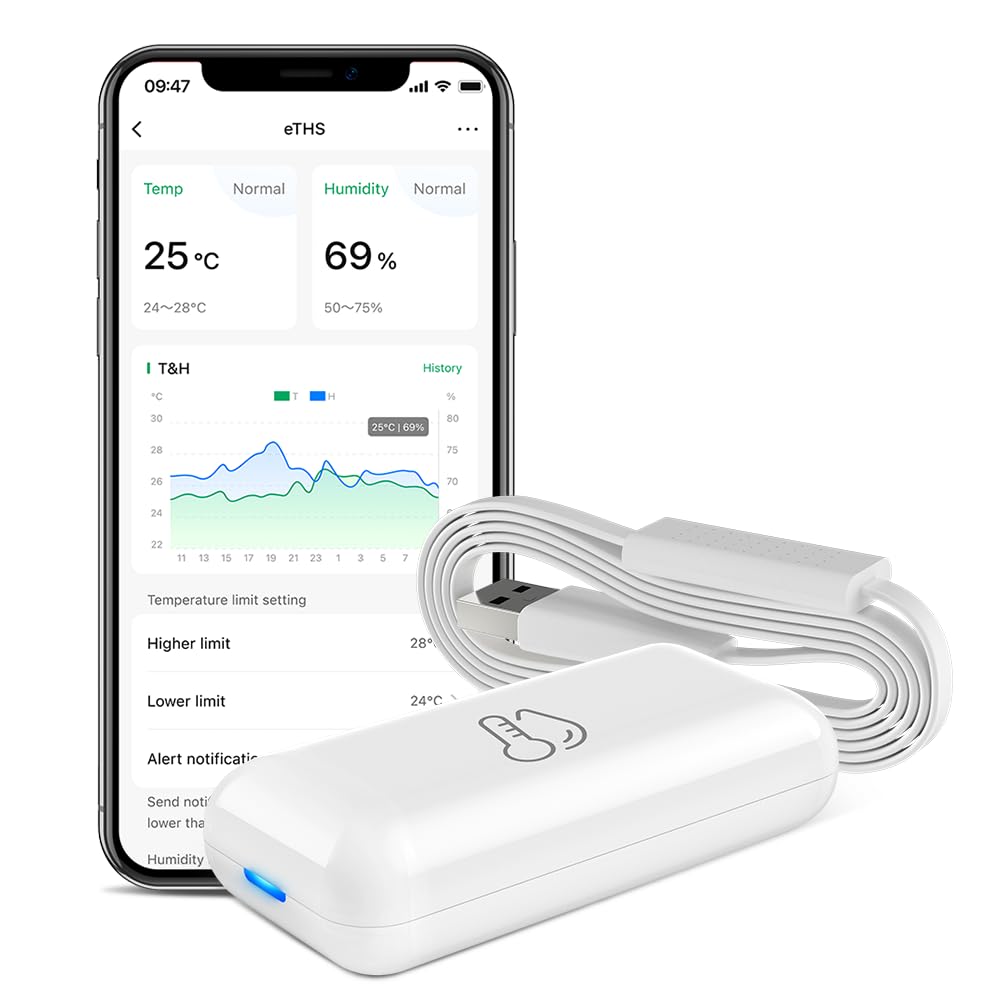
Figura 1: Interfície de l'aplicació i el sensor LinknLink eTHS. La unitat compacta del sensor es mostra al costat d'un telèfon intel·ligent que mostra la temperatura i la humitat actuals, juntament amb gràfics de dades històriques i configuracions d'alertes.
3. Especificacions
| Especificació | Valor |
|---|---|
| Número de model | eTHS |
| Dimensions del paquet | 2.95 x 1.85 x 1.54 polzades |
| Pes de l'article | 1.76 unces |
| Marca | LinknLink |
| Característica especial | Alta precisió |
| Color | Blanc |
| Material exterior | Plàstic |
| Tipus de visualització | Sense pantalla |
| Tecnologia de connectivitat | Wi-Fi (2.4 G) |
| Precisió de la temperatura | ±0.54 °F / ±0.3 °C |
| Precisió de la humitat | ± 2% HR |
| Freqüència d'actualització de dades | Cada 2 segons |
4. Guia de configuració
4.1 Instal·lació de l'aplicació
- Cerca l'aplicació "LinknLink" a la botiga d'aplicacions del teu telèfon intel·ligent (Google Play Store per a Android o Apple App Store per a iOS).
- Baixeu i instal·leu l'aplicació.
- Registra't per obtenir un compte nou o inicia la sessió si ja en tens un.
4.2 Engegada del dispositiu i connexió Wi-Fi
El sensor LinknLink eTHS està dissenyat per a una instal·lació convenient i s'alimenta mitjançant un cable mini USB de 5 V.
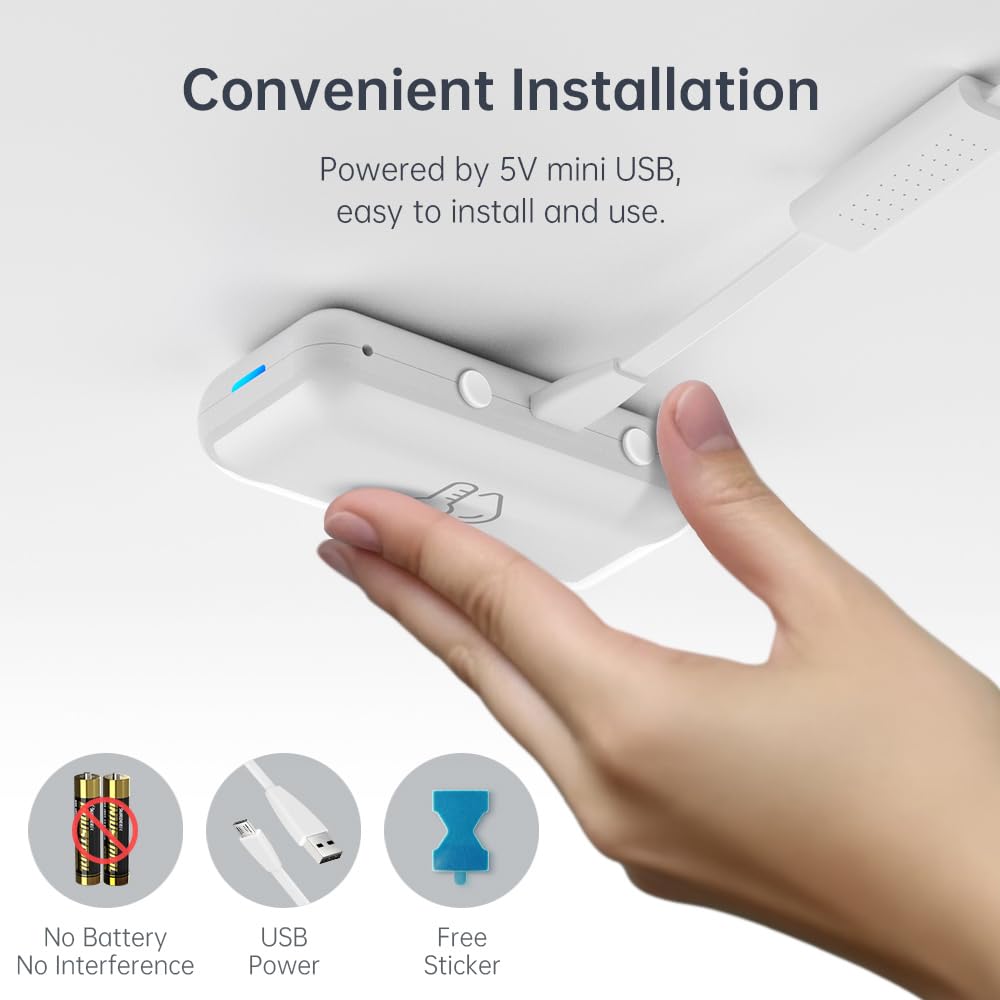
Figura 2: Instal·lació convenient del sensor eTHS alimentat per USB. La imatge mostra una mà connectant un cable USB al sensor, cosa que destaca el seu funcionament sense bateria i la seva configuració senzilla.
- Connecteu el cable del sensor USB proporcionat a la unitat de sensor LinknLink eTHS.
- Connecteu l'altre extrem del cable USB a una font d'alimentació USB de 5 V (per exemple, un adaptador de paret USB, un port USB de l'ordinador).
- El dispositiu s'encén i un indicador lluminós mostrarà el seu estat.
- Obriu l'aplicació LinknLink i seguiu les instruccions que apareixen a la pantalla per afegir un dispositiu nou. Assegureu-vos que el vostre telèfon intel·ligent estigui connectat a una xarxa Wi-Fi de 2.4G.
- El sensor eTHS es connecta directament a la vostra xarxa Wi-Fi, eliminant la necessitat d'un concentrador separat.
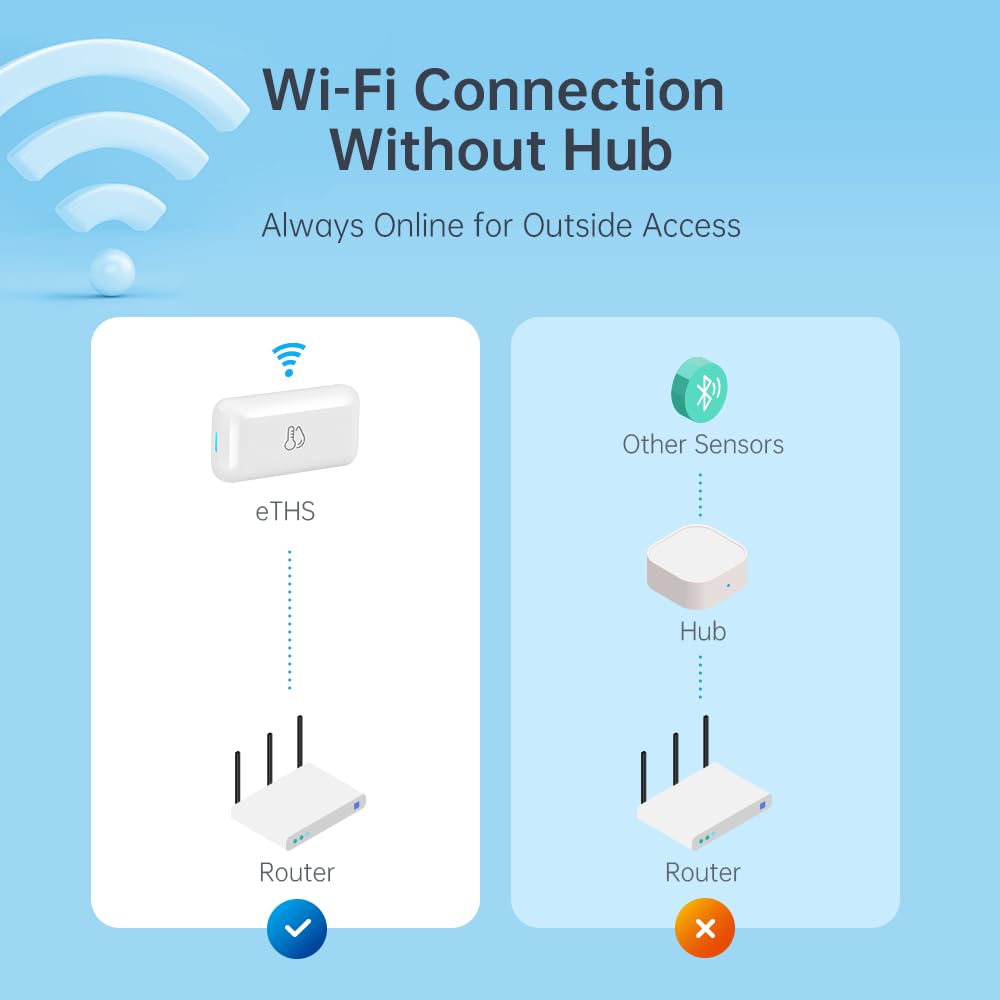
Figura 3: Connexió Wi-Fi directa del sensor eTHS, que mostra com es connecta a un encaminador sense un concentrador intermedi, a diferència d'altres sensors.
5. Instruccions de funcionament
5.1 Monitorització i alertes en temps real
El LinknLink eTHS permet monitoritzar les condicions ambientals de forma remota i rebre alertes de canvis significatius.
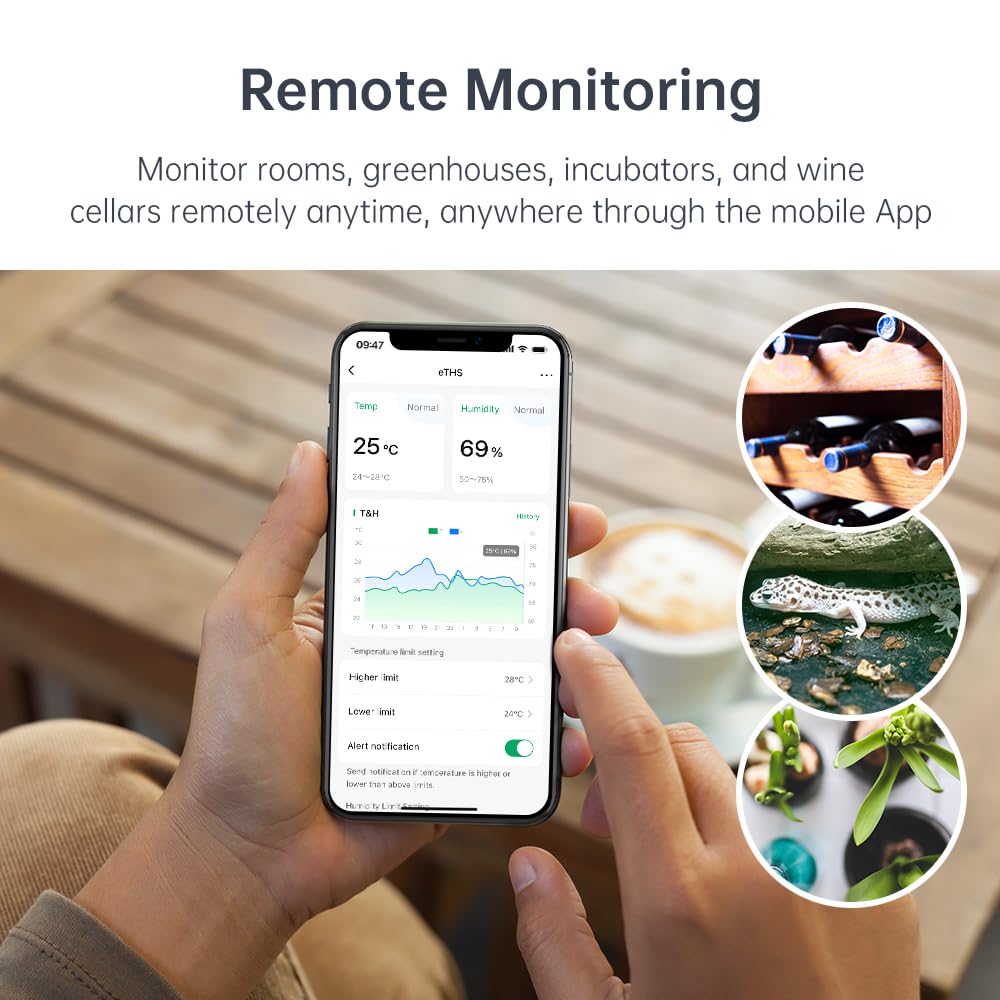
Figura 4: Capacitats de monitorització remota del sensor eTHS en diversos entorns com ara un hivernacle, un celler i una incubadora d'animals.
- Obre l'aplicació LinknLink per a view dades de temperatura i humitat en temps real.
- L'aplicació mostra una corba de dades de 24 hores, cosa que permet fer un seguiment de les tendències.
- Estableix límits de temperatura/humitat superiors i inferiors dins de l'aplicació.
- Rebeu notificacions push immediates al vostre telèfon si les lectures superen o baixen dels límits establerts.
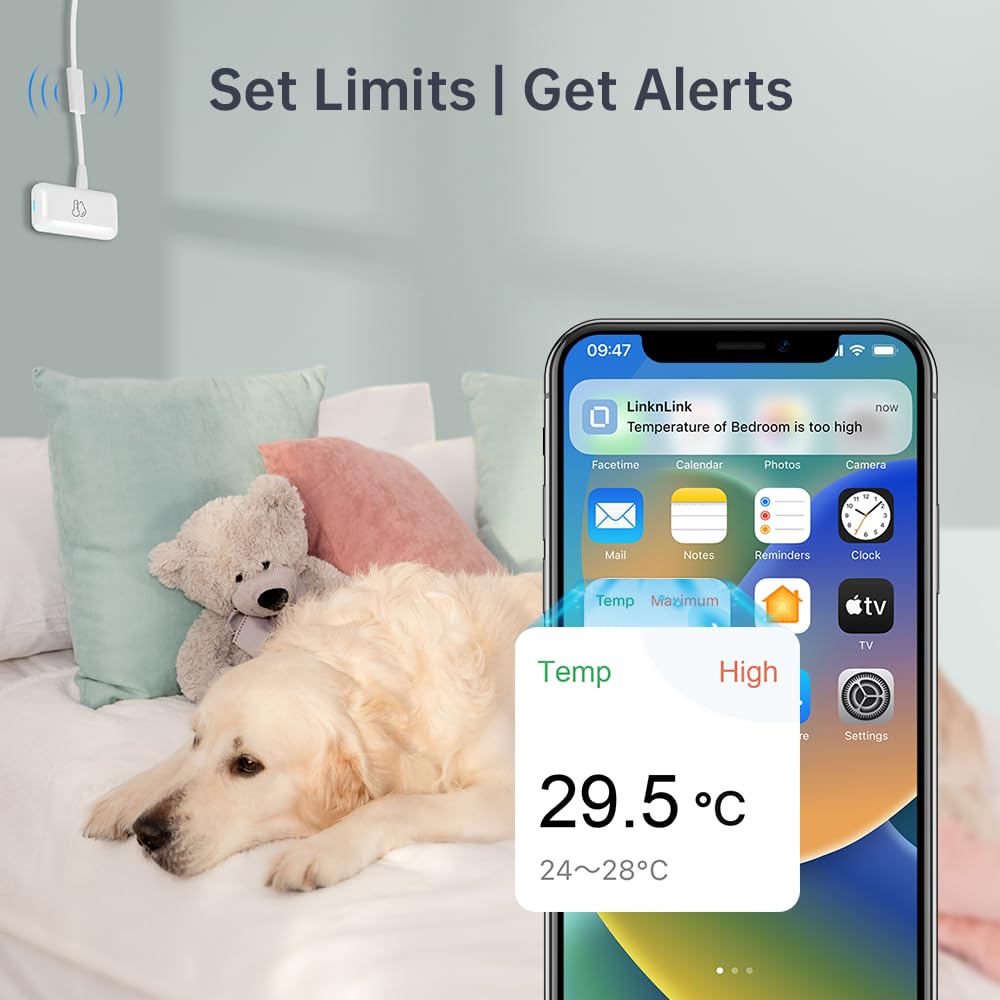
Figura 5: ExampExemple d'una notificació d'alerta d'alta temperatura rebuda en un telèfon intel·ligent, que demostra la capacitat del sensor per notificar als usuaris els canvis ambientals.
5.2 Emmagatzematge i exportació de dades
El sensor eTHS ofereix àmplies capacitats de registre de dades.
- Accedeix a dades històriques detallades dins de l'aplicació LinknLink.
- El dispositiu ofereix fins a 3 anys d'emmagatzematge de dades gratuït.
- Podeu exportar l'historial complet de dades a un Excel file per al manteniment de registres o anàlisis en qualsevol moment.
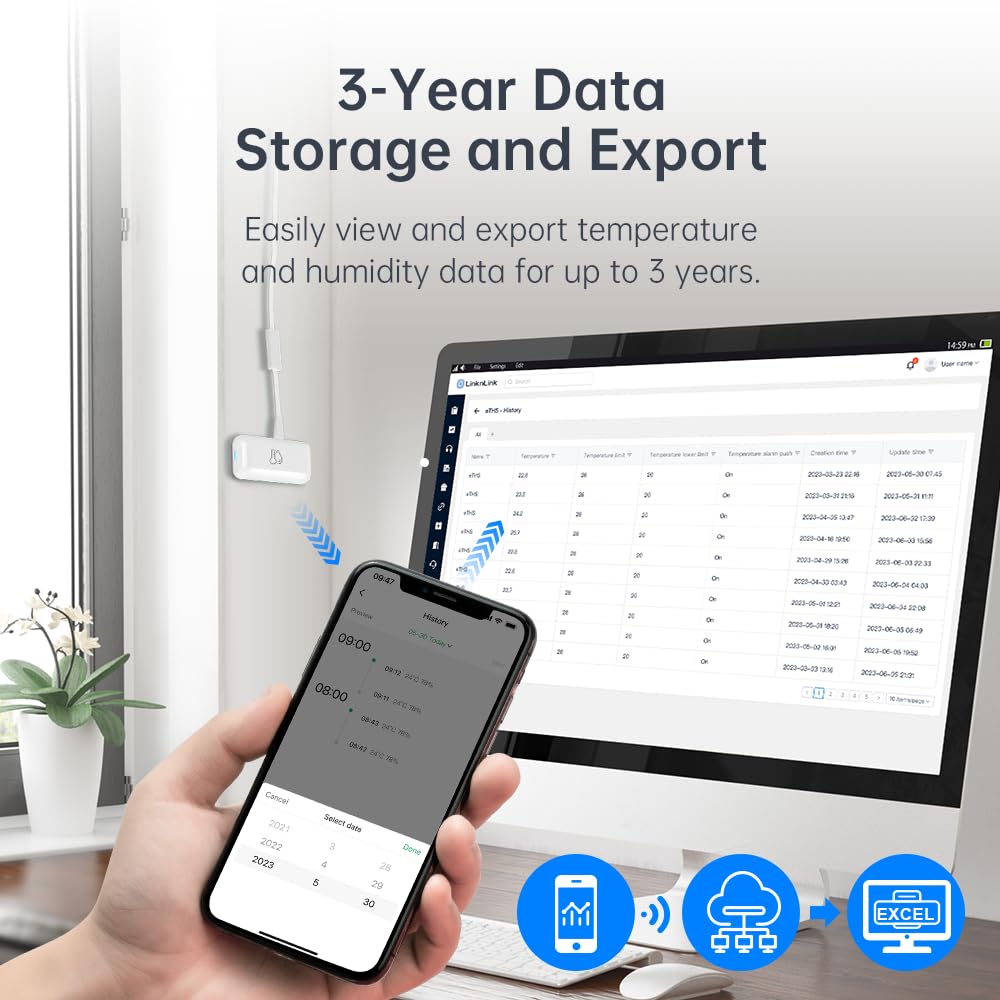
Figura 6: Viewexportant dades històriques de temperatura i humitat des del sensor eTHS a un ordinador, amb un telèfon intel·ligent que mostra les tendències de les dades.
5.3 Integració del control per veu
El LinknLink eTHS és compatible amb els assistents de veu més populars.
- Enllaça el teu compte de LinknLink amb Amazon Alexa o Google Home a través de les seves respectives aplicacions.
- Un cop connectat, pots demanar a Alexa o a l'Assistent de Google la temperatura o la humitat actuals de l'habitació on es troba el sensor.
- Exampordres: "Alexa, quina temperatura fa a la sala d'estar?" o "Ei Google, quina humitat hi ha al soterrani?"
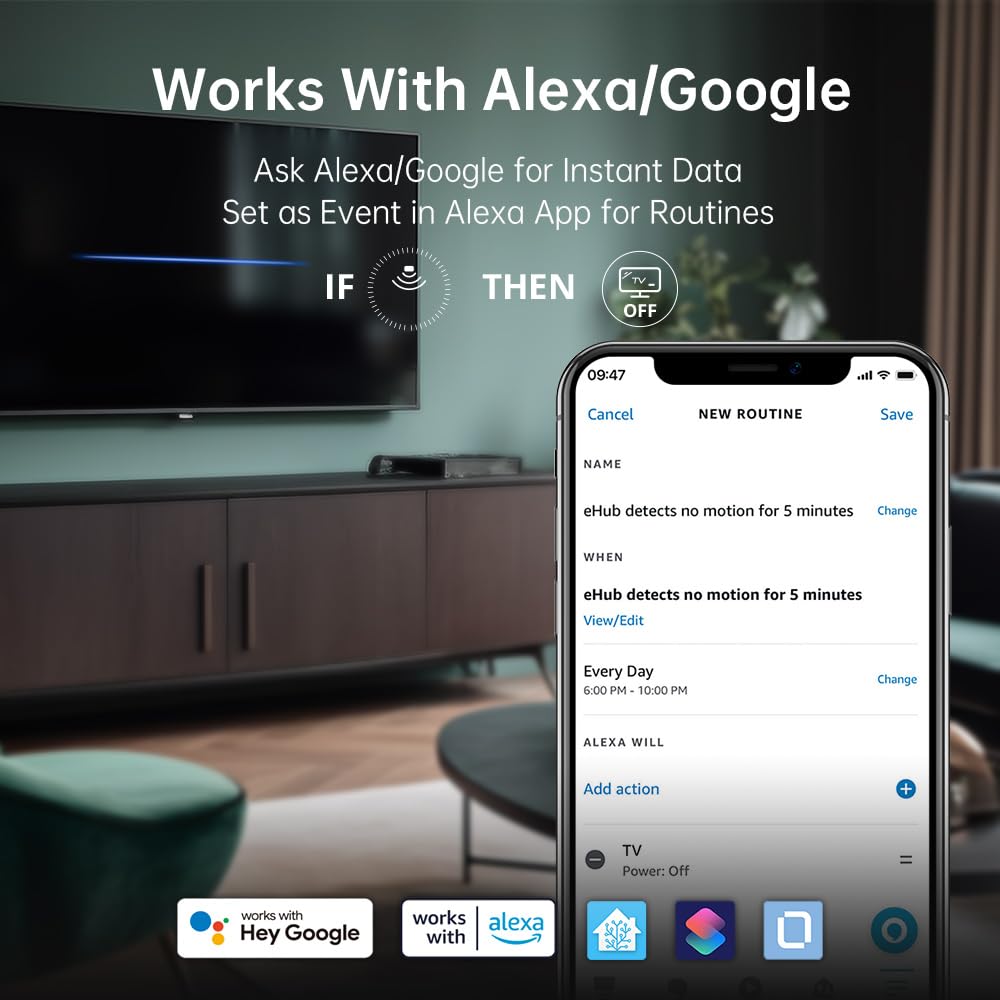
Figura 7: Compatibilitat del sensor eTHS amb Alexa i Google Home, que demostra com es pot utilitzar en rutines per activar accions basades en la detecció de moviment.
6. Funcions avançades
6.1 Integració de l'assistent a casa TH2MQTT
El sensor eTHS és compatible amb TH2MQTT, un pont que connecta el sensor de temperatura i humitat a Home Assistant mitjançant el protocol MQTT. Això permet escenaris d'automatització avançats.
- Supervisa i reacciona als canvis de temperatura i humitat dins de Home Assistant.
- Desencadenar accions com ara encendre l'aire condicionat quan la temperatura és massa alta o activar un humidificador quan la humitat baixa per sota d'un cert nivell.
- Automatitza l'entorn de la teva llar basant-te en dades en temps real.
6.2 Ús de la temperatura/humitat com a activadors de la rutina d'Alexa
Tot i que Alexa admet de manera nativa sensors de moviment com a activadors rutinaris, els sensors de temperatura i humitat no són compatibles directament com a esdeveniments. Tanmateix, LinknLink ofereix una solució intel·ligent mitjançant un dispositiu "Toggle" virtual.
Vídeo 1: Tutorial sobre com utilitzar el sensor LinknLink eTHS per activar rutines d'Alexa en funció dels canvis de temperatura o humitat. Aquest vídeo demostra el procés de creació d'un dispositiu de commutació virtual a l'aplicació LinknLink i enllaçar-lo a Alexa per habilitar l'automatització avançada.
- Crea un dispositiu virtual de commutació: A l'aplicació LinknLink, navegueu fins a "Serveis intel·ligents" i creeu un dispositiu "Estat alternatiu". Aquest dispositiu virtual té dos estats: "Activat" i "En espera".
- Enllaç a Alexa: El dispositiu "Toggle" serà detectat per Alexa com un sensor de moviment, que també té dos estats: "Moviment detectat" i "Sense moviment detectat". Aquests estats reflectiran els estats "Activat" i "En espera" del teu commutador virtual.
- Crea rutines a l'aplicació LinknLink:
- Crea una rutina on la temperatura de l'eTHS pugi per sobre d'un cert llindar (per exemple, 25 °C) canviï l'estat del dispositiu "Toggle" a "Triggered".
- Crea una altra rutina on la temperatura de l'eTHS baixi per sota d'un cert llindar (per exemple, 24 °C) canviï l'estat del dispositiu "Toggle" a "Standby".
- Crea rutines a l'aplicació Alexa:
- Crea una rutina d'Alexa on "Quan Toggle detecta moviment" (és a dir, si la temperatura és alta), Alexa realitza una acció desitjada (per exemple, encén un ventilador intel·ligent o envia una notificació).
- Crea una altra rutina d'Alexa on "Quan Toggle no detecta cap moviment" (és a dir, la temperatura és normal/baixa), Alexa realitza una altra acció (per exemple, apaga el ventilador intel·ligent o envia una notificació).
Aquest mètode utilitza eficaçment l'interruptor virtual com a intermediari per permetre que els canvis de temperatura i humitat activin les rutines d'Alexa, ampliant les possibilitats de la domòtica.

Figura 8: Un diagrama il·lustratiu que detalla el procés d'ús d'un dispositiu de commutació virtual dins de l'aplicació LinknLink per habilitar activadors basats en la temperatura per a les rutines d'Alexa, permetent el control sobre altres dispositius domèstics intel·ligents.
7. Manteniment
7.1 Neteja
- Netegeu el dispositiu amb un drap suau i sec.
- No utilitzeu netejadors líquids ni aerosols, ja que poden danyar el sensor o els components electrònics.
7.2 actualitzacions de microprogramari
Consulteu periòdicament l'aplicació LinknLink per veure si hi ha actualitzacions de firmware disponibles. Les actualitzacions poden millorar el rendiment, afegir noves funcions i augmentar la seguretat. Seguiu les instruccions de l'aplicació per dur a terme qualsevol actualització.
8. Solució De Problemes
Si teniu problemes amb el sensor LinknLink eTHS, consulteu els passos habituals següents per a la resolució de problemes:
- El dispositiu no es connecta a la Wi-Fi:
- Assegura't que la teva xarxa Wi-Fi sigui de 2.4 GHz. El dispositiu no admet xarxes de 5 GHz.
- Comproveu que el dispositiu estigui dins de l'abast del vostre encaminador Wi-Fi.
- Verifiqueu que la contrasenya del Wi-Fi estigui introduïda correctament a l'aplicació.
- Reinicieu el router i el sensor eTHS.
- Lectures inexactes:
- Assegureu-vos que el sensor no estigui col·locat a prop de fonts de calor (per exemple, llum solar directa, conductes de calefacció) ni corrents d'aire fred.
- Eviteu col·locar el sensor en zones amb un flux d'aire elevat otagaire principal.
- Deixeu que el sensor s'estabilitzi durant almenys 30 minuts després de la col·locació per obtenir lectures precises.
- L'aplicació no mostra dades:
- Comproveu la connexió a Internet al vostre telèfon intel·ligent.
- Assegureu-vos que el sensor eTHS estigui en línia i connectat a la Wi-Fi.
- Tanca i torna a obrir l'aplicació LinknLink.
- Si el problema persisteix, intenta tornar a emparellar el dispositiu.
- Alexa/Google Home no respon:
- Verifica que l'habilitat/servei LinknLink estigui activat a l'aplicació Alexa o Google Home.
- Assegureu-vos que el sensor eTHS es detecti i apareixi a la llista dels dispositius Alexa/Google Home.
- Comproveu la precisió de les ordres de veu.
9. Garantia i Suport
9.1 Informació de la garantia
El sensor de monitorització intel·ligent de temperatura i humitat LinknLink eTHS WiFi inclou una garantia estàndard del fabricant. Consulteu l'embalatge del producte o la fitxa oficial de LinknLink. weblloc web per conèixer els termes i condicions específiques de la garantia.
9.2 Atenció al client
Per a més ajuda, assistència tècnica o reclamacions de garantia, poseu-vos en contacte amb el servei d'atenció al client de LinknLink a través dels canals següents:
- Correu electrònic: [Inseriu aquí el correu electrònic d'atenció al client]
- Weblloc: Botiga oficial de LinknLink
- Telèfon: [Inseriu aquí el número de telèfon d'atenció al client]
Si us plau, tingueu a mà el número de model del producte (eTHS) i la informació de compra quan us poseu en contacte amb el servei d'assistència.


