1. Introducció
This manual provides instructions for the safe and effective operation of your iJoy Stitch Speaker. Please read this manual thoroughly before using the device and retain it for future reference.

Image 1.1: The iJoy Stitch Speaker, showcasing the Stitch Hula Dancing design. This portable Bluetooth speaker is designed for wireless audio playback and features a silicone loop for portability.
2. Contingut del paquet
Verifiqueu que tots els elements siguin presents al paquet:
- iJoy Stitch Speaker
- Manual del propietari (aquest document)
- Cable de càrrega (Micro USB)

Image 2.1: The iJoy Stitch Speaker alongside its retail packaging, illustrating the product and its box.
3. Característiques i components del producte
The iJoy Stitch Speaker is equipped with various features for versatile audio playback and portability.
3.1 botons de control
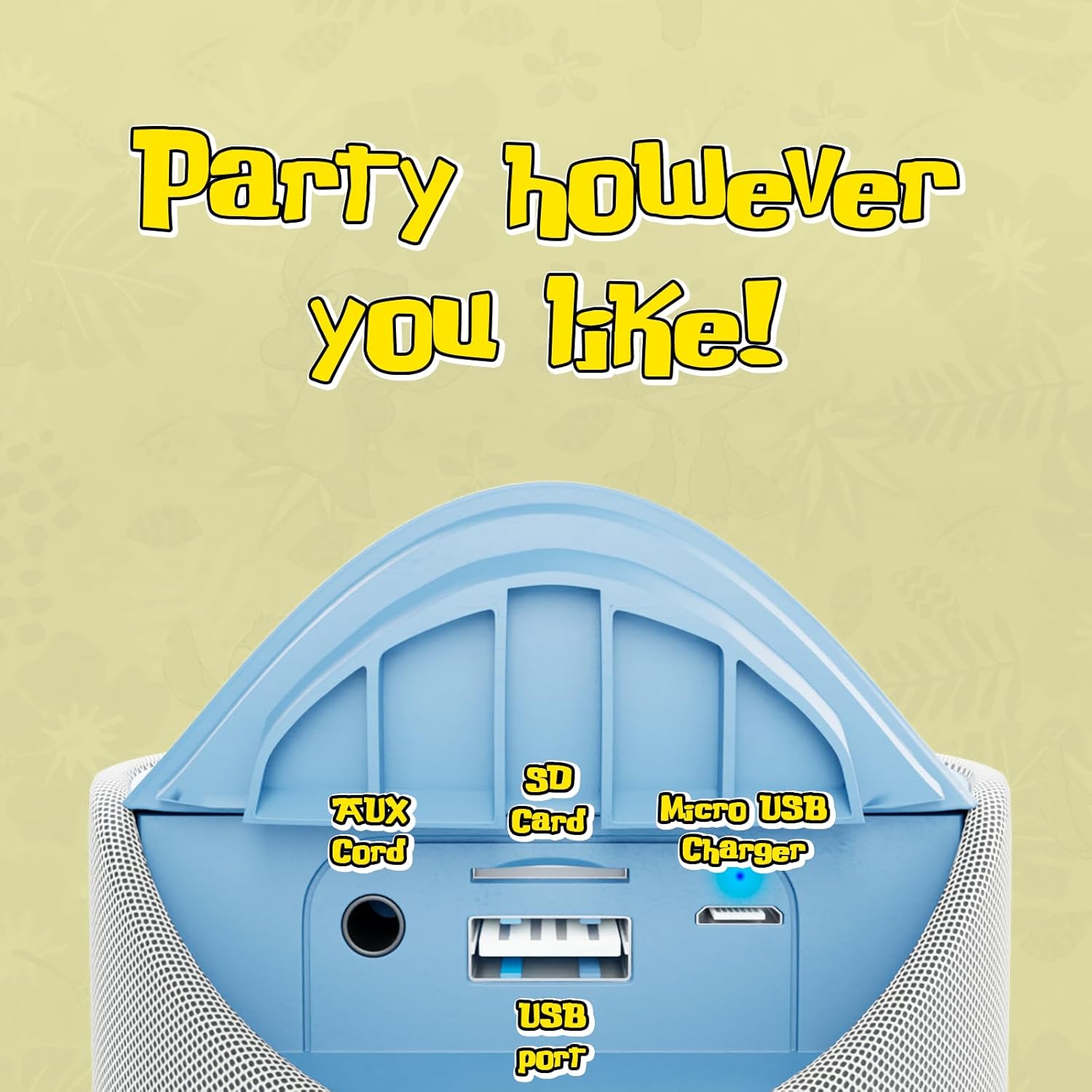
Image 3.1: Top panel of the speaker displaying the control buttons. These include Volume Down (-), Volume Up (+), Play/Pause/Call Answer, Mode Switch (M), and Power On/Off.
- Botó d'encendre (⏻): Premeu i manteniu premut per encendre o apagar l'altaveu.
- Play/Pause/Call Button (⏸): Premeu per reproduir o pausar l'àudio. Premeu per respondre o finalitzar una trucada telefònica.
- Botó per baixar el volum (−): Premeu per reduir el volum.
- Botó de pujar el volum (+): Premeu per augmentar el volum.
- Botó de commutació de mode (M): Press to cycle through available modes (Bluetooth, FM Radio, SD Card, AUX).
3.2 Ports i indicadors

Image 3.2: Rear panel of the speaker revealing the various input ports. These include the AUX port, SD Card slot, USB port, and Micro USB charging port.
- Port AUX: Per connectar dispositius d'àudio externs mitjançant un cable d'àudio de 3.5 mm.
- Ranura per a targeta SD: Per reproduir àudio files directly from an SD memory card.
- Port USB: Per reproduir àudio files directament des d'una unitat flash USB.
- Port de càrrega micro USB: Per carregar la bateria interna de l'altaveu.
- Indicador LED: Indicates charging status and Bluetooth pairing status.
4. Configuració i càrrega
4.1 Càrrega de l'altaveu
- Connect the Micro USB end of the charging cable to the speaker's Micro USB charging port.
- Connecteu l'extrem USB-A del cable de càrrega a un adaptador de corrent USB (no inclòs) o al port USB d'un ordinador.
- The LED indicator will illuminate to show charging is in progress.
- Charging typically takes approximately 2 hours. The LED indicator will change or turn off once fully charged.
Una càrrega completa proporciona fins a 3 hores de reproducció.
4.2 Engegada/apagada
- Per engegar: premeu i manteniu premut el botó d'engegada (⏻) until the speaker indicates it is on (e.g., a sound prompt or LED illumination).
- Per apagar: premeu i manteniu premut el botó d'engegada (⏻) again until the speaker indicates it is off.
5. Instruccions de funcionament
5.1 Vinculació Bluetooth
- Ensure the speaker is powered on and in Bluetooth mode. If not, press the Mode Switch (M) button until the speaker enters Bluetooth pairing mode (indicated by a flashing LED).
- Al vostre dispositiu (p. ex., telèfon intel·ligent, tauleta), activeu el Bluetooth i cerqueu els dispositius disponibles.
- Select "iJoy Stitch Speaker" from the list of found devices.
- Once paired, the speaker will indicate a successful connection (e.g., a sound prompt or solid LED).
- The Bluetooth range is approximately 30 feet (9 meters).
5.2 SD Card / USB Playback
- Insert a formatted SD card or USB flash drive containing audio files into the respective slot on the speaker.
- Press the Mode Switch (M) button to select SD Card mode or USB mode.
- L'altaveu començarà a reproduir àudio automàticament files del suport inserit.
5.3 Ràdio FM
- Press the Mode Switch (M) button to select FM Radio mode.
- In FM mode, press the Play/Pause button (⏸) to automatically scan and save available radio stations.
- Feu servir la tecla Pujar volum (+) i Baixar volum (−) botons per navegar entre les emissores desades.
5.4 Entrada AUX
- Connecteu un extrem d'un cable d'àudio de 3.5 mm (no inclòs) al port AUX de l'altaveu.
- Connecteu l'altre extrem del cable d'àudio a la presa d'auriculars o a la sortida d'àudio del dispositiu extern.
- Press the Mode Switch (M) button to select AUX mode.
- Ara l'àudio es reproduirà a través de l'altaveu des del dispositiu connectat.
5.5 Funcions de trucada
- When a call is incoming while connected via Bluetooth, press the Play/Pause button (⏸) per respondre la trucada.
- Premeu el botó Reprodueix / Pausa (⏸) again to end the call.
- To reject an incoming call, press and hold the Play/Pause button (⏸).
6. Manteniment
6.1 Neteja
Netegeu l'altaveu amb un drap suau i sec. No utilitzeu productes de neteja abrasius ni dissolvents.
6.2 Resistència a l'aigua
The speaker has an IPX4 water resistance rating, meaning it is protected against splashing water from any direction. It is not designed for submersion in water.
7. Solució De Problemes
| Problema | Solució |
|---|---|
| L'altaveu no s'encén. | Ensure the battery is charged. Connect the speaker to a power source using the Micro USB cable. |
| No hi ha so de l'altaveu. | Check the volume level on both the speaker and your connected device. Ensure the correct mode (Bluetooth, SD, FM, AUX) is selected. |
| No es pot emparellar per Bluetooth. | Ensure the speaker is in Bluetooth pairing mode (flashing LED). Make sure your device's Bluetooth is enabled and within 30 feet of the speaker. Try restarting both devices. |
| Mala recepció de ràdio FM. | Relocate the speaker to an area with better signal. Ensure automatic station scanning has been performed. |
8. Especificacions

Image 8.1: Visual representation of the speaker's dimensions, indicating it is approximately 6.3 inches tall and 2.9 inches across.
| Característica | Detall |
|---|---|
| Nom del model | Stitch Speaker |
| Marca | iJoy |
| Tecnologia de connectivitat | Bluetooth |
| Tecnologia de comunicació sense fils | Bluetooth |
| Interval Bluetooth | 30 peus (9 metres) |
| Tipus d'altaveu | Altaveu Bluetooth portàtil |
| Potència de sortida màxima dels altaveus | 5 watts |
| Mode de sortida d'àudio | estèreo |
| Font d'alimentació | Funciona amb bateria |
| Capacitat de la bateria | 800 milionsamp Hores |
| Temps de càrrega | 2 hores |
| Hora de joc | Fins a 3 hores |
| Nivell de resistència a l'aigua | IPX4 (resistent a l'aigua) |
| Dimensions del producte | 3" de profunditat x 3" d'amplada x 6" d'alçada (aprox. 7.6 cm de profunditat x 7.6 cm d'amplada x 15.2 cm d'alçada) |
| Pes de l'article | 8 unces (aprox. 227 grams) |
| Material | Silicona |
| Mètode de control | Touch (Button Controls) |
| UPC | 810116713943 |
9. Garantia i Suport
The iJoy Stitch Speaker comes with a 90-Day Manufacturer Warranty. For warranty claims or technical support, please contact the manufacturer, Quest USA Corp, or refer to the contact information provided with your purchase documentation.
Per obtenir més ajuda, visiteu el iJoy Store on Amazon.


