1. Introducció
This user manual provides detailed instructions for the setup, operation, and maintenance of your BINNIFA 2.0ch Sound Bar. Please read this manual thoroughly before using the product to ensure proper functionality and safety. This sound bar is designed to enhance your television's audio experience with clear, dynamic sound and versatile connectivity options.
2. Informació de seguretat
Per reduir el risc de descàrrega elèctrica, incendi o danys a la unitat, observeu les següents precaucions de seguretat:
- No exposeu aquest aparell a la pluja o la humitat.
- No col·loqueu objectes plens de líquids, com ara gerros, a l'aparell.
- Assegureu-vos que la ventilació sigui adequada; no obstruïu cap obertura de ventilació.
- No instal·leu a prop de cap font de calor com ara radiadors, registres de calor, estufes o altres aparells (inclosos amplificadors) que produeixen calor.
- Eviteu que el cable d'alimentació sigui trepitjat o pessigat.
- Utilitzeu només accessoris/accessoris especificats pel fabricant.
- Desendolleu aquest aparell durant les tempestes amb llamps o quan no l'utilitzeu durant llargs períodes de temps.
- Demaneu tot el servei a personal de servei qualificat.
3. Contingut del paquet
Verifiqueu que tots els elements que s'enumeren a continuació s'inclouen al vostre paquet:
- BINNIFA Soundbar
- Control remot
- Adaptador d'alimentació
- Cable d'àudio òptic
- Cable d'àudio AUX de 3.5 mm
- Kit de muntatge a la paret
- Manual d'usuari (aquest document)
4. Característiques del producte
The BINNIFA 2.0ch Sound Bar offers a range of features designed to enhance your audio experience:
- Qualitat de so millorada: Equipped with four high-quality full-range speakers and advanced DSP technology for clear, dynamic, and layered sound.
- Connectivitat Bluetooth 5.3: Seamless wireless connection to your Bluetooth-enabled devices.
- Multiple Wired Inputs: Supports HDMI (ARC), Optical, and 3.5mm AUX connections for versatile compatibility.
- Disseny per estalviar espai: Compact and wall-mountable design to fit various home setups.
- Control fàcil: Operate via the included remote control or integrated touch buttons.
- Indicador LED: Provides visual feedback on the current operating mode.
- Construcció duradora: Features a wooden soundbar for improved acoustics and aesthetics.
5. Controls i connexions
5.1. Controls de la barra de so

Image: The BINNIFA soundbar shown with its remote control, highlighting the sleek design and control options.
The soundbar features touch-sensitive controls on its top panel for basic functions, and a full-featured remote control for comprehensive operation.
5.2. Connexions del panell posterior
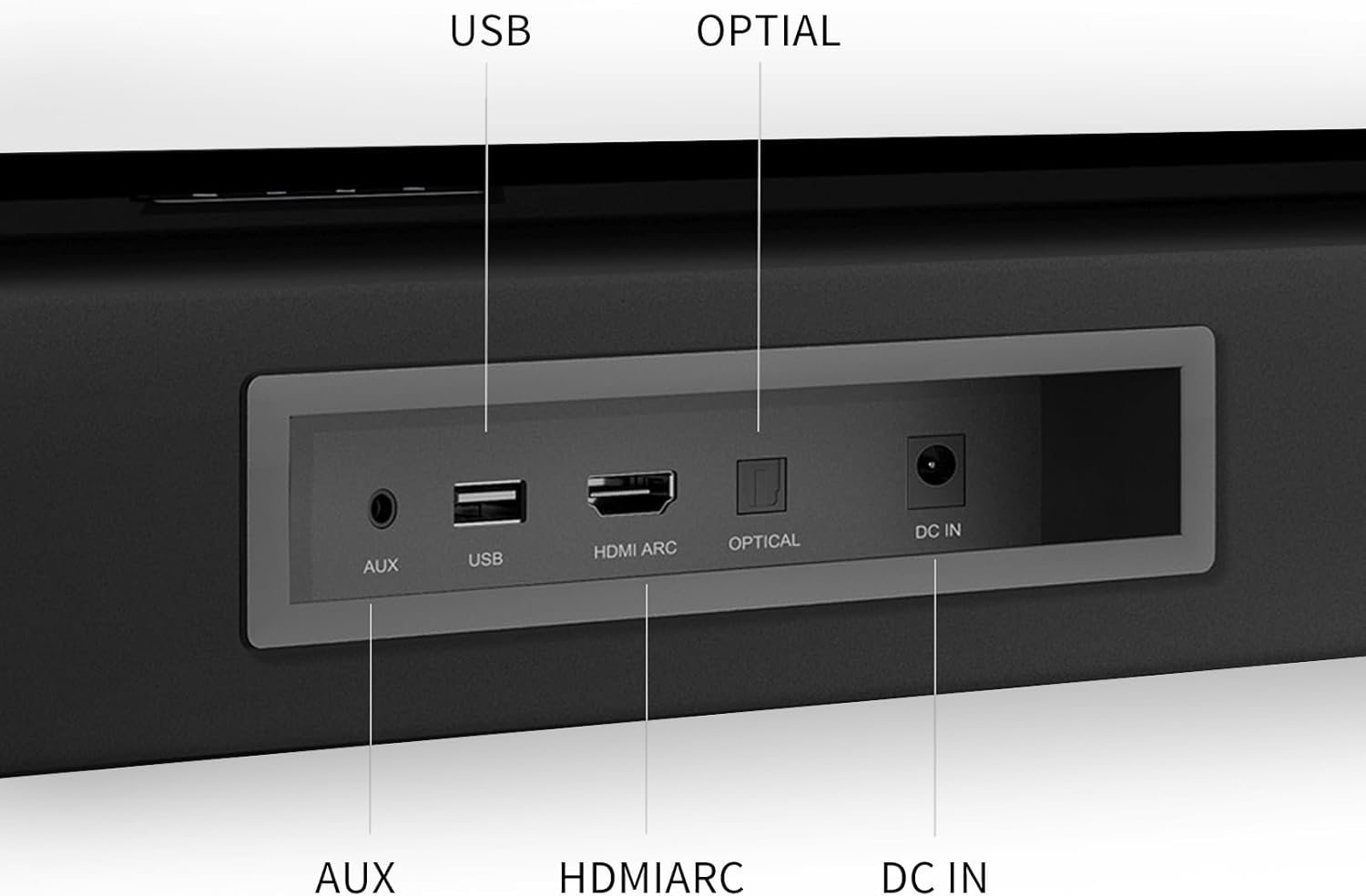
Image: Close-up of the soundbar's rear panel, detailing the AUX, USB, HDMI ARC, Optical, and DC IN ports.
- AUX (3.5 mm): For connecting devices with a 3.5mm audio output.
- USB: Per reproduir àudio files d'una unitat USB.
- ARC HDMI: For connecting to a TV that supports Audio Return Channel, allowing audio to be sent from the TV to the soundbar via a single HDMI cable.
- TPTICA: For connecting to devices with an optical digital audio output.
- DC IN: Per connectar l'adaptador de corrent.
6. Configuració
6.1. Col·locació
The soundbar can be placed on a flat surface in front of your TV or mounted on the wall. For optimal sound, ensure there are no obstructions in front of the soundbar.

Image: The soundbar positioned on a TV stand beneath a television, demonstrating a typical setup.
6.2. Connexió al televisor
Trieu un dels mètodes de connexió següents:
- HDMI ARC (recomanat): Connect an HDMI cable from the soundbar's HDMI ARC port to your TV's HDMI ARC port. This allows for high-quality audio and TV remote control of the soundbar volume.
- Òptic: Connecteu un cable òptic des del port ÒPTIC de la barra de so a la sortida d'àudio digital òptica del televisor.
- AUX (3.5 mm): Connect a 3.5mm audio cable from the soundbar's AUX port to your TV's audio output (headphone jack or dedicated AUX out).
Important: When using HDMI ARC or Optical connections, you may need to adjust your TV's audio settings to output PCM format. Refer to your TV's user manual for specific instructions.

Image: A visual guide illustrating how to set TV audio output to PCM for HDMI ARC and Optical connections.
6.3. Connexió d'alimentació
Connect the power adapter to the DC IN port on the soundbar, then plug the adapter into a wall outlet.
7. Instruccions de funcionament
7.1. Encendre/apagar
Press the Power button on the remote control or the touch panel to turn the soundbar on or off.
7.2. Selecció d'entrada
Press the "Input" button on the remote control or the touch panel repeatedly to cycle through the available input modes: Bluetooth, AUX, USB, HDMI ARC, Optical. The LED indicator on the soundbar will change color to indicate the selected mode.

Image: Diagram showing the LED indicator colors corresponding to Bluetooth (blue), AUX (green), Optical (yellow), and HDMI ARC (purple) input modes.
7.3. Emparellament Bluetooth
- Switch the soundbar to Bluetooth mode. The LED indicator will flash blue, indicating it's in pairing mode.
- On your device (smartphone, tablet, etc.), enable Bluetooth and search for "BINNIFA Soundbar".
- Select the soundbar from the list of available devices to pair. Once connected, the LED indicator will turn solid blue.

Image: A hand holding a smartphone displaying a music app, with the soundbar visible below a TV, illustrating Bluetooth connectivity.
7.4. Modes de so
Use the remote control to select different sound modes (e.g., Movie, Music, News) to optimize audio for various content types.
7.5. Control de volum
Adjust the volume using the Volume Up/Down buttons on the remote control or the soundbar's touch panel.
Video: A short demonstration of the soundbar's audio output while playing content from a TV. This video shows the soundbar in action, providing a visual and auditory example of its performance.
8. Manteniment
Per garantir la longevitat i el rendiment òptim de la barra de so, seguiu aquestes pautes de manteniment:
- Neteja: Feu servir un drap suau i sec per netejar la superfície de la barra de so. No utilitzeu netejadors líquids ni aerosols.
- Ventilació: Mantingueu les obertures de ventilació netes de pols i deixalles.
- Emmagatzematge: Si guardeu la barra de so durant un període prolongat, desconnecteu-la de l'alimentació i guardeu-la en un lloc fresc i sec.
- Eviteu condicions extremes: No exposeu la barra de so a temperatures extremes, humitat ni llum solar directa.
9. Solució De Problemes
| Problema | Causa possible | Solució |
|---|---|---|
| Sense so |
|
|
| Desconnexió Bluetooth |
|
|
| El control remot no funciona |
|
|
10. Especificacions
| Característica | Detall |
|---|---|
| Nom del model | Live-1T |
| Tipus d'altaveu | Barra de so |
| Material | Fusta |
| Color | Negre |
| Dimensions del producte (L x A x A) | 29 "P x 3.3" W x 2.6" H |
| Pes de l'article | 5.3 lliures |
| Potència de sortida màxima dels altaveus | 120 watts |
| Configuració del canal de so envoltant | 2.0 |
| Tecnologia de connectivitat | Bluetooth, HDMI ARC, òptic, AUX, USB |
| Versió Bluetooth | 5.3 |
| Interval Bluetooth | 10 metres |
| Mètode de control | Remote, Touch Buttons |
| Usos recomanats | For Surround Sound Systems, For Televisions, For Smartphones or Tablets |
| Dispositius compatibles | Projector, Gaming Console, Television, Desktop, Home Theater |
11. Garantia i Suport
BINNIFA provides a lifetime warranty for this soundbar, ensuring long-term reliability and customer satisfaction. For any questions, technical assistance, or warranty claims, please contact BINNIFA customer support. Our team is available to provide support within two days.
Please refer to the contact information provided on the product packaging or the official BINNIFA weblloc web per obtenir els canals de suport més actualitzats.


