1. Introducció
This manual provides essential information for the safe and efficient operation of your Anern AN-SCI-EVO Hybrid Solar Inverter. Please read this manual thoroughly before installation and use, and keep it for future reference.
The Anern AN-SCI-EVO is a high-frequency, grid-connected hybrid inverter designed to integrate solar power with your electrical grid. It can operate without batteries but is compatible with lead-acid, gel, and lithium battery types. Its comprehensive LCD display allows for easy configuration of various functions, including battery charging current, AC/solar charger priority, and input voltage configuració.
2. Informació de seguretat
Instruccions importants de seguretat:
- Read all instructions and cautionary markings on the unit and in this manual before operating the inverter.
- Installation must be performed by qualified personnel in accordance with all local electrical codes.
- Do not disassemble the inverter. There are no user-serviceable parts inside. Refer servicing to qualified service personnel.
- Ensure all connections are tight to avoid loose connections that can cause overheating.
- Do not connect the inverter to a power source that exceeds its rated input voltage.
- Always disconnect all power sources (PV, battery, AC) before performing any maintenance or cleaning.
- This inverter is designed for indoor use. Protect it from direct sunlight, rain, snow, and excessive dust.
- Assegureu-vos que hi hagi una ventilació adequada al voltant de l'inversor per evitar el sobreescalfament.
3. Característiques del producte
- Hybrid Operation: Grid-tied inverter capable of operating with or without batteries.
- Sortida d'ona sinusoïdal pura: Provides high-quality, stable AC power, protecting sensitive electronics and extending their lifespan.
- Àmplia compatibilitat de bateries: Supports lead-acid, gel, and lithium battery types.
- Tecnologia MPPT avançada: Maximum Power Point Tracking for efficient solar energy harvesting with a wide PV input voltage rang de 30-400 VDC.
- Comprehensive LCD Display: User-friendly interface for monitoring system status and configuring settings such as battery charging current, AC/solar charger priority, and input voltagrangs e.
- Monitorització remota: Supports WIFI/GPRS remote monitoring for accessing data and controlling the inverter from anywhere (WiFi module included).
- Proteccions múltiples: Includes overcurrent, low voltage, short circuit, overheating, and overcharge protection.

Figura 3.1: Frontal view of the Anern AN-SCI-EVO-2000 Hybrid Solar Inverter, showing the LCD display and control buttons.
4. Contingut del paquet
Upon unpacking, please verify that all items are included and undamaged:
- Anern AN-SCI-EVO Hybrid Solar Inverter (1 unit)
- WiFi Module (1 unit)
- Manual d'usuari (aquest document)
- Mounting accessories (if applicable, not specified in detail)
5. Instal·lació i configuració
Proper installation is crucial for the safe and efficient operation of the inverter. It is recommended that installation be performed by a certified electrician.
5.1 Selecció del lloc
- Install the inverter indoors, away from direct sunlight, moisture, and corrosive substances.
- Ensure the ambient temperature is within the operating range (refer to specifications).
- Provide at least 20 cm of clearance around the inverter for proper ventilation.
- Munteu l'inversor verticalment sobre una superfície resistent.
5.2 Connexions de cablejat
Before making any connections, ensure all power sources (PV array, battery, AC grid) are disconnected and secured against accidental re-connection.
- Connexió de la bateria: Connect the battery bank to the inverter's battery terminals. Ensure correct polarity (+ to + and - to -). The inverter requires a battery connection to operate.
- Connexió del panell fotovoltaic: Connect the solar panel array to the inverter's PV input terminals. Observe correct polarity and ensure the PV input voltage is within the specified MPPT range (30-400 VDC) and does not exceed the maximum PV VOC (400 VDC). Recommended PV cable size is 16 AWG.
- Connexió de sortida de CA: Connect your household loads or distribution panel to the inverter's AC output terminals.
- AC Input Connection (Grid/Generator): If connecting to the utility grid or a generator, connect it to the inverter's AC input terminals.
- Posada a terra: Assegureu-vos que l'inversor estigui correctament connectat a terra d'acord amb els codis elèctrics locals.

Figure 5.1: System connection diagram illustrating various power sources and loads for the hybrid inverter.
5.3 Instal·lació del mòdul WiFi
The included WiFi module allows for remote monitoring. Connect the module to the designated communication port on the inverter. Follow the instructions provided with the WiFi module for network configuration and app setup.

Figura 5.2: Mésview of inverter protection features and WiFi monitoring capability.
6. Instruccions de funcionament
6.1 Engegada inicial
- After all connections are secure, switch on the battery breaker.
- Switch on the PV array breaker.
- Switch on the AC input breaker (if connected to grid/generator).
- The inverter will power on, and the LCD display will illuminate.
6.2 Pantalla LCD i configuració
The LCD display provides real-time system information and allows for configuration of various parameters. Use the buttons below the display to navigate menus and adjust settings.
- Seguiment: View bateria voltage, PV input voltage, vol de sortida de CAtage, charging current, and load power.
- Corrent de càrrega: Adjust the battery charging current.
- Charger Priority: Set the priority for AC charger or solar charger.
- Entrada Voltage Rang: Configure acceptable input voltage ranges for different applications.
6.3 Modes de funcionament
The inverter supports multiple charging and output modes to meet diverse user requirements:
- Solar Energy Priority: Solar power is primarily used to power loads and charge batteries. Utility power is used only when solar power is insufficient.
- Solar Energy + Utility Simultaneously: Solar power and utility power are used concurrently to power loads and charge batteries.
- Battery Only Charging: The inverter charges batteries from solar or utility, but does not directly power loads from these sources.
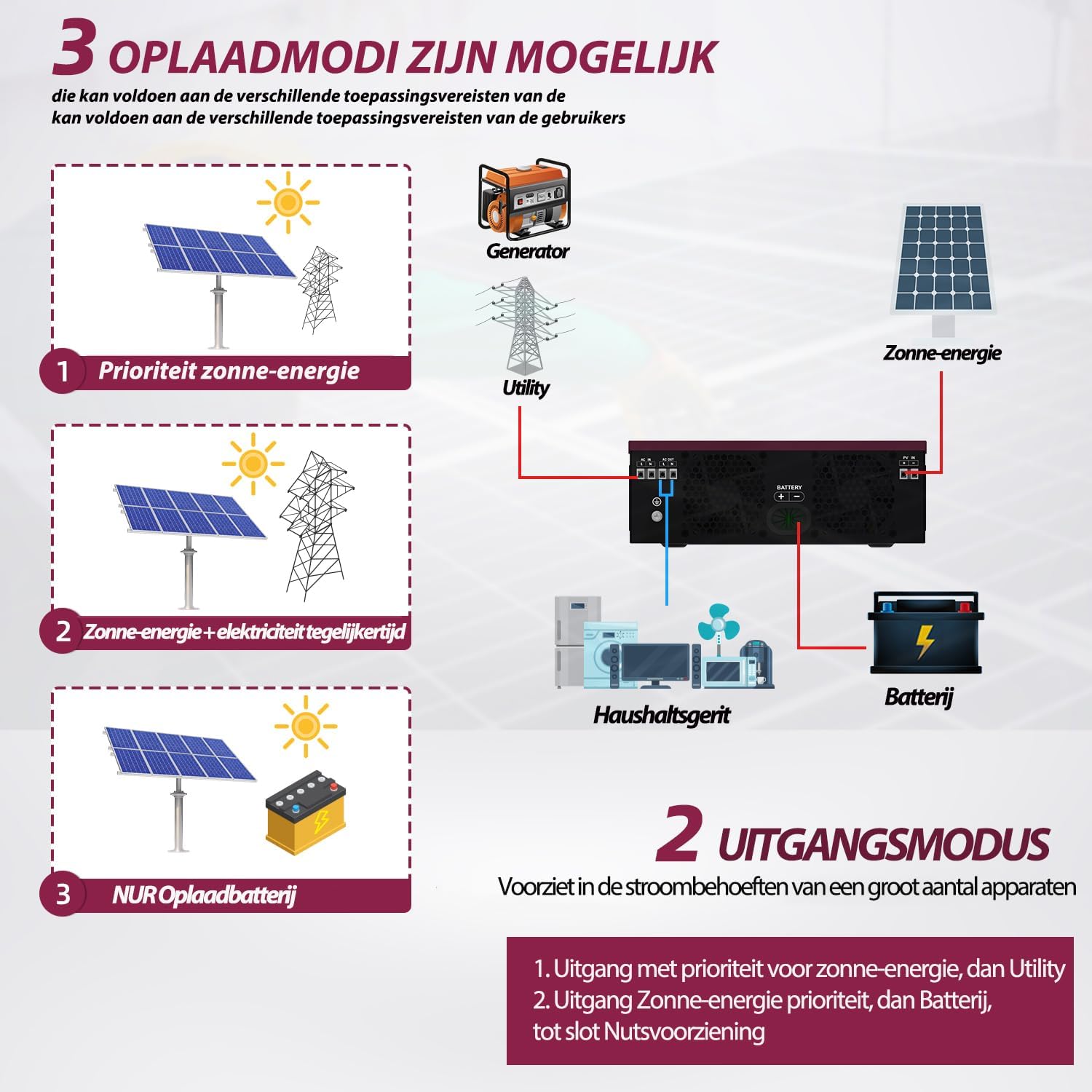
Figure 6.1: Available charging modes for the hybrid solar inverter.
6.4 Monitorització remota
Once the WiFi module is configured, you can monitor the inverter's performance and adjust settings remotely via a mobile application. This allows for real-time data access and control.
7. Manteniment
Un manteniment regular garanteix la longevitat i el rendiment òptim del vostre inversor.
- Neteja: Periodically clean the inverter's exterior with a dry cloth. Ensure ventilation openings are free from dust and debris. Do not use liquid cleaners.
- Comprovació de la connexió: Inspeccioneu anualment totes les connexions elèctriques (fotovoltaica, bateria, corrent altern) per comprovar si estan ben ajustades i si hi ha signes de corrosió. Estrenyeu qualsevol connexió solta.
- Ventilació: Assegureu-vos que la zona al voltant de l'inversor romangui neta per permetre un flux d'aire i una dissipació de calor adequats.
- Inspecció de la bateria: If using batteries, follow the battery manufacturer's maintenance guidelines.
8. Solució De Problemes
This section provides solutions to common issues. If the problem persists, contact customer support.
| Problema | Causa possible | Solució |
|---|---|---|
| L'inversor no s'encén. | No hi ha connexió de bateria o el volum de la bateria és baixtage. | Ensure battery is connected and charged. The inverter requires a battery to operate. |
| Sense sortida de CA. | Overload, short circuit, or internal fault. | Reduce load. Check for short circuits in wiring. Restart inverter. If fault persists, contact support. |
| Inverter reports an error when load is connected. | Load exceeds inverter capacity, or specific load type incompatibility. | Ensure total load does not exceed 2000W. Some inductive loads (e.g., motors, refrigerators) have high startup currents; ensure the inverter's surge capacity (2000W) is sufficient. Try connecting a smaller, resistive load to test. |
| PV input not detected or low. | Insufficient sunlight, incorrect PV wiring, or PV voltage outside MPPT range. | Check solar panel connections and ensure adequate sunlight. Verify PV voltage està entre 30 i 400 V CC. |
| Avís de sobreescalfament. | Poor ventilation or excessive ambient temperature. | Ensure adequate clearance around the inverter. Clean ventilation openings. Reduce ambient temperature if possible. |
9. Especificacions
| Paràmetre | Valor |
|---|---|
| Model | AN-SCI-EVO-2000 (ECO-2000) |
| Màx. Potència d'entrada fotovoltaica | 2000 W |
| PV Voltage Rang | 30-400 V DC |
| Max. PV VOC (Open Circuit Voltage) | 400 V CC |
| Startup Voltage | > 130 V |
| Mida de cable fotovoltaic recomanada | 16 AWG |
| Màx. Corrent de càrrega | 80A |
| Freqüència nominal d'entrada | 50/60 Hz |
| Potència de sortida | 2000 W |
| Capacitat de sobretensió | 2000 W |
| Dimensions (L x A x A) | 45.5 x 35.5 x 20 cm |
| Pes | 6 kg |
10. Garantia i Suport
Garantia: Anern provides a 3-year warranty for this inverter. Please retain your proof of purchase for warranty claims.
Política de devolució: A 30-day, uncomplicated return policy is offered.
Atenció al client: For technical assistance, troubleshooting, or to obtain a German language manual, please contact Anern customer service through the platform where you purchased the product.


