1. Informació de seguretat
Operating laser engraving machines requires adherence to strict safety protocols to prevent injury and damage. Always read and understand all safety warnings before operating the device.
- Protecció ocular: Always wear certified laser safety goggles when the laser is active. The laser beam can cause permanent eye damage.
- Ventilació: Ensure adequate ventilation in the work area. Laser engraving and cutting can produce fumes and particles that may be harmful if inhaled.
- Seguretat del material: Only engrave or cut materials that are safe for laser processing. Avoid materials that produce toxic fumes or are highly flammable when exposed to a laser. Refer to material safety data sheets (MSDS) for specific materials.
- Perill d'incendi: Keep a fire extinguisher nearby. Never leave the machine unattended during operation, especially when cutting flammable materials.
- Seguretat elèctrica: Ensure the machine is properly grounded and connected to a stable power supply. Do not operate with wet hands or in damp ambients.
- Nens i animals de companyia: Mantingueu els nens i les mascotes lluny de la zona d'operacions.
2. Producte acabatview
The NEJE MAX 4 E80 is a high-performance laser engraving and cutting machine designed for precision and efficiency across various materials. It features advanced components for enhanced stability and user experience.

Figure 2.1: The NEJE MAX 4 E80 Laser Engraving Machine, showcasing its large working area and an example of intricate engraving.
Característiques principals:
- E80 20W Laser Module: A powerful industrial-grade laser module with perfect optical quality and extended lifespan, suitable for commercial engraving and cutting applications.
- New Motorized Z-Axis: Equipped with a high-precision (0.001 mm) Z-axis, allowing for 45 mm repositioning. This enables automatic, efficient layer-by-layer cutting of thicker materials (20-25 mm) by adjusting the focal length directly in Lightburn software.
- Industrial-Grade Rails: Upgraded with high-hardness alloy industrial rails that effectively eliminate machine vibrations and improve stability, achieving a mechanical accuracy of 0.01 mm.
- Wireless Offline Operation: Supports wireless offline engraving and cutting. Users can create designs in Lightburn, save them in Gcode format, and then use NEJE software to operate the machine wirelessly from up to 10 meters away, freeing the computer.
- Gran àrea de gravat: Offers a generous working area of 750(X) x 460(Y) x 45(Z) mm.

Figura 2.2: Detallada view of the E80 20W 4-diode laser module, highlighting its internal structure and cooling system.

Figure 2.3: The motorized Z-axis mechanism, illustrating its ability to adjust focus automatically for multi-layer cutting.
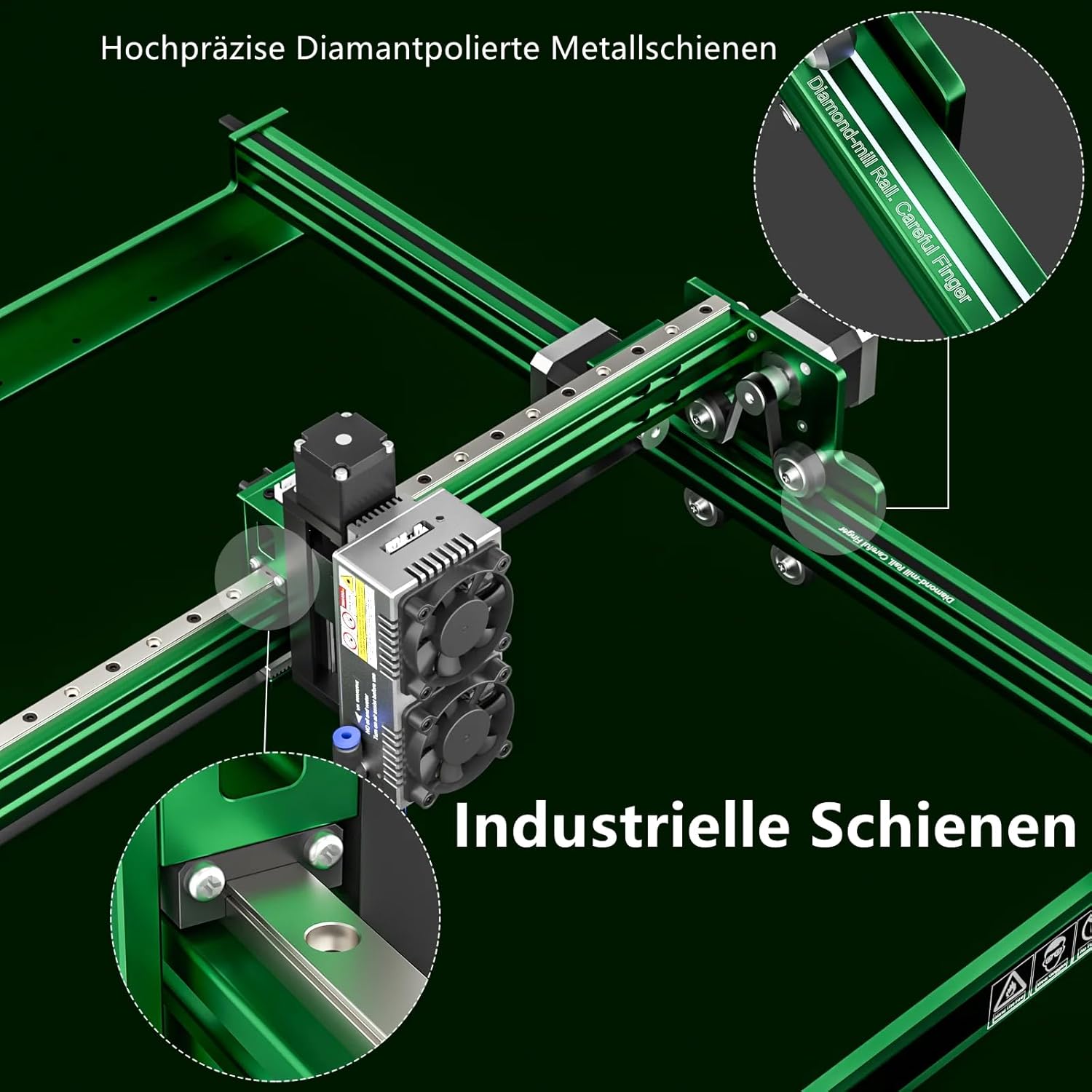
Figure 2.4: The robust industrial-grade rails, designed to minimize vibration and enhance mechanical precision during operation.
3. Guia de configuració
Follow these steps to set up your NEJE MAX 4 E80 laser engraving machine.
3.1 Desembalatge i inspecció
- Traieu amb cura tots els components de l'embalatge.
- Verify that all parts listed in the packing list are present and undamaged. The package includes: MAX 4 Engraver, E80 20W Module, Air Assist Kit, Drawing Pen, Timing Belt Kit x1, 24V 5A Power Adapter, Safety Goggles, USB Cable.
- Report any missing or damaged parts to customer support immediately.
3.2 Muntatge
Assemble the machine frame, attach the laser module, and connect all necessary cables. Refer to the included assembly diagram for detailed instructions.
- Munteu els components principals del marc, assegurant-vos que tots els cargols estiguin ben ajustats.
- Mount the E80 laser module onto the Z-axis carriage.
- Connect the power cable to the laser module and the main control board.
- Install the timing belt and adjust its tension using the provided kit.
3.3 Instal·lació del programari
The NEJE MAX 4 E80 is compatible with Lightburn software for design and Gcode generation, and NEJE's proprietary software for wireless machine control.
- Download and install Lightburn software from the official Lightburn website. Follow their installation guide.
- Download and install the NEJE software from the official NEJE website. This software is essential for wireless operation and firmware updates.
- Connect the machine to your computer via USB for initial setup and firmware updates if prompted.
3.4 Calibratge inicial
Perform initial calibration to ensure optimal performance.
- Z-Axis Calibration: The motorized Z-axis allows for automatic focus adjustment. For initial setup, ensure the laser module is at a suitable height above your material. The software will manage fine adjustments.
- Ajust del focus: While the E80 module has a fixed focus, the motorized Z-axis adjusts the distance to the material to achieve optimal focus. Follow the software's instructions for setting the material thickness and desired focal point.
4. Instruccions de funcionament
This section outlines the general steps for operating your NEJE MAX 4 E80 for engraving and cutting tasks.
4.1 Preparació del material
- Ensure your material is clean and free of dust or debris.
- Secure the material firmly on the workbed to prevent movement during operation. Use clamps or tape if necessary.
- For cutting, elevate the material slightly using a honeycomb panel or standoffs to allow for proper airflow and prevent back reflection.
4.2 Software Workflow and Operation
The NEJE MAX 4 E80 supports a flexible workflow, including wireless offline operation.
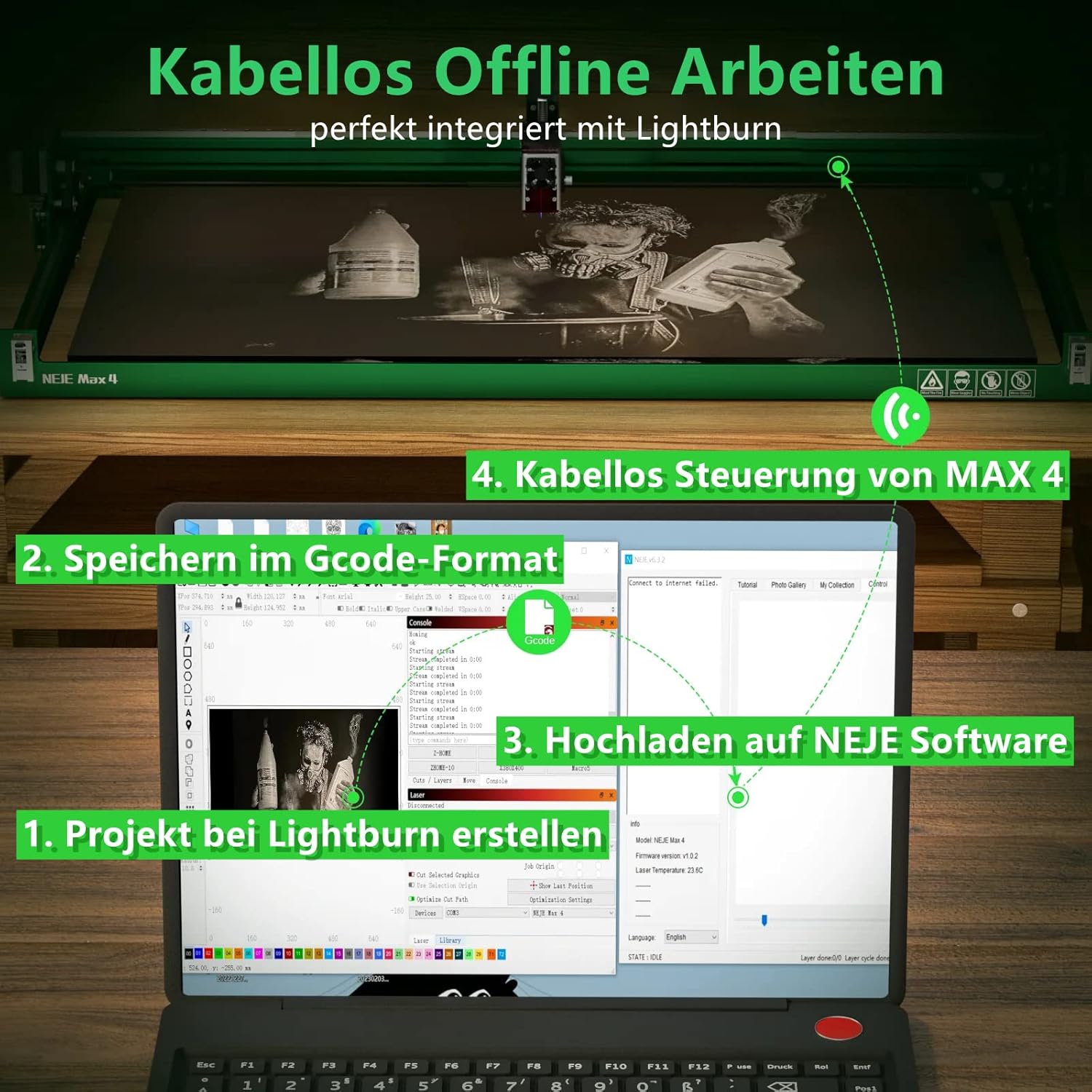
Figure 4.1: The wireless offline workflow, demonstrating how to create a project in Lightburn, save as Gcode, upload to NEJE software, and control the MAX 4 wirelessly.
- Design in Lightburn: Create or import your design in Lightburn software. Adjust dimensions, position, and apply desired engraving or cutting settings (power, speed, passes).
- Generate Gcode: Once your design is ready, generate the Gcode file from Lightburn. This file contains the instructions for the laser machine.
- Upload to NEJE Software: Open the NEJE software and upload the generated Gcode file to the machine. This can be done wirelessly.
- Funcionament sense fil: From the NEJE software, initiate the engraving or cutting process. The machine will operate based on the uploaded Gcode, allowing you to monitor progress remotely.
- Ajust de la configuració: For optimal results, experiment with power, speed, and number of passes based on the material type and desired outcome. The motorized Z-axis can be adjusted via software for precise focus on different material thicknesses.
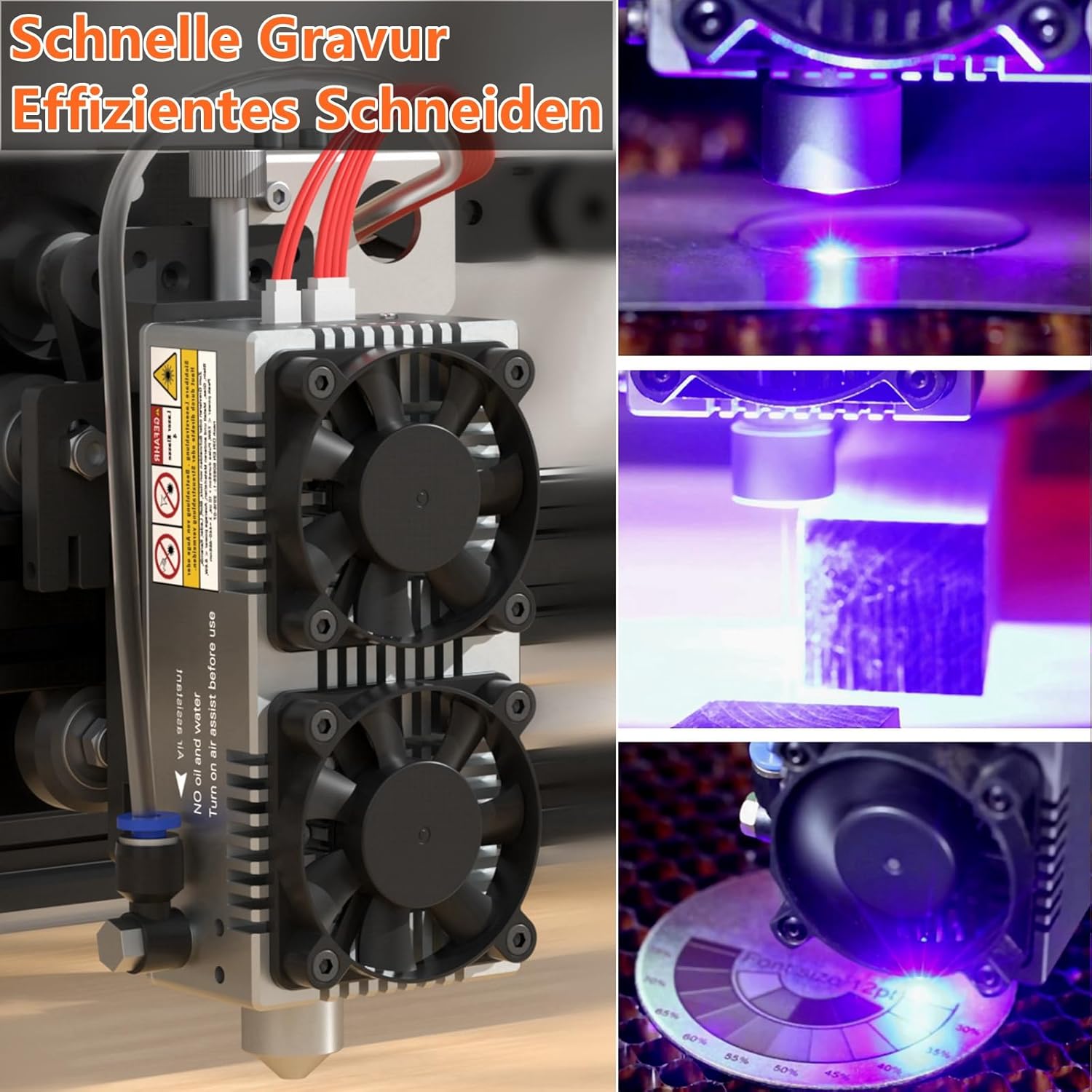
Figura 4.2: Examples of the machine's capability for fast engraving and efficient cutting on various materials.
5. Manteniment
Regular maintenance ensures the longevity and optimal performance of your NEJE MAX 4 E80.
- Neteja de lents làser: Periodically inspect and clean the laser lens using a lint-free cloth and lens cleaning solution. A dirty lens can reduce laser power and engraving quality.
- Rail and Moving Parts Cleaning: Keep the industrial rails and all moving components free of dust, debris, and lubricant buildup. Use a soft cloth to wipe them down.
- Tensió de la corretja: Check the tension of the timing belts regularly. If they appear loose, use the provided timing belt kit to adjust the tension. Proper belt tension is crucial for accurate movement and engraving.
- Inspecció general: Routinely check all connections, screws, and components for any signs of wear or looseness. Tighten as necessary.
6. Solució De Problemes
Aquesta secció ofereix solucions a problemes comuns que podeu trobar.
| Problema | Causa possible | Solució |
|---|---|---|
| El làser no dispara o la sortida és feble | Dirty laser lens, incorrect power settings, loose connection, laser module malfunction. | Clean the laser lens. Check power settings in software. Ensure all cables are securely connected. Contact support if the issue persists. |
| Mala qualitat de gravat/tall | Incorrect focus, wrong speed/power settings, loose belts, material issues. | Adjust Z-axis for proper focus. Optimize speed and power settings for the material. Check and tighten timing belts. Ensure material is flat and suitable. |
| Machine not connecting wirelessly | Software issue, Wi-Fi interference, machine not in pairing mode. | Restart NEJE software and machine. Check Wi-Fi signal strength. Ensure machine is in wireless pairing mode as per software instructions. |
| La màquina fa sorolls inusuals | Loose components, debris on rails, motor issues. | Inspect for loose screws and tighten. Clean rails and moving parts. If noise persists, contact customer support. |
If you encounter problems not listed here or require further assistance, please contact NEJE customer support.
7. Especificacions
Detailed technical specifications for the NEJE MAX 4 E80 Laser Engraving Machine.
- Model: NEJE MAX 4 E80
- Mòdul làser: E80 20W (4-diode hybrid technology)
- Engraving Area (X*Y*Z): 750 mm * 460 mm * 45 mm
- Z-Axis Precision: 0.001 mm
- Precisió mecànica: 0.01 mm
- Entrada d'alimentació: 24 Volts
- Consum d'energia: 120 watts
- Dimensions del producte: 97 cm x 58.2 cm x 6 cm
- Pes de l'article: 7.05 quilos
- Material: Alumini
- Connectivitat: Wireless Offline (Gcode via NEJE Software), USB
- Programari compatible: Lightburn, NEJE Software
8. Garantia i Suport
NEJE is committed to providing high-quality products and excellent customer service.
- Garantia: The NEJE MAX 4 E80 comes with a 2-year warranty from the date of purchase. This warranty covers manufacturing defects and malfunctions under normal use.
- Atenció al client: NEJE offers lifelong professional customer service. If you encounter any issues with installation, usage, or quality, please do not hesitate to contact our support team.
- Contacte: For support inquiries, please refer to the contact information provided on the official NEJE weblloc web o la documentació de la compra.


