Introducció
This manual provides detailed instructions for the setup, operation, maintenance, and troubleshooting of your TECPHILE B102D Bluetooth Wireless Keyboard with Multi-Touch Trackpad. Please read this manual thoroughly before using the product to ensure optimal performance and longevity.

Image: The TECPHILE B102D Bluetooth Wireless Keyboard, showcasing its compact design and backlit keys.
Contingut del paquet
Verifiqueu que tots els elements siguin presents al paquet:
- 1x TECPHILE B102D Bluetooth Wireless Keyboard
- 1x cable de càrrega USB
- 1x Manual d'usuari (aquest document)
Configuració
1. Càrrega del teclat
Before initial use, fully charge the keyboard. Connect the provided USB charging cable to the keyboard's USB-C port and the other end to a 5V 1A power adapter (not included) or a computer's USB port. The charging indicator light will illuminate during charging and turn off when fully charged.
Disclaimer: Kindly use the device with a 5V 1A power adapter only. This will improve the lifespan of your gear and its batteries.

Image: Close-up of the keyboard's USB-C charging port, indicating its location for power connection.
2. Pairing with Devices (Multi-Device Connectivity)
The TECPHILE B102D keyboard can connect to up to three devices simultaneously via Bluetooth.
- Activa el mode de vinculació: Turn on the keyboard. Press and hold the Fn key along with either Q, W, o E for 3-5 seconds until the Bluetooth indicator light flashes. This indicates the keyboard is in pairing mode for the selected device slot.
- Activa el Bluetooth al teu dispositiu: A l'ordinador, la tauleta o el telèfon intel·ligent, aneu a la configuració de Bluetooth i activeu el Bluetooth.
- Selecciona el teclat: Look for "TECPHILE B102D" or a similar name in the list of available Bluetooth devices and select it to connect.
- Confirmeu la connexió: Once connected, the Bluetooth indicator light on the keyboard will stop flashing and remain solid for a moment, then turn off.
- Repetiu per a dispositius addicionals: To pair with a second or third device, repeat steps 1-3, using a different Fn + Q/W/E combination for each new device.

Image: Visual guide demonstrating how to pair the keyboard with multiple devices using Fn+Q/W/E keys.
3. Compatibilitat
The TECPHILE B102D keyboard is widely compatible with various operating systems and devices, including:
- Windows (2000 and later)
- macOS
- iOS (iPad, iPhone)
- iPadOS
- Android
- ChromeOS

Image: Illustration showing the keyboard's compatibility with various operating systems and device types.
Instruccions de funcionament
1. Mecanografia bàsica
The keyboard features a standard QWERTY layout. Simply type as you would on any other keyboard.
2. Multi-Touch Trackpad
The integrated trackpad supports various gestures for navigation and control:
- Toc amb un sol dit: Feu clic amb el botó esquerre.
- Toc amb dos dits: Clic dret.
- Desplaçament amb dos dits: Desplaça't amunt/avall o esquerra/dreta.
- Additional gestures may be supported depending on your operating system.

Image: Diagram illustrating the left and right click functionality of the large trackpad.
3. Control de la llum de fons
El teclat té retroiluminació de 7 colors amb brillantor ajustable.
- Canvia el color: Premeu el botó RGB key (often combined with the light bulb icon) to cycle through the 7 available colors.
- Ajusta la brillantor: Use the dedicated brightness keys (often combined with the light bulb icon and up/down arrows) to increase or decrease backlight intensity.
- Activar/Desactivar: Press the backlight key to toggle the backlight on or off.
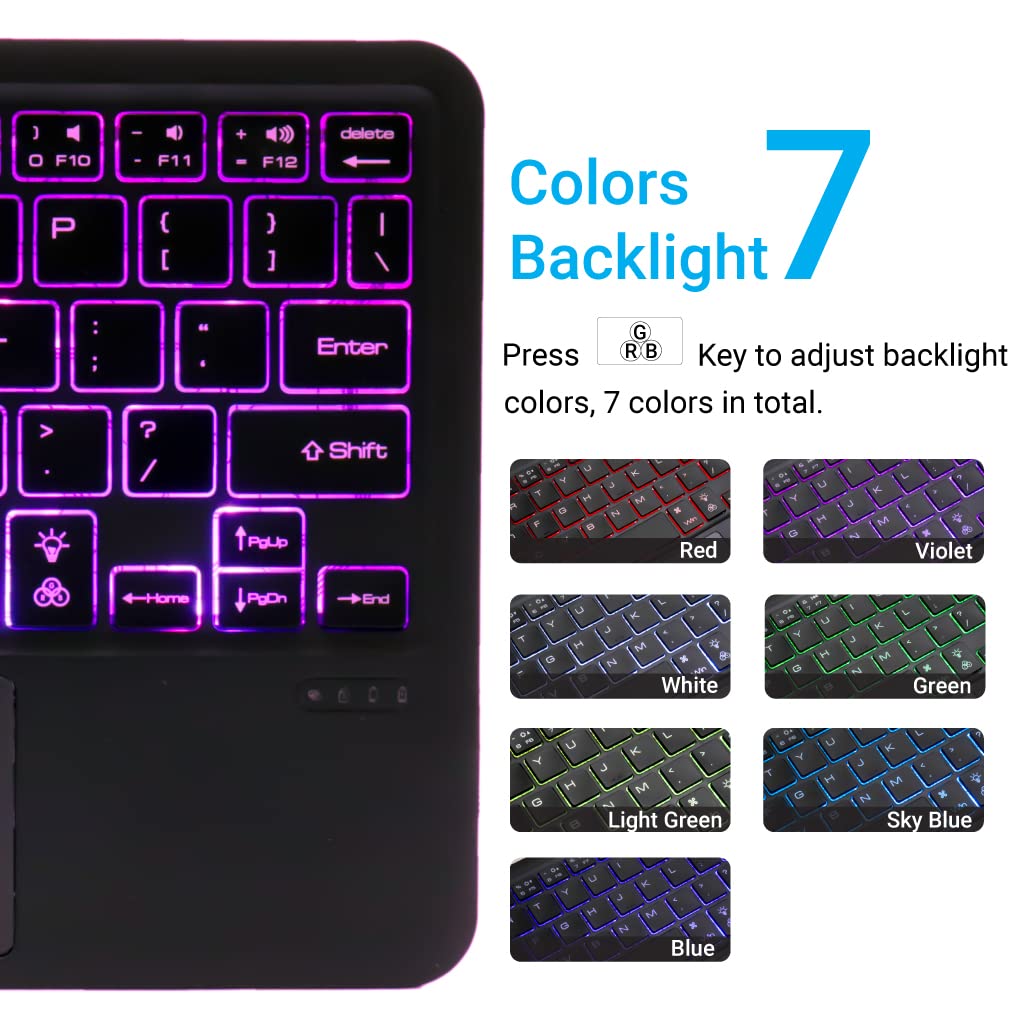
Image: Display of the 7 different backlight colors available on the keyboard.
4. Canviar entre dispositius connectats
To switch between the three paired devices, simply short press the Fn key along with the corresponding device key (Q, W, o E).
- Premeu Fn + Q to switch to Device 1.
- Premeu Fn + W to switch to Device 2.
- Premeu Fn + E to switch to Device 3.

Image: Visual guide for connecting and seamlessly switching between multiple paired devices.
5. Tecles de funció
The keyboard includes a full set of function and media keys. These keys often require pressing the Fn key simultaneously with the desired function key to activate their secondary functions (e.g., volume control, media playback).
Manteniment
1. Neteja
Per netejar el teclat, netegeu suaument la superfície amb un drap suau iamp, lint-free cloth. Avoid using harsh chemicals, abrasive cleaners, or excessive moisture, as these can damage the keyboard's finish or internal components.
2. Cura de la bateria
- Always use a 5V 1A power adapter for charging to prevent battery damage and ensure optimal lifespan.
- Eviteu descarregar completament la bateria amb freqüència.
- If storing the keyboard for an extended period, charge it to about 50% and store it in a cool, dry place.
3. Emmagatzematge
Store the keyboard in a dry environment, away from extreme temperatures, direct sunlight, and humidity. When not in use, it is recommended to turn off the keyboard to conserve battery life.
Resolució de problemes
| Problema | Causa possible | Solució |
|---|---|---|
| El teclat no s'encén. | Bateria baixa. | Charge the keyboard using the provided USB-C cable and a 5V 1A power adapter. |
| No es pot connectar per Bluetooth. | Keyboard not in pairing mode; Bluetooth off on device; device already connected to 3 keyboards. | Ensure keyboard is in pairing mode (Fn + Q/W/E for 3-5s). Check device's Bluetooth settings. Forget previous connections if necessary. |
| Trackpad not responding. | Software issue; trackpad disabled. | Restart the keyboard and the connected device. Ensure trackpad is not accidentally disabled (check function keys). |
| La retroiluminació no funciona. | Backlight turned off; low battery. | Press the backlight key to turn it on. Charge the keyboard. |
| Les tecles no responen o arriben amb retard. | Low battery; interference; distance from device. | Charge the keyboard. Move closer to the connected device. Reduce potential wireless interference. |
Especificacions
- Marca: TECFILE
- Model: B102D
- Connectivitat: Bluetooth
- Disseny del teclat: QWERTY
- Característiques especials: Multi-Touch Trackpad, 7-Color Backlit, Multi-Device Connectivity (up to 3), USB-C Rechargeable
- Bateria: 1x Ió de liti (inclosa)
- Dimensions del producte: 25 x 1 x 15 cm (L x A x A)
- Pes de l'article: 300 g
- Material: Plàstic
- Sistemes operatius compatibles: Windows, macOS, iOS, iPadOS, Android, ChromeOS

Imatge: Diagrama que mostra el pro ultraprimfile and dimensions of the keyboard (24.7 cm x 15 cm x 0.5 cm).
Garantia i Suport
TECPHILE products are designed for reliability and performance. For warranty information, please refer to the warranty card included with your purchase or visit the official TECPHILE website. For technical support or further assistance, please contact TECPHILE customer service through the contact details provided on the product packaging or the official weblloc.
