Producte acabatview
The BOBLOV A23 is a compact and versatile body-worn camera designed for various recording needs, from daily life to professional applications. It features a 180-degree rotatable lens, 1080p HD video recording, 48-megapixel photo capture, and night vision capabilities. The camera is equipped with a 2-inch display and a long-lasting battery for extended use.
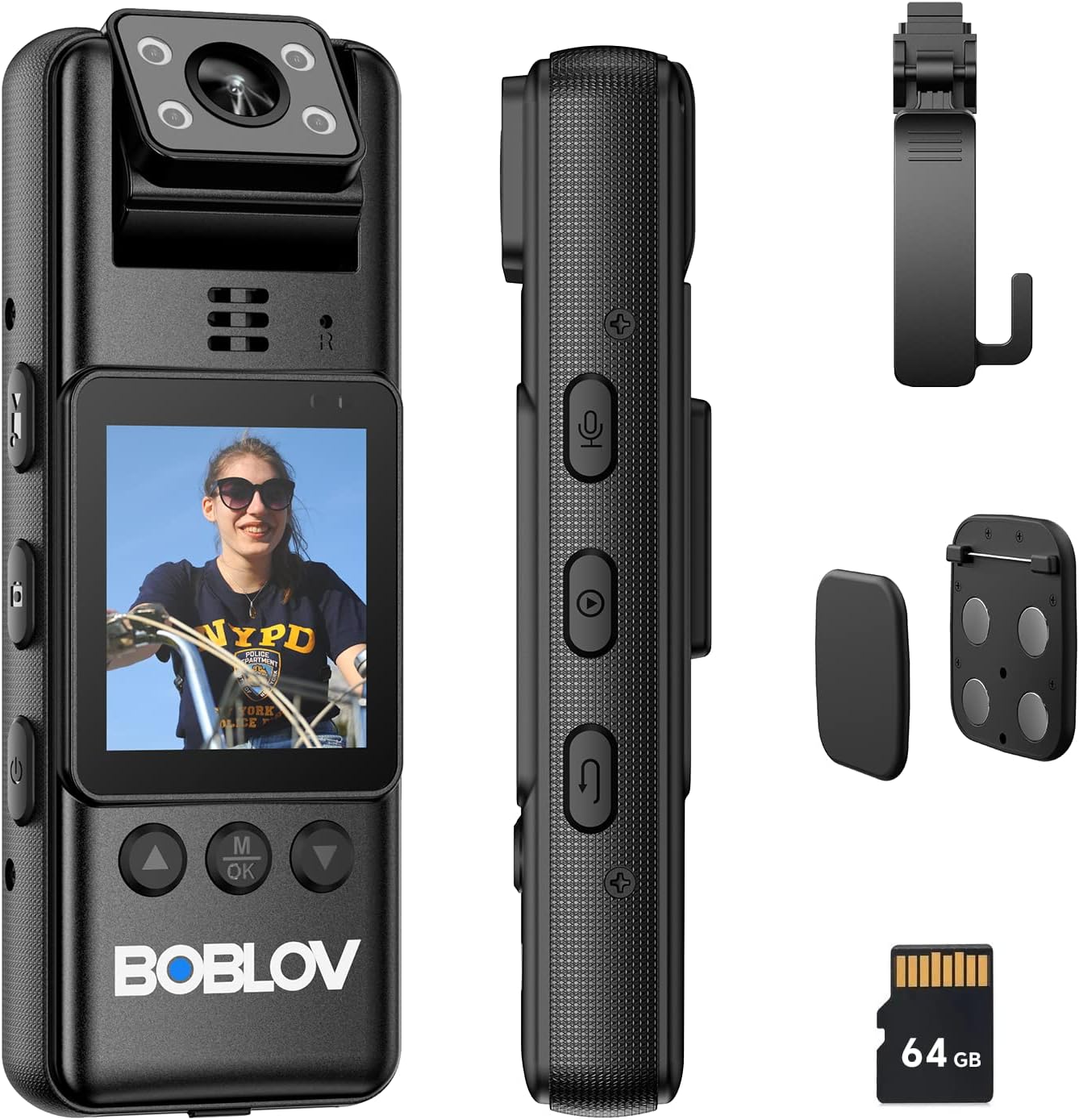
Figure 1: BOBLOV A23 Body Camera and its components, including the camera unit, USB-C cable, magnetic clips, and a 360-degree rotatable clip.
Característiques principals:
- Lent giratòria de 180 graus: Allows for flexible recording angles and automatic image orientation adjustment when in standby mode.
- 1080p HD Video & 48MP Photo: Captura imatges clares i detalladestage and high-resolution still images.
- Visió nocturna: Equipped with 4 built-in IR lights for effective recording in low-light or dark conditions.
- Llarga vida útil de la bateria: Integrated 2200mAh battery provides up to 9 hours of continuous recording.
- Targeta Micro SD de 64 GB inclosa: Comes with a pre-installed A1 64GB micro SD card for immediate use.
- Opcions de muntatge versàtils: Includes magnetic clips and a 360-degree rotatable long clip for various attachment methods.
- Pantalla de 2 polzades: For easy navigation and playback.
Configuració i primer ús
1. Desembalatge i contingut del paquet
Before using your BOBLOV A23 camera, please ensure all components are present in the package:

Figura 2: Detallada view of the BOBLOV A23 packaging list.
- BOBLOV A23 Body Worn Camera (1 unit)
- Cable USB-C (1 unitat)
- Magnetic Clips (1 set)
- Manual d'usuari (1 unitat)
- Long 360° Rotatable Clip (1 unit)
2. Càrrega de la càmera
Fully charge the camera before its first use to ensure optimal battery performance. Use the provided USB-C cable.
- Connecteu el cable USB-C al port de càrrega de la càmera.
- Connecteu l'altre extrem del cable a un adaptador de corrent USB (no inclòs) o al port USB d'un ordinador.
- El llum indicador de càrrega mostrarà l'estat de càrrega. Una càrrega completa sol trigar aproximadament 4 hores.

Figure 3: USB-C charging port and battery capacity information.
The built-in 2200mAh battery provides sufficient power for up to 9 hours of video recording.
3. Instal·lació de la targeta Micro SD
The camera comes with a 64GB A1 micro SD card pre-installed. If you need to access or replace it:
- Locate the micro SD card slot on the camera.
- Gently push the card into the slot until it clicks into place. Ensure the card is inserted in the correct orientation.
- To remove, push the card again until it pops out.
Nota: For optimal performance, use high-speed (Class 10 or higher) micro SD cards. The camera supports loop recording, but this feature may not function correctly with cards larger than the camera's specified capacity (64GB for this model).
Instruccions de funcionament
1. Basic Controls and Buttons
Familiarize yourself with the camera's buttons for easy operation:

Figure 4: Button layout and functions on the BOBLOV A23 camera.
- Botó d'encesa: Press and hold to turn the camera on or off.
- Video Mode Button: Switches to video recording mode.
- Photo Mode Button: Switches to photo capture mode.
- Botó de mode d'àudio: Switches to audio-only recording mode.
- Playback Mode Button: Enters playback mode to review gravat files.
- Botó de retorn: Used to go back in menus or exit playback.
- OK/Menu Button (M/OK): Confirma les seleccions o accedeix al menú.
- Botons de navegació (amunt/avall): Serveix per navegar pels menús i opcions.
2. Encès / apagat
- Per encendre: Premeu i manteniu premut el botó d'engegada fins que la pantalla s'il·lumini.
- Per apagar: Press and hold the Power Button until the camera shuts down.
3. Gravació de vídeo
- Assegureu-vos que la càmera estigui engegada.
- Premeu el botó Botó de mode de vídeo to enter video recording mode.
- Premeu el botó Botó OK/Menú to start recording. A red indicator light will typically blink to confirm recording is active.
- Premeu el botó Botó OK/Menú de nou per aturar la gravació.
4. Fer fotos
- Assegureu-vos que la càmera estigui engegada.
- Premeu el botó Photo Mode Button to enter photo capture mode.
- Premeu el botó Botó OK/Menú per fer una foto.
5. Gravació d'àudio
- Assegureu-vos que la càmera estigui engegada.
- Premeu el botó Botó de mode d'àudio to enter audio-only recording mode.
- Premeu el botó Botó OK/Menú to start audio recording.
- Premeu el botó Botó OK/Menú de nou per aturar la gravació d'àudio.
6. Reproducció
- Premeu el botó Botó del mode de reproducció per entrar al mode de reproducció.
- Utilitza el Navigation Buttons (Up/Down) to browse through your recorded videos, photos, and audio files.
- Premeu el botó Botó OK/Menú to play a selected file.
- Premeu el botó Botó de retorn to exit playback or go back to the file llista.
7. 180-Degree Rotatable Lens
The camera's lens can be manually rotated 180 degrees to adjust the recording angle. When the camera is in standby mode, the image direction on the screen will automatically adjust to match the lens orientation. However, during active video recording, the image orientation will not change.

Figure 5: Illustration of the 180-degree rotatable lens for flexible filming.
8. Visió nocturna
The BOBLOV A23 features built-in IR lights for enhanced recording in low-light or dark environments. The camera can automatically switch to night vision mode when light conditions require it, or it can be manually activated through the settings menu.

Figure 6: Day and night recording capabilities of the BOBLOV A23 camera, demonstrating effective night vision.
Mounting and Usage Scenarios
The BOBLOV A23 offers multiple carrying options to suit various situations:

Figure 7: Magnetic clips and the 360-degree rotatable clip for secure attachment.
- Clips magnètics: For quick and secure attachment to clothing or other magnetic surfaces.
- Long 360° Rotatable Clip: Ideal for attaching the camera to a shoulder strap, belt, or other gear, allowing for flexible positioning and rotation.
The camera is suitable for a variety of uses, including:

Figura 8: Examples of multiple uses for the A23 video recorder, including business, dog walking, law enforcement, and travel.
Manteniment
Proper maintenance ensures the longevity and optimal performance of your BOBLOV A23 camera.
- Neteja: Feu servir un drap suau i sec per netejar el cos de la càmera. Per a l'objectiu, feu servir un drap i una solució especials per netejar objectius per evitar ratllades. No utilitzeu productes químics agressius ni materials abrasius.
- Emmagatzematge: Guardeu la càmera en un lloc fresc i sec, allunyat de la llum solar directa, de temperatures extremes i d'alta humitat.
- Cura de la bateria: To preserve battery life, avoid fully discharging the battery frequently. If storing for extended periods, charge the battery to about 50% every few months.
- Actualitzacions de firmware: Periodically check the official BOBLOV website for any available firmware updates to ensure your camera has the latest features and bug fixes.
Resolució de problemes
If you encounter issues with your BOBLOV A23 camera, refer to the following common problems and solutions:
| Problema | Possible causa/solució |
|---|---|
| La càmera no s'encén. |
|
| Recording stops unexpectedly or camera freezes. |
|
| Mala qualitat de vídeo/fotos. |
|
| Cannot unclip camera from mount. |
|
If the problem persists, please contact BOBLOV customer support for further assistance.
Especificacions
| Característica | Detall |
|---|---|
| Marca | BOBLOV |
| Model | A23 |
| Mida de la pantalla | 2 polzades |
| Característiques especials | Night Vision, 180° Rotatable Lens |
| Abertura | f/2 |
| Formats suportats | Micro SD |
| Composició de la bateria | Polímer de liti |
| Resolució de vídeo | 1080p |
| Dimensions del paquet (L x W x H) | 12.6 x 7.5 x 5.7 cm |
| Estabilització d'imatge | No |
| Resolució de fixes efectius | 48 megapíxels |
| Tecnologia del sensor fotogràfic | CMOS |
| Format de captura de vídeo | MOV |
| Pes de l'article | 270 grams |
Garantia i Suport
BOBLOV offers a two-year warranty for high-quality products. For warranty claims, technical support, or any inquiries not covered in this manual, please refer to the official BOBLOV weblloc web o contacteu directament amb el servei d'atenció al client. Conserveu el rebut de compra com a comprovant de compra a efectes de garantia.
Per obtenir la informació d'assistència més actualitzada, visiteu: www.boblov.com


