1. Introducció
Thank you for choosing the iFi AUDIO micro iDSD Signature Finale. This device is a high-performance portable Digital-to-Analog Converter (DAC) and headphone amplifier designed to deliver exceptional audio quality for a wide range of headphones and audio sources. This manual provides essential information for the proper setup, operation, and maintenance of your device.
2. Producte acabatview
2.1 Característiques clau
- Cutting-edge 16-Core XMOS technology for MQA decoding.
- Enhanced volume knob for precise control.
- Upgraded ELNA Audio capacitor for superior performance.
- FINALE titanium grey chassis design.
- Versatile audio options tailored to personal preferences.
- Dual Burr-Brown DAC chips in a custom interleaved configuration for lower noise floor, improved channel separation, and finer musical detail.
- Supports PCM up to 768kHz, DSD up to 512, 2xDXD, and MQA natively.
- Up to 4100mW of power output, capable of driving sensitive in-ear monitors to current-hungry planar headphones.
- Built-in rechargeable battery for ultra-clean, stable DC power and portability, offering up to 12 hours of playback.
2.2 Components del dispositiu
Familiarize yourself with the various inputs, outputs, and controls of your micro iDSD Signature Finale.
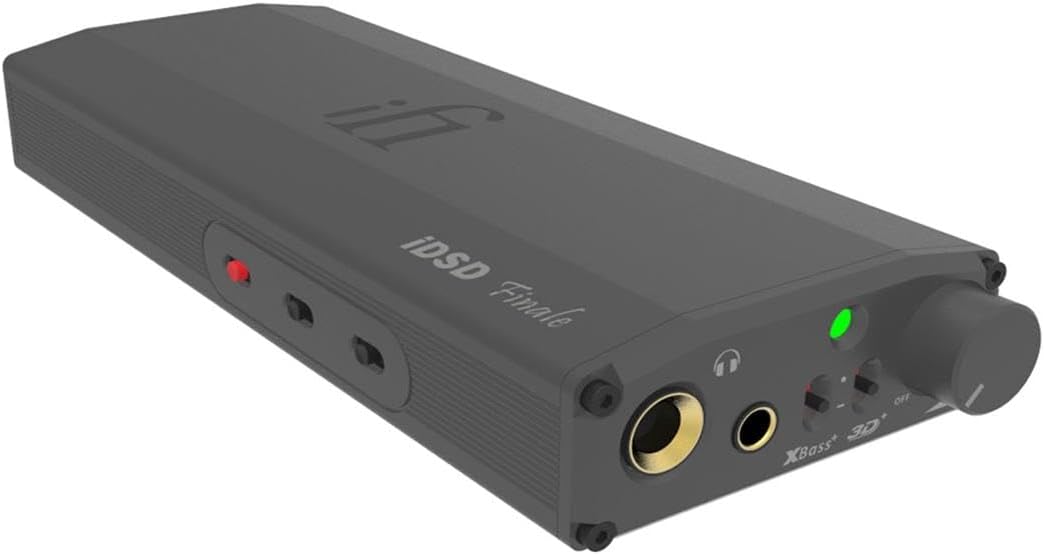
Figura 1: Frontal i lateral View. This image displays the front panel with headphone outputs, volume knob, and various switches, along with the sleek side profile del dispositiu.

Figura 2: Controls del panell frontal. Un detallat view of the front panel, highlighting the 6.3mm and 3.5mm headphone jacks, volume control, XBass and 3D+ switches, and power/status indicator.

Figure 3: Rear Panel Inputs. This image shows the rear panel, featuring SPDIF input (RCA), Digital Input (USB-A), and RCA line outputs.

Figure 4: Bottom Panel. The bottom of the device displays various technical specifications, power mode, filter settings, and iEMatch switches.
3. Instruccions de configuració
3.1 Càrrega del dispositiu
Before initial use, fully charge the micro iDSD Signature Finale. Connect the device to a USB power source using the provided USB cable. The LED indicator will show charging status and turn off when fully charged.
3.2 Connexió a una font d'àudio
- Entrada digital USB: Connect your computer (Windows, macOS, Linux) or compatible mobile device to the USB-A Digital Input port on the rear panel (Figure 3) using a suitable USB cable. Ensure necessary drivers are installed for Windows systems (available on the iFi weblloc).
- Entrada SPDIF: For coaxial or optical digital sources, connect to the SPDIF Input (RCA) on the rear panel (Figure 3).
3.3 Connecting Headphones or Speakers
- Auriculars: Plug your headphones into either the 6.3mm (1/4 inch) or 3.5mm headphone jack on the front panel (Figure 2). The 4.4mm balanced output is also available for compatible headphones.
- Extern Amplifier/Active Speakers: Use the RCA Line Outputs on the rear panel (Figure 3) to connect to an external amplifier o altaveus alimentats.
4. Instruccions de funcionament
4.1 Engegada/Apagada i control de volum
- To power on the device, rotate the volume knob clockwise until it clicks. The LED indicator will illuminate.
- Adjust the volume by rotating the knob. Start with a low volume and gradually increase to a comfortable listening level.
- To power off, rotate the volume knob counter-clockwise until it clicks.
4.2 Sound Enhancement Features
- XBass: This feature enhances bass response. Activate or deactivate using the switch on the front panel (Figure 2).
- 3D+: This feature expands the soundstage, creating a more spacious listening experience. Activate or deactivate using the switch on the front panel (Figure 2).
4.3 Power Modes and Filters
The micro iDSD Signature Finale offers various power modes and digital filters, accessible via switches on the bottom panel (Figure 4). Experiment with these settings to find your preferred audio profile.
- Power Mode (Eco, Normal, Turbo): Adjusts the output power to match your headphones' sensitivity.
- Ressò: For highly sensitive IEMs.
- Normal: For most headphones.
- Turbo: For demanding, high-impedance, or planar magnetic headphones.
- Filtres digitals: Select from various digital filter options (e.g., Bit-Perfect, Standard) to fine-tune the sound characteristics. Refer to the iFi website for detailed descriptions of each filter.
- iEMatch: This feature optimizes output for highly sensitive in-ear monitors, reducing hiss and improving dynamic range.
5. Manteniment
- Mantingueu el dispositiu net netejant-lo amb un drap suau i sec. Eviteu utilitzar productes químics agressius o materials abrasius.
- No exposeu el dispositiu a temperatures extremes, humitat o llum solar directa.
- Eviteu deixar caure o sotmetre el dispositiu a forts impactes.
- Assegureu-vos de ventilar adequadament durant l'ús per evitar el sobreescalfament.
- Quan no l'utilitzeu durant períodes prolongats, guardeu el dispositiu en un lloc fresc i sec.
6. Solució De Problemes
| Problema | Possible causa/solució |
|---|---|
| Sense sortida de so. |
|
| So distorsionat o de mala qualitat. |
|
| Dispositiu no reconegut per l'ordinador. |
|
| Battery not charging or device not holding charge. |
|
7. Especificacions
| Característica | Detall |
|---|---|
| Número de model | Signatura micro iDSD |
| Pes de l'article | 1.6 lliures |
| Dimensions del producte | 6.8 x 2.6 x 1.1 polzades |
| Dispositius compatibles | Auriculars |
| Programari compatible | MQA |
| Compatibilitat de sistemes operatius | Linux, Windows, macOS |
| Tecnologia de connectivitat | XLR (Note: The device primarily uses USB, SPDIF, 3.5mm, 6.3mm, and 4.4mm balanced outputs/inputs.) |
| Nombre de canals | 16 (Refers to XMOS core technology) |
| Chipset DAC | Dual Burr-Brown DAC chips |
| Max PCM Sampli Rate | 768 kHz |
| Max DSD Sampli Rate | DSD 512 |
| Potència de sortida | Fins a 4100 mW |
8. Garantia i Suport
The iFi AUDIO micro iDSD Signature Finale comes with a manufacturer's warranty. Please refer to the warranty card included with your product or visit the official iFi AUDIO weblloc web per obtenir informació detallada sobre els termes i condicions de garantia específics de la vostra regió.
For technical support, troubleshooting assistance beyond this manual, or service inquiries, please contact iFi AUDIO customer support through their official website or the contact information provided in your product packaging. When contacting support, please have your product model and serial number ready.
9. Vídeos de productes
En aquest moment no hi ha vídeos oficials de productes del venedor disponibles per incrustar.


