
1. Introducció
The Sovol SV07 Plus is a high-performance FDM 3D printer designed for both enthusiasts and professionals, offering a large build volume and advanced features for efficient and precise printing. Equipped with Klipper firmware, it delivers exceptional speed and a user-friendly experience through its intuitive touch screen interface.
This manual provides essential information for setting up, operating, maintaining, and troubleshooting your Sovol SV07 Plus 3D printer. Please read it thoroughly before use to ensure safe and optimal performance.
Official Product Introduction: This video provides a general overview of the Sovol SV07 Plus 3D printer's features and capabilities.
Sovol SV07 Plus is Coming!: A brief promotional video highlighting the arrival of the SV07 Plus.
2. Informació de seguretat
Observeu sempre les següents precaucions de seguretat per evitar lesions o danys a la impressora:
- Mantingueu les mans i els dits allunyats de les peces mòbils durant el funcionament.
- Do not touch the hotend or heated bed during or immediately after printing, as they reach high temperatures.
- Assegureu-vos que la impressora estigui col·locada sobre una superfície estable i anivellada en una zona ben ventilada.
- Do not leave the printer unattended during operation, especially during long prints.
- Use only recommended filament types and power supply.
- Keep children and pets away from the printer.
- En cas d'emergència, desconnecteu immediatament el subministrament elèctric.
3. Contingut del paquet
Your Sovol SV07 Plus package should include:
- 3D printer*1
- Necessary tools for assembly and maintenance (located in the integrated tool drawer).
- USB drive with test files and software.
- Cable de corrent.
- Sample filament.
4. Impressora sobreview
The Sovol SV07 Plus features a robust design with key components optimized for performance and ease of use.
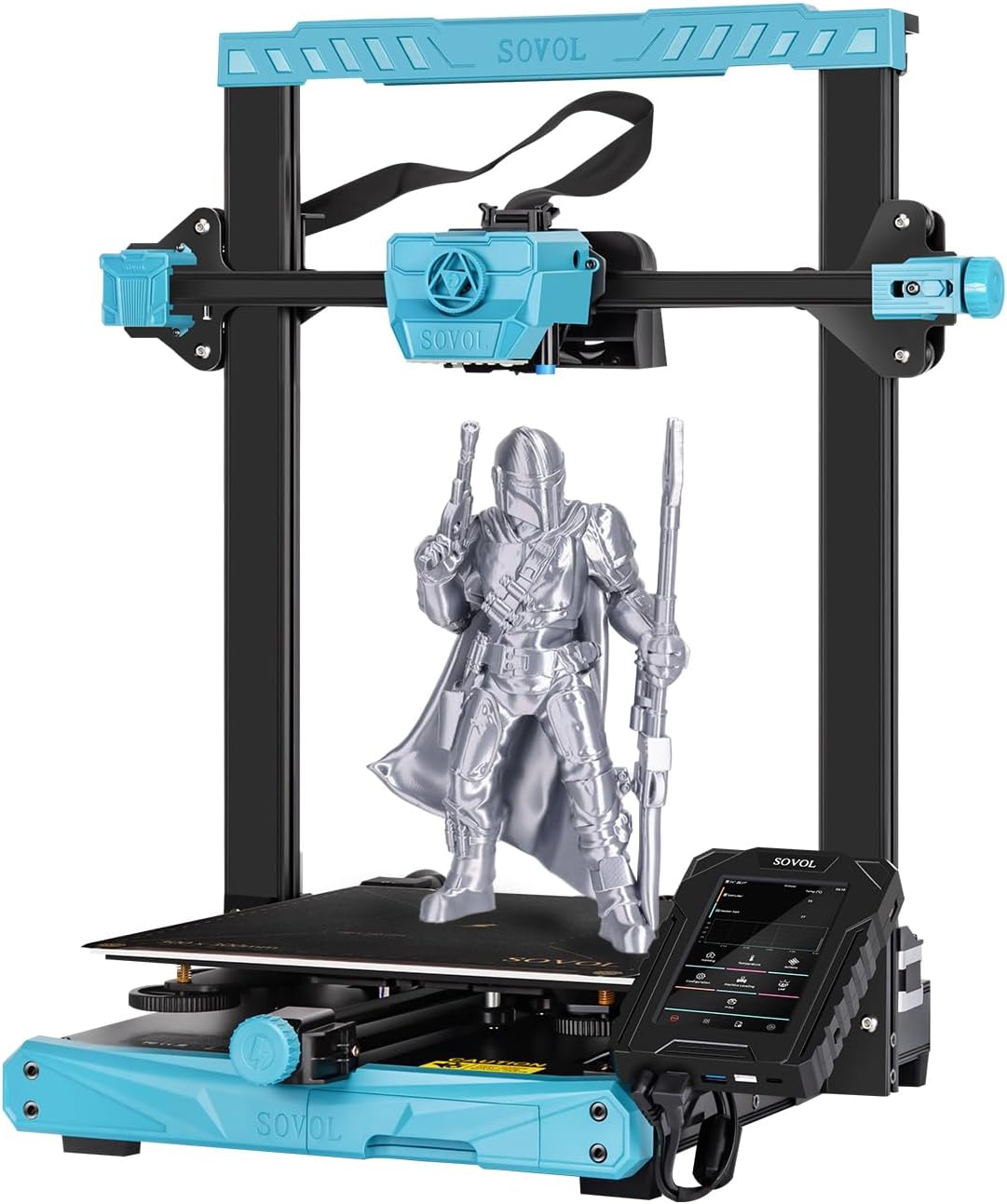
En general view of the Sovol SV07 Plus 3D Printer.
Components clau:
- 5-inch Klipper Touch Screen: High-resolution interface for intuitive control and access to advanced Klipper functions.
- Planetary Dual Gear Direct Drive Extruder: Ensures precise filament extrusion and is ideal for flexible materials.
- All Metal High Flow Hotend: Capable of reaching 300°C for printing a wide range of materials.
- Llit escalfat: Upgraded 420W heated bed for rapid heating and improved adhesion.
- Dual Z-axis: Enhances accuracy and precision of vertical movement.
- Filament Run-out Sensor: Automatically pauses printing when filament runs out or breaks.
- Llum LED: Illuminates the print area for better visibility during printing and leveling.
- Tool Drawer: Conveniently stores essential tools.
5. Setup and Initial Calibration
5.1 Muntatge
The Sovol SV07 Plus comes largely pre-assembled. Follow the quick start guide included in the package for final assembly steps, which typically involve attaching the gantry and connecting a few cables.
5.2 Bed Leveling and Z-Offset Calibration
Accurate bed leveling and Z-offset calibration are crucial for successful first layers and overall print quality. The SV07 Plus features a 25-point auto-leveling system.
Guide and Tutorial: How to Level SV07 & SV07 Plus. This video provides a detailed walkthrough of the bed leveling and Z-offset calibration process.
- Initial Manual Adjustment: Before auto-leveling, ensure the bed leveling nuts are tightened counter-clockwise as much as possible, then loosen them two turns clockwise. This provides a good starting point for the auto-leveling system.
- Z-Calibrate: On the touch screen, navigate to 'Machine Leveling' and select 'Z Calibrate'. The printer will auto-home.
- Ajusta el desplaçament Z: Once the nozzle moves to the center of the bed, place a piece of A4 paper between the nozzle and the hotbed. Adjust the Z-offset using the 'raise nozzle' or 'lower nozzle' buttons until you feel slight resistance when pulling the paper. The nozzle should scratch the paper slightly without completely pressing it.
- Desa i reinicia: Click 'Accept' to apply the values, then confirm and restart the system.
- Bed Level (Screws Adjust): After Z-offset, go back to 'Machine Leveling' and select 'Bed Level'. Click on 'Screws Adjust'. The printer will move the nozzle to each of the four corners. At each corner, use the physical leveling nuts under the bed to adjust the height until the paper test (slight scratch) is achieved. The screen will indicate if you need to turn clockwise (CW) or counter-clockwise (CCW) and by how much. Repeat this process several times until all corners are within acceptable tolerance (e.g., 00:10 or less).
- Bed Mesh: Once the manual screw adjustment is complete, click 'Bed Mesh' on the screen. The printer will perform a detailed 25-point mesh leveling. After the detection is complete, restart the system.
6. Instruccions de funcionament
6.1 Càrrega del filament
Ensure the hotend is preheated to the appropriate temperature for your filament type. Insert the filament into the extruder until it is gripped by the gears. Use the 'Extrude' function on the touch screen to feed the filament through the hotend until it comes out cleanly.
6.2 Inici d'una impressió
Prepare your 3D model using a slicing software (e.g., Cura with SV07 Plus profile) and save it to a USB drive. Insert the USB drive into the printer's touch screen unit. On the touch screen, navigate to 'Print', select your file from the USB drive, and confirm to start printing.
6.3 Monitoring and Fine-Tuning
During printing, you can monitor progress and fine-tune settings via the touch screen. The Klipper firmware offers various options for real-time adjustments.

The 5-inch Klipper touchscreen provides comprehensive control and monitoring.
If the print nozzle is too close to the bed, resulting in rough printing, fine-tune the Z-offset value upwards. If the print nozzle is too far from the bed, causing adhesion issues, fine-tune the Z-offset value downwards. Always make small adjustments (e.g., 0.01mm or 0.05mm) and observe the effect.
7. Característiques clau
7.1 High-Speed Printing with Klipper Firmware
The SV07 Plus is powered by Klipper firmware, allowing for a maximum print speed of 500mm/s. This significantly reduces print times while maintaining quality. The 5-inch touch screen provides access to Klipper's advanced features like height mapping and input shaping for optimal performance.

Klipper firmware enables high-speed printing and advanced functionalities.
7.2 Large Build Volume & Fast Heating
With a generous build volume of 300x300x350mm, the SV07 Plus accommodates larger models and batch printing. The 600W power supply and upgraded 420W heated bed ensure rapid heating, reaching 60°C in approximately 90 seconds.

Comparison of SV07 Plus (300x300x350mm) and SV07 (220x220x250mm) build volumes.

The 600W power supply and 420W heated bed ensure stable and fast heating.
7.3 Planetary Dual Gear Direct Drive Extruder
Sovol's self-developed direct drive extruder with a planetary dual gear set provides a higher drive ratio and lighter motor, resulting in precise extrusion. An external knob simplifies filament feeding.

Detallada view of the planetary dual gear direct drive extruder for accurate extrusion.
7.4 All Metal High Flow Hotend (Max 300°C)
The all-metal hotend with a larger melt zone allows for printing at high speeds and with various high-temperature materials, including ABS, PC, ASA, Nylon, Carbon Fiber, and more.

The all-metal hotend supports high-temperature printing for diverse filament types.

The printer is compatible with a wide range of filaments including TPU, PLA, PETG, ABS, ASA, PC, WOOD, Nylon, and Carbon Fiber.
7.5 Improved Cooling Design
Equipped with triple cooling fans, the SV07 Plus ensures efficient cooling of prints, leading to better layering and overall print quality, especially at high speeds.

Triple cooling fans provide effective cooling for high-speed printing.
7.6 Dual Z-axis & Anti-backlash Nut
Dual Z-axis screws and stepper motors improve the accuracy and precision of nozzle vertical movement to 0.001mm. An anti-backlash nut further reduces shaking, contributing to more stable printing.

Dual Z-axis for enhanced stability and precision.

Upgraded anti-slip belts and anti-backlash nut for stable and precise movement.
7.7 Filament Run-out Sensor
The integrated filament run-out sensor automatically detects when filament runs out or breaks, pausing the print to allow for filament replacement and preventing failed prints.

The filament run-out sensor automatically pauses printing for filament changes.
7.8 Double Sided PEI Plate & LED Light
The double-sided PEI plate offers excellent adhesion and easy print removal. If one side gets scratched, the other side can be used. An LED light under the extruder provides illumination for observing the bed leveling process and the first layer, even in low light conditions.

The double-sided PEI plate offers durability and ease of use.

The LED light illuminates the print area for better visibility.
7.9 Integrated Tool Drawer
A convenient pull-out tool drawer is integrated into the printer's base, providing quick storage and easy organization for your tools, keeping your workspace tidy.

The integrated tool drawer keeps your workspace organized.
8. Manteniment
Regular maintenance ensures the longevity and optimal performance of your 3D printer:
- Netegeu la base d'impressió: Wipe the PEI surface with alcohol before each print to ensure optimal adhesion.
- Netegeu el broquet: Regularly clean any filament residue from the nozzle. For clogs, perform a cold pull or use a nozzle cleaning needle.
- Lubricar les peces mòbils: Apply a small amount of lithium grease to the Z-axis lead screws and smooth rods periodically.
- Revisar cinturons: Ensure the X and Y-axis belts are properly tensioned. Adjust using the belt tensioner if necessary.
- Inspeccioneu el cablejat: Periodically check all electrical connections for looseness or damage.
9. Solució De Problemes
Aquí teniu alguns problemes comuns i les seves possibles solucions:
| Problema | Causa possible | Solució |
|---|---|---|
| Mala adherència de la primera capa | Incorrect Z-offset, dirty bed, warped bed, wrong bed temperature. | Recalibrate Z-offset, clean PEI plate with alcohol, ensure bed is level, adjust bed temperature. |
| Filament no extrudit | Nozzle clog, tangled filament, incorrect temperature, extruder issue. | Clean nozzle, check filament path, verify hotend temperature, inspect extruder gears. |
| Canvi de capes | Loose belts, motor overheating, print speed too high. | Check and tighten belts, ensure proper cooling for motors, reduce print speed. |
| Stringing/Oozing | Incorrect retraction settings, too high temperature. | Adjust retraction distance and speed in slicer, lower hotend temperature slightly. |
10. Especificacions

Sovol SV07 Plus with key dimensions.
| Característica | Detall |
|---|---|
| Model | SV07 Plus |
| Tecnologia d'impressió | FDM (Fused Deposition Modeling) |
| Volum de construcció | 300 x 300 x 350 mm (11.8 x 11.8 x 13.8 polzades) |
| Velocitat màxima d'impressió | 500 mm/s |
| Temperatura del broquet | Màxim 300 °C |
| Temperatura del llit escalfat | Max 100°C (Heats to 60°C in 90 seconds) |
| Tipus d'extrusora | Planetary Dual Gear Direct Drive |
| Mode de nivellació | Anivellació automàtica de 25 punts |
| Firmware | Klipper |
| Mostra | 5-inch High Resolution Touch Screen |
| Font d'alimentació | 600W |
| Connectivitat | USB, WiFi (Klipper) |
| Filaments compatibles | PLA, ABS, PETG, TPU, ASA, PC, Wood, Nylon, Carbon Fiber |
| Dimensions del producte | 25 x 23.43 x 10.43 polzades |
| Pes de l'article | 32 lliures (14.54 kg) |
11. Garantia i Suport
Sovol provides customer support for their products. For specific warranty details, technical assistance, or replacement parts, please refer to the official Sovol weblloc web o contacteu directament amb el servei d'atenció al client. Conserveu el rebut de compra com a comprovant de compra per a reclamacions de garantia.
És possible que hi hagi plans de protecció addicionals disponibles per a la compra per ampliar la cobertura més enllà de la garantia estàndard del fabricant.


