1. Introducció
This instruction manual provides essential information for the safe and correct installation, operation, and maintenance of your Hoover 48030183 Wall Mount. This accessory is designed to securely store your Hoover H-FREE 100 or HF122 series electric broom, keeping it organized and easily accessible. Please read this manual thoroughly before installation and retain it for future reference.
2. Instruccions de seguretat
- Always ensure the mounting surface is suitable and strong enough to support the weight of the wall mount and the electric broom.
- Use appropriate tools and fasteners for your wall type (e.g., drywall anchors, wood screws, masonry plugs).
- Before drilling, check for hidden electrical wires, water pipes, or gas lines behind the wall.
- Mantingueu els nens i les mascotes allunyats de la zona d'instal·lació.
- Si no esteu segur del procés d'instal·lació, consulteu un professional qualificat.
- Do not overload the wall mount with items other than the intended electric broom.
3. Contingut del paquet
Please check the package contents to ensure all parts are present:
- Hoover 48030183 Wall Mount (1 unit)
- (Fasteners such as screws and wall anchors may or may not be included. Please check your specific product packaging.)
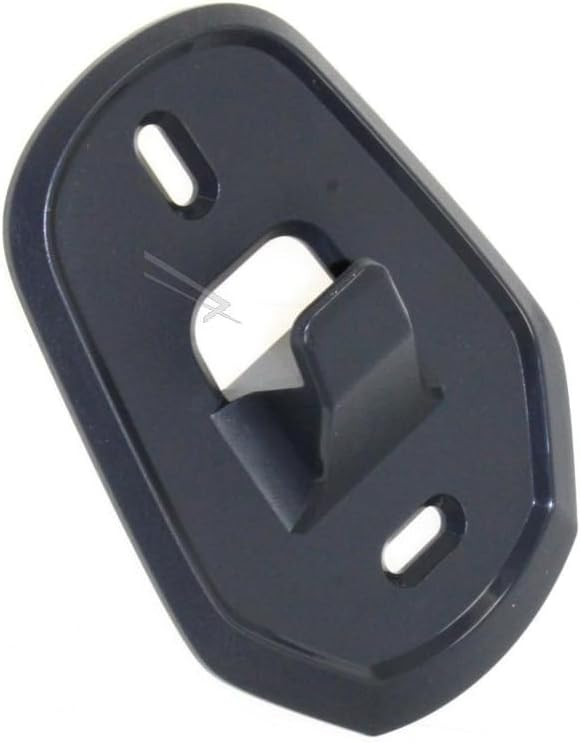
Image 1: The Hoover 48030183 Wall Mount. This dark grey, oval-shaped plastic bracket features two elongated screw holes at the top and bottom for secure wall mounting, and a robust central hook designed to cradle the electric broom.
4. Configuració i instal·lació
Follow these steps to install the wall mount:
- Trieu una ubicació: Select a suitable wall location near an electrical outlet if your broom requires charging while mounted. Ensure the location is clear of obstructions and at a convenient height for accessing your electric broom.
- Marca els punts de perforació: Hold the wall mount against the chosen wall location. Use a pencil to mark the positions for the two screw holes. Ensure the mount is level before marking.
- Perforar forats pilot: Using an appropriate drill bit for your wall type and chosen fasteners, drill pilot holes at the marked positions.
- Inseriu ancoratges de paret (si cal): If drilling into drywall or masonry, insert suitable wall anchors into the pilot holes. Tap them gently with a hammer until flush with the wall surface.
- Muntar el suport: Align the wall mount with the drilled holes (or anchors). Insert screws through the elongated holes of the bracket and tighten them securely. Do not overtighten, as this may damage the bracket or the wall.
- Seguretat de la prova: Gently pull on the installed wall mount to ensure it is firmly attached to the wall before hanging your electric broom.
5. Ús
Once the wall mount is securely installed, you can use it to store your Hoover H-FREE 100 or HF122 electric broom:
- Per muntar: Carefully align the electric broom's handle or main body (refer to your broom's specific design for the hanging point) with the hook on the wall mount. Gently lower the broom until it rests securely on the hook.
- Per eliminar: Lift the electric broom upwards from the hook.
- Ensure the broom is stable and does not wobble excessively when mounted.
6. Manteniment
The Hoover 48030183 Wall Mount requires minimal maintenance:
- Neteja: Wipe the surface of the wall mount with a soft, damp cloth as needed to remove dust or dirt. Do not use abrasive cleaners or solvents.
- Inspecció: Periodically check the wall mount and its fasteners for any signs of loosening or damage. Retighten screws if necessary.
7. Solució De Problemes
| Problema | Causa possible | Solució |
|---|---|---|
| Wall mount feels loose. | Screws are not fully tightened or wall anchors are insufficient. | Retighten screws. If still loose, consider using stronger or more appropriate wall anchors for your wall type. |
| Broom does not fit securely. | Incorrect broom model or improper hanging technique. | Ensure your broom is a Hoover H-FREE 100 or HF122 series model. Verify you are hanging the broom by its designated hanging point. |
| Wall mount is damaged. | Excessive force or impact. | Discontinue use and replace the wall mount. |
8. Especificacions
- Model de producte: 48030183
- Compatibilitat: Hoover H-FREE 100 series, Hoover HF122 series electric brooms
- Material: Plàstic
- Color: Gris fosc
- ASIN: B0CCDBK93R
- Marca: Generico (Compatible with Hoover products)
- (Dimensions: Refer to product packaging for exact measurements.)
9. Garantia i Suport
For warranty information or technical support regarding the Hoover 48030183 Wall Mount, please refer to the documentation included with your purchase or contact the retailer or manufacturer directly. Keep your proof of purchase for any warranty claims.


