1. Introducció
This manual provides detailed instructions for the setup, operation, and maintenance of your Luqeeg 1080P HD Video Camera, Model Luqeeg5t32wd7gak. Please read this manual thoroughly before using the device to ensure proper functionality and safety.
The Luqeeg 1080P HD Video Camera is designed for versatile surveillance applications, offering high-definition video capture, motion detection, and remote monitoring capabilities.
2. Producte acabatview
2.1 Característiques clau
- 1080P HD Video Capture: Grava vídeos clars i detallatstage.
- Connectivitat Wi-Fi: Enables real-time monitoring and video playback via a mobile device.
- Punt d'accés integrat: Allows direct connection for live streaming without a memory card.
- Disseny compacte i portàtil: Apte per a diverses aplicacions interiors i exteriors.
- Detecció de moviment intel·ligent: Automatically detects activity and sends alerts.
- Intelligent Overwrite Function: Manages storage by replacing older recordings with new ones.
- Hide Mode: Allows control of monitoring light for discreet operation with a 140-degree field of view.
- Visió nocturna: Provides clear recording in low-light conditions up to 6 meters.
2.2 Contingut del paquet
Si us plau, comproveu el paquet per veure si hi ha els elements següents:
- Luqeeg 1080P HD Video Camera (Model: Luqeeg5t32wd7gak)
- Cable d'alimentació USB
- Manual d'usuari (Aquest document)
- Mounting Accessories (if applicable, not explicitly listed but implied by "Wall Mount")

Figure 1: Luqeeg 1080P HD Video Camera and included USB power cable.
3. Informació de seguretat
- Ensure the camera is powered by a 5V power source.
- Eviteu exposar la càmera a temperatures extremes o a la llum solar directa durant períodes prolongats.
- Do not immerse the camera in water. The IP65 rating indicates protection against dust and low-pressure water jets, but not submersion.
- Mantingueu el dispositiu allunyat de camps magnètics forts.
- No intenteu desmuntar ni reparar la càmera vosaltres mateixos. Poseu-vos en contacte amb el servei d'atenció al client per obtenir ajuda.
- Assegureu-vos que hi hagi una ventilació adequada al voltant de la càmera durant el funcionament.
4. Configuració
4.1 Instal·lació física
- Trieu una ubicació: Select a suitable location for the camera, considering its 140-degree field of view and power source accessibility. The camera is suitable for both indoor and outdoor use (IP65 rated).
- Muntatge: Use the provided mounting accessories to secure the camera to a wall or other stable surface. Ensure the camera is positioned to capture the desired area.
- Connexió d'alimentació: Connect the USB power cable to the camera's power input and then to a 5V power adapter (not included) or a USB port.

Figura 2: Frontal view of the Luqeeg 1080P HD Video Camera, showing the lens.

Figura 3: posterior view of the camera, illustrating the mounting bracket.
4.2 Instal·lació i connexió de l'aplicació
- Descarrega l'aplicació: Cerca the designated control app (compatible with Android smartphones) on your device's app store and install it.
- Registre del compte: Obre l'aplicació i segueix les instruccions que apareixen a la pantalla per registrar un compte nou o iniciar la sessió si ja en tens un.
- Afegeix un dispositiu: In the app, select the option to "Add Device" or "Scan Device."
- Connecta't a Wi-Fi:
- Via Home Wi-Fi: Follow the app's instructions to connect the camera to your home Wi-Fi network. Ensure your Wi-Fi network is 2.4GHz, as 5GHz networks may not be supported.
- Via Built-in Hotspot: If you do not have a memory card installed or prefer direct connection, enable the camera's built-in hotspot. Connect your mobile device to this hotspot via your phone's Wi-Fi settings. This allows for instant live streaming.
- Configuració: Once connected, you can configure camera settings such as video quality, motion detection sensitivity, and recording preferences within the app.

Figure 4: Illustrates the camera's Wi-Fi connectivity and remote viewing on a smartphone.

Figura 5: Detallada views of the camera's components, including the lens and USB port for power/data.
5. Funcionament
5.1 Viu View i Enregistrament
Once the camera is connected to the app, you can access the live video feed. From the live view interface, you can initiate manual recordings, take snapshots, and adjust various settings.
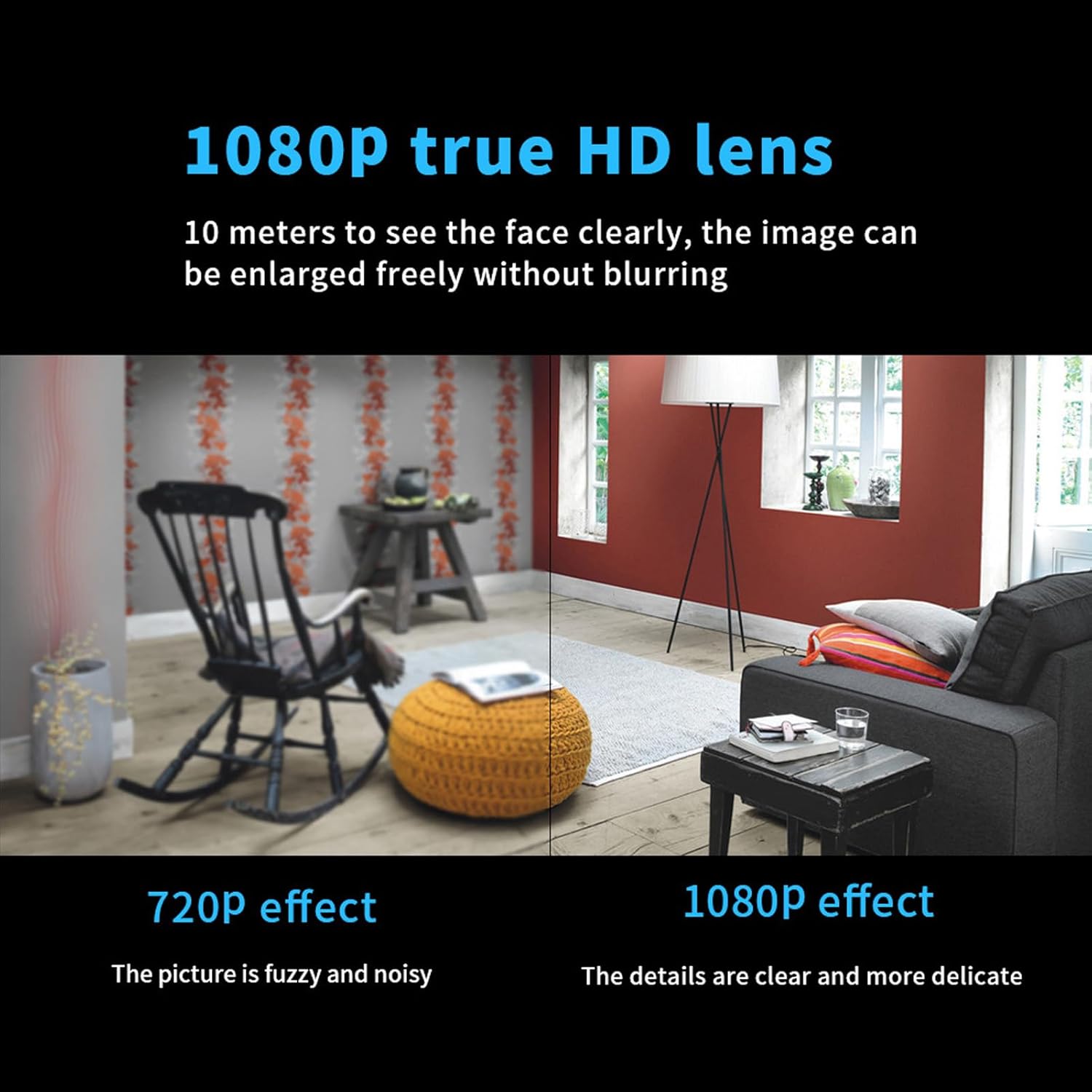
Figure 6: Visual comparison demonstrating the clarity of 1080P HD video capture versus 720P.
5.2 Detecció de moviment
The camera features a smart motion detection system. When motion is detected, the camera can automatically start recording and send alerts to your mobile device. You can customize the sensitivity of motion detection and alert preferences within the app.
- Activa/Desactiva: Toggle motion detection on or off in the app settings.
- Sensibilitat: Adjust the detection sensitivity to minimize false alarms.
- Alertes: Configure push notifications to receive instant alerts on your smartphone.
5.3 Visió nocturna
The camera is equipped with infrared night vision technology, allowing it to capture clear video footage in low-light or complete darkness up to 6 meters. This feature activates automatically when ambient light levels are low.

Figure 7: Illustrates the camera's ability to record clearly in both daylight and dark environments using night vision.
5.4 Hide Mode
For discreet surveillance, the camera offers a "Hide Mode" feature. This mode allows you to control the monitoring light, making the camera less noticeable while maintaining its full 140-degree field of view. Refer to the app settings to activate and configure Hide Mode.
5.5 Gravació d'àudio
The camera is capable of recording audio, providing clear sound evidence alongside video footage. This feature enhances the overall surveillance capability.

Figure 8: Representation of the camera's clear audio recording function.
5.6 Gestió d'emmagatzematge
The camera supports local storage via a memory card (not included). The intelligent overwrite function ensures that your storage is always managed efficiently by replacing the oldest recordings with new ones when the card is full. This eliminates the need for manual deletion.
També pots tornarview foo gravattage directly through the mobile application.
5.7 User Sharing
The camera supports multi-user real-time sharing. The main account holder can add multiple sub-accounts, allowing family members or authorized individuals to view videos simultaneously. This feature can be configured within the app.

Figure 9: Depicts the user sharing functionality, allowing multiple users to access the camera feed.
6. Manteniment
- Neteja: Feu servir un drap suau i sec per netejar la lent i el cos de la càmera. Eviteu utilitzar productes químics agressius o materials abrasius.
- Actualitzacions de firmware: Periodically check the mobile app for available firmware updates to ensure optimal performance and access to new features.
- Gestió d'emmagatzematge: While the intelligent overwrite function manages storage, it is recommended to periodically back up important recordings to another device.
- Cicle d'alimentació: If the camera experiences issues, try disconnecting and reconnecting the power source to perform a soft reset.
7. Solució De Problemes
| Problema | Causa possible | Solució |
|---|---|---|
| La càmera no s'encén | Sense font d'alimentació; cable/adaptador defectuós | Check power connection; try a different USB cable or power adapter. |
| No es pot connectar a la Wi-Fi | Incorrect Wi-Fi password; camera too far from router; 5GHz network | Verify Wi-Fi password; move camera closer to router; ensure router is broadcasting 2.4GHz Wi-Fi. |
| App cannot find camera | Camera not in pairing mode; network issue | Ensure camera is powered on and indicator light is blinking (if applicable); restart camera and app; check network connection. |
| Poca qualitat de vídeo | Dirty lens; low bandwidth; low light conditions | Clean the camera lens; ensure stable Wi-Fi connection; verify night vision is active in low light. |
| La detecció de moviment no funciona | Feature disabled; sensitivity too low; incorrect detection zone | Enable motion detection in app; increase sensitivity; adjust detection zone. |
| No es desen les gravacions | No memory card; faulty memory card; storage full | Insert a compatible memory card; format memory card in app; check if intelligent overwrite is enabled. |
8. Especificacions
| Característica | Detall |
|---|---|
| Marca | Luqeeg |
| Nom del model | Luqeeg5t32wd7gak |
| Resolució de captura de vídeo | 1080p |
| Camp de View | 140 graus |
| Tecnologia de connectivitat | Cablejat, sense fil (Wi-Fi) |
| Protocol de connectivitat | Wi-Fi |
| Font d'alimentació | Elèctric amb cable (5 volts) |
| Dispositius compatibles | Telèfon intel·ligent (Android) |
| Ús interior/exterior | Interior, Exterior |
| Tipus de muntatge | Muntatge de paret |
| Gamma de visió nocturna | 6 metres |
| Tecnologia de poca llum | Night Color (Infrared) |
| Tipus d'alerta | Només moviment |
| Classificació de protecció internacional | IP65 |
| Mètode de control | App |
| Pes de l'article | 1.06 unces |
| Material | Plàstic metàl·lic |
| Necessites piles? | No |

Figura 10: Mésview of key features including HD 1080p, 140-degree wide angle, night vision, motion detection, and remote viewing.
9. Garantia i Suport
For warranty information and technical support, please refer to the contact details provided with your purchase or visit the official Luqeeg weblloc web. Conserveu el rebut de compra com a comprovant de compra per a reclamacions de garantia.
Per obtenir més ajuda, també podeu contactar directament amb el venedor a través de la plataforma on vau comprar el producte.