1. Introducció
Thank you for choosing the BINNUNE BG02 Gaming Headset. This manual provides detailed instructions for setting up, operating, and maintaining your headset to ensure optimal performance and longevity. Please read this manual thoroughly before using the product.
2. Producte acabatview i Components
The BINNUNE BG02 is a wired gaming headset designed for immersive audio and clear communication across multiple platforms. It features a comfortable over-ear design and a flexible microphone.

Figura 2.1: Frontal view of the BINNUNE BG02 Gaming Headset with its attached microphone.
Contingut del paquet:
- BINNUNE BG02 Gaming Headset with attached 3.5mm audio cable
- PC Splitter Cable (3.5mm Y-splitter for separate audio/mic jacks)
- Guia d'inici ràpid

Figure 2.2: Contents included in the BINNUNE BG02 Gaming Headset package, showing the headset, cables, and documentation.
Característiques principals:
- 50mm Titanium Drivers: For rich, full-range sound.
- Unidirectional Boom Mic: Bendable microphone designed for clear voice capture and noise suppression.
- Controls d'àudio en línia: Convenient access to volume adjustment and microphone mute switch.
- Compatibilitat entre plataformes: Works with PS5, PS4, PS4 Pro, Nintendo Switch, PC, and mobile devices with a 3.5mm jack.

Figura 2.3: Detallada view of the 50mm titanium-coated drivers, engineered for enhanced audio clarity and immersive sound.

Figure 2.4: A user demonstrating the flexible unidirectional boom microphone, designed to capture voice clearly while minimizing background noise.
3. Configuració
The BINNUNE BG02 headset connects via a standard 3.5mm audio jack. Follow the instructions below for your specific device.
3.1 Connecting to PlayStation 5 / PlayStation 4 / Nintendo Switch / Mobile Devices:
- Locate the 3.5mm audio jack on your controller (PS5/PS4), console (Nintendo Switch), or mobile device.
- Insert the 3.5mm plug of the headset cable firmly into the audio jack.
- Adjust audio settings on your device if necessary to ensure the headset is selected as the input/output device.

Figure 3.1: The BINNUNE BG02 Headset positioned with a PlayStation 5 console and controller, illustrating its intended use for gaming.
3.2 Connecting to PC:
For PCs with separate audio and microphone jacks, use the included PC splitter cable.
- Connect the 3.5mm plug of the headset to the female end of the PC splitter cable.
- Insert the green plug of the splitter cable into your PC's audio output (headphone) jack.
- Insert the pink plug of the splitter cable into your PC's microphone input jack.
- Ensure your PC's sound settings are configured to use the headset for both playback and recording.
4. Instruccions de funcionament
The BINNUNE BG02 headset features convenient in-line controls for quick adjustments during use.

Figura 4.1: Detallada view of the in-line audio controls, featuring a volume slider and a microphone mute button for easy access.
4.1 Control de volum:
- Locate the volume slider on the in-line control unit.
- Slide the control up to increase volume and down to decrease volume.
4.2 Silenci del micròfon:
- Locate the microphone mute switch on the in-line control unit.
- Flip the switch to mute the microphone (typically indicated by a red line or icon).
- Flip the switch again to unmute the microphone.
4.3 Microphone Positioning:
- The boom microphone is flexible. Adjust its position to be close to your mouth for optimal voice clarity.
- Assegureu-vos que el micròfon no estigui obstruït.
5. Compatibilitat
The BINNUNE BG02 Gaming Headset is designed for broad compatibility with various gaming consoles and devices that support a 3.5mm audio connection.
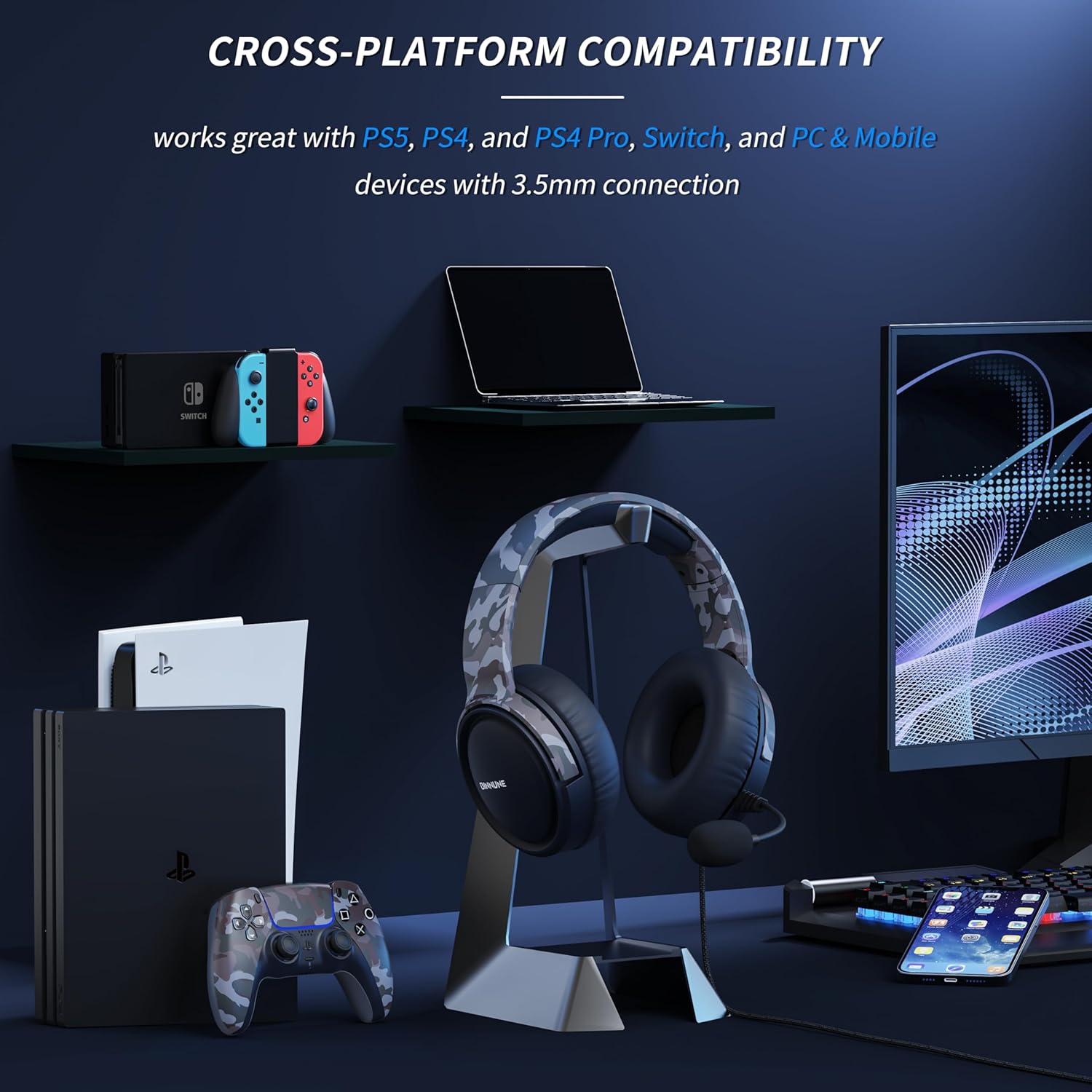
Figure 5.1: The BINNUNE BG02 Headset displayed with various compatible devices including PlayStation 5, PlayStation 4, Nintendo Switch, PC, and mobile phones.
Plataformes compatibles:
- PlayStation 5 (PS5)
- PlayStation 4 (PS4)
- PlayStation 4 Pro (PS4 Pro)
- Nintendo Switch
- PC (with included splitter cable for separate audio/mic jacks)
- Mobile Devices (with 3.5mm audio jack)
6. Manteniment
Proper care and maintenance will extend the life of your BINNUNE BG02 Gaming Headset.
- Neteja: Feu servir un drap suau i sec per netejar els auriculars i la diadema. Per a la brutícia persistent, netegeu lleugerament.amp Es pot fer servir un drap, però assegureu-vos que no entri humitat a les reixetes de l'altaveu ni al micròfon.
- Emmagatzematge: Guardeu els auriculars en un lloc fresc i sec, allunyat de la llum solar directa i de temperatures extremes. Eviteu enredar el cable.
- Cura del cable: Do not pull on the cable to disconnect the headset. Always grasp the plug. Avoid sharp bends or kinks in the cable.
- Cura del micròfon: Handle the flexible boom microphone gently. Avoid excessive bending or twisting.
7. Solució De Problemes
If you encounter issues with your BINNUNE BG02 Gaming Headset, refer to the following common solutions:
| Problema | Causa possible | Solució |
|---|---|---|
| No hi ha àudio dels auriculars |
|
|
| El micròfon no funciona |
|
|
| Distorsió del so o estàtica |
|
|
8. Especificacions
| Característica | Detall |
|---|---|
| Número de model | BG02 |
| Connectivitat | Cablejat (connector de 3.5 mm) |
| Mida del controlador | Controladors de titani de 50 mm |
| Tipus de micròfon | Unidirectional Boom Mic |
| Controls | In-line Volume Slider, Mic Mute Switch |
| Factor de forma | Circumauricular (Over-Ear) |
| Material | Plàstic |
| Pes | Aproximadament 9 unces |
| Ús recomanat | Gaming, Video Conferencing |
9. Garantia i Suport
BINNUNE products are designed for reliability and performance. For any questions, technical support, or warranty inquiries, please contact BINNUNE customer service through the retailer's platform or the official BINNUNE weblloc web. Si us plau, conserveu el comprovant de compra per a reclamacions de garantia.
Per obtenir la informació d'assistència més actualitzada, visiteu: www.binnune.com (Nota: Això és un marcador de posició) URL ja que no es va proporcionar cap enllaç de suport específic a les dades del producte.)