Introducció
Aquest manual proporciona instruccions detallades per a la configuració, el funcionament i el manteniment dels auriculars sense fil PDP Afterglow Wave. Dissenyats per a una experiència d'àudio immersiva, aquests auriculars són compatibles amb Xbox Series X|S, PC amb Windows 10/11, PlayStation PS5/PS4 i diversos dispositius compatibles amb Bluetooth.

Imatge: Els auriculars sense fil PDP Afterglow Wave, mostraasinel seu disseny negre i la il·luminació RGB personalitzable als auriculars.
Característiques del producte
- Il·luminació RGB personalitzable: Personalitza els teus auriculars amb milions de combinacions de colors i efectes d'il·luminació mitjançant l'aplicació gratuïta PDP Control Hub.
- Disseny còmode: Compta amb coixins suaus d'escuma viscoelàstica i auriculars giratoris per a sessions de joc prolongades i un emmagatzematge còmode.
- Àudio immersiu: Equipat amb transductors de 50 mm per a uns aguts clars i uns greus profunds.
- Controles convenients: Controls de volum supraaurals i un selector d'equilibri de joc/xat per a ajustaments ràpids d'àudio.
- Micròfon amb cancel·lació de soroll: Proporciona una comunicació clara, amb una funció de silenci per a la privadesa.
- Connectivitat versàtil: Es connecta sense fils mitjançant un dongle USB de baixa latència a les consoles o mitjançant Bluetooth a dispositius mòbils.
- Àmplia compatibilitat: Amb llicència oficial per a Xbox i compatible amb PC amb Windows 10/11, consoles PlayStation (PS5/PS4) i la majoria de dispositius Bluetooth.
- Llarga vida útil de la bateria: Fins a 16 hores de joc amb una sola càrrega.
Instruccions de configuració
1. Càrrega dels auriculars
Abans del primer ús, carregueu completament els auriculars. Connecteu el cable de càrrega USB inclòs al port de càrrega dels auriculars i a un port USB amb alimentació (per exemple, consola, PC, adaptador de paret USB). Les llums RGB dels auriculars parpellejaran durant la càrrega i s'haurien de mantenir fixes quan estiguin completament carregats. Una càrrega completa sol trigar aproximadament 8 hores i proporciona fins a 16 hores de durada de la bateria.
Imatge: Els auriculars destaquen la seva bateria de 16 hores de durada per a sessions de joc més llargues.
2. Connexió a Xbox/PC (adaptador sense fil)
- Inseriu el dongle sense fil USB a un port USB disponible de la consola Xbox o de l'ordinador.
- Engegueu els auriculars prement i mantenint premut el botó d'engegada fins que s'encenguin els llums.
- Els auriculars i el dongle s'haurien d'emparellar automàticament. Un llum fix al dongle i als auriculars indica que la connexió s'ha realitzat correctament.
- Ajusteu el volum amb els controls integrats a l'auricular.
Imatge: Els auriculars emfatitzen la seva compatibilitat amb diverses plataformes de jocs i dispositius Bluetooth.
3. Connexió via Bluetooth (dispositius mòbils, PS5/PS4)
- Assegureu-vos que els auriculars estan apagats.
- Premeu i manteniu premut el botó Bluetooth dels auriculars fins que l'indicador lluminós comenci a parpellejar, cosa que indica el mode d'emparellament.
- Al dispositiu (per exemple, telèfon intel·ligent, tauleta, consola PlayStation), navegueu fins a la configuració de Bluetooth i seleccioneu "Afterglow Wave" de la llista de dispositius disponibles.
- Un cop connectats, l'indicador lluminós Bluetooth dels auriculars s'il·luminarà fixament.
Instruccions de funcionament
Controls dels auriculars
- Botó d'encesa: Premeu i manteniu premut per encendre/apagar. Premeu breument per comprovar l'estat de la bateria.
- Marcador de volum: Gireu per ajustar el volum general de l'àudio.
- Dial d'equilibri del joc/xat: Ajusta el balanç entre l'àudio del joc i l'àudio del xat.
- Botó de mode: Passa ciclònicament per diferents efectes d'il·luminació RGB. Premeu i manteniu premut per activar/desactivar les llums RGB.
- Micròfon: Puja el braç del micròfon per silenciar. Baixa'l per activar el so.
Imatge: Primer pla del micròfon amb cancel·lació de soroll dels auriculars, que il·lustra la funció de silenciar.
Aplicació del centre de control PDP
Baixeu l'aplicació gratuïta PDP Control Hub de la Microsoft Store (per a Xbox/PC) o de la botiga d'aplicacions del vostre dispositiu (per a mòbils) per personalitzar els vostres auriculars:
- Modificar zones i efectes d'il·luminació RGB.
- Ajusta la configuració d'àudio i els preajustos de l'equalitzador.
- Actualitza el firmware dels auriculars.
Imatge: Diagrama que mostra les zones d'il·luminació RGB personalitzables dels auriculars, gestionades mitjançant l'aplicació PDP Control Hub.
Manteniment
- Neteja: Feu servir un drap suau i sec per netejar els auriculars. Eviteu productes de neteja o dissolvents abrasius.
- Emmagatzematge: Guardeu els auriculars en un lloc fresc i sec, allunyats de la llum solar directa i de temperatures extremes. Els auriculars giratoris permeten guardar-los en una posició plana.
- Cura de la bateria: Per allargar la durada de la bateria, eviteu descarregar completament els auriculars amb freqüència. Carregueu-los regularment, fins i tot si no els feu servir durant períodes prolongats.
- Resistència a l'aigua: Aquests auriculars no són resistents a l'aigua. Eviteu l'exposició a líquids.
Resolució de problemes
| Problema | Possible solució |
|---|---|
| Sense àudio o volum baix |
|
| El micròfon no funciona |
|
| Els auriculars es desconnecten aleatòriament o el senyal és deficient |
|
| Els llums RGB no funcionen |
|
Especificacions
| Característica | Detall |
|---|---|
| Nom del model | Auriculars sense fil Afterglow Wave |
| Número de model | 049-032-BK |
| Connectivitat | Sense fil (adaptador USB), Bluetooth |
| Versió Bluetooth | 4.0 |
| Interval Bluetooth | 20 peus |
| Mida del controlador d'àudio | Controladors dinàmics de 50 mm |
| Impedància | 32 ohms |
| Durada de la bateria | Fins a 16 hores |
| Temps de càrrega | Aproximadament 8 hores |
| Micròfon | Cancel·lació de soroll, girar per silenciar |
| Controls | Volum supraaural, equilibri de joc/xat, botó de mode (RGB) |
| Compatibilitat | Xbox Series X|S, PC amb Windows 10/11, PlayStation PS5/PS4, dispositius Bluetooth |
| Pes | 1.19 lliures (aprox. 0.54 kg) |
| Material | Policarbonat (PC) |
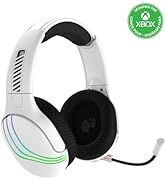
Imatge: Els auriculars destaquen pels seus controladors de 50 mm per a una qualitat d'àudio immersiva.
Informació de la garantia
Els productes PDP estan coberts per la garantia del fabricant. Per obtenir detalls específics sobre el període i els termes de la garantia dels auriculars sense fil PDP Afterglow Wave, consulteu la fitxa oficial de PDP. weblloc web o poseu-vos en contacte amb el seu servei d'atenció al client. Conserveu el comprovant de compra per a reclamacions de garantia.
Suport
Per obtenir més ajuda, assistència tècnica o per descarregar l'aplicació PDP Control Hub, visiteu el lloc web oficial de PDP. weblloc:
També podeu trobar preguntes freqüents i recursos addicionals a les seves pàgines d'assistència.


