Introducció
Thank you for choosing the SABLUTE Large Print Backlit Keyboard. This wired USB computer keyboard is designed with oversized, easy-to-read letters and features a 7-color adjustable backlight, an integrated wrist rest, and a convenient phone holder. It is ideal for users seeking enhanced visibility and comfort, including seniors, students, and office workers. This manual provides detailed instructions for setup, operation, maintenance, and troubleshooting to ensure optimal performance and longevity of your keyboard.

Image: The SABLUTE Large Print Backlit Keyboard in black, featuring large, illuminated keys and a built-in slot holding a tablet, demonstrating its design and functionality.
Informació de seguretat
- No exposeu el teclat a líquids ni a una humitat excessiva.
- Avoid extreme temperatures. Operate and store the keyboard in a moderate environment.
- Do not attempt to disassemble or repair the keyboard yourself. Refer all servicing to qualified personnel.
- Keep the keyboard away from strong magnetic fields.
- Feu servir només amb ports USB compatibles.
Contingut del paquet
Si us plau, comproveu el paquet per veure si hi ha els elements següents:
- SABLUTE Large Print Backlit Keyboard (Model: H1)
- Cable USB integrat
- Manual d'usuari (aquest document)
Configuració
- Desembalatge: Traieu amb cura el teclat del seu embalatge.
- Connexió: Locate an available USB-A port on your computer (desktop, laptop, PC, or Windows device). Insert the USB cable from the keyboard into the USB port.
The keyboard is plug-and-play, meaning no additional drivers are required for most operating systems (Windows, Mac). Your computer should automatically recognize the device.
- Col·locació: Place the keyboard on a stable, flat surface. The integrated wrist rest is designed to provide ergonomic support during use.
- Suport per a telèfon/tauleta: The integrated slot at the top of the keyboard can be used to hold your smartphone or tablet for convenient viewing during use. Note that this holder does not provide charging functionality.

Image: A user typing on the SABLUTE keyboard with a smartphone placed vertically in the integrated holder, highlighting the convenience of the phone/tablet slot.
Instruccions de funcionament
Basic Typing
The keyboard functions as a standard QWERTY keyboard. The large print keys are designed to reduce typing errors and eye strain.

Imatge: Primer pla view of the SABLUTE keyboard highlighting the extra-large characters on the keys, designed for easy visibility and reduced typing errors.
Control de la llum de fons
The keyboard features a 7-color adjustable backlight with multiple modes. This allows for comfortable typing in various lighting conditions, reducing eye fatigue.

Image: A collage showing the SABLUTE keyboard illuminated in seven different colors, demonstrating the customizable backlight feature.
- Ajust de brillantor: Premeu Fn + Amunt pàgina per augmentar la brillantor, i Fn + Pàgina avall to decrease brightness. There are 7 levels of brightness.

Image: Diagram illustrating how to adjust the backlight brightness using the Fn + Page Up/Page Down keys, showing increasing light bars.
- Toggling Backlight Color: Premeu Fn + 1 (the key with the lightbulb icon) to cycle through the 7 available backlight colors.

Image: Diagram showing the keyboard with a purple backlight and the instruction "Fn + 1 Toggle the Backlight Color", indicating the key combination for changing colors.
- Keeping One Backlight Color: Premeu Fn + 2 to set the backlight to a single, static color.

Image: Diagram showing the keyboard with a blue backlight and the instruction "Fn + 2 Keep One Backlight Color", indicating the key combination for a static color mode.
- Backlighting While Typing: Premeu Fn + 3 to activate a mode where keys light up as you type.

Image: Diagram showing the keyboard with keys lighting up in various colors as if being typed on, with the instruction "Fn + 3 Backlighting While Typing".
- Backlight Color Change (Breathing Mode): Premeu Fn + 4 to enable a mode where the backlight colors smoothly transition back and forth.

Image: Diagram showing the keyboard with a yellow backlight and the instruction "Fn + 4 Backlight Color Changes Back and Forth", indicating a dynamic color mode.
Ergonomic Design and Wrist Rest
The keyboard is designed with an ergonomic layout and an integrated palm rest to reduce wrist fatigue and discomfort during prolonged use. This helps maintain a natural hand position.

Image: A person's hands positioned comfortably on the SABLUTE keyboard, illustrating the ergonomic design and wrist rest that helps keep hands level.

Image: A banner image illustrating the ergonomic wrist rest, showing anatomical diagrams of the wrist and stating that it effectively relieves pressure, fatigue, and pain.
Quiet Keystrokes
The keyboard is engineered with a shorter keystroke distance, which effectively reduces typing noise, making it suitable for quiet environments.

Image: A close-up diagram of a keyboard key, with an arrow pointing down, indicating that shorter keystroke distance effectively reduces noise.
Vídeos oficials de productes
Large Print Backlit Keyboard with Wrist Rest Wired Keyboard
Vídeo: Un overview of the SABLUTE Large Print Backlit Keyboard, showcasing its large print keys, integrated wrist rest, and wired connectivity. This video highlights the key features and benefits for users seeking an accessible and comfortable typing experience.
Large Print Backlit Keyboard Wired Computer Keyboards
Video: A detailed demonstration of the SABLUTE Large Print Backlit Keyboard, focusing on its large, easy-to-read characters and the benefits of its wired connection for stable and delay-free typing. The video also showcases the various backlight options.
Wired USB Lighted Large Print Backlit Computer Keyboards
Video: This video provides a comprehensive look at the SABLUTE Wired USB Lighted Large Print Backlit Keyboard, emphasizing its illuminated keys for low-light environments and its plug-and-play USB connectivity. It demonstrates the keyboard's suitability for various users, including those with visual impairments.
Manteniment
- Neteja: To clean the keyboard, disconnect it from your computer. Use a soft, lint-free cloth slightly dampened with water or a mild cleaning solution. Avoid harsh chemicals or abrasive materials. For dust and debris between keys, use compressed air.
- Emmagatzematge: When not in use for extended periods, store the keyboard in a dry, cool place, away from direct sunlight and extreme temperatures.
- Cura del cable: Do not bend or crimp the USB cable excessively. Always pull from the plug, not the cable, when disconnecting.
Resolució de problemes
| Problema | Causa possible | Solució |
|---|---|---|
| El teclat no respon | Connexió USB fluixa; Port USB defectuós; Problema amb el controlador. | Ensure the USB cable is securely plugged into the computer. Try a different USB port. Restart your computer. |
| La llum de fons no funciona | Backlight turned off; Brightness set to minimum. | Premeu Fn + Amunt pàgina to increase brightness. Cycle through backlight modes using Fn + 1. |
| Les tecles són enganxoses o no responen | Debris under keys; Excessive wear. | Clean the keyboard with compressed air. If the issue persists, contact customer support. |
| Phone/Tablet holder not fitting device | Device too thick with case. | The holder is designed for standard phone/tablet thickness. Remove bulky cases if necessary. |
Especificacions
- Model: H1
- Connectivitat: USB-A per cable
- Dimensions: 17 x 8.5 x 1.25 polzades
- Pes de l'article: 1.43 lliures
- Nombre de claus: 78 (Full-size with numeric keypad)
- Il·luminació de fons: 7-Color RGB, adjustable brightness and modes
- Característiques especials: Large Print Keys, Integrated Wrist Rest, Phone/Tablet Holder
- Dispositius compatibles: Laptop, PC, Windows, Mac
- Fabricant: SABLUTE
- País d'origen: Xina
- Petjada de carboni: 23.8 kg CO2e (Plastic parts include recycled plastic)
Garantia i Suport
SABLUTE provides comprehensive support for its products:
- Garantia del fabricant: Garantia del fabricant de 360 dies.
- Política de substitució: Substitució de 90 dies.
- Atenció al client: 24 Hours Reply for inquiries.
- Número de contacte (EUA): 1-213-296-1273 (Mon-Fri 9am-1pm, 2pm-6pm PST).
- For further assistance, please visit the official SABLUTE store on Amazon or contact their customer service directly.
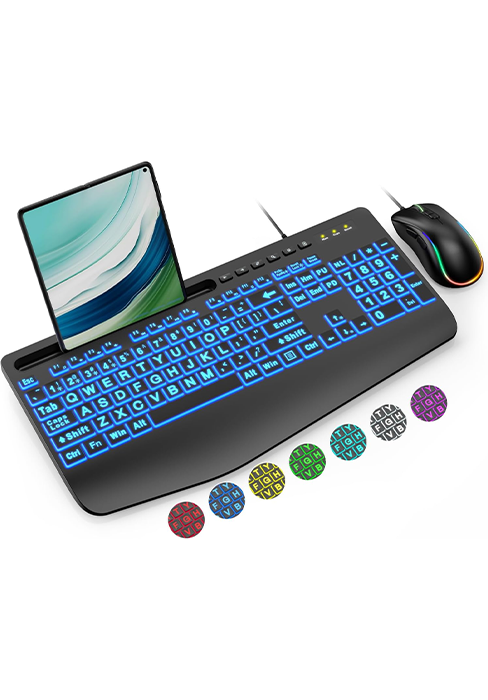
Image: An infographic detailing SABLUTE's customer support, including 24-hour reply, 90-day replacement, 360-day manufacturer warranty, and contact phone number.


