Introducció
The Moman H2 Motorcycle Intercom Headset is designed to provide seamless communication and entertainment for motorcycle riders. Featuring advanced Bluetooth technology, noise reduction, and a durable waterproof design, the H2 ensures a clear and reliable connection for up to two riders over a distance of 1000 meters. This manual provides detailed instructions for setting up, operating, maintaining, and troubleshooting your Moman H2 headset.
Producte acabatview i Característiques clau
The Moman H2 headset offers a range of features to enhance your riding experience:
- Intercomunicador bidireccional: Real-time communication for two riders up to 1000 meters (0.6 miles).
- Advanced Wireless Connectivity: Equipped with Bluetooth 5.1 for faster transmission, longer distance, more stable connection, and improved efficiency.
- Comunicació de mans lliures: Supports hands-free calls, including answering, hanging up, and rejecting calls.
- Àudio d'alta qualitat: Features 40mm Hi-Fi speakers for excellent sound quality for music and calls.
- Dual Noise Reduction: Incorporates DSP (Digital Signal Processing) and CVC (Clear Voice Capture) noise cancellation technology to minimize engine, wind, and traffic noise, ensuring clear audio even at high speeds.
- Ràdio FM integrada: Allows you to search and select clear FM channels.
- Assistent de veu AI: Access your smartphone's voice assistant for hands-free control.
- Durador i resistent a la intempèrie: IP65 waterproof and dustproof rating, capable of withstanding harsh weather conditions including dust, rain, storms, and snow. Operates in temperatures from -20°C to 50°C (-4°F to 122°F).
- Llarga vida útil de la bateria: Built-in 900mAh battery provides up to 20 hours of continuous operation (music/call) and 300 hours of standby time on a single charge.
- Control fàcil: Designed with large physical buttons and a rotary knob for easy operation, even while wearing gloves.
- Àmplia compatibilitat: Applicable to most open-face, modular, and full-face helmets.

Figura 1: Mésview of Moman H2 Pro functions and features.

Figure 2: The Moman H2 supports communication between two riders up to 1000 meters.
Contingut del paquet
Abans de començar, comproveu el paquet per assegurar-vos que hi ha tots els components:
- Moman H2 Pro Intercom Unit x 1
- Velcro Clip x 1
- Back Clip x 1
- Hook and Loop Fasteners x 1
- Pair of Speakers with Microphone x 1
- Headphone Velcro x 4
- Cable USB x 1
- Destornillador x 1
- Manual d'usuari x 1
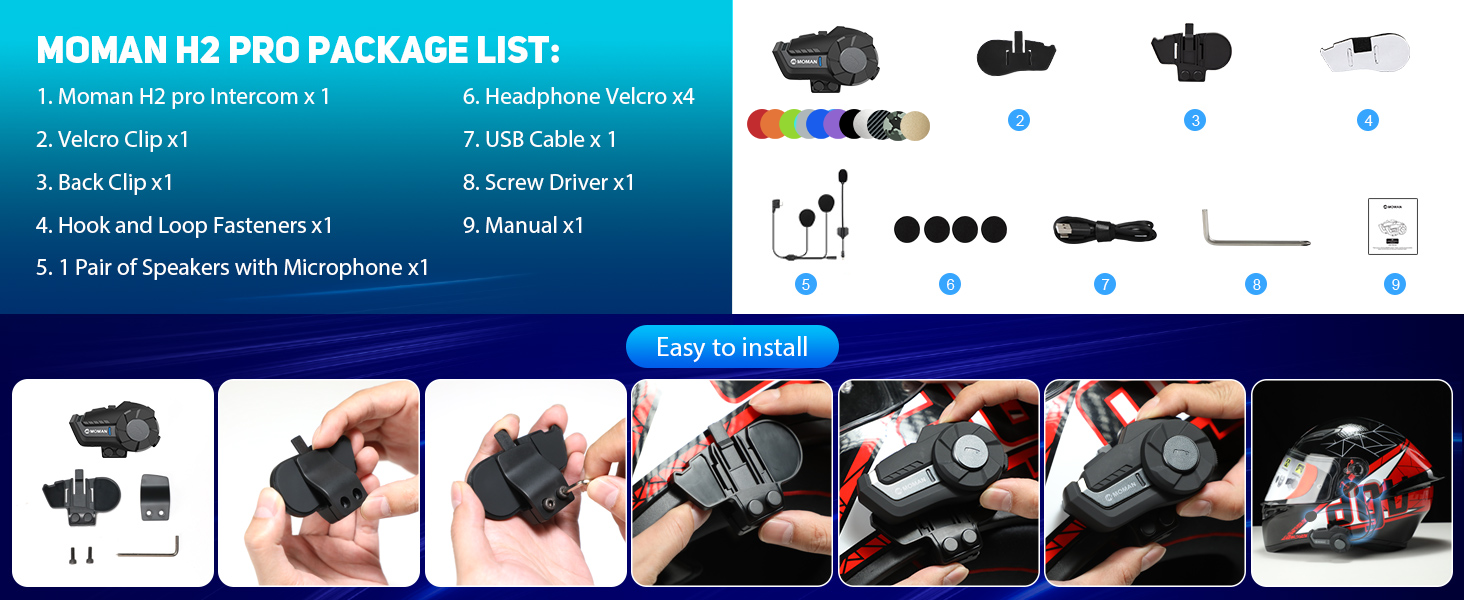
Figure 3: Moman H2 Pro Package List.
Configuració i instal·lació
The Moman H2 intercom can be installed on your helmet using either a back clip or Velcro fasteners. Choose the method that best suits your helmet and preference.
Passos d'instal·lació:
- Trieu el mètode de muntatge: Decide whether to use the back clip for a secure, semi-permanent attachment or the Velcro for easier removal and repositioning.
- Attach Intercom Unit:
- Using Back Clip: Securely attach the back clip to the side of your helmet. Then slide the Moman H2 intercom unit onto the clip until it clicks into place.
- Using Velcro: Apply the adhesive Velcro strip to a flat, clean surface on the side of your helmet. Attach the corresponding Velcro on the intercom unit and press firmly to secure.
- Instal·lar altaveus: Place the 40mm Hi-Fi speakers inside your helmet's ear pockets. Use the provided headphone Velcro pads to secure them in position. Ensure the speakers are aligned with your ears for optimal sound.
- Posició del micròfon: Attach the microphone to the inside of your helmet, near your mouth. Ensure it is positioned to pick up your voice clearly without being obstructed by padding or wind.
- Connectar els cables: Route the speaker and microphone cables neatly within the helmet padding and connect them to the appropriate ports on the Moman H2 intercom unit.
- Càrrec inicial: Before first use, fully charge the Moman H2 using the provided USB cable. Connect the USB cable to the charging interface on the unit and a power source. The indicator light will show charging status.
Figure 4: Easy installation guide for the Moman H2.
Instruccions de funcionament
The Moman H2 features intuitive controls for various functions. Familiarize yourself with the buttons and rotary knob for easy operation while riding.
Funcions del botó:
| Element de control | Acció | Funció |
|---|---|---|
| Tecla d'encesa / apagat | Manteniu premut | Encès/Apagat |
| Premsa breu | Change Language (when powered on) | |
| Doble premsa | Rellamada de la darrera trucada | |
| Tecla de funció | Premsa breu | Reproducció/pausa de música |
| Manteniu premut | Share Music (initiate music sharing with another H2 unit) | |
| Single Press (during call) | Finalitzar/rebutjar la trucada | |
| Doble premsa | Activa la ràdio FM | |
| Premsa triple | Activa l'Assistent de veu | |
| Perilla rotativa | Gira en el sentit de les agulles del rellotge | Volume Up / Next Song (short rotation) / Change FM Channel (long rotation) |
| Gira en sentit contrari a les agulles del rellotge | Volume Down / Previous Song (short rotation) / Change FM Channel (long rotation) |
Pairing and Intercom Usage:
- Bluetooth Pairing (with Phone):
- Ensure the H2 is powered off.
- Press and hold the On/Off Key until the indicator light flashes rapidly, indicating pairing mode.
- On your smartphone, enable Bluetooth and search for "Moman H2".
- Select "Moman H2" to connect. The indicator light will change to a slow flash or solid blue once paired.
- Intercom Pairing (between two H2 units):
- Ensure both H2 units are powered off.
- On both units, press and hold the On/Off Key until they enter pairing mode (rapid flashing light).
- Once both are in pairing mode, they will automatically search and connect to each other. The indicator lights will change once connected.
- To initiate intercom conversation, a short press on the Function Key on either unit might be required (refer to specific manual for exact trigger).
- Reproducció de música: Once paired with your phone, use the Function Key to play or pause music. Use the Rotary Knob to adjust volume or skip tracks.
- Ràdio FM: Double press the Function Key to activate FM radio. Use the Rotary Knob to change stations.
- Assistent de veu: Triple press the Function Key to activate your phone's voice assistant (e.g., Siri, Google Assistant).

Figure 5: Precise Function and Easy Control layout.
Manteniment
Proper maintenance will ensure the longevity and optimal performance of your Moman H2 headset.
- Neteja: Netegeu la unitat amb un suau, damp tela. No utilitzeu productes químics aggressivs, dissolvents de neteja o detergents forts.
- Exposició a l'aigua: While the device is IP65 waterproof, avoid prolonged submersion in water. Ensure the charging port cover is securely closed when not charging to maintain water resistance.
- Emmagatzematge: Guardeu els auriculars en un lloc fresc i sec quan no els feu servir. Eviteu temperatures extremes.
- Cura de la bateria: To preserve battery life, charge the unit regularly, even if not used frequently. Avoid fully discharging the battery for extended periods.
Resolució de problemes
If you encounter issues with your Moman H2 headset, refer to the following common problems and solutions:
| Problema | Causa possible | Solució |
|---|---|---|
| El dispositiu no s'encén. | Bateria baixa. | Carregueu el dispositiu completament mitjançant el cable USB proporcionat. |
| Cannot pair with phone/another unit. | Device not in pairing mode; Bluetooth off on phone; too far apart. | Ensure device is in pairing mode (rapid flashing light). Turn Bluetooth on phone. Bring devices closer (within 1 meter for pairing). Try resetting the device. |
| Mala qualitat d'àudio / Soroll. | Microphone/speakers improperly positioned; environmental noise; low signal. | Adjust microphone closer to mouth. Ensure speakers are aligned with ears. Move away from strong electromagnetic interference. DSP&CVC noise reduction should handle most environmental noise. |
| Intercom range is shorter than expected. | Obstructions (buildings, terrain); heavy radio interference. | Ensure clear line of sight between units. Avoid areas with high radio frequency interference. |
| Els botons no responen. | Device frozen; physical damage. | Try restarting the device. If unresponsive, allow battery to drain completely and then recharge. If issue persists, contact customer support. |
Especificacions
| Característica | Detall |
|---|---|
| Nom del model | H2 |
| Marca | mare |
| Gamma d'intercomunicació | Up to 1000 meters (0.6 miles) for 2 riders |
| Versió Bluetooth | 5.1 |
| Capacitat de la bateria | 900 mAh |
| Temps de treball | Up to 20 hours (music/call) |
| Temps d'espera | Fins a 300 hores |
| Temps de càrrega | Aproximadament 2 hores |
| Resistència a l'aigua | IP65 (resistent a l'aigua i a la pols) |
| Temperatura de funcionament | -20 °C a 50 °C (-4 °F a 122 °F) |
| Mida de l'altaveu | 40 mm Hi-Fi Speakers |
| Reducció de soroll | DSP & CVC Technology |
| Material | Elastòmer termoplàstic (TPE) |
| Tipus de control | Physical Buttons, Rotary Knob |
Garantia i Suport
Moman products are designed for durability and performance. For specific warranty details, please refer to the warranty card included in your product package or visit the official Moman website. For technical support, troubleshooting assistance beyond this manual, or inquiries about replacement parts, please contact Moman customer service through their official channels.
While specific warranty information is not available in this document, Moman is committed to providing premium products, superior quality, and professional service.

Figure 6: Moman's commitment to quality and service.


