Introducció
The Looki Hot Water Dispenser is designed to provide instant hot water for various beverages and quick meals. Featuring a 3.0-liter capacity, a touch display, and 2600W power, it offers convenience and efficiency for daily use. This manual provides detailed instructions for setup, operation, maintenance, and troubleshooting to ensure optimal performance and longevity of your appliance.
1. Configuració
1.1 Desembalatge
Carefully remove all packaging materials from the dispenser. Ensure all components are present: the main unit, water reservoir, and drip tray. Retain packaging for future transport or storage if needed.
1.2 Col·locació
Place the dispenser on a stable, flat, and heat-resistant surface, away from direct sunlight and heat sources. Ensure there is adequate ventilation around the unit. Do not place it near the edge of a countertop where it could be easily knocked over.
1.3 Omplir el dipòsit d'aigua
Remove the water reservoir from the back of the unit. Fill it with clean, cold tap water up to the MAX fill line (3.0L). Do not overfill. Reattach the reservoir securely to the main unit.

Image: A hand pouring water into the transparent water reservoir of the Looki Hot Water Dispenser, illustrating the filling process.

Image: The Looki Hot Water Dispenser in use, dispensing hot water into a glass, showcasing la seva funció principal.
1.4 Ús inicial
Before first use, it is recommended to run a full cycle of hot water without any beverage to clean the internal components. Plug the power cord into a grounded electrical outlet. Place a large heat-resistant container under the dispenser spout. Select the highest temperature and maximum volume setting, then dispense. Discard this water. Repeat if desired.
2. Instruccions de funcionament
2.1 Engegada/apagada
Premeu el botó On/Off button on the touch display to power the unit on or off. The LED display will illuminate when the unit is on.
Imatge: Una imatge detallada view of the Looki Hot Water Dispenser's LED touch display, showing various icons for temperature, volume, milk function, and cleaning, with a hand interacting with the screen.
2.2 Ajust de la temperatura
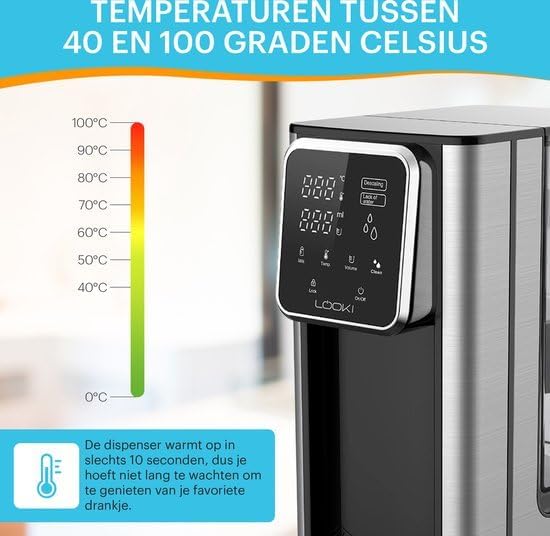
Utilitza el Temp icon on the touch display to cycle through available temperature settings (e.g., 40°C to 100°C). Select the desired temperature for your beverage or meal.

Image: The Looki Hot Water Dispenser alongside a temperature scale ranging from 0°C to 100°C, highlighting its ability to dispense water at various temperatures within 10 seconds.
2.3 Ajust del volum
Premeu el botó Volum icon to select the desired water volume to be dispensed. This feature helps in dispensing precise amounts of water.
2.4 Distribució d'aigua calenta
Place your cup or container under the spout. Once temperature and volume are set, press the Dispensar button (often indicated by a water droplet icon or a large central button) to start dispensing. The dispenser will stop automatically once the selected volume is reached.

Image: A split image comparing the traditional method of boiling water with a kettle (top) versus the instant dispensing of hot water from the Looki Hot Water Dispenser (bottom), emphasizing convenience.
2.5 Milk Function (if applicable)
If your model includes a milk function, press the Llet icon to activate settings suitable for milk-based beverages. Refer to the display for specific instructions related to this function.
2.6 Característiques de seguretat
The Looki Hot Water Dispenser is equipped with automatic shut-off and overheat protection. The unit will automatically turn off if the water level is too low or if it detects overheating, ensuring safe operation.
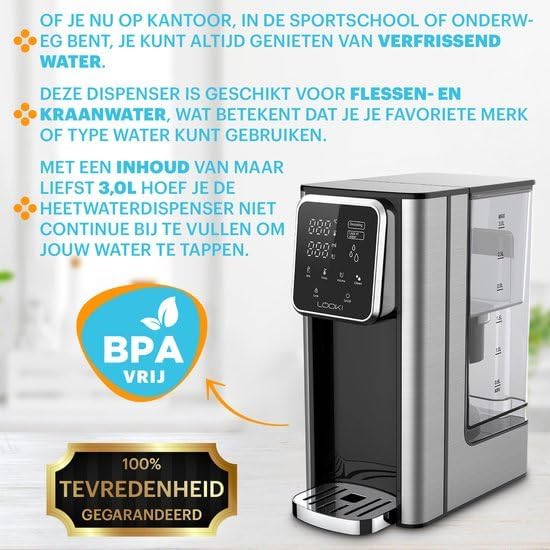
Image: A woman holding a cup of coffee next to the Looki Hot Water Dispenser, with icons below showing various uses like tea, coffee, hot chocolate, and bouillon, demonstrating versatility.
3. Manteniment
3.1 Neteja
Regular cleaning ensures hygiene and extends the life of your dispenser. Unplug the unit before cleaning. Wipe the exterior with a soft, damp cloth. The drip tray can be removed and washed with warm, soapy water. Rinse thoroughly and dry before reattaching.
3.2 Funció d'autoneteja
The dispenser features an integrated self-cleaning function. Refer to the display for the Neteja icon. Follow the on-screen prompts to initiate the cleaning cycle. This function helps to flush out internal components.
3.3 Descalcificació
Over time, mineral deposits (limescale) can build up, especially in hard water areas. The display may show a "Descaling" or "Calc" indicator. To descale, use a descaling solution specifically designed for hot water appliances, following the product's instructions. Alternatively, a mixture of white vinegar and water can be used (e.g., 1 part vinegar to 2 parts water). Fill the reservoir with the descaling solution, run a full cycle, then rinse by running several cycles with fresh water.
4. Solució De Problemes
| Problema | Causa possible | Solució |
|---|---|---|
| No es dispensa aigua. | Water reservoir empty or not properly seated. | Fill the water reservoir. Ensure it is securely placed. |
| L'aigua no és prou calenta. | Incorrect temperature setting. Limescale buildup. | Check temperature setting. Perform descaling. |
| "Descaling" or "Calc" indicator on. | Limescale buildup detected. | Realitzeu un cicle de descalcificació segons les instruccions de manteniment. |
| La unitat no s'encén. | No endollat. Problema amb la presa de corrent. | Ensure power cord is securely plugged in. Test outlet with another appliance. |
Si el problema persisteix després d'intentar aquestes solucions, poseu-vos en contacte amb l'atenció al client.
5. Especificacions
- Número de model: LKI-Dispenser
- Marca: Looki
- Capacitat: 3.0 litres
- Wattage: 2600 watts
- Voltage: 240 Volts
- Color: Negre
- Dimensions del producte: 26 x 15 x 30 cm
- Primera data disponible: 21 de setembre de 2023
6. Garantia i Suport
This Looki Hot Water Dispenser comes with a 24 mesos de garantia des de la data de compra, que cobreix els defectes de fabricació. Conserveu el comprovant de compra per a reclamacions de garantia.
For technical support, troubleshooting assistance, or warranty inquiries, please contact Looki customer service. Refer to the product packaging or the Looki official weblloc web per obtenir la informació de contacte més actualitzada.
Manufacturer: Looki


