1. Informació de seguretat
Please read all safety instructions carefully before using the LAMTTO Wireless Carplay Car Stereo. Failure to follow these instructions may result in injury or damage.
- Instal·lació: Assegureu-vos que el dispositiu estigui ben muntat i que no us obstrueixi view or interfere with vehicle controls. Improper installation can lead to accidents.
- Font d'alimentació: Use only the provided car charger. Connecting to an incompatible power source may damage the device or cause fire.
- Seguretat de conducció: Do not operate the device or adjust settings while driving. Always pull over to a safe location before making any adjustments.
- Temperatura: Eviteu exposar el dispositiu a temperatures extremes, a la llum solar directa durant períodes prolongats o a una humitat elevada.
- Neteja: Desconnecteu l'alimentació abans de netejar. Feu servir un drap suau i sec. No utilitzeu netejadors líquids ni aerosols.
- Desmuntatge: No intenteu desmuntar ni reparar el dispositiu vosaltres mateixos. Encarregueu tot el manteniment a personal qualificat.
2. Contingut del paquet
Verifiqueu que tots els elements que s'enumeren a continuació s'inclouen al vostre paquet:
- 6.86 inch Carplay Screen Unit
- Car charger with 9.8 FT cable
- Backup camera with 26 FT cable
- Muntatge per ventosa
- Muntatge adhesiu
- 4.9 FT AUX cable
- Manual d'usuari
- Instal·leu l'eina

Image: Illustration of the LAMTTO Carplay Screen unit and all included accessories, such as the car charger, backup camera, various mounts, AUX cable, and user manual.
3. Producte acabatview
The LAMTTO Wireless Apple Carplay Car Stereo is a portable 6.86-inch touch screen device designed to enhance your driving experience with smart connectivity and safety features.
3.1 Característiques clau
- Apple CarPlay i Android Auto sense fil: Seamlessly integrate your smartphone for navigation, music, calls, and messages.
- Wireless Mirrorlink & AndroidCast: Project your phone's screen directly onto the carplay display for video, audio, and picture sharing.
- AHD 1080P Backup Camera: Enhance parking safety with clear night vision and auxiliary lane lines.
- 6.86" HD IPS Touch Screen: Capacitive touch screen with 1280x400 resolution and 170° full-viewing angle for clear visuals.
- Sortides d'àudio múltiples: Supports Bluetooth transmit, FM transmit, AUX output, and a high-quality built-in speaker.
- Fàcil instal·lació: Plug-and-play design with flexible mounting options, connecting directly to the cigarette lighter.

Image: The main LAMTTO 6.86-inch Carplay screen unit, along with the included backup camera, suction cup mount, and icons representing Apple CarPlay and Android Auto functionality.
3.2 Connectivitat sense fil
The device offers robust wireless connectivity for both Apple CarPlay and Android Auto, allowing you to access your phone's features without cables.
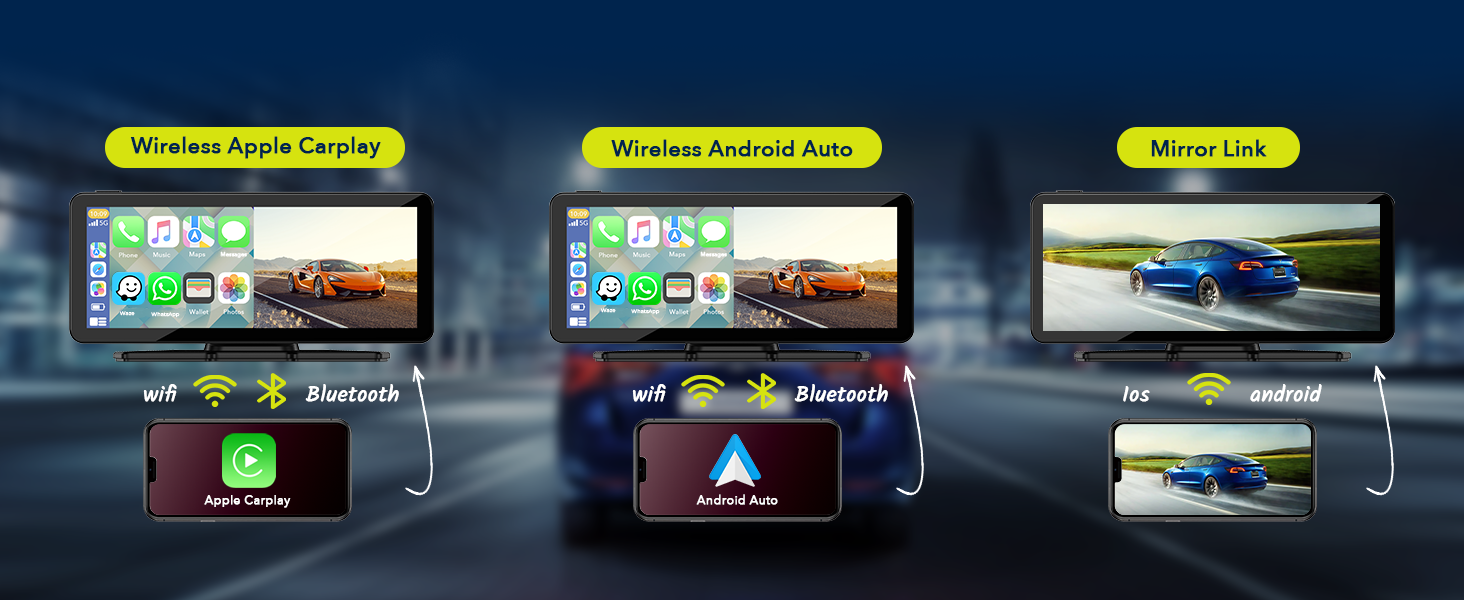
Image: A visual representation showing how the LAMTTO Carplay screen connects wirelessly via Wi-Fi and Bluetooth to both Apple CarPlay and Android Auto enabled smartphones.
3.3 Assistència de veu
Utilize Siri or Google Assistant for hands-free control, enabling safer driving by managing navigation, calls, and music through voice commands.

Image: Depicts a driver using voice commands like "Ok Google, call Lily" or "Hi Siri, navigate to the car park" to interact with the Carplay screen, emphasizing hands-free operation.
4. Configuració i instal·lació
The LAMTTO Carplay Screen is designed for easy, non-destructive installation, allowing you to retain your car's original radio system.
4.1 Muntatge de la unitat
Choose between the suction cup mount or the adhesive mount based on your preference and dashboard surface. Ensure the chosen location does not obstruct your view or airbags.
- Superfície neta: Thoroughly clean the dashboard or windshield area where you intend to mount the unit.
- Adjuntar el muntatge: Securely attach the chosen mount (suction cup or adhesive) to the desired location. For adhesive mount, press firmly for 30 seconds.
- Attach Carplay Unit: Slide the Carplay screen onto the mount until it clicks into place. Adjust the angle for optimal viewing.

Imatge: Examples of various mounting positions for the Carplay screen, including dashboard suction mount, adhesive sticker bracket, and windshield suction mount, demonstrating flexibility.
4.2 Connexió d'alimentació
- Insert the provided car charger into your vehicle's cigarette lighter socket.
- Connect the other end of the car charger cable to the power input port on the Carplay screen unit.
- La unitat s'encendrà automàticament quan s'activi el contacte del vehicle.
4.3 Instal·lació de la càmera de marxa enrere (opcional)
For enhanced safety, install the included AHD 1080P backup camera.
- Muntar la càmera: Install the backup camera at the rear of your vehicle, typically near the license plate light.
- Cable de ruta: Carefully route the 26 FT camera cable from the rear of the vehicle to the Carplay screen unit, ensuring it does not interfere with moving parts or get pinched.
- Connectar l'alimentació: Connect the red wire of the backup camera to the positive terminal of your vehicle's reverse lamp. This ensures the camera activates automatically when reversing.
- Connectar a la unitat: Plug the camera's video cable into the designated camera input port on the Carplay screen unit.

Image: A visual demonstrating the 1080P waterproof reverse camera in action, showing a clear view of the area behind the car with parking guidelines on the Carplay screen.
5. Instruccions de funcionament
5.1 Wireless Apple CarPlay / Android Auto Connection
- Ensure your smartphone's Wi-Fi and Bluetooth are enabled.
- On the Carplay screen, select the "CarPlay" or "Android Auto" icon.
- The screen will display a Wi-Fi network name and password. Connect your phone to this Wi-Fi network.
- Once connected to Wi-Fi, pair your phone via Bluetooth with the Carplay unit.
- After successful pairing, Apple CarPlay or Android Auto will launch automatically. Subsequent connections should be automatic.
5.2 Wireless Mirrorlink / AndroidCast
This feature allows you to mirror your phone's screen onto the Carplay display.
- Connect the Carplay unit's Wi-Fi to your phone as described in section 5.1.
- On the Carplay screen, select the "Mirrorlink" or "AndroidCast" icon.
- For Android devices, you may need to scan a QR code displayed on the Carplay screen to download the "TcLink" APP to enable AndroidCast.
- Follow the on-screen prompts on your phone to initiate screen mirroring.

Image: Illustrates the wireless Apple Airplay and Android Cast features, showing how content from a smartphone can be mirrored onto the Carplay screen.
5.3 Opcions de sortida d'àudio
The Carplay unit offers several ways to output audio to your car's sound system:
- Altaveu integrat: The unit has its own speaker for direct audio output.
- Transmissió Bluetooth: Connect your car's original Bluetooth system to the Carplay unit to transmit audio wirelessly.
- Transmissió FM: Select an unused FM frequency on the Carplay unit and tune your car's FM radio to the same frequency to receive audio.
- Sortida AUX: Use the provided 4.9 FT AUX cable to connect the Carplay unit's AUX output to your car's AUX input port.

Image: Displays the four audio output methods: Bluetooth, Built-in Speaker, FM transmission, and AUX connection, illustrating how sound can be routed from the Carplay unit.
5.4 Using the Backup Camera
When the backup camera is properly installed and connected to your vehicle's reverse lamp, the Carplay screen will automatically switch to the rearview display when you engage reverse gear.
- The display will show a clear 1080P image from the rear camera.
- Auxiliary parking lines will be overlaid on the image to assist with parking maneuvers.
5.5 Ajust de la brillantor de la pantalla
Adjust the screen brightness manually via the settings menu on the Carplay unit to suit different lighting conditions.

Image: A visual representation of the screen brightness adjustment feature, showing a slider control on the Carplay display to increase or decrease brightness.
6. Manteniment
Proper maintenance ensures the longevity and optimal performance of your LAMTTO Carplay Screen.
- Neteja de la pantalla: Feu servir un drap suau i sense borrissol per netejar suaument la pantalla. Per a taques difícils, fregueu lleugeramentampNetegeu el drap amb aigua o un netejador de pantalles. Eviteu productes químics agressius o materials abrasius.
- Neteja general: Mantingueu la unitat neta de pols i deixalles. Feu servir un raspall suau o aire comprimit per netejar les reixetes de ventilació i els ports.
- Gestió de cables: Ensure all cables are neatly routed and secured to prevent damage from pinching or snagging.
- Emmagatzematge: If storing the unit for an extended period, disconnect it from power and store it in a cool, dry place away from direct sunlight.
7. Solució De Problemes
If you encounter issues with your LAMTTO Carplay Screen, refer to the following common problems and solutions:
| Problema | Causa possible | Solució |
|---|---|---|
| La unitat no s'encén. | No power from cigarette lighter; loose power cable connection; faulty car charger. | Check if the car's cigarette lighter socket is working. Ensure the car charger is fully inserted into both the socket and the unit. Try using the supplied car charger only. |
| Cap so o so intermitent. | Incorrect audio output setting; loose AUX cable; FM frequency interference; Bluetooth not connected. | Verify the selected audio output mode (Bluetooth, FM, AUX, Built-in Speaker). Ensure AUX cable is securely connected. If using FM, try a different frequency. Re-pair Bluetooth. Restart the unit and/or car. |
| El CarPlay/Android Auto no es connecta sense fil. | Wi-Fi/Bluetooth not enabled on phone; incorrect Wi-Fi password; phone not paired. | Ensure phone's Wi-Fi and Bluetooth are on. Verify Wi-Fi password. Forget and re-pair Bluetooth connection on both devices. Ensure Android Auto is Android 11 or above. |
| La càmera de marxa enrere no es mostra. | Camera cable loose; reverse lamp connection issue; camera malfunction. | Check all camera cable connections, especially the red wire to the reverse lamp. Ensure the vehicle is in reverse gear. |
| Screen mirroring (Mirrorlink/AndroidCast) not working. | Incorrect app installed (Android); Wi-Fi connection issue; phone compatibility. | Ensure your phone is connected to the unit's Wi-Fi. For Android, confirm the "TcLink" APP is installed and updated. Check phone's mirroring settings. |
8. Especificacions
| Característica | Detall |
|---|---|
| Nom del model | 6.86-Inch Carplay Screen |
| Marca | LAMTTO |
| Mida de la pantalla | 6.86 polzades (diagonal de pantalla visible: 7" / 18 cm) |
| Tipus de visualització | Pantalla tàctil IPS HD |
| Resolució | 1280 x 400 |
| Viewangle ing | 170° completviewangle de ing |
| Tecnologia de connectivitat | Wireless, Bluetooth, Wi-Fi |
| Sortida d'àudio | Bluetooth Transmit, FM Transmit, AUX Output, Built-in Speaker |
| Càmera de seguretat | AHD 1080P (Video Capture Resolution: 1080p) |
| Mètode de control | Toca |
| Dimensions del producte | 0.39 x 7.4 x 3.07 polzades |
| Pes de l'article | 2.2 lliures |
| Tipus de muntatge | Adhesive Mount, Suction Cup Mount |
| Compatible Vehicle Voltage | 12-24V Car Models |
9. Garantia i Suport
LAMTTO is committed to providing quality products and excellent customer service.
- 90-Day Return/Exchange: Enjoy a 90-day period for returns or exchanges without reason.
- Atenció al client de per vida: LAMTTO provides lifelong customer service for products and accessories.
- 24-Hour Response: Expect a professional response to your inquiries within 24 hours.
For further assistance, please contact LAMTTO customer support through the platform where you purchased the product or visit the official LAMTTO store page on Amazon: LAMTTO Amazon Store.

Image: Icons representing 24-hour customer response, 90-day return/exchange policy, and lifetime customer service, highlighting LAMTTO's commitment to support.


