1. Instruccions de seguretat importants
Please read these instructions carefully before using the product and retain them for future reference. Adhere to all warnings and follow all instructions.
- No utilitzeu aquest aparell prop de l'aigua.
- Netegeu només amb un drap sec.
- No bloquegeu cap obertura de ventilació. Instal·leu-ho d'acord amb les instruccions del fabricant.
- No instal·leu a prop de cap font de calor com ara radiadors, registres de calor, estufes o altres aparells (inclosos amplificadors) que produeixen calor.
- Eviteu que el cable d'alimentació sigui trepitjat o pessigat, especialment als endolls, els endolls i el punt on surten de l'aparell.
- Utilitzeu només accessoris/accessoris especificats pel fabricant.
- Desendolleu aquest aparell durant les tempestes amb llamps o quan no l'utilitzeu durant llargs períodes de temps.
2. Producte acabatview
The SeeYing Bluetooth Turntable is designed for high-fidelity vinyl playback with modern connectivity options. It features a belt-drive system, adjustable counterweight, and a high-quality magnetic cartridge for precise tracking.
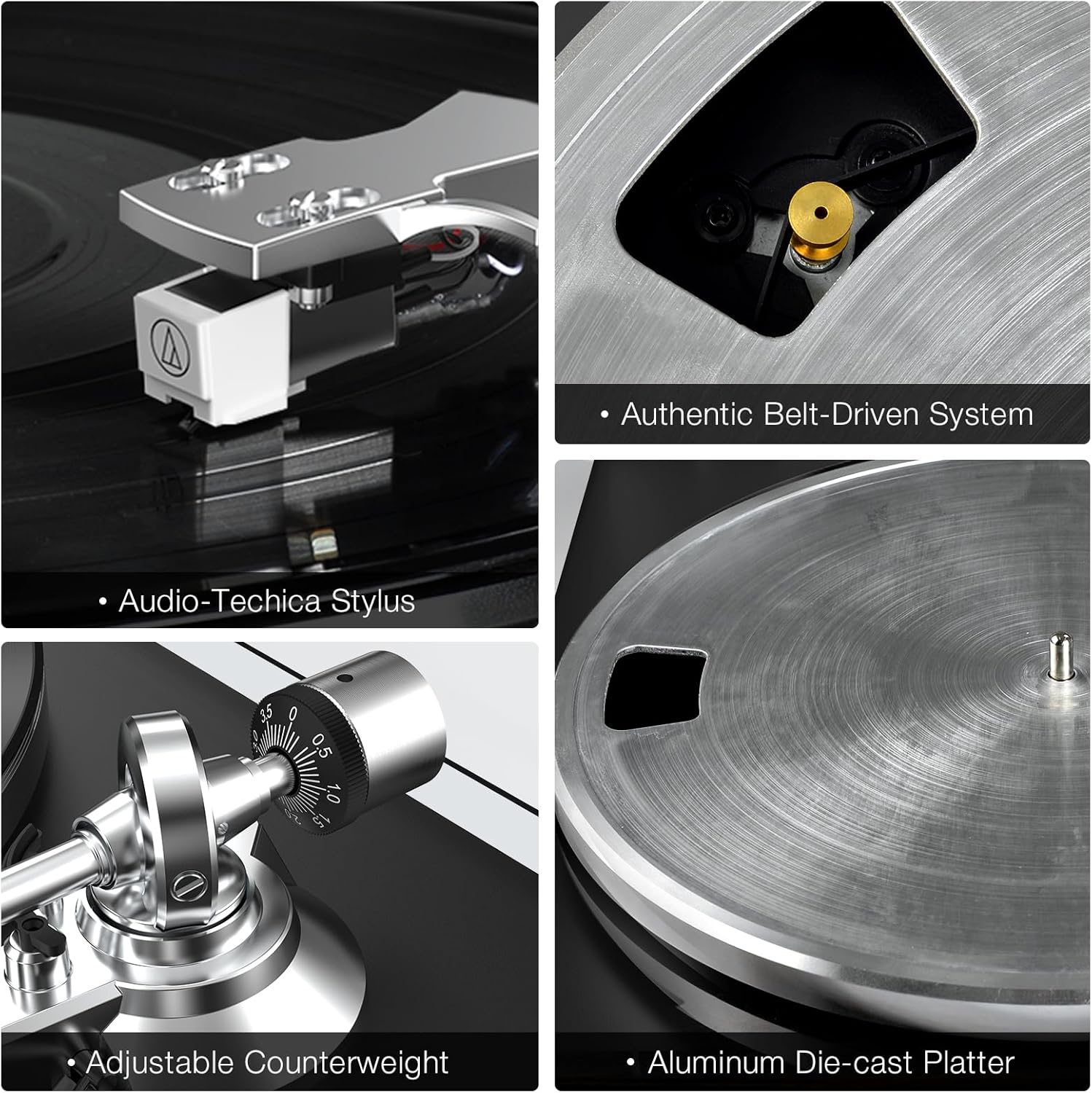
Components clau: This image displays the Audio-Technica stylus, the authentic belt-driven system, the adjustable counterweight, and the aluminum die-cast platter, highlighting the precision engineering of the turntable.

Connexions del panell posterior: This diagram illustrates the various input and output ports on the rear of the turntable, including the ground connector, phono/line-out jacks, phono/line-out switch, USB port for PC link, 12V DC adapter jacks, and wireless output connectivity indicator.
3. Guia de configuració
Follow these steps to set up your SeeYing Turntable for the first time.
- Desembalatge: Traieu amb cura tots els components de l'embalatge. Assegureu-vos que hi hagi totes les peces que figuren a la llista d'embalatge.
- Platter and Belt Installation:
Place the aluminum platter onto the spindle. Locate the drive belt and carefully stretch it around the motor pulley and the inner rim of the platter. Ensure the belt is not twisted.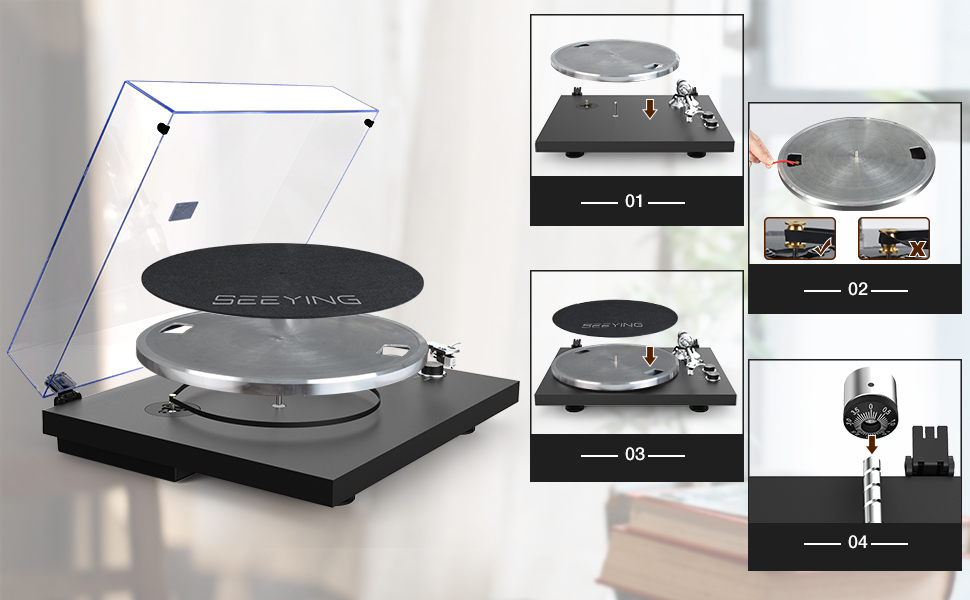
Passos de configuració: This image provides a visual guide for the initial setup, including placing the platter, installing the belt, and adjusting the counterweight.
- Ajust del contrapès: Slide the counterweight onto the rear of the tonearm. Rotate the counterweight until the tonearm is balanced and floats freely. Then, adjust the tracking force according to your cartridge's specifications (typically 1.5-2.5 grams for the included cartridge).
- Dust Cover Installation: Attach the dust cover hinges to the designated slots on the turntable base.
- Connexió d'alimentació: Connect the provided power adapter to the 'DC IN 12V' port on the rear of the turntable and plug it into a wall outlet.
4. Instruccions de funcionament
Learn how to play records and utilize the turntable's features.
4.1 Reproduint un disc
- Posa un disc al plat.
- Select the appropriate speed (33 or 45 RPM) using the speed button. For 7-inch records, use the 45 RPM setting. For 12-inch records, use the 33 RPM setting.

Botons de control: This image highlights the 33 & 45 speed selection button and the Start & Stop button for easy operation.
- Aixequeu el braç fent servir la palanca de cueing.
- Moveu el braç sobre el solc inicial desitjat del disc.
- Gently lower the tonearm using the cueing lever. The record will begin to play.
- To stop playback, lift the tonearm using the cueing lever and return it to the tonearm rest.
4.2 Vinculació Bluetooth
The turntable can wirelessly connect to Bluetooth speakers or headphones.
- Ensure your Bluetooth speaker/headphones are in pairing mode.
- Turn on the turntable. It will automatically search for and attempt to pair with nearby Bluetooth devices.
- Once connected, the Bluetooth indicator light on the turntable will illuminate steadily. Audio will now be streamed wirelessly.

Connectivitat sense fils: This image demonstrates the turntable's ability to connect wirelessly to Bluetooth speakers, providing a convenient audio experience.
4.3 RCA Output Connection
For wired connections to external amplifiers or powered speakers, use the RCA output.
- Connect the RCA cables (red for right, white for left) from the turntable's RCA output jacks to the corresponding input jacks on your amplifier o altaveus alimentats.
- Set the PHONO/LINE switch on the rear of the turntable to the appropriate setting (PHONO if connecting to a phono input on an amplifier, LINE if connecting to a line-level input or powered speakers).

Sortida RCA: This image illustrates the use of RCA output to connect the turntable to external speakers for enhanced sound quality.
4.4 USB to PC Recording
Converteix els teus discos de vinil a àudio digital files al teu ordinador.
- Connect the turntable to your computer using a USB cable (not always included, check 'Included Components').
- Install appropriate audio recording software on your computer (e.g., Audacity).
- Follow the software's instructions to record the audio playback from the turntable.
5. Manteniment
Proper maintenance ensures the longevity and performance of your turntable.
5.1 Neteja del plat giratori
- Netegeu la coberta antipols i l'armari amb un drap suau i sec.
- For the stylus, use a soft brush and brush gently from back to front.
- Eviteu utilitzar productes químics aggressivs o netejadors abrasius.
5.2 Substitució del llapis òptic
The stylus (needle) should be replaced after approximately 300-500 hours of playback to maintain sound quality and prevent record wear.
- Carefully grasp the stylus housing and pull it downwards and forwards to remove it from the cartridge.
- Insert the new stylus by pushing it upwards and backwards into the cartridge until it clicks into place.
- Ensure the new stylus is securely seated.

Detachable Stylus: This image shows the detachable high-end AT3600L stylus, emphasizing its precision tracking and ease of replacement.
6. Solució De Problemes
Si teniu problemes amb el tocadiscos, consulteu els problemes i solucions més comuns següents.
| Problema | Causa possible | Solució |
|---|---|---|
| Sense poder | Power adapter not connected; Power outlet not active | Assegureu-vos que l'adaptador de corrent estigui connectat correctament; proveu una altra presa de corrent. |
| Sense so ni volum baix | Incorrect input selection on amplifier; RCA cables loose; PHONO/LINE switch incorrect; Bluetooth not paired | Seleccioneu l'entrada correcta a amplifier; Check RCA cable connections; Set PHONO/LINE switch correctly; Re-pair Bluetooth device. |
| So distorsionat o amb salts | Stylus dirty or worn; Tracking force incorrect; Record dirty or damaged | Clean or replace stylus; Adjust counterweight/tracking force; Clean record or try a different one. |
| El plat no gira | Drive belt dislodged or broken; Motor issue | Check and re-seat drive belt; Contact customer support if motor issue suspected. |
7. Especificacions
| Característica | Detall |
|---|---|
| Marca | SeeYing |
| Nom del model | SeeYing (HP-H0056) |
| Tecnologia de connectivitat | Bluetooth |
| Velocitat de rotació màxima | 45 Revolutions Per Minute (supports 33 1/3 RPM) |
| Components inclosos | USB Conversion, RCA Cable |
| Característiques especials | Integrat Preamplifier, Adjustable Speed |
| Material | Alumini |
| Color | Negre |
| Dispositius compatibles | Bluetooth speakers, Bluetooth headphones, Computers, Active speakers with RCA input, USB-compatible devices (e.g., smartphone, tablet) |
| Dimensions del producte (aprox.) | 48.9 x 42.29 x 19.8 cm |
| Pes del producte (aprox.) | 6.14 quilos |
8. Garantia i Suport
SeeYing is committed to product quality and customer satisfaction. While specific warranty terms are not detailed here, the manufacturer provides excellent 1-to-1 after-sales support for all customers.
For any inquiries or support needs, please contact SeeYing customer service through your purchase platform or the official SeeYing weblloc.


