1. Introducció
This manual provides detailed instructions for the installation, operation, and maintenance of your COMMAX CDV-77M 7-inch Fine View Monitor. Please read this manual thoroughly before using the product to ensure proper function and safety. Keep this manual for future reference.
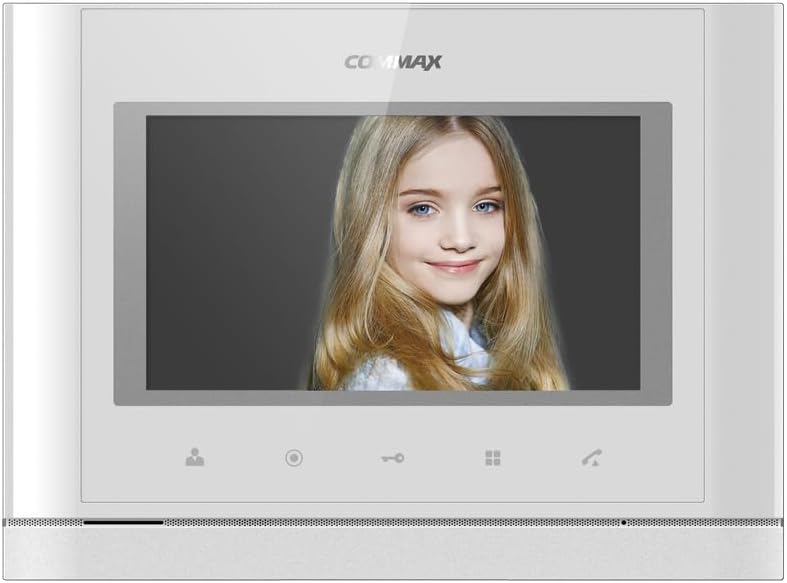
Davant view of the COMMAX CDV-77M monitor, showcasing its 7-inch TFT LCD screen and sleek design. The screen is active, displaying an image.
2. Característiques del producte
- 7-inch TFT LCD screen for clear video display.
- Supports video communication and door lock release functions.
- Expandable system: Connects with up to 2 door cameras, 2 additional monitors, and 2 interphones.
- PAL/NTSC video format conversion capability.
- Hand-free operation for convenience.
- Wall-mounted design for easy installation.
3. Informació de seguretat
Please observe the following safety precautions to prevent damage to the product and ensure user safety:
- No exposeu la unitat a l'aigua ni a una humitat excessiva.
- Eviteu col·locar la unitat sota la llum solar directa o a prop de fonts de calor.
- No intenteu obrir ni reparar la unitat vosaltres mateixos. Encarregueu tot el manteniment a personal qualificat.
- Assegureu-vos que la font d'alimentació coincideixi amb el volum especificattage (AC 100-240V, 50/60Hz).
- Mantingueu la unitat allunyada de camps magnètics forts.
- Operate within the specified temperature range of 0℃ to 40℃.
4. Instal·lació
4.1 Contingut del paquet
Verifiqueu que tots els components siguin presents:
- COMMAX CDV-77M Monitor Unit
- Suport de muntatge a la paret
- Cargols i ancoratges de muntatge
- Manual d'usuari (aquest document)
- Cable d'alimentació
4.2 Muntatge del monitor
The CDV-77M monitor is designed for wall-mounted installation. Choose a suitable location indoors, away from direct sunlight and moisture.
- Secure the wall mounting bracket to the desired location using the provided screws and anchors.
- Assegureu-vos que el suport estigui anivellat i ben fixat.
- Refer to the dimensions diagram for proper spacing and fit:

Technical drawing showing the dimensions of the COMMAX CDV-77M monitor: 244 mm width and 180 mm height.
4.3 Connexions de cablejat
Before making any connections, ensure the power supply is disconnected.
- Door Camera Connection: Connect the door camera using a 4-wire cable. The maximum recommended distance is 28 meters (using 0.5Ø wire).
- Interphone Connection: Connect the interphone unit using a 4-wire cable.
- Additional Monitor Connection: If connecting additional monitors, refer to the specific wiring diagram provided with your system.
- Connexió d'alimentació: Connect the AC 100-240V, 50/60Hz power cable to the monitor and a suitable power outlet.
After all connections are made, carefully attach the monitor unit to the wall mounting bracket.
5. Instruccions de funcionament
Familiarize yourself with the monitor's controls:

Detailed diagram illustrating the front panel of the COMMAX CDV-77M monitor, with labels for the TFT LCD, Speaker, Microphone, Power Switch, and control buttons: Monitoring, Interphone, Door Release, Menu, and Talk.
- Encès/apagat: Use the Power Switch located on the side/bottom of the unit.
- Recepció d'una trucada: When a visitor calls from the door camera, the monitor will display their image and ring. Press the Botó Parla to communicate.
- Seguiment: Premeu el botó Botó de supervisió a view the feed from the connected door camera at any time.
- Obertura de la porta: During a call or while monitoring, press the Botó d'obertura de la porta to unlock the connected door.
- Interphone Communication: Premeu el botó Interphone Button to initiate communication with another connected interphone or monitor.
- Navegació del menú: Utilitza el Botó de menú to access settings and adjustments for the monitor.
6. Manteniment
- Neteja: Use a soft, dry cloth to clean the monitor screen and casing. No utilitzeu productes de neteja abrasius ni dissolvents.
- Eliminació de pols: Regularly dust the unit to prevent accumulation, especially around ventilation areas.
- Eviteu líquids: Do not spray liquids directly onto the monitor.
7. Solució De Problemes
| Problema | Causa possible | Solució |
|---|---|---|
| No power to the monitor. | Power cable disconnected; power outlet faulty; power switch off. | Check power cable connection; test outlet with another device; ensure power switch is on. |
| No video from door camera. | Camera cable loose or damaged; camera faulty. | Check camera wiring connections; ensure camera is powered and functioning. |
| No hi ha àudio durant la comunicació. | Microphone/speaker faulty; wiring issue. | Check audio wiring; ensure volume settings are appropriate. |
| Door lock not releasing. | Door lock wiring issue; lock mechanism faulty. | Verify door lock wiring; test door lock mechanism independently. |
Si el problema persisteix després d'intentar aquestes solucions, poseu-vos en contacte amb l'atenció al client.
8. Especificacions
| Característica | Detall |
|---|---|
| Model | CDV-77M |
| Mida de la pantalla | LCD TFT d'7 polzades |
| Font d'alimentació | CA 100-240V, 50/60Hz |
| Tipus de muntatge | Tipus de paret |
| Temperatura de funcionament | 0 ℃ ~ 40 ℃ |
| Wiring (Door Camera) | 4 wires (Distance: 28m with 0.5Ø wire) |
| Wiring (Interphone) | 4 fils |
| Màx. Connexions | 2 Cameras, 2 Monitors, 2 Interphones |
| Consum | Max. 15W / Standby 3W |
| Dimensions (A×A×P) | 244 mm × 180 mm × 18 mm |
| Format de vídeo | PAL/NTSC convertible |
9. Garantia i Suport
For warranty information, please refer to the warranty card included with your product or contact your local COMMAX distributor. For technical support or service inquiries, please visit the official COMMAX weblloc o poseu-vos en contacte amb el seu departament d'atenció al client.
Fabricant: COMMAX
Data de primera disponibilitat: 7 d'agost de 2023


