Introducció
This manual provides detailed instructions for the setup, operation, and maintenance of your Morpheus 360 Advantage Stereo Wireless Headset. Designed for seamless communication and audio, this headset features Bluetooth 5.3 connectivity, a detachable noise-cancelling boom microphone, and comfortable protein leather ear cushions, making it ideal for both work and gaming environments.

The Morpheus 360 Advantage Stereo Wireless Headset, showcasing its design and included USB-A and USB-C dongles for versatile connectivity.
Característiques principals:
- Seamless Multi-Device Connection: Bluetooth 5.3 technology allows connection to multiple devices, facilitating easy switching between phone calls and video conferences.
- Wear All Day Comfort: Lightweight design with protein leather ear cushions and memory foam for extended wear.
- Noise-Free Communication: Detachable noise-cancelling boom microphone with 120-degree rotation filters background noise for clear calls.
- Compatibilitat universal: Complies with UC standard, ensuring seamless operation with communication software like Zoom, Skype, and MS Teams.
- Controls integrats: Built-in call and volume controls for convenient management.
Contingut del paquet
Verifiqueu que tots els elements siguin presents al vostre paquet:
- Morpheus 360 Avantage Stereo Wireless Headset
- Micròfon boom desmuntable
- USB-A Receiver-Dongle
- USB-C Adapter (for USB-A dongle)
- Cable de càrrega USB (USB-A a USB-C)
- Manual d'usuari (aquest document)
Producte acabatview
Familiarize yourself with the components of your headset:

Left earcup with microphone port and control buttons.
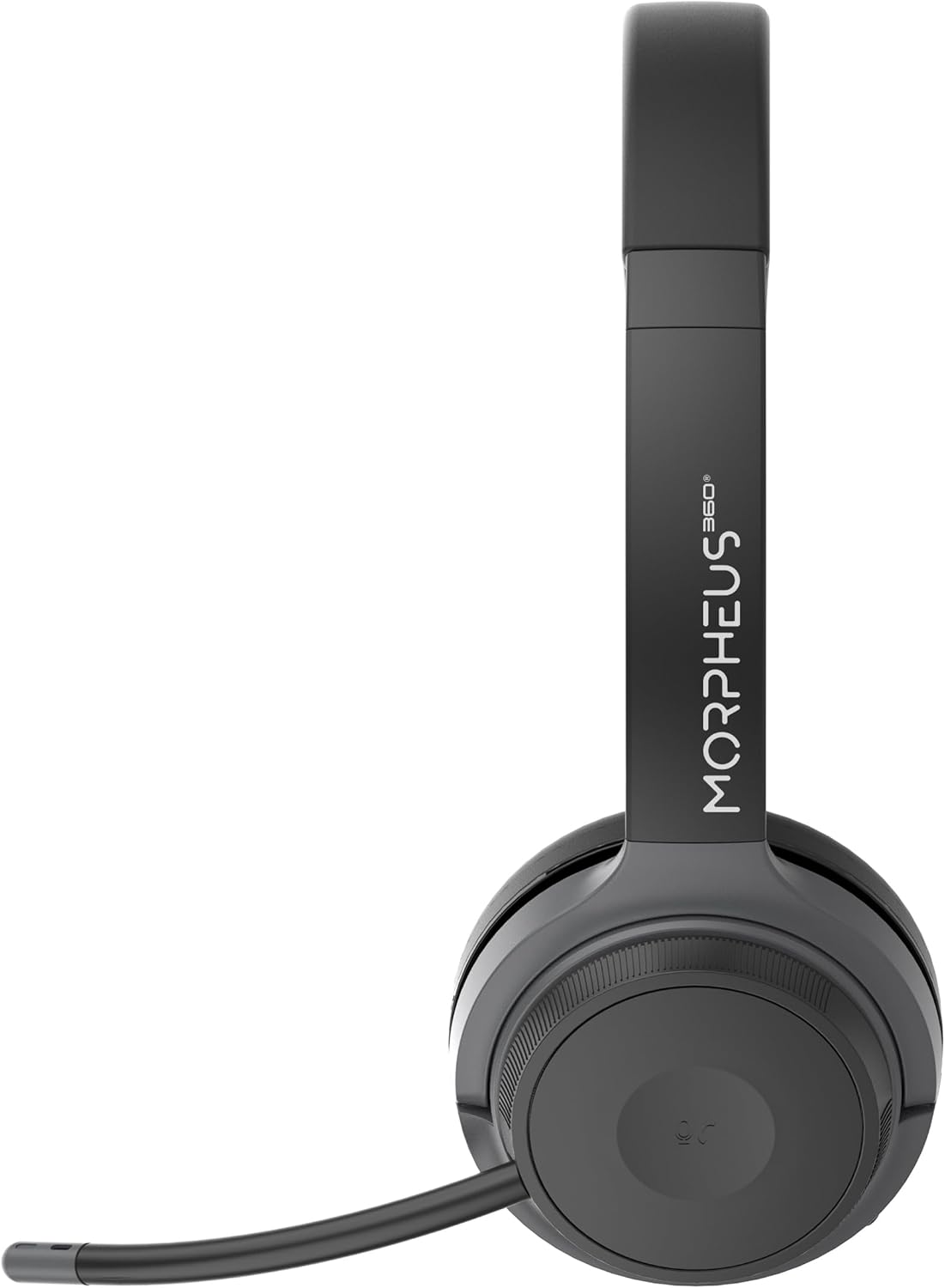
Right earcup featuring the volume control dial and USB-C charging port.
- Diadema: Ajustable per a un ajust còmode.
- Coixinets per a les orelles: Soft protein leather with memory foam for comfort.
- Port del micròfon: Located on the left earcup for attaching the boom microphone.
- Botó d'encesa/emparellament: Controls power and initiates Bluetooth pairing.
- Dial de control de volum: Located on the right earcup, allows for precise volume adjustments.
- Port de càrrega USB-C: For charging the headset battery.
- Botons de control multimèdia: Play/Pause, Next/Previous Track (functionality may vary by device).
- Botó de control de trucades: Answer/End/Reject calls.
Configuració
1. Càrrega dels auriculars
Before first use, fully charge the headset. A full charge takes approximately 2 hours.
- Connect the USB charging cable to the USB-C port on the headset.
- Connecteu l'altre extrem del cable a una font d'alimentació USB (per exemple, un port USB de l'ordinador, un adaptador de paret).
- The LED indicator will show charging status (refer to LED indicator section for details).
2. Attaching the Boom Microphone
The boom microphone is detachable and can be inserted into the microphone port on the left earcup. Ensure it clicks securely into place. The microphone can be rotated 120 degrees for optimal positioning.
3. Connexió a dispositius
Your headset offers two primary connection methods: Bluetooth and 2.4GHz Wireless (via USB dongle).
Connexió Bluetooth:
- Assegureu-vos que els auriculars estiguin carregats i apagats.
- Press and hold the Power/Pairing button until the LED indicator flashes blue and red, indicating pairing mode.
- Al dispositiu (telèfon intel·ligent, tauleta, ordinador portàtil), activeu el Bluetooth i cerqueu dispositius nous.
- Select "Morpheus 360 Advantage" from the list of available devices.
- Once connected, the LED indicator will show a solid blue light.

The headset supports Bluetooth 5.3 for stable connections and Universal Communication (UC) standards for broad compatibility.
2.4GHz Wireless Connection (via USB Dongle):
This method is ideal for devices without Bluetooth or for a more stable connection, particularly with PCs and Macs.
- Plug the USB-A receiver-dongle into an available USB-A port on your computer. If your computer only has USB-C ports, use the included USB-A to USB-C adapter.
- Power on the headset. It should automatically connect to the dongle.
- The LED indicator on both the headset and dongle will show a solid blue light when connected.
- Ensure the Morpheus 360 headset is selected as the default audio input and output device in your computer's sound settings.
Instruccions de funcionament
Encès/apagat:
- Encès: Press and hold the Power/Pairing button for approximately 3 seconds until the LED indicator lights up.
- Apagar: Press and hold the Power/Pairing button for approximately 5 seconds until the LED indicator turns off.
Control de volum:
Rotate the volume control dial on the right earcup:
- Gireu en sentit horari per augmentar el volum.
- Rotate counter-clockwise to decrease volume.
Gestió de trucades:
- Respon a la trucada: Premeu el botó de control de trucades una vegada.
- Finalitzar la trucada: Press the Call Control button once during a call.
- Rebutja la trucada: Premeu i manteniu premut el botó de control de trucades durant 2 segons.

The headset provides comfortable wear for extended periods, ideal for calls and online meetings.
Reproducció multimèdia:
- Reproduir/pausa: Premeu el botó Reproduir/Pausa una vegada.
- Pista següent: Premeu el botó Pista següent una vegada.
- Pista anterior: Premeu el botó Pista anterior una vegada.
Ús del micròfon:
- Silencia/Activa el silenci: Use the dedicated mute button on the microphone boom or the headset controls (if available).
- Posicionament: Adjust the 120-degree rotatable boom microphone for optimal voice pickup, ensuring it is close to your mouth.
Manteniment
Neteja:
- Netegeu els auriculars amb un drap suau, sec i sense borrissol.
- For ear cushions, use a slightly damp cloth with mild soap if necessary, then wipe dry immediately.
- No utilitzeu netejadors abrasius, alcohol ni dissolvents químics.
Emmagatzematge:
- Guardeu els auriculars en un lloc fresc i sec, allunyat de la llum solar directa i de temperatures extremes.
- Avoid placing heavy objects on the headset.
Cura de la bateria:
- Charge the headset regularly, even if not in frequent use, to maintain battery health.
- Eviteu descarregar completament la bateria amb freqüència.
Resolució de problemes
| Problema | Causa possible | Solució |
|---|---|---|
| Els auriculars no s'encén. | Bateria baixa. | Carregueu completament els auriculars. |
| No es pot connectar per Bluetooth. | Headset not in pairing mode; Device Bluetooth off; Out of range. | Ensure headset is in pairing mode (flashing blue/red). Turn device Bluetooth on. Move headset closer to device (within 10 meters). |
| No hi ha so o hi ha mala qualitat de so. | Volume too low; Incorrect audio output selected; Headset not connected properly. | Increase headset and device volume. Select "Morpheus 360 Advantage" as audio output. Reconnect headset. |
| El micròfon no funciona. | Microphone muted; Not properly attached; Incorrect input device selected. | Unmute microphone. Ensure microphone is securely attached. Select "Morpheus 360 Advantage" as audio input in device settings. |
| Connexió intermitent. | Interference; Out of range; Low battery. | Move away from other wireless devices. Stay within 10 meters of connected device. Charge headset. |
Especificacions
| Característica | Detall |
|---|---|
| Nom del model | HS6500SBT |
| Tecnologia de connectivitat | Wireless (Bluetooth 5.3, 2.4GHz via USB Dongle) |
| Versió Bluetooth | 5.3 |
| Interval Bluetooth | Fins a 10 metres (33 peus) |
| Durada de la bateria | Up to 30 Hours (Talk/Playtime) |
| Temps de càrrega | Aproximadament 2 hores |
| Control de soroll | Cancel·lació passiva de soroll |
| Micròfon | Detachable Noise Cancelling Boom Microphone (120-degree rotation) |
| Col·locació de l'orella | Sobre l'orella |
| Material | Faux Leather (Protein Leather Ear Cushions) |
| Dispositius compatibles | Laptops, Desktops, Tablets, Telephones, Smartphones, Communication Software (UC Standard) |
| Dimensions del producte | 8.75 x 3 x 8.5 polzades |
| Pes de l'article | 9.6 unces |
| Impedància | 30 ohms |
| UPC | 856816008538 |
Informació de la garantia
Morpheus 360 products are designed and manufactured to the highest quality standards. For detailed warranty information, including terms, conditions, and registration, please refer to the official Morpheus 360 weblloc web o la targeta de garantia inclosa amb el producte.
Conserveu el vostre comprovant de compra per a reclamacions de garantia.
Suport
For further assistance, technical support, or frequently asked questions, please visit the official Morpheus 360 support weblloc:
You may also find helpful resources and contact information on the product's Amazon listing page.


