Introducció
This manual provides comprehensive instructions for the setup, operation, maintenance, and troubleshooting of your EasySMX Wireless Gamepad Joystick Controller. Please read this manual thoroughly before using the product to ensure proper functionality and to maximize your gaming experience.
Producte acabatview
The EasySMX Wireless Gamepad is designed for a wide range of gaming platforms, offering a comfortable grip and responsive controls. Key features include 2.4G wireless connectivity, dual vibration feedback, and broad compatibility.

Figure 1: EasySMX Wireless Gamepad Joystick Controller with USB receiver.
Característiques principals:
- Àmplia compatibilitat: Works with Android 5.0+ smartphones/tablets (with OTG), PS3, smart TVs, TV boxes, and PCs. Wired support for Nintendo Switch/Switch Lite.
- Connectivitat sense fils: Utilizes 2.4G wireless technology for a stable connection.
- Vibració dual: Built-in asymmetrical motors provide immersive haptic feedback.
- Adherència millorada: Features large textured non-slip grips for comfortable extended play.
- Llarga vida útil de la bateria: Integrated 600mAh battery offers up to 12 hours of playtime on a single charge.
- Plug and Play: Simple setup for immediate gaming.
Disseny del controlador:

Figura 2: Detallada view of the EasySMX Wireless Gamepad with labeled buttons and components.
- Left Joystick (L3): For directional control and pressing for L3 function.
- Directional-Pad (D-Pad): Per a una entrada direccional precisa.
- Right Joystick (R3): For camera control or other functions, pressing for R3 function.
- Botó enrere: Typically used for menu navigation or specific in-game functions.
- Botó Turbo: Activates or deactivates turbo function for assigned buttons.
- Botó d'inici: Typically used to pause games or access menus.
- Function Keys (A, B, X, Y): Botons d'acció estàndard.
- Port de càrrega: USB port for charging the controller.
- LB Button: Left Bumper button.
- LT Button: Left Trigger button.
- RB Button: Right Bumper button.
- RT Button: Right Trigger button.
- LED Indicators (LED 1, 2, 3, 4): Indicate connection status, player number, and charging status.
Contingut del paquet
Please check the package contents upon unboxing. The standard package should include:
- 1 x EasySMX Wireless Gamepad Joystick Controller
- 1 x Receptor USB de 2.4 G
- 1 x cable de càrrega USB
- 1 x Manual d'usuari
Configuració
1. Càrrega del controlador
Before first use, it is recommended to fully charge the controller. Connect the supplied USB charging cable to the controller's charging port and the other end to a USB power source (e.g., PC USB port, USB wall adapter). The LED indicators will show charging status and turn off or change color when fully charged.
A full charge provides approximately 12 hours of playtime. If the battery is low during use, you can connect the USB cable to continue playing in wired mode.
2. Connexió a dispositius
The EasySMX Wireless Gamepad supports both wireless (2.4G USB receiver) and wired connections.
Wireless Connection (2.4G USB Receiver)
- Insert the 2.4G USB receiver into an available USB port on your device (PC, PS3, Android TV Box, etc.).
- Turn on the EasySMX controller. The controller will automatically attempt to connect to the receiver.
- Once connected, the LED indicator(s) on the controller will stabilize, indicating a successful connection.

Figure 3: Illustration of wireless connection using the 2.4G USB receiver.
Connexió per cable
For devices that support wired input or when the controller battery is low:
- Connect the USB charging cable to the controller's charging port.
- Connect the other end of the USB cable to an available USB port on your device (PC, Nintendo Switch, etc.).
- The controller will automatically switch to wired mode and be recognized by your device.
Compatibilitat acabadaview:

Figure 4: Compatibility table showing supported platforms for Bluetooth and Wired connections.
Note on Android/HarmonyOS/Nintendo Switch: These devices may require an OTG (On-The-Go) adapter for connection, which is not included with the controller.
Sistemes incompatibles: This controller is not compatible with Xbox 360, Xbox One, Mac, iOS, PlayStation 4, Amazon Fire TV, or Amazon Fire Stick.
Instruccions de funcionament
Funcionament bàsic
- Encès/apagat: Press the central logo button to power on the controller. Hold the central logo button for a few seconds to power off.
- Funcions del botó: Refer to Figure 2 for the layout and names of all buttons (A, B, X, Y, LB, LT, RB, RT, Start, Back, D-Pad, Left/Right Joysticks).
- Calibració del joystick: If joysticks exhibit drift, some systems may require recalibration through their respective settings.
Funció Turbo
La funció Turbo permet prémer un botó repetidament mentre es mantingui premut, cosa que pot ser útil en certs jocs.
- Press and hold the button you wish to set to Turbo (e.g., A button).
- Mentre manteniu premut el botó, premeu el Botó Turbo once. The button is now set to Turbo.
- To clear the Turbo function for a button, press and hold the Turbo-enabled button, then press the Botó Turbo de nou.
Feedback de doble vibració
The controller features dual asymmetrical motors that provide varying levels of vibration feedback based on in-game events (e.g., impacts, explosions, gunshots). This enhances immersion during gameplay.
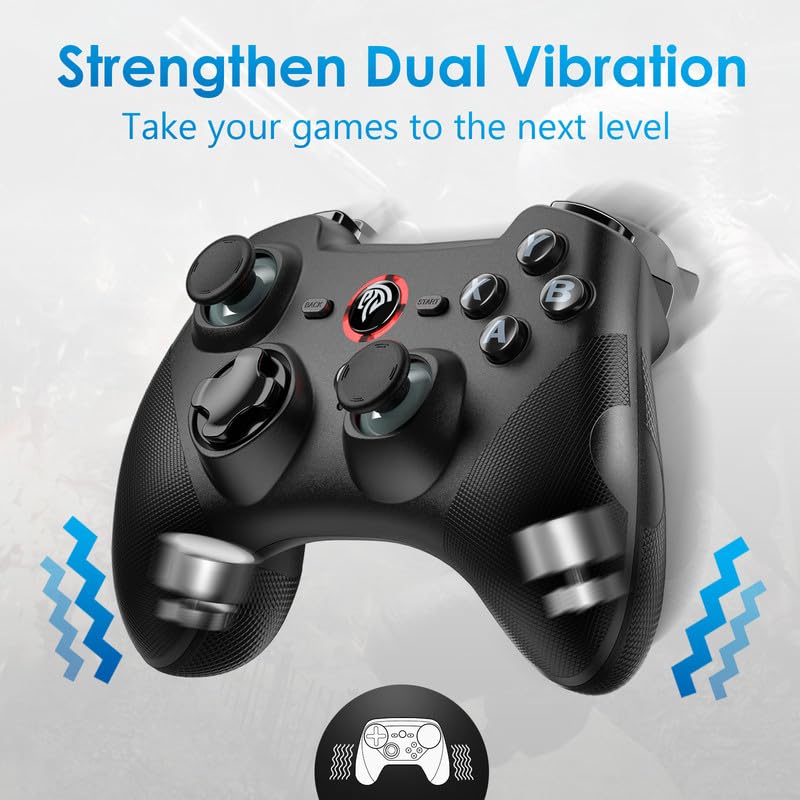
Figure 5: Illustration of the dual vibration motors within the controller.
Manteniment
- Neteja: Feu servir un drap suau i sec per netejar la superfície del controlador. Per a la brutícia persistent, netegeu lleugerament.amp cloth can be used, but ensure no liquid enters the controller. Do not use harsh chemicals or abrasive cleaners.
- Emmagatzematge: Guardeu el controlador en un lloc fresc i sec, allunyat de la llum solar directa, de temperatures extremes i d'alta humitat.
- Cura de la bateria: To prolong battery life, avoid fully discharging the controller frequently. If storing for an extended period, charge the controller to about 50% and recharge every few months.
- Manipulació: Eviteu deixar caure el controlador ni sotmetre'l a impactes forts, ja que això pot danyar els components interns.
Resolució de problemes
| Problema | Causa possible | Solució |
|---|---|---|
| El controlador no s'encén. | Bateria baixa. | Charge the controller using the supplied USB cable. |
| El controlador no es connecta sense fil. | USB receiver not properly inserted or not recognized; interference; out of range. | Ensure the USB receiver is fully inserted. Try a different USB port. Move closer to the receiver. Restart the controller and the device. |
| Els botons o els joysticks no responen. | Connection issue; software glitch; physical damage. | Reconnect the controller. Restart the game/device. Check for physical obstructions or damage. |
| La funció de vibració no funciona. | Game does not support vibration; vibration setting is off; driver issue. | Verify the game supports vibration. Check in-game or system settings for vibration options. Ensure correct drivers are installed on PC. |
| El controlador es desconnecta sovint. | Low battery; signal interference; distance from receiver. | Charge the controller. Reduce interference from other wireless devices. Stay within optimal range of the receiver. |
Especificacions
- Model: PSD-9101
- Connectivitat: 2.4G Wireless, Wired (USB)
- Capacitat de la bateria: 600 mAh
- Approximate Playtime: Fins a 12 hores
- Vibració: Dual Asymmetrical Motors
- Dimensions: 6.69 x 5.2 x 3.03 polzades (dimensions del paquet)
- Pes: 11.4 unces (pes de l'article)
- Compatibilitat: Android 5.0+ (with OTG), PS3, Smart TV, TV Box, PC (Windows), Nintendo Switch/Switch Lite (wired).
- Sistemes incompatibles: Xbox 360, Xbox One, Mac, iOS, PlayStation 4, Amazon Fire TV, Amazon Fire Stick.
Garantia i Suport
The EasySMX Wireless Gamepad Joystick Controller comes with an 18 mesos de garantia des de la data de compra. Aquesta garantia cobreix els defectes de fabricació i els problemes derivats de l'ús normal.
For technical support, warranty claims, or any questions regarding your product, please contact EasySMX customer service through their official website or the retailer where you purchased the product. Please have your purchase receipt and product model number (PSD-9101) ready when contacting support.
Per a més informació, visiteu el EasySMX Store on Amazon.


