1. Introducció
Thank you for choosing the ELEPHAS Mini Portable Projector. This compact and versatile device is designed to provide a high-quality viewing experience for entertainment, education, and business presentations. With its advanced features and user-friendly design, you can enjoy large-screen projection anywhere.
The ELEPHAS Mini Projector, comparable to a smartphone in size, incorporates upgraded 2023 technology. It features a built-in HIFI speaker for rich audio without the need for external speakers and an efficient heat dissipation system to minimize fan noise. Supporting 1080P HD resolution and equipped with a German Emerald Glass Lens, it delivers vibrant, detailed images up to 200 inches. Its multimedia capabilities allow easy connection to a wide range of devices.

Image: The ELEPHAS Mini Portable Projector, shown with its included mini tripod, demonstrating its compact size and portability when held in a hand.
2. Contingut del paquet
Si us plau, reviseu el paquet amb cura per assegurar-vos que hi hagi tots els elements:
- ELEPHAS Mini Portable Projector (Model BL128)
- Mini trípode
- Bossa de transport
- Comandament a distància (piles no incloses)
- Adaptador d'alimentació
- Manual d'usuari

Image: The ELEPHAS Mini Portable Projector displayed alongside a smartphone and its dedicated carrying case, illustrating its compact dimensions (15cm x 11cm x 6cm) for easy transport.
3. Característiques del producte
The ELEPHAS Mini Portable Projector offers a range of features designed for optimal performance and user convenience:
- Disseny ultracompacte: Easily fits in your hand, making it highly portable for indoor and outdoor use.
- 1080P HD Support: Delivers clear and detailed images with support for Full HD resolution.
- Built-in HIFI Speaker: Provides excellent sound quality without the need for external audio devices.
- Dissipació de calor eficient: Advanced cooling system significantly reduces fan noise for a quieter viewexperiència.
- German Emerald Glass Lens: Equipped with a high-quality lens supporting 24-bit true colors and over 16.77 million colors for vivid projection.
- Projecció en pantalla gran: Capable of projecting an impressive screen size of up to 200 inches.
- Connectivitat versàtil: Features multiple ports including USB, HDMI, AV, and Audio for broad device compatibility.
- Àmplia compatibilitat de dispositius: Connects seamlessly with laptops, PCs, TV boxes, TV sticks, Chrome Books, tablets, Blu-Ray DVD players, USB drives, media players, and smartphones (iOS, Android, Windows).

Image: An internal diagram illustrating the advanced optical path and components of the projector, highlighting the German Osram LED projection technology and Emerald Glass Lens responsible for high-quality image output.
4. Guia de configuració
Follow these steps to set up your ELEPHAS Mini Portable Projector:
- Col·locació: Place the projector on a stable, flat surface, such as a table, at the desired distance from your projection screen or wall. Ensure there are no obstructions blocking the lens or ventilation ports.
- Connexió d'alimentació: Connecteu l'adaptador de corrent al port d'entrada d'alimentació del projector i, a continuació, endolleu l'adaptador a una presa de corrent.
- Encès: Press the power button on the projector or the remote control to turn on the device. The indicator light will illuminate.
- Ajust del focus: Once the projector is on, adjust the focus ring (usually located near the lens) until the projected image appears clear and sharp.
- Connexió de dispositius: Refer to the 'Connectivity' section to connect your desired input devices (e.g., laptop, smartphone, USB drive).

Image: Two individuals enjoying an outdoor movie night, with the ELEPHAS Mini Portable Projector projecting onto a screen inside a tent, demonstrating its suitability for portable outdoor entertainment.
5. Instruccions de funcionament
This section outlines the basic operation of your projector:
- Comandament a distància: Use the included remote control to navigate menus, select input sources, adjust volume, and control playback. Ensure batteries are inserted correctly.
- Selecció de la font d'entrada: Press the 'Source' button on the remote or projector to cycle through available input options (HDMI, USB, AV). Select the input corresponding to your connected device.
- Control de volum: Use the volume up/down buttons on the remote to adjust the audio output from the built-in speaker.
- Ajust de la imatge: In addition to the manual focus ring, some settings like aspect ratio or keystone correction might be available in the projector's on-screen display (OSD) menu. Access the OSD menu using the 'Menu' button on the remote.
- Apagar: Press the power button again to turn off the projector. It is recommended to allow the projector to cool down before unplugging it.
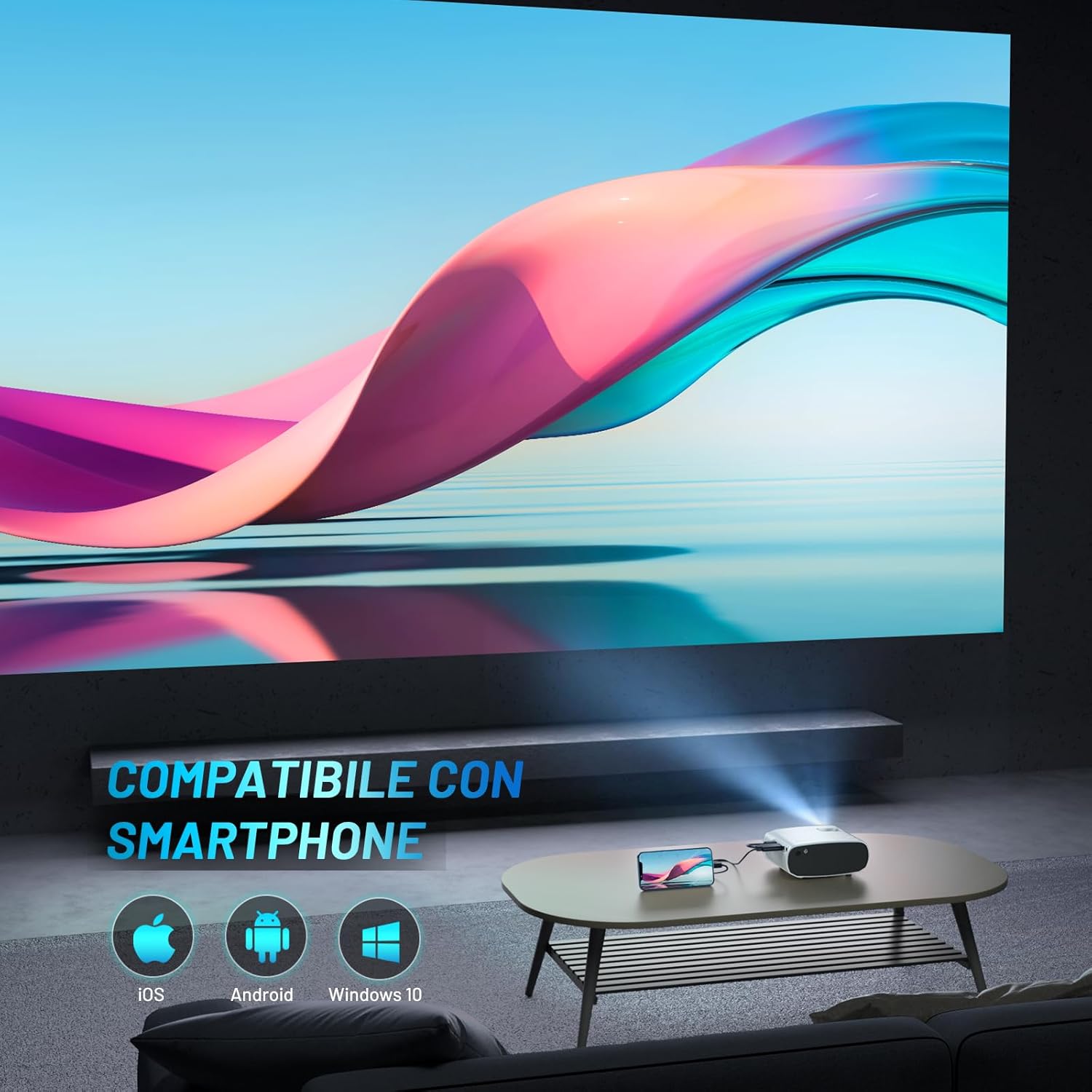
Image: The ELEPHAS Mini Portable Projector set up in a living room, projecting content onto a wall while connected to a smartphone, demonstrating its ease of use for home entertainment.
6. Connectivitat
The ELEPHAS Mini Portable Projector offers various connection options to suit your needs:
- Port HDMI: Connect devices such as laptops, PCs, TV boxes, TV sticks (e.g., Roku Stick, Fire TV, Chromecast), gaming consoles (XBOX, PS4), and Blu-Ray DVD players for high-definition video and audio transmission.
- Port USB: Plug in USB flash drives to play multimedia content directly (videos, photos, music).
- Port AV: Use the AV cable (not always included, check package) to connect older devices with composite video and stereo audio outputs.
- Port de sortida d'àudio: Connect external speakers or headphones for a more immersive audio experience, though the built-in HIFI speaker is often sufficient.
- Compatibilitat amb telèfons intel·ligents: The projector supports direct connection with iOS, Android, and Windows smartphones, often requiring a compatible adapter or cable (not included) for screen mirroring.

Image: A visual diagram illustrating the projector's extensive multimedia support, showing connections to various devices such as Roku Stick, Fire TV, Chromecast, external speakers, USB disk, phone/tablet/PC, XBOX/PS4, and DVD player.
7. Manteniment
Proper maintenance ensures the longevity and optimal performance of your projector:
- Neteja de lents: Netegeu suaument la lent del projector amb un drap suau i sense borrissol dissenyat específicament per a superfícies òptiques. No utilitzeu productes de neteja abrasius ni força excessiva.
- Ports de ventilació: Regularly check and clean the ventilation ports to prevent dust buildup, which can hinder heat dissipation and affect performance. Use a soft brush or compressed air.
- Emmagatzematge: When not in use, store the projector in its carrying bag in a cool, dry, and dust-free environment. Avoid extreme temperatures or humidity.
- Apagueu correctament: Always power off the projector using the designated power button and allow it to complete its shutdown cycle before unplugging.
8. Solució De Problemes
Si teniu problemes amb el projector, consulteu els problemes i solucions més comuns següents:
| Problema | Causa possible | Solució |
|---|---|---|
| No es projecta cap imatge | No power; Incorrect input source; Loose cable connection | Ensure power adapter is securely connected and outlet is active. Select the correct input source (HDMI, USB, AV). Check all cable connections. |
| Sense so | Volume too low; Muted; External audio device not connected/configured | Increase volume using remote. Check if projector or source device is muted. Ensure external speakers are properly connected if used. |
| La imatge és borrosa/poc nítida | Focus not adjusted; Projector too far/close; Lens dirty | Adjust the manual focus ring until the image is sharp. Ensure projector is within optimal projection distance. Clean the lens. |
| Image edges are not sharp | Inherent characteristic of some compact projectors; Keystone correction needed | While the projector offers good overall clarity, slight softness at the extreme edges can be a characteristic of compact projectors. Ensure the projector is perpendicular to the screen and adjust keystone correction if available in settings. |
| El soroll del ventilador és fort | Normal operation; Blocked vents | A certain level of fan noise is normal for cooling. Ensure ventilation ports are not blocked and are clean. The projector features an efficient heat dissipation system to minimize noise. |
9. Especificacions
| Marca | ELEFAS |
| Número de model | BL128 |
| Color | Blanc |
| Tipus de producte | Projector portàtil |
| Tecnologia de connectivitat | USB, HDMI |
| Característiques especials | Portable, Built-in Speaker, Efficient Heat Dissipation System |
| Dispositius compatibles | Smartphone, Laptop, PC, TV Box, TV Stick, Chrome Book, Tablets, Blu-Ray DVD Players, USB Drives, Media Players |
| Resolució de visualització | 1920 x 1080 (compatible amb 1080P HD) |
| Tipus de visualització | LED |
| Factor de forma | Portàtil |
| Tipus de muntatge | Muntatge de taula |
| Components inclosos | Mini Tripod, Carrying Bag |
| Usos recomanats | Negocis, Educació, Jocs, Cinema a casa |
10. Garantia i Suport
For specific warranty details regarding your ELEPHAS Mini Portable Projector, please refer to the warranty card included with your purchase or the product listing on the retailer's weblloc. Els termes de la garantia solen cobrir els defectes de fabricació durant un període especificat a partir de la data de compra.
For technical support, troubleshooting assistance beyond this manual, or any other inquiries, please contact ELEPHAS customer service. Contact information can usually be found on the product packaging, the official ELEPHAS weblloc web o a través del vostre punt de compra.
Note: No official product videos were found for this model at the time of manual creation.


