1. Introducció
Thank you for choosing the ciciglow TM919BK Digital Programmable Timer Switch. This device is designed to automatically control the power supply to electrical appliances based on your programmed schedule. It features a large LCD display, 16 ON/OFF programs per day, and a countdown function, offering precise timing control for various applications. Please read this manual carefully before installation and operation to ensure proper use and to prevent damage.
2. Informació de seguretat
- Risc elèctric: Installation should only be performed by a qualified electrician or competent person. Ensure power is disconnected before installation or maintenance.
- Voltage Compatibilitat: This timer switch operates within 85-265V AC. Do not connect to voltagestà fora d'aquest rang.
- Capacitat de càrrega: Do not exceed the maximum load capacity of 30A (5000W). Overloading can cause damage to the device and connected appliances, and poses a fire risk.
- Medi ambient: No instal·lar en mullat o damp locations. Keep away from water and excessive heat.
- Ús previst: Use this device only for its intended purpose as a programmable timer switch.
3. Producte acabatview i Característiques
The TM919BK is a versatile digital timer switch designed for automated control of electrical circuits.

Figura 3.1: Frontal view of the TM919BK Digital Timer Switch.
Característiques principals:
- Control de temps: Up to 16 ON/OFF settings per day, with a timing range from 1 minute to 168 hours.
- Pantalla LCD: Clear LCD display with LED indicators for easy program setting visibility.
- Funció de compte enrere: Allows setting devices to automatically turn off after a designated time.
- Muntatge en carril DIN: Suitable for 35mm DIN Rail installation.
- Còpia de seguretat d'energia: Built-in CR2450 battery for memory retention during power outages.

Figura 3.2: lateral view showing the built-in battery for memory backup.
4. Contingut del paquet
Si us plau, comproveu el paquet per veure si hi ha els elements següents:
- 1 x ciciglow TM919BK Digital Programmable Timer Switch
- 1 x Manual d'usuari
5. Especificacions
| Paràmetre | Valor |
|---|---|
| Model | TM919BK |
| Font d'alimentació | 85~265V AC |
| Capacitat | 30 A 5000 W |
| Interval de cronometratge | 1 minut a 168 hores |
| Programes | 16 ON/OFF per dia |
| Funcions | Clock display (12hr/24hr), Timer, Countdown |
| Material | Plàstic |
| Muntatge | Carril DIN de 35 mm |
| Pes de l'article | 5.2 unces |
| Dimensions del paquet | 3.54 x 2.76 x 1.97 polzades |
6. Configuració i instal·lació
The TM919BK timer switch is designed for 35mm DIN Rail mounting. Ensure all power is disconnected before proceeding with installation.
6.1 Esquema de cablejat
Refer to the following diagram for correct wiring connections. It is crucial to connect the Live (L) and Neutral (N) wires correctly to the input terminals, and the load to the output terminals (NO - Normally Open, NC - Normally Closed, Common).
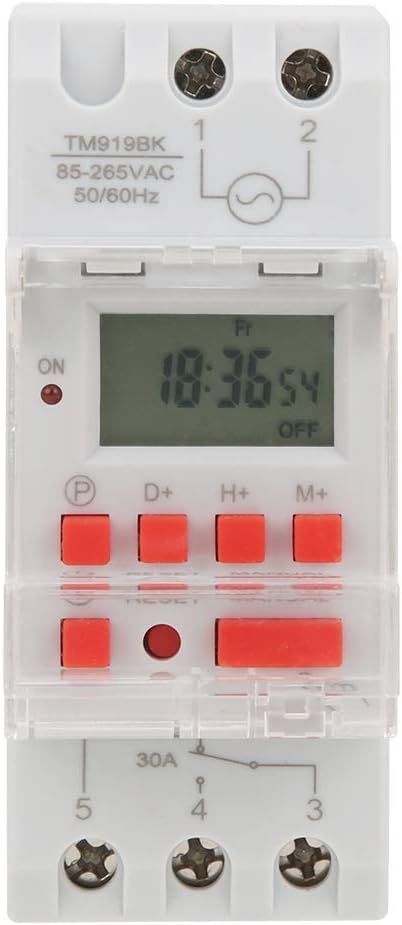
Figure 6.1: Wiring diagram for the TM919BK.
- Terminals 1 i 2: Power input (L and N for 85-265V AC).
- Terminal 3: Common terminal for the switch output.
- Terminal 4: Normally Open (NO) contact. The circuit is closed when the timer is ON.
- Terminal 5: Normally Closed (NC) contact. The circuit is closed when the timer is OFF.
6.2 Muntatge
Snap the timer switch onto a standard 35mm DIN rail. Ensure it is securely fastened.
6.3 Engegada inicial
After wiring and mounting, restore power. The LCD display should light up. If the display is blank, press the RESET button with a pointed object (e.g., a toothpick) to initialize the device.
7. Instruccions de funcionament
Familiarize yourself with the buttons on the timer switch:

Figure 7.1: Control buttons on the TM919BK.
- P: Program setting button.
- D+: Day setting button.
- H+: Hour setting button.
- M+: Minute setting button.
- Icona de rellotge: Used to exit programming mode and return to clock display, or to set current time/day.
- RESET: Restableix tots els paràmetres als valors predeterminats de fàbrica.
- MANUAL: Manual override for ON/AUTO/OFF modes.
7.1 Configuració de l'hora i el dia actuals
- Manteniu premut el botó Icona de rellotge botó.
- Mentre sosteniu el Icona de rellotge, premeu D+ per configurar el dia actual de la setmana.
- Mentre sosteniu el Icona de rellotge, premeu H+ per configurar l'hora actual.
- Mentre sosteniu el Icona de rellotge, premeu M+ per configurar el minut actual.
- Allibera el Icona de rellotge per desar la configuració.
7.2 Configuració dels programes d'activació/desactivació
The timer allows for up to 16 ON and 16 OFF programs. Each program can be set for specific days or combinations of days.
- Premeu el botó P premeu el botó una vegada. La pantalla mostrarà "1 ON".
- Premeu D+ to select the day(s) for this program. Options include: every day, specific weekdays, weekends, etc.
- Premeu H+ per configurar l'hora d'encesa desitjada.
- Premeu M+ per ajustar el minut d'encesa desitjat.
- Premeu el botó P de nou. La pantalla mostrarà "1 OFF".
- Repetiu els passos 2-4 per configurar l'hora d'apagada del primer programa.
- Continueu prement P to cycle through "2 ON", "2 OFF", up to "16 ON", "16 OFF", setting each program as needed.
- Després de configurar tots els programes desitjats, premeu el botó Icona de rellotge per sortir del mode de programació i tornar a la visualització de l'hora actual.
Note: If no button is pressed for 10 seconds during programming, the timer will automatically exit programming mode.
7.3 Manual Override (MANUAL Button)
Premeu el botó MANUAL botó per circular pels modes següents:
- ACTIVITAT: The output is continuously ON, ignoring all programs.
- AUTOMÀTIC: The timer operates according to the programmed ON/OFF schedules.
- DESACTIVAT: The output is continuously OFF, ignoring all programs.
Assegureu-vos que el temporitzador estigui configurat a AUTO mode for programmed operations.
7.4 Funció de compte enrere
The countdown function allows the device to turn ON or OFF after a specified duration.
- Premeu el botó P button repeatedly until "d ON" or "d OFF" appears (for countdown ON or countdown OFF).
- Ús H+ i M+ to set the desired countdown duration (up to 99 hours 59 minutes).
- Premeu el botó Icona de rellotge per iniciar el compte enrere. La pantalla mostrarà el temps restant.
8. Manteniment
- Neteja: Netegeu el dispositiu amb un drap suau i sec. No utilitzeu productes de neteja abrasius ni dissolvents.
- Còpia de seguretat de la bateria: The built-in CR2450 battery maintains time and program settings during power outages. If the display is blank or settings are lost frequently after power interruptions, the battery may need replacement. This should be done by a qualified technician.
- Inspecció: Comproveu periòdicament les connexions del cablejat per comprovar si estan ben ajustades i si hi ha signes de desgast.
9. Solució De Problemes
| Problema | Causa possible | Solució |
|---|---|---|
| La pantalla està en blanc. | No power supply; device reset needed. | Check power connections. Press the RESET botó. |
| Timer not switching ON/OFF as programmed. | Incorrect program settings; timer in manual ON/OFF mode. | Verify program settings. Ensure the timer is in AUTO mode prement MANUAL. |
| La configuració es perd després d'apagar l'alimentaciótage. | Backup battery low or depleted. | The internal CR2450 battery may need replacement by a qualified technician. |
| Load not turning ON/OFF. | Incorrect wiring; overloaded circuit; faulty appliance. | Check wiring against diagram. Ensure load does not exceed 30A/5000W. Test the appliance separately. |
10. Garantia i Suport
This product comes with a standard manufacturer's warranty. For specific warranty terms and conditions, please refer to the documentation provided with your purchase or contact the seller directly. If you encounter any issues or require technical assistance, please contact ciciglow customer support or your retailer.
Per obtenir més ajuda, visiteu el ciciglow Store on Amazon.