1. Introducció
Gràcies per la compraasing the ANJANK 4-in-1 Wireless Charging Station with Alarm Clock. This device is designed to simplify your charging experience by providing a centralized solution for your iPhone, Apple Watch, and AirPods, along with an integrated digital alarm clock. Please read this manual carefully to ensure proper setup and operation.
2. Contingut del paquet
Si us plau, comproveu el paquet per veure si hi ha els elements següents:
- 1 x ANJANK 4-in-1 Wireless Charging Station with Alarm Clock
- 1 adaptador d'alimentació de 18W
- 1 x cable tipus C
- 1 x Manual d'usuari
3. Producte acabatview
The ANJANK 4-in-1 Wireless Charging Station integrates multiple functions into a compact design, featuring dedicated charging areas for your smartphone, Apple Watch, and AirPods, alongside a digital alarm clock display.


4. Instruccions de configuració
- Connectar l'alimentació: Insert the Type-C cable into the charging port on the back of the station. Connect the other end of the cable to the provided 18W power adapter, then plug the adapter into a wall outlet.
- Encès: The digital clock display will illuminate, indicating the device is powered on and ready for use.
- Col·locació inicial: Place the charging station on a stable, flat surface, such as a nightstand or desk.
5. Instruccions de funcionament
5.1. Wireless Phone Charging
Place your compatible smartphone on the vertical charging pad. Ensure the phone is centered on the pad for optimal charging. The charging indicator light on the station will illuminate to confirm charging is active.
- The station supports both vertical and horizontal phone placement for charging.
- Phone cases up to 3mm (0.12 inch) thick are generally supported. Cases with magnetic or metal attachments should be removed to prevent interference.


5.2. Apple Watch Charging
Place your Apple Watch on the dedicated magnetic charging module. Ensure the watch is properly aligned and secured to initiate charging.
5.3. AirPods Charging
Place your AirPods charging case on the flat wireless charging pad located at the base of the station. The charging indicator will confirm active charging.
5.4. Funcions del despertador
The integrated digital alarm clock offers adjustable settings for time, alarm, brightness, and volume.
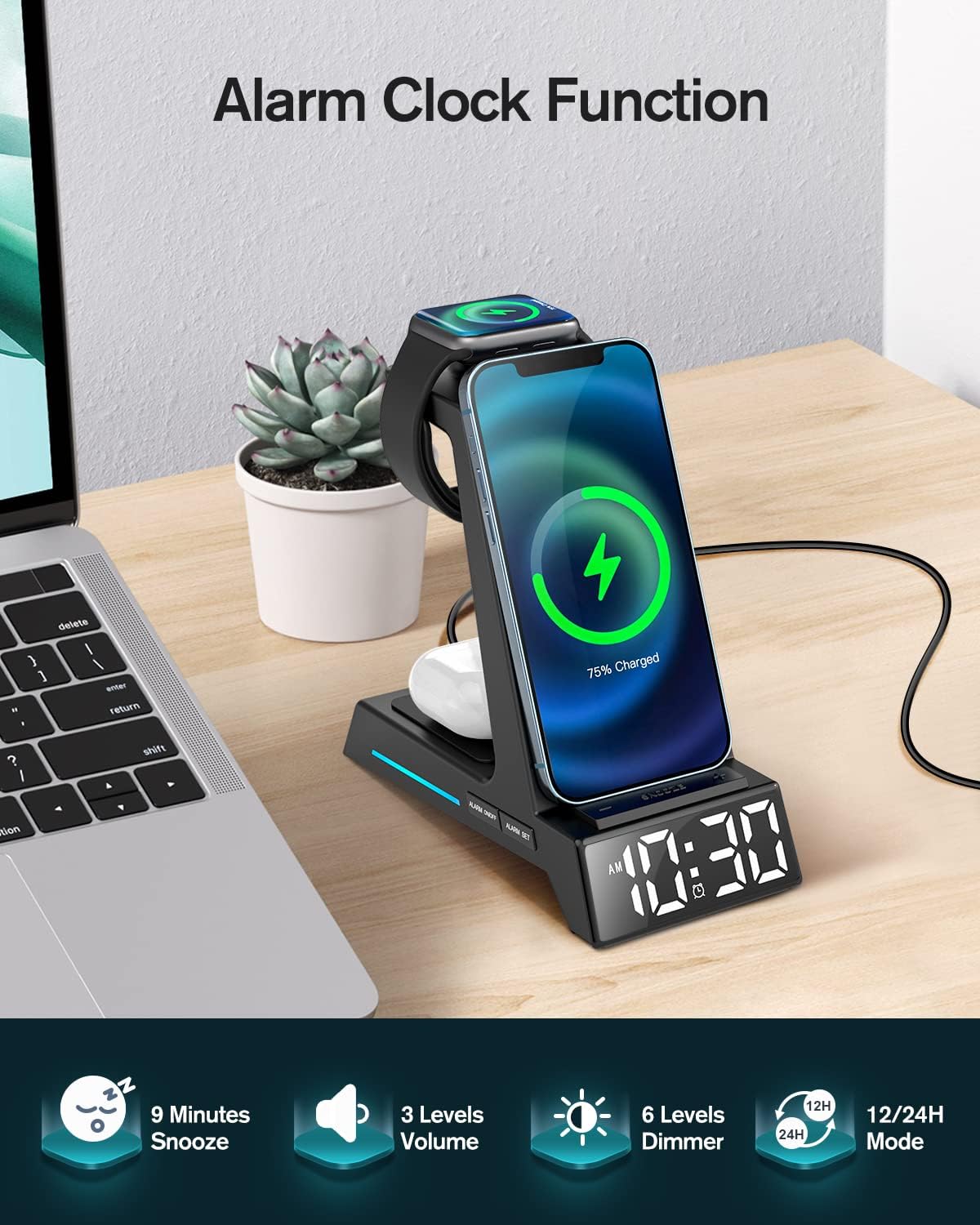
- Hora de configuració: Use the 'TIME' button to enter time setting mode. Use the '+' and '-' buttons to adjust hours and minutes. Press 'TIME' again to confirm.
- Configuració d'alarma: Use the 'ALARM' button to enter alarm setting mode. Use the '+' and '-' buttons to adjust the alarm time. Press 'ALARM' again to confirm.
- Funció de posposar: When the alarm sounds, press the 'SNOOZE' button to activate a 9-minute snooze.
- Ajust de brillantor: Use the 'DIMMER' button to cycle through 6 levels of display brightness.
- Ajust de volum: Use the 'VOLUME' button to cycle through 3 levels of alarm volume.
- Mode horari: Press the '12/24H' button to switch between 12-hour (with AM/PM indicator) and 24-hour time formats.
6. Compatibilitat
The ANJANK 4-in-1 Wireless Charging Station is compatible with a wide range of devices:

- iPhones: iPhone 16/16 Plus/16 Pro/16 Pro Max, 15/15 Plus/15 Pro/15 Pro Max, 14/14 Plus/14 Pro/14 Pro Max, 13/13 Mini/13 Pro/13 Pro Max, 12/12 Mini/12 Pro/12 Pro Max, 11/11 Pro/11 Pro Max, X/XR/XS/XS Max, 8/8 Plus.
- Apple Watch: iWatch Ultra 9/8/7/6/5/4/3/2/SE. Note: Not compatible with Samsung Watch.
- AirPods: AirPods Pro/Pro 2/3/2.
- Other Qi-enabled Phones: Compatible with LG (VS980/G3/G6/G6+/G7/G7 ThinQ/G7+ ThinQ/G8/G8 ThinQ), Google (Pixel 3/3XL, NEXUS 4/5/6), Sony (Xperia Z3v/XZ2/XZ2 Premium/XZ3), Nokia (Lumia 720/735/810/820/822/830), HTC (PH98100/PG32100/PJ53100/PL83200/PM23100), and other devices supporting wireless charging.
7. Manteniment
To ensure the longevity and optimal performance of your charging station, follow these maintenance guidelines:
- Neteja: Disconnect the power before cleaning. Use a soft, dry cloth to wipe the surface of the device. Avoid using abrasive cleaners, solvents, or harsh chemicals.
- Dissipació de calor: The ANJANK charging station features cooling holes on its back and bottom for efficient heat dissipation. Ensure these vents are not blocked to maintain optimal operating temperature.

8. Solució De Problemes
If you encounter issues with your ANJANK charging station, refer to the following common problems and solutions:
| Problema | Causa possible | Solució |
|---|---|---|
| El dispositiu no es carrega | Incorrect placement, phone case too thick, power not connected, incompatible device. | Ensure device is centered on the charging pad. Remove phone case if thicker than 3mm or if it has metal/magnetic attachments. Verify power adapter is securely plugged in. Check device compatibility. |
| Alarm clock not working/display issues | Incorrect settings, power interruption. | Refer to Section 5.4 for detailed instructions on setting time and alarm. Ensure continuous power supply. |
| Flashing blue light on base | Indicates full charge or a connection issue (e.g., device not properly aligned, foreign object detected). | This can indicate your device is fully charged. If it flashes while charging, reposition your device on the pad. Ensure no foreign objects are between the device and the charging pad. |
| Càrrega lenta | Using a non-18W power adapter, device misalignment, background apps. | Use the provided 18W power adapter. Ensure proper alignment of the device on the charging pad. Close unnecessary background applications on your device. |
9. Especificacions
| Característica | Detall |
|---|---|
| Número de model | AC199-Negre |
| Entrada Voltage | 5 Volts |
| Wattage | 18 watts |
| Tipus de connector | USB tipus C |
| Pes de l'article | 14.9 unces |
| Dimensions del paquet | 6.5 x 6.1 x 3.31 polzades |
| Característiques especials | 3-in-1 Wireless Charging (Phone+AirPods+Apple Watch), Alarm Clock, Display Dimmer, 12/24H Time Mode, Snooze, Adjustable Volume, Charging Indicator, Space-Saving, Easy Setup |
10. Informació de seguretat
Per garantir un funcionament segur i evitar danys al dispositiu o lesions, observeu les següents precaucions de seguretat:
- No desmunteu, modifiqueu ni repareu el dispositiu vosaltres mateixos.
- Mantingueu el dispositiu allunyat de l'aigua, la humitat i les altes temperatures.
- Eviteu exposar el dispositiu a la llum solar directa durant períodes prolongats.
- Use only the provided power adapter and cable. Using unauthorized accessories may cause damage or fire.
- This device incorporates multiple protection features, including over-current protection, over-voltage protection, and over-charging protection, to ensure safe charging.
- Ensure proper ventilation by not blocking the cooling holes on the device.
11. Garantia i Suport
ANJANK products come with a standard manufacturer's warranty. If you have any questions, concerns, or require technical assistance, please do not hesitate to contact our customer service team. We are committed to providing the best solution within 24 hours.
For support, please refer to the contact information provided on the product packaging or the official ANJANK weblloc.


