1. Introducció
This manual provides detailed instructions for the Tenveo VHD3U+M5B All-in-One Conference System, which includes a 3X Optical Zoom PTZ Camera and a MagiCall Bluetooth Speakerphone. This system is designed to provide high-quality audio and video for various meeting environments, supporting a range of connectivity options and software platforms.

Image 1.1: Tenveo VHD3U+M5B All-in-One Conference System components.
2. Contingut del paquet
Verifiqueu que tots els elements siguin presents al paquet:
- Tenveo FHD 1080P 60FPS PTZ Camera
- MagiCall Bluetooth Conference Speakerphone
- Comandament a distància IR
- Adaptador d'alimentació DC12V
- Cable USB3.0
- Muntatge de paret
- Cargols de muntatge
- Manual d'usuari (aquest document)
3. Característiques del producte
The Tenveo VHD3U+M5B system offers a comprehensive set of features for effective video conferencing:
- Vídeo Full HD: 1080P at 60 frames per second for clear video quality.
- Zoom òptic: 3X optical zoom capability for detailed views.
- Funcionalitat PTZ: Pan (±175°) and Tilt (±90°) for flexible camera positioning.
- Camp Ampli de View (FOV): 114° wide-angle lens to capture more participants.
- Àudio avançat: MagiCall Bluetooth Speakerphone with 360° voice pickup, echo cancellation, and noise reduction.
- Connectivitat múltiple: USB3.0, HDMI, RS232, RS485 for the camera; USB, Wireless, and Bluetooth 5.0 for the speakerphone.
- Àmplia compatibilitat: Works with popular video conferencing software (Zoom, Teams, Google Meet, OBS, etc.) and operating systems (Windows, Mac, Linux, Android).
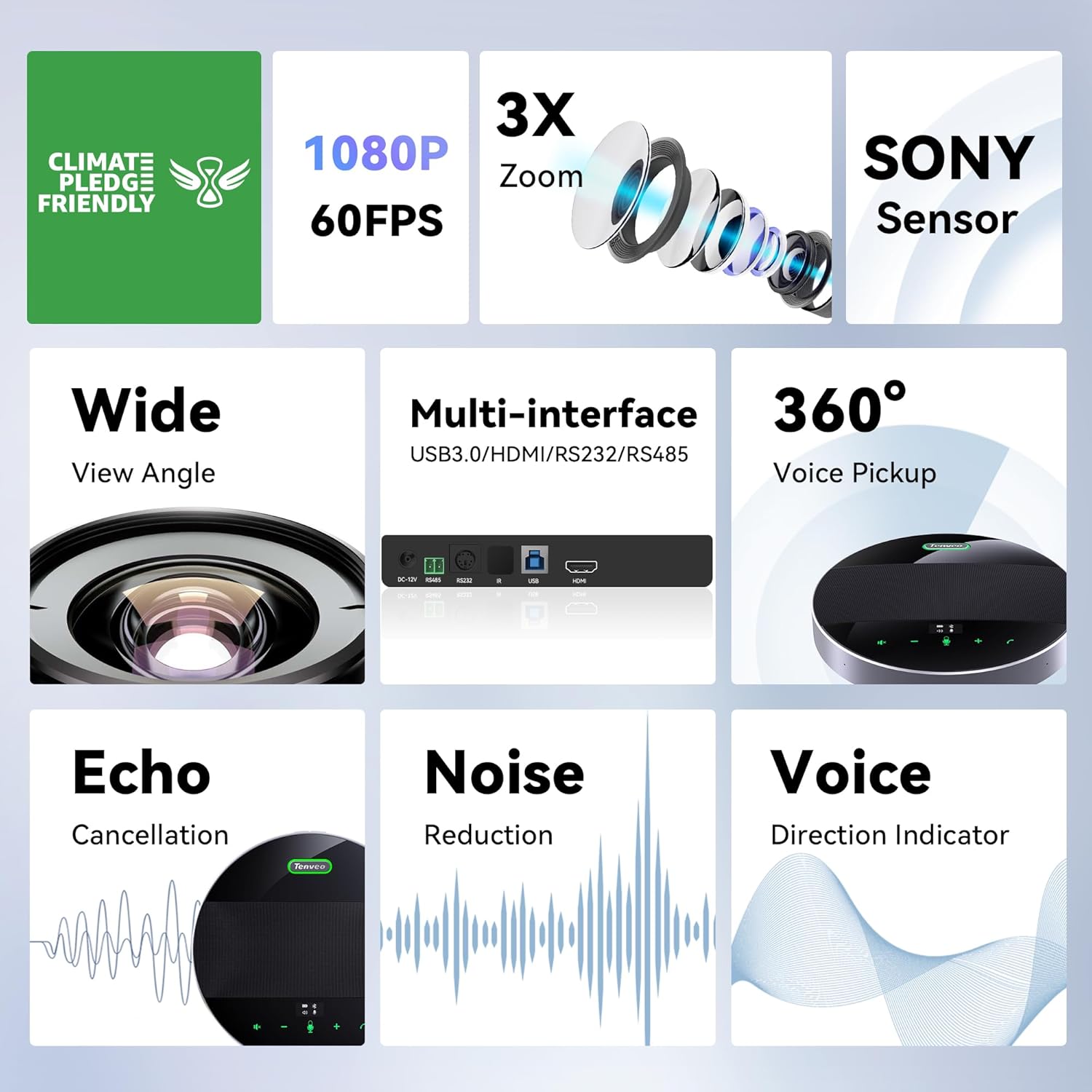
Imatge 3.1: acabatview of key features including 1080P, 3X Zoom, Sony Sensor, and multiple interfaces.

Image 3.2: Visual comparison demonstrating the clarity of 1080P video output.

Image 3.3: Illustration of the 3X optical zoom and 114° wide field of view in a conference setting.

Image 3.4: Diagram illustrating the 360-degree omnidirectional sound pickup capability of the speakerphone.

Image 3.5: MagiCall M5 speakerphone highlighting intelligent noise reduction, echo cancellation, and voice enhancement.

Image 3.6: The MagiCall speakerphone with its compact design and screen-touch buttons, including an OLED display for battery level.
Image 3.7: Information on the speakerphone's 14-hour playtime with an 8000mAh battery.
4. Instruccions de configuració
Follow these steps to set up your Tenveo VHD3U+M5B Conference System:
4.1 Instal·lació de la càmera
The PTZ camera supports various installation methods:
- Desktop: Col·loqueu la càmera sobre una superfície plana.
- Trípode: Attach the camera to a standard tripod using the mounting screw hole.
- Muntatge en paret: Use the provided wall mount and screws to secure the camera to a wall.
- Muntatge al sostre: Use the provided ceiling mount and screws to secure the camera to the ceiling.
Image 4.1: Visual representation of desktop, tripod, ceiling, and wall mounting options for the camera.
4.2 Connexió del sistema
The system is designed for plug-and-play operation, requiring no additional drivers.
- Connexió d'alimentació: Connect the DC12V Power Adapter to the camera and plug it into a power outlet.
- Camera to Computer/Display:
- For video output to a computer for conferencing software, connect the camera via the USB3.0 cable.
- For video output to a display (e.g., Smart TV, monitor), connect the camera via an HDMI cable.
- For serial control (joystick), connect via RS232 or RS485 ports.
- Speakerphone Connection:
- USB: Connect the speakerphone to your computer using the USB cable.
- Bluetooth: Power on the speakerphone and pair it with your device via Bluetooth 5.0.
- Sense fil: Use the provided Bluetooth dongle for wireless connection to a computer.

Imatge 4.2: posterior view of the camera showing DC-12V power, RS485, RS232, IR, USB3.0, and HDMI ports.
Image 4.3: Diagram illustrating various connection possibilities for the camera, including power, serial joystick, USB3.0 to laptop, and HDMI to display.
Image 4.4: Speakerphone connectivity options: USB, Wireless, and Bluetooth.
5. Instruccions de funcionament
5.1 Camera Operation (via IR Remote Control)
Use the provided IR Remote Control to manage camera functions:
- Clau de control PTZ: Use the arrow keys to pan (left/right) and tilt (up/down) the camera. Press the center button to return to the middle position.
- ZOOM Slow Key: Apropa o allunya lentament.
- ZOOM Fast Key: Apropa o allunya ràpidament.
- Focus Key: Switch between Auto/Far/Near/Manual focus modes. Default is Auto focus.
- Position Keys (1-9): Set and recall preset camera positions. Press [PRESET] then a number to save; press a number to recall.
- Tecla de reinici PTZ: Returns the camera to its original position.
- MENÚ: Enter or exit the OSD (On-Screen Display) Menu.

Image 5.1: Layout of the IR Remote Control with key functions labeled.
5.2 Speakerphone Operation
The MagiCall speakerphone features intuitive touch controls:
- Control de volum: Use the '+' and '-' buttons to adjust the speaker volume.
- Silenciar el micròfon: Press the microphone icon to mute/unmute.
- Control de trucades: Use the call answer/end buttons for managing calls.
- Pantalla OLED: Displays battery level and connection status.
5.3 Configuració predeterminada
The system supports multiple preset settings for quick camera adjustments:
- VISCA Protocol: 7 presets
- PELCO-D Protocol: 255 presets
- PELCO-P Protocol: 32 presets

Image 5.2: Demonstrates the use of preset settings to quickly focus on different participants in a meeting.
6. Manteniment
To ensure the longevity and optimal performance of your conference system, follow these maintenance guidelines:
- Neteja: Feu servir un drap suau i sec per netejar les superfícies de la lent de la càmera i l'altaveu. Eviteu productes de neteja o dissolvents abrasius.
- Emmagatzematge: Quan no l'utilitzeu durant períodes prolongats, guardeu el sistema en un lloc fresc i sec, allunyat de la llum solar directa i de temperatures extremes.
- Gestió de cables: Assegureu-vos que els cables no estiguin doblegats ni tensats per evitar danys.
7. Solució De Problemes
If you encounter issues with your Tenveo VHD3U+M5B Conference System, refer to the following common solutions:
- Sense sortida de vídeo:
- Check all cable connections (USB, HDMI, power).
- Assegureu-vos que la càmera estigui engegada.
- Verify that the correct video input source is selected on your display or conferencing software.
- No Audio from Speakerphone:
- Check the speakerphone's power and battery level.
- Ensure the speakerphone is connected via USB, Wireless, or Bluetooth and properly paired.
- Adjust the volume on the speakerphone and your connected device.
- Ensure the speakerphone is not muted.
- Camera Not Responding to Remote:
- Check the batteries in the IR Remote Control.
- Ensure there are no obstructions between the remote and the camera's IR receiver.
- Confirm the camera address setting if multiple cameras are in use.
- Qualitat de vídeo/àudio deficient:
- Ensure sufficient lighting in the meeting environment.
- Check your internet connection speed if using online conferencing.
- Minimize background noise for optimal speakerphone performance.
8. Especificacions
| Característica | Detall |
|---|---|
| Dimensions del producte | 5.98 x 9.72 x 6.69 polzades |
| Pes de l'article | 4.4 lliures |
| Número de model de l'article | VHD3U+M5B |
| Tecnologia del sensor fotogràfic | CMOS |
| Resolució de captura de vídeo | 1080p |
| Distància focal màxima | 7 mil·límetres |
| Apertura màxima | 1.96 f |
| Format de captura de vídeo | MJPG/YUY2/H.264/H.265 |
| Format d'àudio compatible | AAC, OPUS |
| Tecnologia de connectivitat | Bluetooth/Wireless/USB, HDMI, USB |
| Speakerphone Battery | 2 Lithium Polymer batteries required (8000mAh) |
9. Garantia i Suport
Tenveo offers the following for your product:
- Garantia estàndard: 3 Anys.
- Suport tècnic: Lifetime technical support service.
- Assistència a distància: Remote assistance for setup is available if needed.
- Garantia de devolució de diners: 30-Day No-Questions-Asked Money-Back Guarantee.
For any questions or support, please contact Tenveo customer service. You can expect a reply within 12 hours and a satisfactory solution.


