Introducció
This user manual provides comprehensive instructions for the installation, setup, operation, and maintenance of your XSDTS Smart Door Lock, Model 3DR-Q8-Pro (6068-R). This advanced smart lock integrates multiple security features including 3D facial recognition, fingerprint scanning, password entry, smart card access, and traditional mechanical keys, all controllable via the TUYA App. Please read this manual carefully before installation and use to ensure optimal performance and security.
Producte acabatview
Característiques clau
- Mètodes de desbloqueig 7 en 1: Supports 3D facial recognition, fingerprint, password, smart card, mechanical key, TUYA App remote unlock, and one-time access codes.
- Integrated Intercom & Doorbell: Features a built-in doorbell and intercom system with real-time video monitoring via the TUYA App.
- Seguretat avançada: Inclou tamper alarm, anti-peeping password function, and automatic locking.
- High-Speed Recognition: Fingerprint recognition in less than 0.5 seconds with a 99.9% success rate.
- Àmplia compatibilitat: Suitable for wooden or metal doors with a thickness of 45mm to 110mm.
- Interfície fàcil d'utilitzar: Features a Portuguese language operating system, voice prompts, and screen display for easy setup and operation.
- Gestió remota: Control and monitor your lock from anywhere using the TUYA App, including remote unlocking and access log viewing.
Contingut del paquet
Si us plau, verifiqueu que tots els components siguin presents al vostre paquet:
- Panell frontal x 1
- Tauler posterior x 1
- Lock Plug x 1 (optional, depending on model)
- Smart Card x 4
- Clau mecànica x 2
- Kit de cargols x 1

Image: Illustration of the smart lock components and various lock body dimensions, including the main panels, lock body, and accessories.
Guia d'instal·lació
Professional installation is highly recommended for this smart door lock due to the precision required for fitting the mortise lock and panels. Ensure your door meets the thickness requirement of 45mm to 110mm.
Mesura de la porta
Before installation, accurately measure your door according to the following steps:
- Measure the thickness of the door frame.
- Measure the length of the guide piece (mortise lock).
- Measure the width of the guide piece (mortise lock).
- Measure the distance from the door edge to the center of the lock body.
- Measure the distance from the center of the handle to the center of the lower screw hole on the back panel.

Image: Visual guide demonstrating how to measure various parts of the door and existing lock for proper smart lock installation.

Image: Detailed diagram showing the dimensions of the mortise lock body (Model 6068) and its compatibility with the smart lock panels.

Image: Guide on how to select the correct mortise lock size based on existing door measurements, highlighting various available sizes.
Setup: Initial Configuration & App Pairing
Your XSDTS Smart Door Lock is designed for easy integration with the TUYA Smart App, allowing for remote control and advanced features.
TUYA App Connection
- Download the "Tuya Smart" or "Smart Life" App from your smartphone's app store (iOS or Android).
- Registreu-vos o inicieu sessió al vostre compte.
- Ensure your smart lock is powered on and in pairing mode (refer to the lock's screen or voice prompts for specific instructions).
- In the App, tap "Add Device" or the "+" icon, then select "Security & Video Surveillance" > "Smart Lock (Wi-Fi)".
- Follow the on-screen instructions in the App to connect your lock to your home Wi-Fi network. This typically involves confirming the Wi-Fi network and entering the password.
- Once connected, you can manage users, view access logs, and remotely unlock your door.

Image: Screenshot of the TUYA App interface demonstrating features like mobile unlock, temporary password generation, door opening records, and alert messages.

Image: Diagram illustrating the functions of the Tuya WiFi Module, including remote APP unlock, smart scene linkage, doorbell message promotion, and door unlock record viewing.
Instruccions de funcionament
Your XSDTS Smart Door Lock offers multiple convenient ways to unlock your door.
Mètodes de desbloqueig
- 3D Facial Recognition: Stand in front of the lock, and it will automatically recognize your face and unlock. Ensure your face is properly registered in the system.
- Empremta digital: Place your registered finger on the fingerprint sensor. The lock will unlock in less than 0.5 seconds.
- Contrasenya: Enter your registered password on the keypad. Use the anti-peeping function by entering random digits before or after your actual password.
- Targeta intel · ligent: Tap your registered smart card on the designated area of the lock.
- Clau mecànica: In case of emergency or power failure, use the provided mechanical keys to unlock the door manually.
- TUYA App Remote Unlock: Open the TUYA App on your smartphone, select your lock, and tap the unlock button. This is useful for granting access remotely.
- One-Time Access Codes: Generate temporary, single-use codes via the TUYA App for guests or service personnel. These codes automatically expire after use.
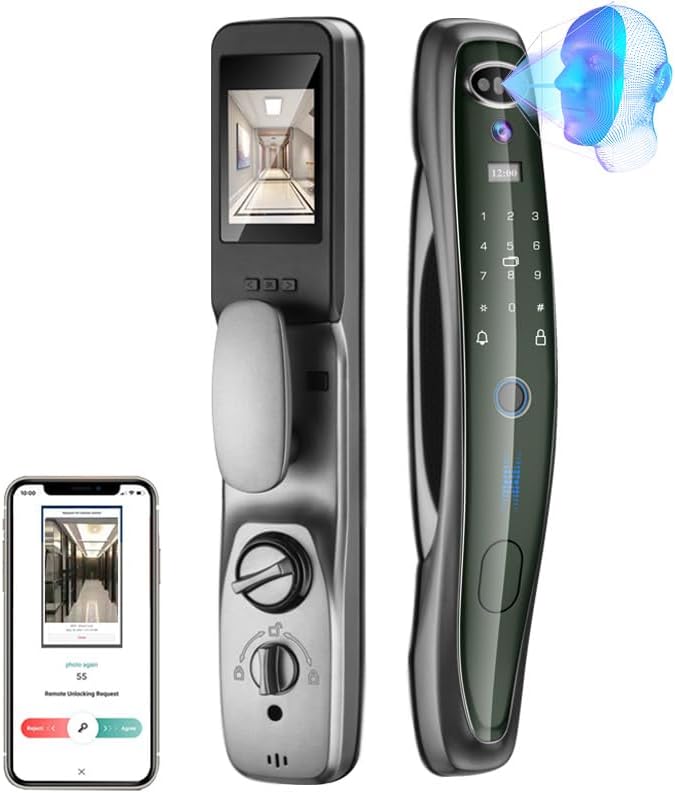
Image: The smart lock displaying its 3D facial recognition capability and the mobile app interface for remote unlocking requests.

Image: Visual representation of the various unlocking methods: 3D facial recognition, fingerprint, password, smart card, mechanical key, and mobile application.

Image: Highlights the speed and accuracy of the fingerprint recognition feature, showing less than 0.5 seconds recognition time and 99.98% success rate.
Intercom and Monitoring
The integrated doorbell and camera allow you to see who is at your door in real-time, either on the lock's screen or via the TUYA App. When someone presses the doorbell, the App will send a notification with an image, allowing you to view live video and decide whether to unlock the door remotely.

Image: Diagram showing the wide-angle "cat's eye" lens for binocular recognition and intelligent light filling, providing a broad view of the area outside the door.
Manteniment
To ensure the longevity and optimal performance of your XSDTS Smart Door Lock, follow these maintenance guidelines:
- Neteja: Wipe the lock's surface with a soft, dry cloth. Avoid using abrasive cleaners, solvents, or harsh chemicals, as they can damage the finish and electronic components.
- Bateria: The lock features a rechargeable battery. Monitor the battery level via the lock's screen or the TUYA App. Recharge the battery promptly when indicated to prevent loss of function.
- Sensors: Keep the fingerprint sensor, camera lens, and facial recognition area clean and free of dust or smudges for accurate operation.
- Parts mecàniques: Periodically check the mechanical components for smooth operation. Do not lubricate the lock cylinder unless specifically instructed by the manufacturer.
Resolució de problemes
If you encounter issues with your XSDTS Smart Door Lock, please refer to the following common solutions:
| Problema | Causa possible | Solució |
|---|---|---|
| Lock not responding / No power | Low battery or completely drained. | Recharge the lock's battery. Use the mechanical key for emergency access. |
| Fingerprint/Facial recognition failure | Sensor/camera dirty, unregistered user, or improper placement. | Clean the sensor/camera. Ensure your fingerprint/face is properly registered. Try different angles or re-register if necessary. |
| Cannot connect to Wi-Fi / TUYA App | Incorrect Wi-Fi password, weak signal, or router issues. | Double-check Wi-Fi password. Ensure the lock is within Wi-Fi range. Restart your router. Follow App pairing instructions carefully. Note: The lock supports 2.4GHz Wi-Fi networks. |
| Lock does not fit door properly | Incorrect measurements or mortise size. | Verify door thickness and mortise dimensions against specifications. Professional installation is crucial for proper fit. |
| Voice prompts/screen not in desired language | Cal ajustar la configuració de l'idioma. | Access the lock's settings menu (usually via the screen or master password) to change the language to Portuguese or English. |
If the problem persists, please contact XSDTS customer support for further assistance.
Especificacions
| Característica | Detall |
|---|---|
| Marca | XSDTS |
| Model | 3DR-Q8-Pro (6068-R) |
| Número de part | 3DR-Q8-Preto, 6068-R |
| Color | Negre |
| Estil | Modern |
| Acabar | Polit |
| Material | Alumini |
| Forma | Oval |
| Característiques especials | Fingerprint, Rechargeable, Anti-peeping password, Automatic lock, Password unlock, 3D Facial Recognition, Wi-Fi Connectivity, Intercom, Doorbell |
| Components inclosos | Front panel, back panel, lock plug (optional), 4 smart cards, 2 mechanical keys, screw kit |
| Pes | 5 quilos |
| Dimensions del producte (L x A x A) | 42 x 7.5 x 6.5 cm |
| Compatibilitat del gruix de la porta | 45 mm - 110 mm |
| Tipus de bloqueig | Biomètric |
Garantia i Suport
For warranty information and technical support, please contact XSDTS customer service. Keep your purchase receipt as proof of purchase.
For inquiries related to your purchase or delivery, please contact the seller: Shan Tou Tong Sheng Trading CO., LTD.
For the most up-to-date support resources, including FAQs and software updates, please visit the official XSDTS website or the product page on Amazon.


