1. Producte acabatview
The Bewinner H310 LGA 1151 Motherboard is a Micro ATX mainboard designed to support 8th and 9th generation Intel Core processors. It features DDR4 memory support, multiple storage interfaces including SATA 6Gb/s and M.2, and integrated graphics output options. This manual provides essential information for installation, operation, and maintenance.

Figure 1: Bewinner H310 LGA 1151 Motherboard, top-down view.
Característiques principals:
- Wide CPU Compatibility: Supports 8th and 9th generation Intel Core CPUs (LGA1151 socket).
- Memòria DDR4 de doble canal: Supports up to 32GB across 2 DIMM slots, with effective frequencies including 2133 MHz.
- Subministrament d'energia estable: Features a three-phase power supply with solid-state capacitors and 24+8 pin power connectors for reliable operation.
- High-Speed H310 Chipset: Provides stable and efficient performance for various computing tasks.
- Integrated Graphics Support: Equipped with an integrated graphics processor and multiple display outputs (DVI, HDMI, VGA) for multi-monitor setups.
2. Contingut del paquet
Verifiqueu que tots els elements siguin presents al paquet:
- 1 x Bewinner H310 LGA 1151 Motherboard
- Manual d'usuari (aquest document)
Note: Additional accessories such as SATA cables or I/O shields may be included depending on the specific retail package.
3. Key Components and Connectors
Familiarize yourself with the layout and various connectors on the motherboard.

Figura 2: Mésview of key areas including CPU socket, DIMM slots, chipset, and SATA ports.
Panell d'E/S posterior:
The rear I/O panel provides external connectivity for peripherals and displays.

Figure 3: Rear I/O panel showing PS/2, VGA, DVI, HDMI, USB 2.0, USB 3.0, LAN, and Audio ports.
Onboard Connectors:
Internal connectors for power, storage, and front panel components.

Figure 4: Labeled diagram of onboard connectors including 24-pin ATX power, SATA 6Gb/s, NVMe M.2, PCIe slots, USB headers, and front panel headers.
4. Guia de configuració
Follow these general steps to install your motherboard into a computer system. Always ensure power is disconnected before handling components.
4.1. Preparació
- La seguretat primer: Disconnect the power supply from the wall outlet. Wear an anti-static wrist strap or frequently touch a grounded metal object to discharge static electricity.
- Reuneix els components: Ensure you have your CPU, CPU cooler, RAM modules, storage devices, power supply, and PC case ready.
4.2. Instal·lació de la placa base
- Instal·lació de la CPU: Open the CPU socket lever, align the CPU with the socket (match the golden triangle or notches), gently place the CPU into the socket, and close the lever to secure it.
- Instal·leu el refrigerador de CPU: Apply thermal paste (if not pre-applied) and install the CPU cooler according to its instructions.
- Instal·lació de la memòria RAM: Open the clips on the DDR4 DIMM slots. Align the RAM modules with the slots (notch on the module matches the slot key), and press down firmly on both ends until the clips snap into place. For dual-channel operation, refer to your CPU cooler's manual for recommended slot population.
- Muntar la placa base: Install the I/O shield into your PC case. Carefully place the motherboard into the case, aligning the screw holes with the standoffs. Secure the motherboard with screws.
- Instal·leu l'SSD M.2 (opcional): If using an M.2 SSD, insert it into the M.2 slot and secure it with the provided screw.
- Connectar l'alimentació: Connecteu el connector d'alimentació ATX de 24 pins i el connector d'alimentació de la CPU de 8 pins de la font d'alimentació a la placa base.
- Connecta l'emmagatzematge: Connect SATA data cables from your storage drives (HDDs/SSDs) to the SATA 6Gb/s ports on the motherboard. Connect SATA power cables from your power supply to the drives.
- Connecteu el panell frontal: Connect the front panel headers (power button, reset button, USB ports, audio jacks, LED indicators) to the corresponding pins on the motherboard. Refer to the motherboard's silkscreen labels for correct orientation.
- Instal·leu les targetes d'expansió (opcional): If using a dedicated graphics card or other PCIe expansion cards, insert them into the appropriate PCIe slots and secure them.
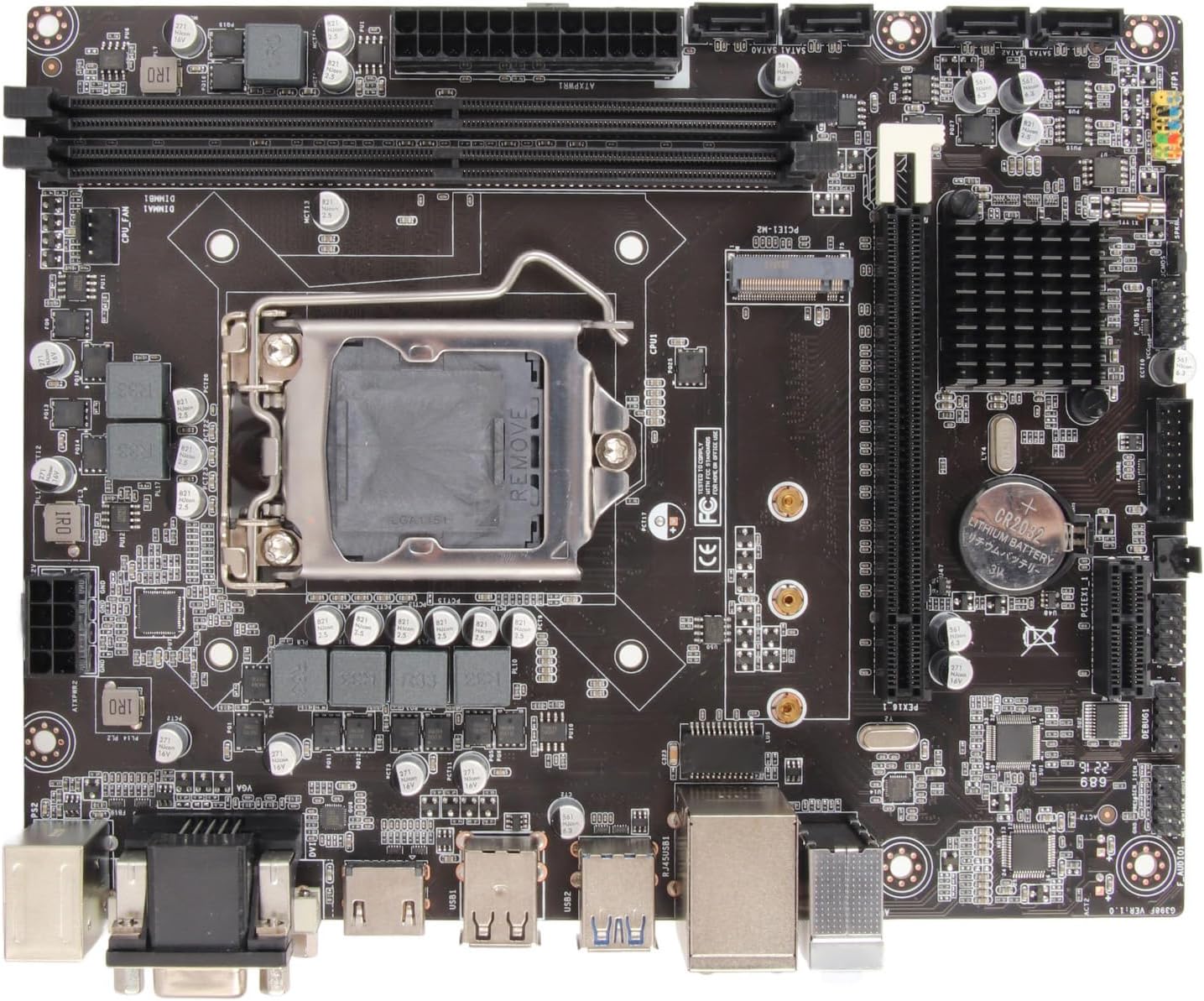
Figura 5: De dalt a baix view of the motherboard, useful for identifying component locations during installation.
5. Instruccions de funcionament
Once all components are installed and connected, you can proceed with system operation.
5.1. Primera arrencada
- Connecteu els perifèrics: Connect your monitor, keyboard, and mouse to the rear I/O ports.
- Encès: Connect the power supply to the wall outlet and flip the power switch on the PSU. Press the power button on your PC case.
- Accés a la BIOS/UEFI: During startup, repeatedly press the designated key (usually DEL or F2) per entrar a la utilitat de configuració de la BIOS/UEFI.
5.2. Configuració de la BIOS/UEFI
The BIOS/UEFI interface allows you to configure system settings, boot order, and monitor hardware status.
- Ordre d'arrencada: Set the boot priority to your operating system installation media (USB drive or DVD-ROM) to install Windows or other OS.
- System Time/Date: Adjust the system clock if necessary.
- Control del ventilador: Configura la velocitat del ventilador per obtenir uns nivells de refrigeració i soroll òptims.
- Guardar i sortir: After making changes, save your settings and exit the BIOS/UEFI. The system will restart.
5.3. Instal·lació del sistema operatiu
Follow the on-screen prompts to install your preferred operating system. After installation, install all necessary drivers for the motherboard chipset, integrated graphics, audio, and LAN from the manufacturer's weblloc web o contingut multimèdia inclòs.
6. Manteniment
Un manteniment adequat garanteix la longevitat i el rendiment estable de la placa base.
- Mantenir net: Regularly clean dust from inside your PC case using compressed air. Dust accumulation can lead to overheating.
- Actualitzacions de la BIOS/UEFI: Comproveu el del fabricant weblloc web per a actualitzacions de la BIOS/UEFI. Les actualitzacions poden millorar la compatibilitat, l'estabilitat i el rendiment. Seguiu atentament les instruccions d'actualització.
- Actualitzacions de controladors: Keep your motherboard drivers (chipset, audio, LAN, graphics) updated to ensure optimal performance and compatibility with new software.
- Condicions ambientals: Operate the motherboard in a well-ventilated area, away from direct sunlight, excessive heat, and moisture.
7. Solució De Problemes
Si teniu problemes, consulteu els següents consells de resolució de problemes:
- Sense energia:
- Ensure the power supply is connected to the wall and switched on.
- Verify that the 24-pin ATX and 8-pin CPU power connectors are securely seated on the motherboard.
- Comproveu la connexió de l'interruptor d'alimentació del panell frontal a la placa base.
- Sense pantalla:
- Ensure the monitor is connected to the correct display output (VGA, DVI, or HDMI) on the motherboard or dedicated graphics card.
- Reseat RAM modules. Try booting with only one RAM module.
- Check if the CPU is properly installed.
- Inestabilitat/Avaries del sistema:
- Comproveu les temperatures de la CPU i la GPU. Assegureu-vos que hi hagi una refrigeració adequada.
- Verify RAM compatibility and stability. Run memory diagnostic tools.
- Assegureu-vos que tots els controladors estiguin actualitzats.
- Perifèric no detectat:
- Prova de connectar el perifèric a un port USB diferent.
- Install or update drivers for the peripheral.
- Check BIOS/UEFI settings for USB port enablement.
- Problemes del sistema operatiu:
- Ensure the operating system is installed on a bootable drive.
- Comproveu l'ordre d'arrencada a la BIOS/UEFI.
- Perform a clean installation of the operating system if issues persist.
8. Especificacions tècniques
Detailed specifications for the Bewinner H310 LGA 1151 Motherboard.

Figure 6: Motherboard dimensions: approximately 21.5 cm (8.5 inches) by 17 cm (6.7 inches).
| Característica | Especificació |
|---|---|
| Marca | Guanyador |
| Nom del model | H310 (Model Number: Bewinnerw4dsgtaq2y) |
| Socket de CPU | LGA 1151 |
| Processadors compatibles | 8th and 9th Generation Intel Core (e.g., i3-8100, i5-8400, i7-8700, i3-9100, i5-9400, i7-9700) |
| Tipus de xipset | Intel H310 |
| Tecnologia de RAM | DDR4 |
| Ranures de memòria | 2 x DIMM (doble canal) |
| Capacitat màxima de RAM | Fins a 32 GB |
| Velocitat de rellotge de memòria | 2133 MHz (Supports 1066, 1333, 1600 MHz) |
| Gràfics | Processador gràfic integrat |
| Còdec d'àudio | Realtek ALC662 6-channel |
| Controlador LAN | Realtek 100M/1000M |
| Ranures d'expansió | 1 x PCI Express X16, 1 x PCI Express X1 |
| Ports SATA | 4 x SATA 6 Gb/s |
| Ranura M.2 | 1 x NVME M.2 |
| Ports USB (posteriors) | 4 x USB 2.0/1.1, 2 x USB 3.0 |
| Sortides de visualització | 1 x VGA, 1 x DVI, 1 x HDMI compatible |
| Other Rear I/O | 1 x PS/2 port, 1 x RJ45 LAN port, 1 x Audio connector |
| Factor de forma | Micro ATX (17 x 21.5 cm / 6.7 x 8.5 inches) |
| Bateria CMOS | CR2032 (integrated) |
| Dispositius compatibles | PC, Laptop (as a component) |
| Origen | Xina |
9. Garantia i Suport
For warranty information and technical support, please refer to the retailer or the official Bewinner weblloc web. Conserveu el comprovant de compra per a qualsevol reclamació de garantia.
- Suport al producte: Visit the Bewinner support page for FAQs, driver downloads, and contact information.
- Reclamacions de garantia: Contact your point of purchase or Bewinner customer service with your product model number (Bewinnerw4dsgtaq2y) and purchase details.


