1. Producte acabatview
The Tenveo PTZ Camera Controller is designed for precise control of various PTZ (Pan-Tilt-Zoom) cameras. It features a 4D joystick for intuitive camera movement and zoom, multiple interface options, and support for common control protocols. This manual provides instructions for setting up, operating, and maintaining your controller.
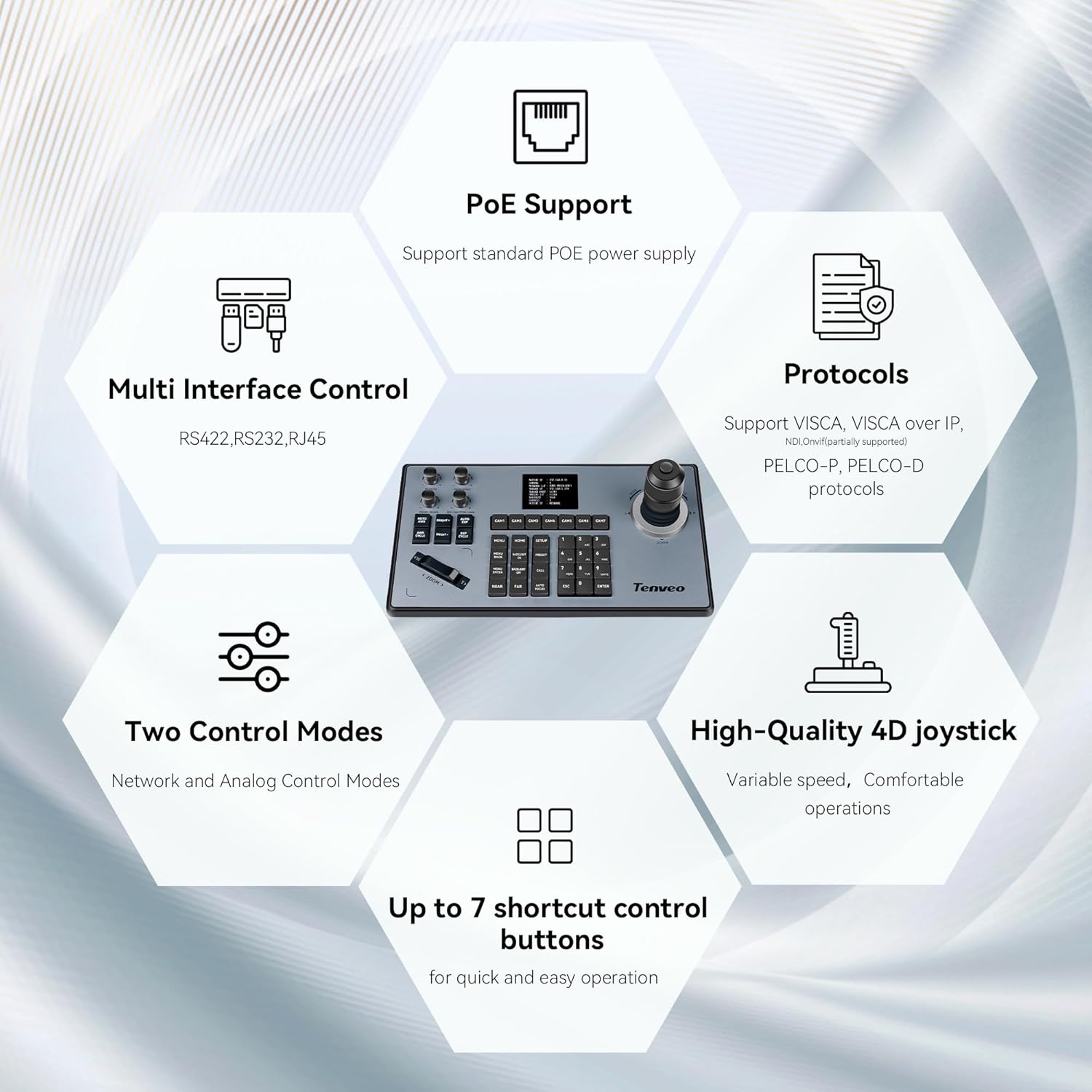
Imatge 1: acabatview of the Tenveo PTZ Camera Controller's key features, including PoE support, multi-interface control (RS422, RS232, RJ45), protocol compatibility (VISCA, PELCO-P, PELCO-D), two control modes, a high-quality 4D joystick, and up to 7 shortcut buttons.
Característiques principals:
- Palanca de control 4D: Provides variable speed control for pan, tilt, and zoom functions, ensuring smooth and precise camera adjustments.
- Multiple Control Interfaces: Supports RS232, RS422, and RJ45 (Ethernet) for versatile connectivity.
- Suport PoE: Compatible with standard Power over Ethernet (PoE) power supply, simplifying installation.
- Compatibilitat de protocols: Supports VISCA, VISCA over IP, PELCO-P, and PELCO-D protocols for broad camera compatibility.
- Modes de control dual: Operates in both Network and Analog control modes.
- Botons de drecera: Up to 7 programmable shortcut buttons for quick access to frequently used functions.
2. Configuració i instal·lació
2.1 Desembalatge i inspecció
Carefully unpack the controller and inspect it for any signs of damage. Ensure all components are present according to the packing list.
2.2 Connexió del controlador
The controller offers various connection options to suit your setup. Refer to the rear panel diagram for port identification.
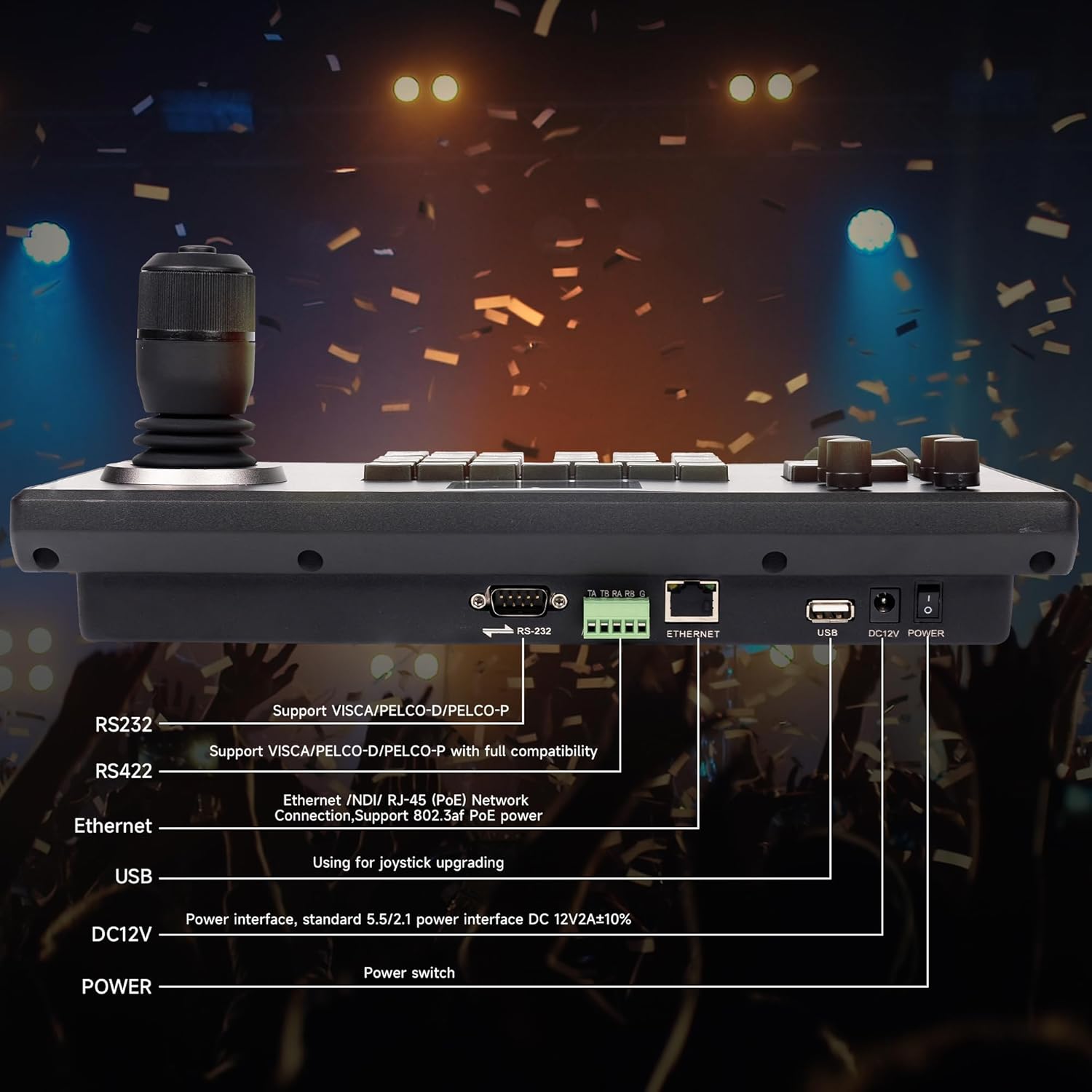
Image 2: Rear panel of the controller showing RS232, RS422, Ethernet (RJ-45), USB, DC12V Power input, and power switch.
- Connexió d'alimentació: Connect the provided DC12V power adapter to the 'DC12V POWER' port. Alternatively, if using PoE, connect an Ethernet cable from a PoE-enabled switch to the 'ETHERNET' port.
- RS232/RS422 Connection: For serial control, connect your camera(s) to the 'RS232' or 'RS422' ports using appropriate cables. Ensure the correct wiring configuration for your camera model.
- Ethernet (IP) Connection: For IP control, connect an Ethernet cable from the 'ETHERNET' port to your network switch or directly to an IP camera.
- Port USB: The USB port is primarily used for firmware upgrades.
2.3 Camera Connection Examples
The controller supports various camera types and connection methods.

Image 3: Close-up of the 4D joystick, highlighting its design for variable speed control and comfortable operation.

Image 4: Diagram illustrating how to connect conference cameras, dome cameras, and PTZ cameras via a network switch (with PoE) to the controller, supporting both network and analog control modes.

Imatge 5: Un example setup showing the controller connected to a PoE switch, which in turn connects to multiple PTZ cameras, demonstrating an easy connection method.
2.4 Configuració inicial
After connecting, power on the controller. You may need to configure network settings (e.g., IP address) and select the appropriate control protocol for your cameras. Refer to your camera's manual for specific protocol and address settings.
3. Instruccions de funcionament
The controller's interface is designed for efficient camera management.

Imatge 6: Detallada view of the control panel, identifying the LCD Screen, Function Wheel, Function Keys, Joystick, Camera Select buttons, Zoom controls, and Number Keys.
3.1 Disseny del tauler de control
- Pantalla LCD: Displays current camera status, settings, and menu options.
- Palanca de control: Controls pan, tilt, and zoom (by twisting) with variable speed.
- Camera Select (CAM1-CAM7): Buttons to select which camera to control.
- Controls de zoom: Dedicated 'ZOOM <' and '> ZOOM' buttons for fine-tuning zoom.
- Tecles de funció: Buttons for various camera functions such as MENU, HOME, SETUP, PRESET, CALL, BRIGHTNESS, FOCUS, etc.
- Tecles numèriques: Used for entering values, selecting presets, or navigating menus.
- Roda de funcions: For adjusting specific parameters like iris or focus, depending on the selected function.
3.2 Funcionament bàsic
- Encès: Flip the power switch on the rear panel. The LCD screen will illuminate.
- Selecciona la càmera: Press the corresponding 'CAM' button (e.g., CAM1) to select the camera you wish to control.
- Panorama/inclinació: Move the joystick left, right, up, or down to pan and tilt the selected camera. The speed of movement is proportional to how far you push the joystick.
- Zoom: Twist the joystick clockwise for telephoto (zoom in) and counter-clockwise for wide-angle (zoom out). Alternatively, use the dedicated 'ZOOM <' and '> ZOOM' buttons.
- Focus: Use the 'AUTO FOCUS' button or the 'NEAR' and 'FAR' buttons to adjust focus. The Function Wheel may also be assigned for manual focus.
- Presets: To save a preset, position the camera, then press 'PRESET' followed by a number key (0-9). To recall a preset, press 'CALL' followed by the saved number key.
- Navegació del menú: Press the 'MENU' button to access the camera's OSD (On-Screen Display) menu. Use the joystick and number keys to navigate and select options. Press 'ESC' to exit.
4. Manteniment
Un manteniment adequat garanteix la longevitat i el rendiment òptim del vostre controlador.
- Neteja: Use a soft, dry cloth to clean the exterior of the controller. For stubborn dirt, a slightly damp cloth with mild detergent can be used, ensuring no liquid enters the device. Avoid abrasive cleaners or solvents.
- Emmagatzematge: Guardeu el controlador en un lloc fresc i sec, allunyat de la llum solar directa i de temperatures extremes quan no l'utilitzeu.
- Actualitzacions de firmware: Periodically check the Tenveo official website for available firmware updates to ensure optimal performance and compatibility. Use the USB port for updates as per instructions provided with the firmware.
5. Solució De Problemes
Aquesta secció tracta problemes comuns que podeu trobar.
5.1 Problemes comuns i solucions
- El controlador no respon:
- Ensure the power adapter is securely connected and the power switch is on.
- If using PoE, verify the Ethernet cable is connected to a PoE-enabled switch and the switch is powered.
- Check all connection cables (RS232, RS422, Ethernet) between the controller and cameras.
- Verify the correct camera is selected using the 'CAM' buttons.
- Joystick Movement is Reversed (Pan/Tilt):
- Press the 'SETUP' key.
- Navigate the LED screen menu using the joystick until you reach 'Keyboard Settings'.
- Press the small button on top of the joystick to enter the Keyboard Settings.
- Adjust the settings for Left/Right movement and Tilt movement to match the desired joystick direction.
- Camera Not Switching or Delayed Response:
- Ensure all cameras are properly connected and powered.
- Verify that each camera has a unique address if using serial control, or a unique IP address if using IP control.
- Check for network congestion or interference if using IP control.
- Confirm that the selected protocol on the controller matches the protocol of the camera.
- Limited Functionality with Camera:
- Ensure the camera's control protocol (VISCA, PELCO-P, PELCO-D) is fully compatible with the controller's implementation. Some camera-specific functions may not be universally supported.
- Refer to your camera's manual for supported control commands.
5.2 Compatibilitat universal
The controller is designed for broad compatibility with various PTZ camera protocols.

Image 7: The controller supports universal compatibility with major protocols including VISCA, VISCA over IP, PELCO-D, and PELCO-P.
6. Especificacions
| Característica | Detall |
|---|---|
| Número de model | B0DK68XJF8 |
| Fabricant | Tenveo |
| Interfícies de control | RS232, RS422, RJ45 (Ethernet) |
| Protocols de control | VISCA, VISCA over IP, PELCO-P, PELCO-D |
| Joystick | 4D, Variable Speed |
| Font d'alimentació | DC12V or PoE (Power over Ethernet) |
| Data de primera disponibilitat | 11 de juny de 2024 |
| Tipus d'element | Electrònica |
7. Garantia i Suport
For warranty information and technical support, please refer to the documentation included with your purchase or visit the official Tenveo weblloc web. Els termes de garantia específics poden variar segons la regió i el distribuïdor.
For further assistance, please contact Tenveo customer service through their official channels.


