Informació important de seguretat
Read all instructions before using this product. Keep this manual for future reference. Adhere to all warnings on the product and in the operating instructions. Do not use this apparatus near water. Clean only with a dry cloth. Do not block any ventilation openings. Install in accordance with the manufacturer's instructions. Do not install near any heat sources such as radiators, heat registers, stoves, or other apparatus (including amplifiers) that produce heat. Only use attachments/accessories specified by the manufacturer. Unplug this apparatus during lightning storms or when unused for long periods of time. Refer all servicing to qualified service personnel. Servicing is required when the apparatus has been damaged in any way, such as power-supply cord or plug is damaged, liquid has been spilled or objects have fallen into the apparatus, the apparatus has been exposed to rain or moisture, does not operate normally, or has been dropped.
Producte acabatview
The Vivitar Singimals Kids Karaoke Speaker with Microphone (Model SNG200-ELPH-STK-6, Elliot the Elephant) is designed to provide an engaging karaoke experience for children. It features Bluetooth v5.1 connectivity, a 5W speaker, multicolor LED lighting, and a built-in rechargeable battery offering up to 12 hours of playtime.

Image: The Vivitar Singimals Kids Karaoke Speaker, featuring the Elliot the Elephant design, shown with its wired microphone attached. The speaker has a handle on top and control buttons on the front panel.
Contingut del paquet
- Singimals Kids Karaoke Speaker (Elliot the Elephant)
- Micròfon per cable
- Cable de càrrega USB
- Manual d'usuari
Configuració
Carregant l'altaveu
- Localitza el port de càrrega USB a l'altaveu.
- Connecteu el cable de càrrega USB proporcionat al port de càrrega de l'altaveu.
- Connecteu l'altre extrem del cable USB a un adaptador de corrent USB compatible (no inclòs) o al port USB d'un ordinador.
- El llum indicador de càrrega s'il·luminarà durant la càrrega i s'apagarà quan estigui completament carregat.
- Una càrrega completa proporciona fins a 12 hores de reproducció.
Connexió del micròfon
- Insert the microphone's 3.5mm jack into the MIC input port on the speaker.
- Ensure the microphone's ON/OFF switch is set to the "ON" position for use.

Image: A close-up of the top rear panel of the speaker, highlighting the USB, Micro SD, 5V 1A power, and MIC input ports. This illustrates where to connect the charging cable and microphone.
Instruccions de funcionament
Encès/Apagat
Locate the ON/OFF switch on the speaker's control panel. Slide it to "ON" to power on the device. Slide it to "OFF" to power off.
Connexió Bluetooth
- Power on the karaoke speaker. It will automatically enter Bluetooth pairing mode, indicated by a flashing blue LED.
- Al telèfon intel·ligent, la tauleta o un altre dispositiu compatible amb Bluetooth, aneu a la configuració de Bluetooth.
- Cerca available devices and select "Singimals" from the list.
- Once connected, the blue LED will stop flashing and remain solid. You can now play music from your device through the speaker.
Ús del micròfon
After connecting the microphone and ensuring its switch is "ON", speak or sing into the microphone. Your voice will be amplified through the speaker. Adjust the microphone volume using the dedicated controls if available, or the main volume controls.
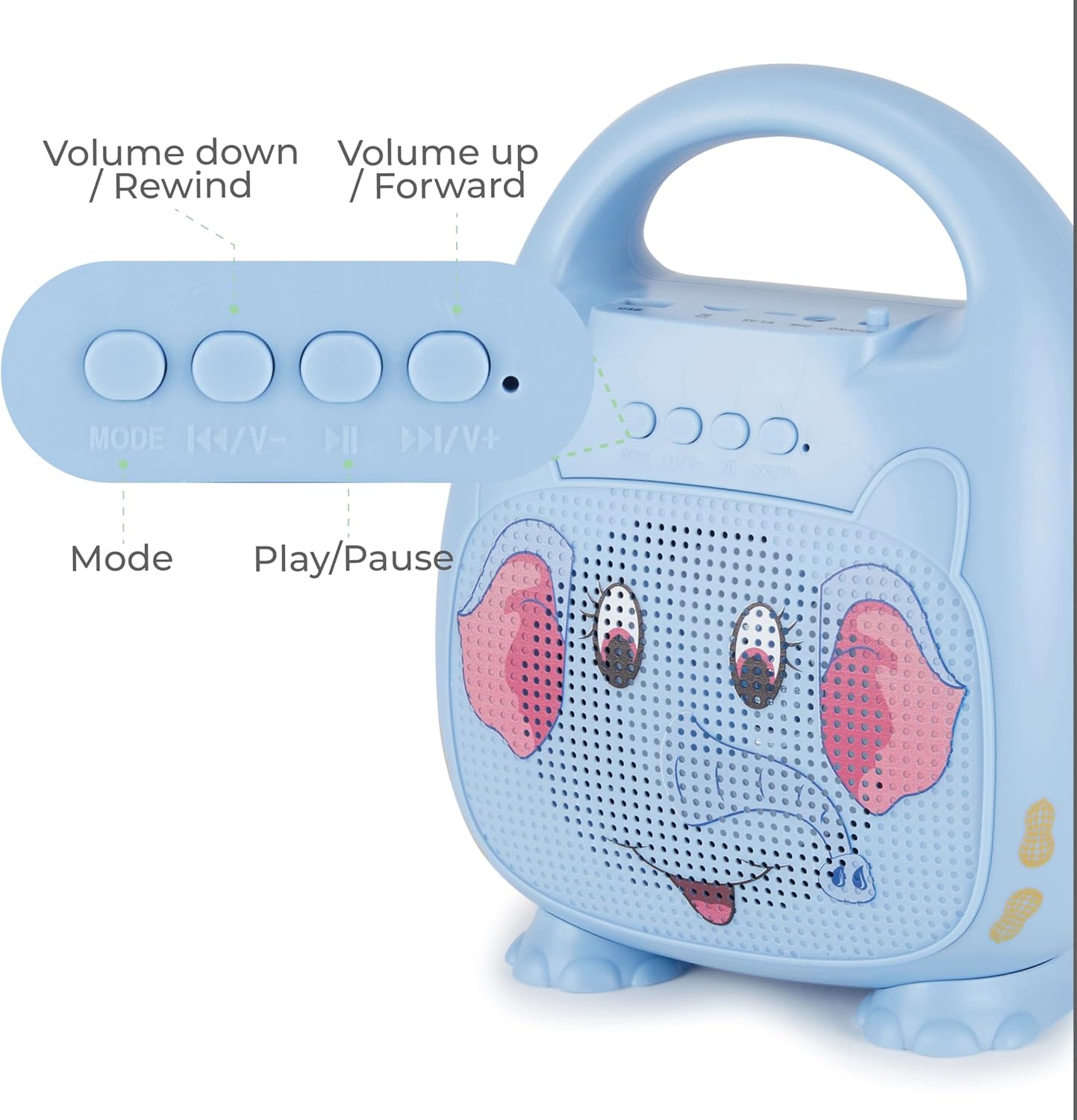
Imatge: Una imatge detallada view of the control panel on the speaker, showing buttons for Mode selection, Volume Down/Rewind, Play/Pause, and Volume Up/Forward. This illustrates how to navigate music and adjust settings.
Botons de control
- Mode: Press to switch between Bluetooth, USB, and Micro SD modes.
- |<< / V-: Premeu per anar a la pista anterior. Mantingueu premut per baixar el volum.
- >>||: Premeu per reproduir o posar en pausa la música.
- >>| / V+: Premeu per anar a la pista següent. Mantingueu premut per augmentar el volum.
Il·luminació LED
The speaker features multicolor LED lighting that pulses and changes with the music, enhancing the karaoke experience. The lights activate automatically when the speaker is powered on.
Manteniment
Neteja
Wipe the speaker and microphone with a soft, dry cloth. Do not use liquid cleaners or abrasive materials.
Emmagatzematge
Guardeu el dispositiu en un lloc fresc i sec, allunyat de la llum solar directa i de temperatures extremes.
Cura de la bateria
To prolong battery life, fully charge the speaker before first use and at least once every three months if not used regularly.
Resolució de problemes
| Problema | Solució |
|---|---|
| L'altaveu no s'encén. | Ensure the battery is charged. Connect the USB charging cable and allow it to charge for at least 30 minutes before attempting to power on again. Check the ON/OFF switch. |
| No hi ha so del micròfon. | Verify the microphone is securely plugged into the MIC port. Ensure the microphone's ON/OFF switch is in the "ON" position. Increase the volume on the speaker. |
| No es pot connectar per Bluetooth. | Ensure the speaker is in Bluetooth pairing mode (flashing blue LED). Turn off and on Bluetooth on your device. Move your device closer to the speaker. Forget "Singimals" from your device's Bluetooth list and try pairing again. |
| Distorsió del so. | Reduce the volume on both the speaker and your connected device. Ensure there are no obstructions between your Bluetooth device and the speaker. |
Especificacions
- Model: SNG200-ELPH-STK-6
- Marca: Vivitar
- Connectivitat: Bluetooth v5.1
- Sortida de l'altaveu: 5W
- Font d'alimentació: Alimentat per bateria (1 bateria de ions de liti, inclosa)
- Temps de joc: Fins a 12 hores
- Port de càrrega: USB
- Material: Metall, plàstic
- Dimensions del producte: 8.7 x 4.7 x 9.4 polzades
- Pes de l'article: 2.09 lliures (0.95 quilograms)
- Dispositius compatibles: Telèfon intel·ligent, tauleta, ordinador personal
Garantia i Suport
For warranty information and customer support, please refer to the official Vivitar weblloc web o poseu-vos en contacte amb el seu departament d'atenció al client. Conserveu el rebut de compra com a comprovant de compra.
Manufacturer: Sakar International, Inc.
Informació addicional
Vídeos de productes
No official seller videos are available for embedding in this manual.


