1. Introducció
This manual provides comprehensive instructions for the installation, operation, and maintenance of the FGI TrolMaster TCS-1 Tent-X Main Controller. The TCS-1 is designed to integrate and manage various environmental control and irrigation devices within a controlled growing environment, such as a grow tent. It serves as a central hub for monitoring and adjusting key parameters to optimize plant growth.
2. Producte acabatview
2.1 Característiques clau
- Professional-grade garden controller suitable for home or hobby use.
- Integrated 3-in-1 sensor for monitoring temperature, humidity, and lighting conditions (on/off).
- Supports connection of up to four DS-type plug-in control modules for environmental and irrigation device management.
- Compact design with hydroponic capabilities.
- Free phone application for remote monitoring and control.
2.2 Components
The TrolMaster TCS-1 Tent-X Main Controller system includes the following primary components:
- TCS-1 Main Controller Unit
- 3-in-1 Sensor (Temperature, Humidity, Light)
- Necessary connection cables
- Power Adapter (12V/1A DC)

Figura 1: Frontal view of the TCS-1 Main Controller, showing the display and control buttons.

Figura 2: posterior view of the TCS-1 Main Controller, illustrating the Internet, Sensors, Devices, Line1, Line2, Micro SD, and DC power ports.
3. Instruccions de configuració
Follow these steps to set up your TrolMaster TCS-1 Tent-X Main Controller:
- Desempaquetar el controlador: Carefully remove all components from the packaging. Verify that all items listed in Section 2.2 are present.
- Muntar el controlador: Choose a suitable location within your grow environment that is protected from direct water exposure and excessive heat. Ensure adequate ventilation around the unit.
- Connect the 3-in-1 Sensor: Plug the 3-in-1 temperature, humidity, and light sensor into the designated "SENSORS" port on the rear of the main controller. Position the sensor in an area that accurately reflects the environmental conditions you wish to monitor.
- Connexió de dispositius: Connect your climate control and irrigation devices (e.g., fans, humidifiers, pumps) to the "DEVICES", "LINE1", or "LINE2" ports as required. Refer to the device-specific instructions for proper connection. The system supports various modules as shown in the system diagram.
- Connexió a Internet (opcional): For remote monitoring and control via the phone app, connect an Ethernet cable from your router to the "INTERNET" port on the controller.
- Inseriu la targeta Micro SD (opcional): If data logging is desired, insert a Micro SD card into the "MICRO SD" slot.
- Encès: Connect the 12V/1A DC power adapter to the "DC" port on the controller, then plug the adapter into a standard 110V power outlet. The controller display should illuminate.
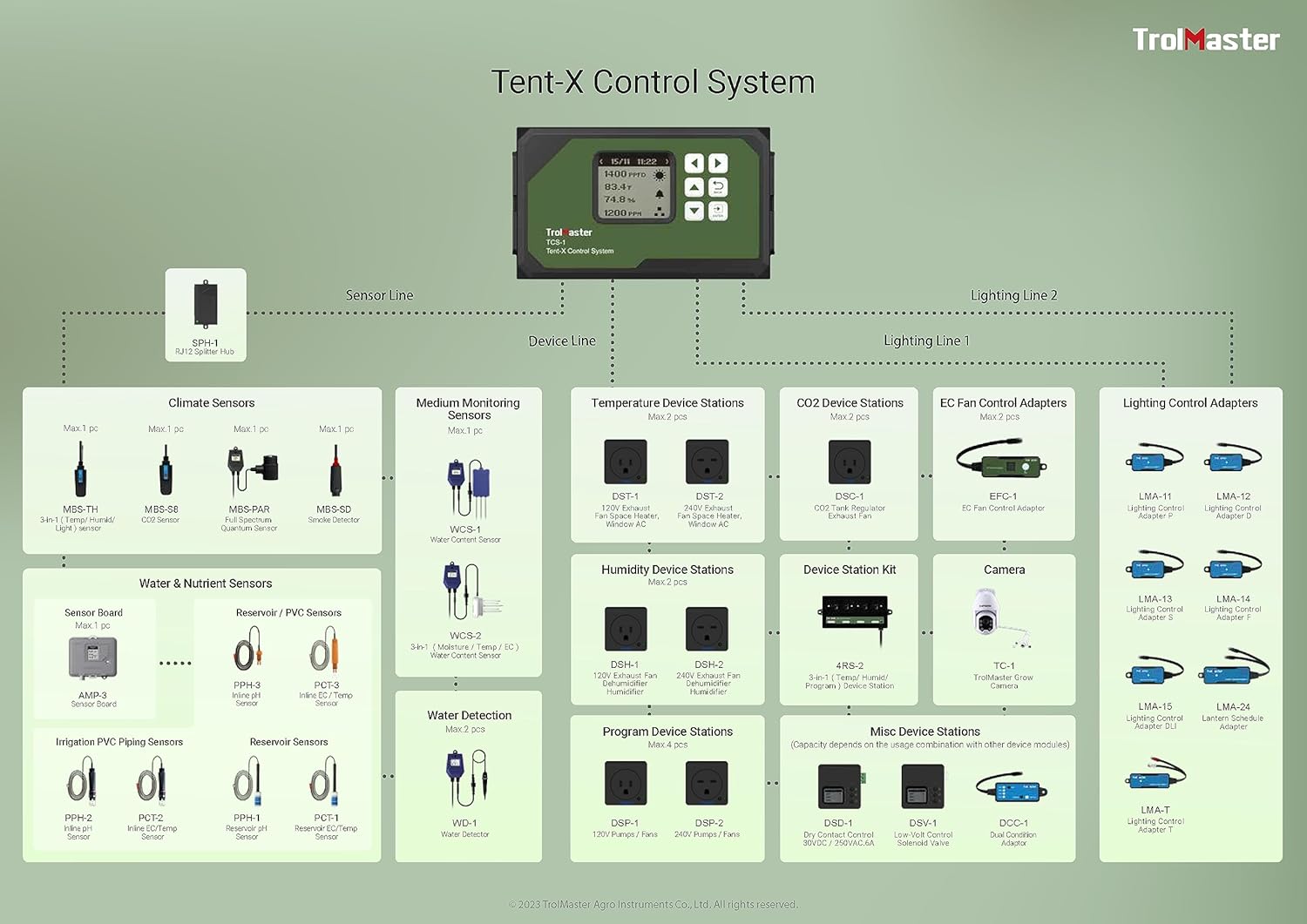
Figure 3: Comprehensive system diagram illustrating the connectivity of the TCS-1 Main Controller with various climate, water, nutrient, and lighting devices.
4. Instruccions de funcionament
4.1 Navegació bàsica
The TCS-1 controller features a display screen and several buttons for navigation and setting adjustments:
- Fletxes amunt/avall: Navegueu per les opcions del menú i ajusteu els valors.
- Fletxes esquerra/dreta: Move between different screens or sub-menus.
- Botó ENTER: Confirm selections or enter a menu.
- Botó TORNAR: Torna a la pantalla anterior o surt d'un menú.
4.2 Configuració inicial
Upon first power-up, the controller may prompt you to set basic parameters such as date, time, and measurement units. Follow the on-screen instructions using the navigation buttons.
4.3 Setting Environmental Parameters
Access the main menu to configure desired temperature, humidity, and lighting schedules. The 3-in-1 sensor provides real-time data, allowing the controller to activate or deactivate connected devices to maintain your set points. Consult the on-screen menu for specific parameter adjustments.
4.4 Ús de l'aplicació mòbil
Download the official TrolMaster mobile application from your device's app store. Once installed, follow the app's instructions to connect it to your TCS-1 controller via the internet connection. The app allows for remote monitoring of environmental conditions, adjustment of settings, and receiving alerts.
5. Manteniment
To ensure optimal performance and longevity of your TCS-1 Tent-X Main Controller, observe the following maintenance guidelines:
- Neteja: Periodically wipe the controller's exterior with a soft, dry cloth. Avoid using abrasive cleaners or solvents.
- Cura del sensor: Keep the 3-in-1 sensor clean and free from dust or debris. Ensure it is not obstructed, as this can affect readings.
- Actualitzacions de firmware: Comproveu el TrolMaster website or mobile app periodically for firmware updates. Keeping your controller's firmware up-to-date ensures access to the latest features and performance improvements.
- Condicions ambientals: Operate the controller within its specified environmental limits (temperature, humidity) to prevent damage.
6. Solució De Problemes
If you encounter issues with your TCS-1 Tent-X Main Controller, refer to the following common troubleshooting steps:
- El controlador no s'encén:
- Assegureu-vos que l'adaptador de corrent estigui connectat correctament tant al controlador com a una presa de corrent que funcioni.
- Verifiqueu que la presa de corrent funciona connectant-hi un altre dispositiu.
- Lectures inexactes del sensor:
- Check if the 3-in-1 sensor is properly connected to the "SENSORS" port.
- Assegureu-vos que el sensor estigui net i no obstruït.
- Relocate the sensor if it is exposed to direct airflow from a fan or heater, which can cause localized readings.
- Dispositius que no responen:
- Verify that the devices are correctly connected to the appropriate ports ("DEVICES", "LINE1", "LINE2").
- Check the controller's settings to ensure the devices are enabled and configured with the correct parameters.
- Ensure the devices themselves are powered on and functional independently.
- Problemes de connectivitat de l'aplicació mòbil:
- Confirm the controller is connected to the internet via an Ethernet cable.
- Check your network connection and router status.
- Assegureu-vos que l'aplicació mòbil estigui actualitzada a la darrera versió.
For further assistance, please contact FGI/TrolMaster customer support or visit their official weblloc web per a preguntes freqüents detallades i recursos de suport.
7. Especificacions
| Dimensions del producte | 6"L x 2.5"W x 8"H (1.8 Pounds) |
| Número de model de l'article | TCS-1 Tent-X |
| Fabricant | TrolMaster |
| Marca | FGI |
| Color | Verd |
| Material | Plàstic |
| Voltage | 110 Volts |
| Primer disponible | 22 d'agost de 2023 |
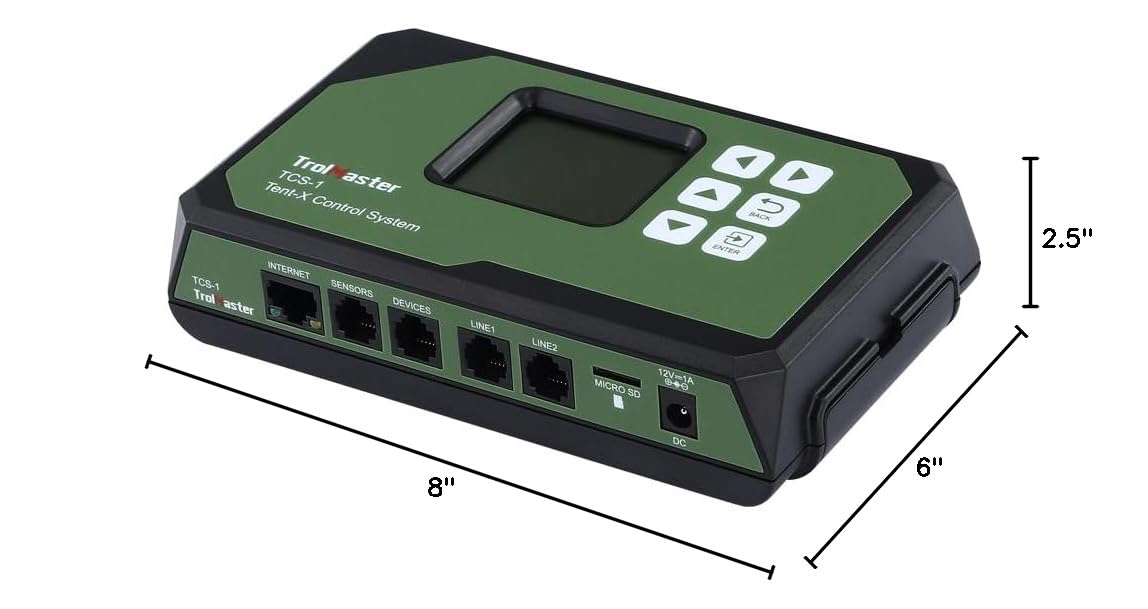
Figure 4: Physical dimensions of the TCS-1 Main Controller.
8. Garantia i Suport
For warranty information and customer support, please refer to the official FGI or TrolMaster weblloc web. Conserveu el rebut de compra com a comprovant de compra per a qualsevol reclamació de garantia.
Recursos en línia:
- FGI Store: Visit the FGI Store on Amazon
- Manufacturer: TrolMaster (refer to their official website for direct support)


