1. Producte acabatview
This manual provides instructions for the ASONPAO 878Max/893Max Universal Wireless Garage Door Keypad and Remote. This system offers convenient and secure access to your garage, compatible with various LiftMaster, Chamberlain, and Sears Craftsman garage door openers.
2. Compatibilitat
The ASONPAO 878Max/893Max system is compatible with LiftMaster, Chamberlain, and Sears Craftsman garage door openers manufactured from 1993 to the present, featuring a Purple, Yellow, Red, Orange, or Green Learn Button. It replaces models such as 877MAX, 878MAX, 877LM, 377LM, 977LM, 66LM, 893LM, 891LM, 371LM, 971LM, 81LM, 893MAX, 895MAX, 890MAX, and G953EV-P2.
Important: This system does not support Dip Switch Garage Door Openers.

Image: Compatibility chart for ASONPAO garage door openers.
3. Configuració i programació
3.1 Programació del teclat
Follow these steps to program your ASONPAO wireless keypad:
- Locate the Learn button on your garage door opener. Note that the location and color of the Learn button may vary depending on your opener model.
- On the keypad, press and hold the '*' and '#' buttons simultaneously until the lights on the keypad stop blinking.
- Enter your desired 4-digit personal identification number (PIN). Then press the '#' button.
- Press and release the Enter button the number of times corresponding to your garage door opener's Learn button color:
- 1 press for 310 MHz Security+ (Red/Orange Learn Button)
- 2 presses for 315 MHz Security+ (Purple Learn Button)
- 3 presses for 390 MHz Security+ 2.0 (Yellow Learn Button)
- 4 presses for 390 MHz Billion Code (Green Learn Button)
- Press the '0' button to exit programming mode.
- Press and immediately release the Learn button on your garage door opener. The Learn LED will light up.
- Within 30 seconds, enter your 4-digit PIN on the keypad, then press the ENTER button. The garage door opener lights will flash or click twice, indicating successful programming.
- Test the keypad by entering your PIN and pressing ENTER. The garage door should activate.
Note: To program the Keyless Entry to more than one garage door opener, repeat the steps above using a new PIN for each additional garage door opener.

Image: Keypad programming steps.
3.2 Remote Programming
Follow these steps to program your ASONPAO remote control:
- Locate the Learn button on your garage door opener and identify its color.
- Using a visor clip or a small tool, press the 'PROG' button on the back of the remote until the LED light on the remote turns on.
- Choose the button on the remote you wish to program. Press this button and release it the number of times specified by the color of your opener's Learn button (e.g., 1 for Red/Orange, 2 for Purple, 3 for Yellow, 4 for Green). This will exit 'PROG' mode.
- Press and immediately release the Learn button on the garage door opener. The Learn LED will glow steadily for 30 seconds.
- Within 30 seconds, press and hold the same button on the remote that you chose in step 3. Release the button when the opener lights blink or click twice, indicating successful programming.
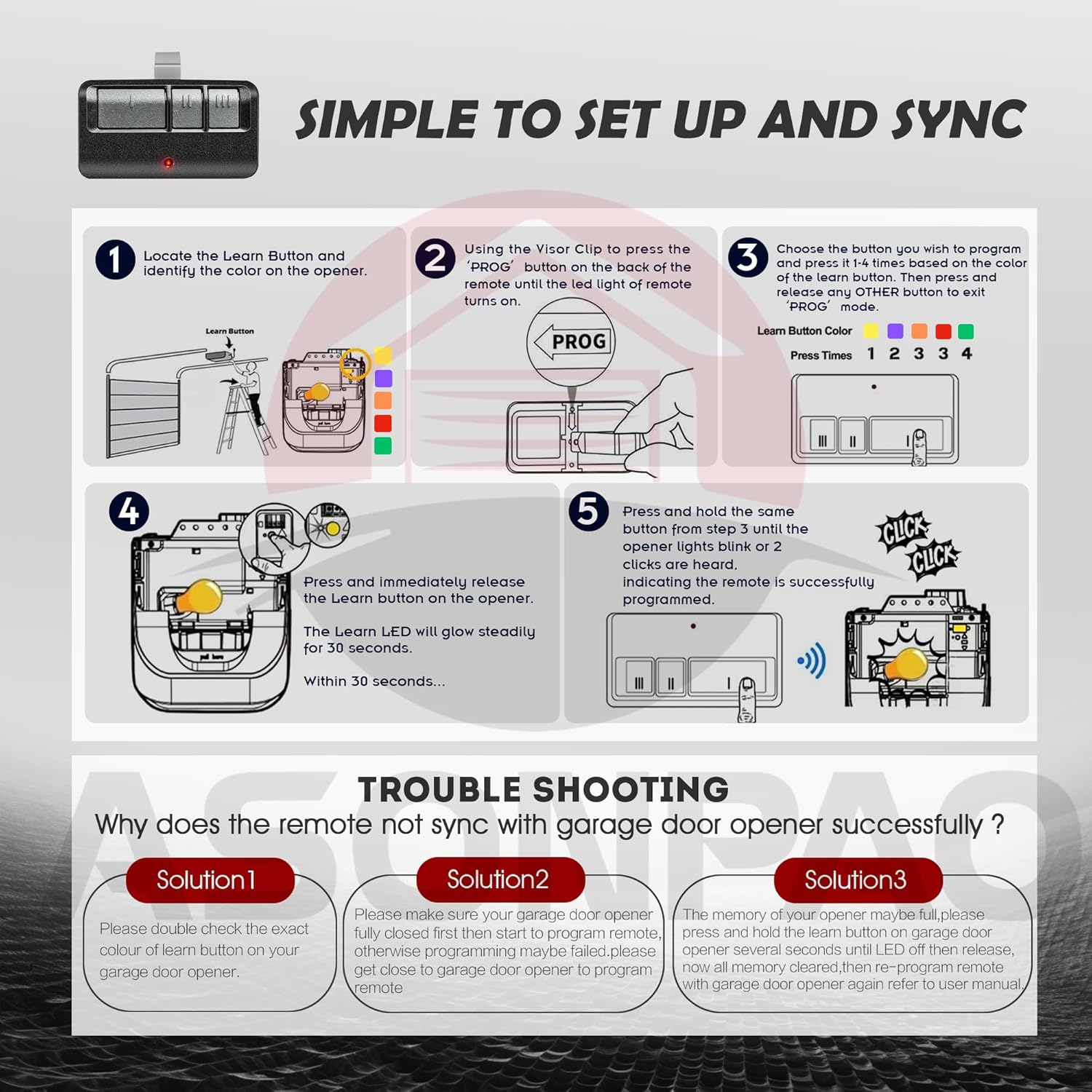
Image: Remote programming steps.
3.3 Programming Video Guide
For a visual guide on programming, please refer to the video below:
Video: Programming instructions for the ASONPAO 893MAX G953EV-P2 953EV remote and keypad.
4. Instruccions de funcionament
4.1 Keypad Operation
To open or close your garage door using the keypad, simply enter your programmed 4-digit PIN and press the ENTER button. The keypad features a built-in night light for convenient use in low-light conditions.
4.2 Funcionament del control remot
Press the programmed button on your remote control to open or close your garage door. The remote can be easily attached to your car's visor or carried in your pocket.

Image: Keypad with night light feature for day and night visibility.

Image: Remote control usage examples.
5. Característiques clau
- Seguretat avançada: Utilizes cutting-edge encryption technology and rolling codes (310/315/390MHz and Security+ 2.0) to protect against unauthorized access.
- Rendiment durador: Constructed with a robust ABS alloy casing, designed to withstand drops and provide consistent performance.
- Guest-Friendly Access: Features a temporary password function, allowing guests access without sharing your primary PIN.
- Llum nocturna: A built-in night light on the keypad ensures visibility and ease of use after dark.
- Interval estès: Offers an extremely distant reach of up to 164 feet for reliable operation.
- Multi-Channel Operation: The keypad can operate up to 5 garage doors, and the remote can operate up to 3 garage doors.

Image: Secure and dependable features of the system.

Image: Illustration of the 164 feet remote range.

Image: Multi-functionality for operating multiple garage doors.
6. Manteniment
6.1 Substitució de la bateria
The keypad requires one 9V battery (included). The remote controls use 240mAh batteries. When the battery is low, the device's indicator light may dim or fail to illuminate, or the range may decrease. Replace batteries as needed to ensure optimal performance.

Image: Battery information for keypad and remote.
7. Solució De Problemes
7.1 Remote Not Syncing with Garage Door Opener
If your remote control is not successfully syncing with your garage door opener, consider the following solutions:
- Verify Learn Button Color: Double-check the exact color of the Learn button on your garage door opener and ensure you are pressing the remote button the correct number of times during programming.
- Proximity to Opener: Ensure your garage door opener is in programming mode and that you are in close proximity to the opener when attempting to program the remote.
- Clear Opener Memory: The garage door opener's memory may be full. To resolve this, clear the opener's memory (refer to your garage door opener's manual for specific instructions) and then re-program the remote.
Image: Troubleshooting guide for remote synchronization.
8. Especificacions
| Característica | Detall |
|---|---|
| Dimensions del paquet | 7.44 x 3.66 x 2.56 polzades |
| Pes de l'article | 11.3 unces |
| Número de model de l'article | 878 màx |
| Bateries | 1 x 9V battery (included for keypad) |
| Nombre màxim de dispositius compatibles | 5 (keypad), 3 (remote) |
| Dispositius compatibles | Universal for 1993 to Present LiftMaster Chamberlain MyQ Sears Craftsman Garage Door Opener |
| Color | Negre |
9. Garantia i Suport
This product comes with a 12-year warranty. For any queries or technical assistance, please contact ASONPAO customer support through the store homepage or support email. Our team is available to provide online technical support within 24 hours.

Image: ASONPAO customer support information.


