1. Introducció
Gràcies per la compraasing the TCL 40L5AG 40-inch Google TV Smart Television. This television combines a Full HD display with advanced image processing, smart features powered by Google TV, and immersive audio to provide a comprehensive entertainment experience. Please read this manual thoroughly before using the product to ensure proper operation and to maximize your viewplaer.
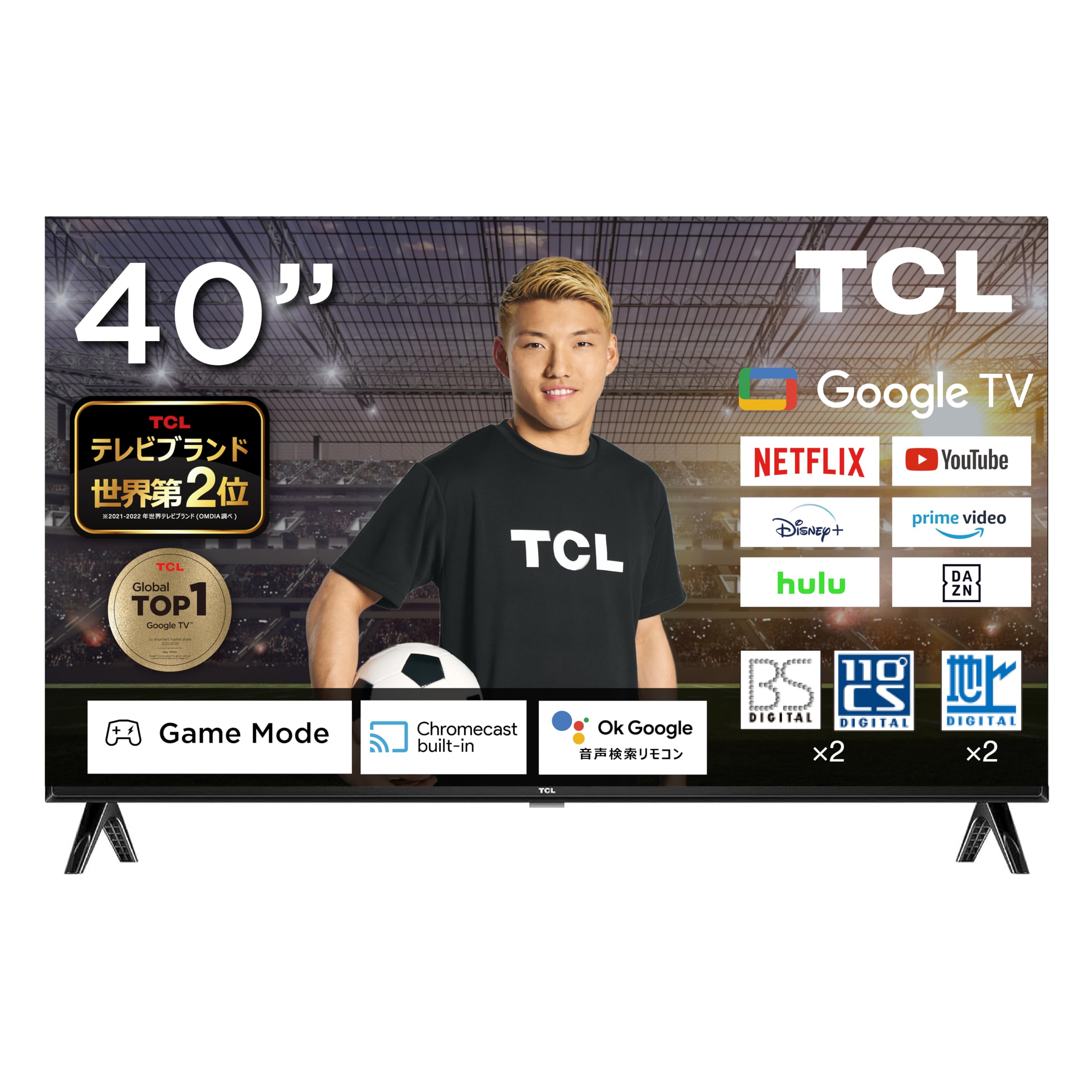
Figure 1: TCL 40L5AG 40-inch Google TV Smart Television. This image shows the front view of the television with its slim bezels and stand.
2. Configuració
2.1 Desembalatge i muntatge
Traieu amb cura el televisor del seu embalatge. Assegureu-vos que hi hagi tots els components:
- TCL 40L5AG Television
- Control remot
- Bateries per a comandament a distància
- Suport per a TV (si escau)
- Cable d'alimentació
- Manual d'usuari (aquest document)
If using the TV stand, attach it securely according to the instructions provided in the quick start guide. For wall mounting, refer to a compatible VESA wall mount kit (sold separately) and follow its installation instructions.
2.2 Cables de connexió
Connect the necessary cables to the appropriate ports on the rear of the television.

Figura 2: posterior view of the TCL 40L5AG showing various connection terminals. This diagram illustrates the locations of the Optical Digital Audio Output, LAN, Headphone Output, Video Input, Antenna Input, HDMI Inputs (1-2), miniB-CAS Card Slot, and USB Terminal.
- Potència: Connecteu el cable d'alimentació al televisor i després a una presa de corrent.
- Antena: Connect your terrestrial, BS, or 110-degree CS digital antenna cable to the Antenna Input terminal.
- HDMI: For external devices like Blu-ray players or gaming consoles, connect HDMI cables to HDMI Input 1 or 2.
- LAN: For a wired internet connection, connect an Ethernet cable to the LAN terminal.
- USB: For connecting USB storage devices (e.g., for HDD recording), use the USB terminal.
- miniB-CAS Card: Insert the miniB-CAS card into the designated slot for digital broadcast reception.
- Sortida d'àudio digital òptic: Per connectar a sistemes d'àudio externs.
- Sortida d'auriculars: Per connectar auriculars.
- Entrada de vídeo: Per connectar dispositius de vídeo més antics.
2.3 Assistent d'encesa inicial i configuració
After connecting all cables, plug in the power cord. The TV will power on and guide you through the initial setup process, which includes:
- Selecció de la llengua
- Connexió de xarxa (Wi-Fi o amb cable)
- Google account login (recommended for full Google TV features)
- Channel scanning for terrestrial, BS, and 110-degree CS digital broadcasts
- Time zone and other basic settings
3. Funcionament del televisor
3.1 Funcions bàsiques del televisor
Use the remote control to navigate the television. Key functions include:
- Botó d'encesa: Encén o apaga el televisor.
- Pujar/baixar el volum: Ajusta el volum d'àudio.
- Canal amunt/avall: Canvia els canals de televisió.
- Entrada/Font: Selecciona la font d'entrada (HDMI, AV, TV).
- Botó d'inici: Accedeix a la pantalla d'inici de Google TV.
- Botons de navegació (amunt/avall/esquerra/dreta) i D'acord: Per a la navegació i selecció de menús.
3.2 Interfície de Google TV
The Google TV interface organizes your content from various streaming services and apps into a personalized home screen. Google AI recommends content based on your viewing history and preferences.

Figure 3: The Google TV home screen displaying recommended content and various streaming applications.
You can add favorite content to a "Watchlist" which will be saved across your Google account and accessible from other devices.
3.3 Google Assistant (Voice Search)
The TCL 40L5AG supports Google Voice Search and Google Assistant. Press the dedicated Google Assistant button on your remote control and speak into the microphone to search for content, get information, or control smart home devices.

Figure 4: A user interacting with the Google Assistant feature on the TCL TV, demonstrating voice command functionality.
3.4 Chromecast integrat
With Chromecast built-in, you can cast videos, photos, music, and other content from your smartphone, tablet, or computer directly to your TV screen. Ensure your device and TV are connected to the same Wi-Fi network.

Figure 5: An illustration of Chromecast in action, showing a smartphone screen mirroring content to the TCL television.
3.5 Accés als serveis de transmissió en temps real
The TV comes with popular streaming services like Netflix and YouTube pre-installed. You can also download other apps from the Google Play Store. Supported services include YouTube, Amazon Prime Video, Netflix, Hulu, Disney+, Apple TV+, U-NEXT, and more.

Figure 6: A family enjoying various streaming services and content on the TCL television.
4. Característiques clau
4.1 Algo Engine Lite
The Algo Engine Lite utilizes an advanced image analysis algorithm to process TV broadcasts and online video content, delivering high-quality visual beauty with enhanced texture and clarity.

Figure 7: A visual representation of the Algo Engine Lite processor, highlighting its role in image analysis.
4.2 Algo Engine - Detail Restoration
This feature minimizes noise, including wave-like patterns in flat image areas, beyond just text and edge noise. It also skillfully upscales HD and 2K content to 4K resolution, reproducing highly detailed images.

Figure 8: Comparison of an image before and after Algo Engine's detail restoration, showing enhanced clarity in a canal scene.
4.3 Algo Engine - Superior Contrast (Micro Dimming)
Equipped with "Micro Dimming," the Algo Engine analyzes image information in detail for each zone. This allows for clear separation of light and dark areas, even in subtle details, creating a more realistic sense of depth in landscapes.

Figure 9: A city night scene demonstrating the improved contrast and depth with Algo Engine's Micro Dimming feature.
4.4 Algo Engine - Precise Color Management
Through 3D color management, the Algo Engine minimizes color gamut loss during color transitions. It accurately reproduces gradations and colors from the darkest to the brightest areas of an image.

Figure 10: A visual comparison of fruit bowls, illustrating the enhanced color accuracy and vibrancy achieved with Algo Engine's precise color management.
4.5 Algo Engine - Evolved HDR Expression
The Algo Engine thoroughly analyzes High Dynamic Range (HDR) images and flexibly adapts to a wide range of brightness levels. This ensures faithful depiction of both bright and dark areas, supporting HDR10/HLG formats (1080p only).

Figure 11: A sunset scene demonstrating the enhanced dynamic range and detail in bright and dark areas with Algo Engine's HDR expression.
4.6 Full HD LCD Panel
The television features a Full HD LCD panel with direct-lit LED backlighting, providing bright and high-quality images across the entire screen. The panel resolution is twice that of standard High Vision, allowing for rich expression of diverse content with high-precision visuals.

Figure 12: A comparison showing the difference between HD and Full HD display quality, highlighting the clarity of the Full HD LCD panel.
4.7 Dolby Audio
Experience clear and powerful sound with Dolby Audio support, enhancing your overall entertainment experience.

Figure 13: A waterfall scene illustrating the immersive sound experience provided by Dolby Audio.
4.8 Bezel-less Design
The television features an ultra-thin metal frame, enhancing immersion and contributing to a sleek aesthetic in your living space.

Figura 14: Primer pla views of the TCL television's ultra-thin bezel, showcasing its modern, immersive design.
5. Manteniment
5.1 Cleaning the Screen and Exterior
- Desendolla sempre el televisor abans de netejar-lo.
- Feu servir un drap suau i sense borrissol per netejar suaument la pantalla. Per a marques difícils, fregueu lleugerament.ampRenta el drap amb aigua o una solució de neteja de pantalles dissenyada específicament per a electrònica. No ruixis líquid directament sobre la pantalla.
- Netegeu l'exterior casing with a soft, dry cloth. Avoid using abrasive cleaners, waxes, or solvents as they can damage the finish.
5.2 Actualitzacions de programari
Your TCL Google TV may receive automatic software updates to improve performance and add new features. Ensure your TV is connected to the internet for these updates. You can also manually check for updates in the TV's settings menu.
6. Solució De Problemes
Si teniu problemes amb el televisor, consulteu les solucions habituals següents:
| Problema | Solució |
|---|---|
| Sense poder | Assegureu-vos que el cable d'alimentació estigui ben connectat tant al televisor com a la presa de corrent. Comproveu si la presa de corrent funciona connectant un altre dispositiu. |
| No hi ha imatge, però hi ha so | Comproveu la font d'entrada. Premeu el botó "Input" del comandament a distància per canviar de font. Assegureu-vos que els dispositius externs estiguin encesos i connectats correctament. |
| No hi ha so, però hi ha imatge | Check the volume level and ensure the TV is not muted. If using external audio, check its connections and settings. |
| No es pot connectar a la Wi-Fi | Assegureu-vos que el vostre encaminador Wi-Fi estigui activat i funcioni. Torneu a introduir la contrasenya del Wi-Fi. Intenteu reiniciar tant el televisor com l'encaminador. |
| El comandament a distància no funciona | Revisa i substitueix les piles. Assegura't que no hi hagi cap obstrucció entre el comandament a distància i el sensor d'infrarojos del televisor. |
| Problemes de qualitat d'imatge (per exemple, borrosa, distorsionada) | Check the cable connections. Adjust picture settings in the TV menu. For broadcast issues, check antenna connection. |
| Smart features (Google TV, apps) not responding | Ensure a stable internet connection. Try restarting the TV by unplugging it for a few minutes and plugging it back in. If issues persist, consider a factory reset (see below). |
6.1 Restabliment de fàbrica
If troubleshooting steps do not resolve the issue, a factory reset may be necessary. This will erase all personal settings and installed apps, returning the TV to its original factory state. Refer to the TV's settings menu for the exact steps to perform a factory reset.
7. Especificacions
The following table outlines the key technical specifications for the TCL 40L5AG television:
| Característica | Especificació |
|---|---|
| Marca | TCL |
| Número de model | 40L5AG |
| Tipus de visualització | LCD |
| Mida de la pantalla | 40 polzades |
| Resolució | Full HD (1920 x 1080) |
| Relació d'aspecte | 1.77:1 |
| Relació de contrast | 5000:1 |
| Tecnologia de connectivitat | Bluetooth, WiFi |
| Ports HDMI | 2 |
| Mètode de sortida | USB, Digital Audio Output |
| Serveis d'Internet compatibles | YouTube, Netflix |
| Característiques dels altaveus | 16W 2 canals |
| Dimensions del producte (P x A x A) | 18 x 71.6 x 46.8 cm |
| Pes del producte | 8 kg |
| Consum anual d'energia | 76 kWh/any |
| Compatible amb muntatge a la paret | Sí |
| Any de llançament | 2020 |

Figure 15: Diagram showing the dimensions of the TCL 40L5AG television, including width, height, and depth, along with recommended room size and optimal viewdistància.
8. Garantia i Suport
For warranty information and customer support, please refer to the warranty card included with your product or visit the official TCL website for your region. You may also contact TCL customer service for assistance with product registration, technical support, or service inquiries.
Assistència en línia: www.tcl.com


