1. Introducció
Thank you for choosing the ONIKUMA CW908 Wired Gaming Mouse. This manual provides detailed instructions on how to set up, operate, maintain, and troubleshoot your new gaming mouse. Please read this manual carefully before use to ensure optimal performance and longevity of your device.
2. Producte acabatview
The ONIKUMA CW908 is a high-performance wired gaming mouse designed for comfort and precision. It features 7 programmable buttons, adjustable DPI up to 7200, and vibrant RGB lighting. Its ergonomic and lightweight design ensures comfortable use during extended gaming sessions.
2.1 Mouse Components
- Botó esquerre de clic: Funció de clic principal estàndard.
- Botó dret: Funció de clic secundari estàndard.
- Roda de desplaçament: Per a la funció de desplaçament i clic amb el botó central.
- Botó d'ajust de DPI: Passa ciclísticament pels paràmetres de DPI.
- Botó Endavant: Navega cap endavant web navegadors o aplicacions.
- Botó enrere: Navega cap enrere web navegadors o aplicacions.
- Il·luminació RGB: Integrated LED lighting for aesthetic appeal.
- Connector USB: For wired connection to your computer.
2.2 Imatges del producte
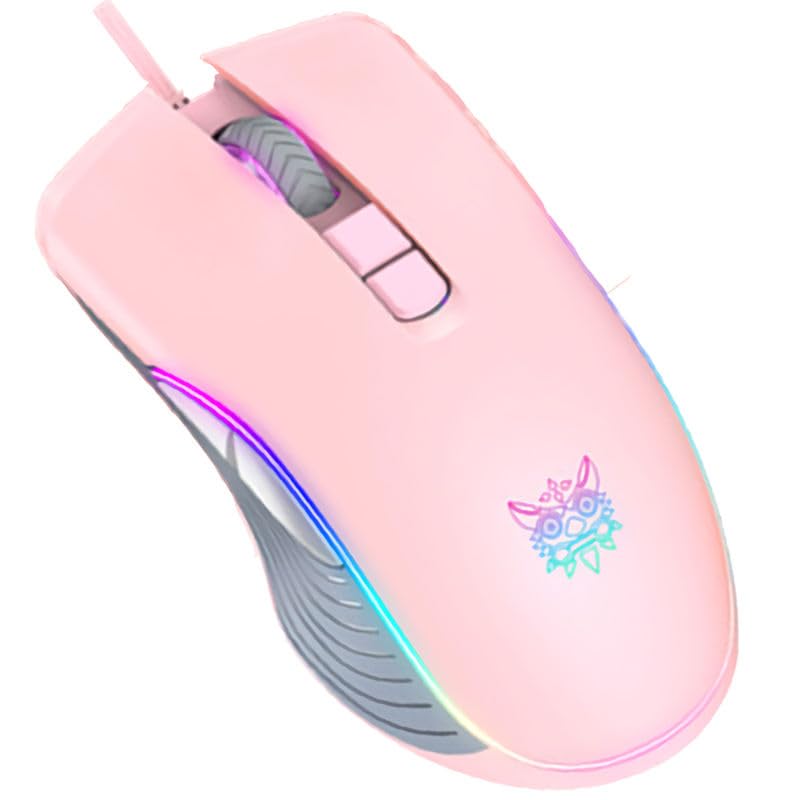
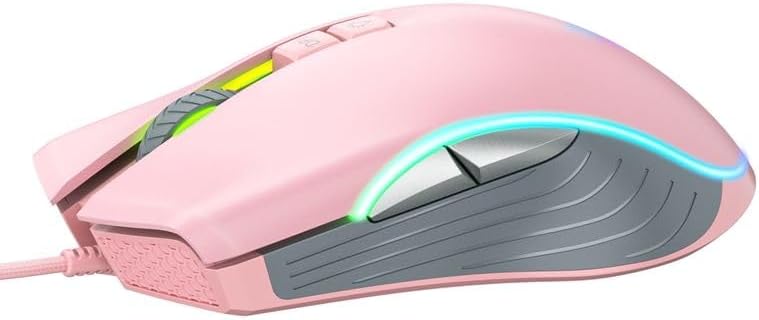
3. Instruccions de configuració
Setting up your ONIKUMA CW908 mouse is a simple plug-and-play process.
- Desempaqueta el ratolí: Traieu amb cura el ratolí del seu embalatge.
- Connexió a l'ordinador: Plug the USB connector of the mouse into an available USB port on your personal computer or laptop.
- Instal·lació del controlador: Your operating system (Windows 7, Windows 98, Linux, or newer versions) should automatically detect and install the necessary drivers. This process may take a few moments.
- A punt per al seu ús: Once the drivers are installed, the mouse will be ready for immediate use. The RGB lighting will illuminate.
4. Instruccions de funcionament
The ONIKUMA CW908 mouse offers intuitive controls for both general use and gaming.
4.1 Funcionament bàsic
- Moveu el ratolí sobre una superfície plana per controlar el cursor a la pantalla.
- Use the Left Click Button for primary actions (e.g., selecting items, opening files).
- Use the Right Click Button for secondary actions (e.g., opening context menus).
- Roll the Scroll Wheel up or down to navigate through documents or web pages. Press the Scroll Wheel for its middle-click function.
4.2 Ajust de DPI
The mouse features an adjustable DPI (Dots Per Inch) setting, allowing you to change cursor sensitivity on the fly. The CW908 supports up to 7200 DPI.
- Premeu el botó Botó d'ajust de DPI (usually located behind the scroll wheel) to cycle through different DPI levels.
- Each press will switch to a predefined DPI setting, indicated by a change in the RGB lighting color or pattern (if applicable).
- Select the DPI level that best suits your task, whether it's precise aiming in games or fast navigation across multiple monitors.
4.3 Botons laterals
The Forward and Backward buttons on the side of the mouse provide quick navigation.
- El Botó Endavant typically moves forward in web navegadors o file exploradors.
- El Botó enrere typically moves backward in web navegadors o file exploradors.
5. Personalització de la configuració
While the ONIKUMA CW908 offers plug-and-play functionality, advanced customization for button remapping or more intricate RGB control may require dedicated software. Please check the official ONIKUMA website for any available software downloads specific to the CW908 model.
- Configuració de DPI: As mentioned, the DPI button cycles through preset levels. Software, if available, may allow for custom DPI steps.
- Programació de botons: With compatible software, the 7 buttons can often be remapped to perform specific functions, macros, or keyboard shortcuts, enhancing your gaming and productivity.
- Il·luminació RGB: Software can provide more granular control over RGB effects, colors, and brightness, beyond the default cycling modes.
6. Manteniment
Proper maintenance ensures the longevity and performance of your gaming mouse.
- Neteja: Feu servir un drap suau i sec per netejar la superfície del ratolí. Per a la brutícia persistent, netegeu lleugerament.ampNetegeu el drap amb aigua o una solució de neteja suau. Eviteu productes químics agressius.
- Neteja del sensor: Occasionally, dust or debris may accumulate around the optical sensor on the underside of the mouse. Use a cotton swab or compressed air to gently clean the sensor area.
- Cura del cable: Avoid sharply bending or pulling the USB cable. Store the mouse in a way that prevents the cable from being crimped or damaged.
- Emmagatzematge: Quan no l'utilitzeu, guardeu el ratolí en un entorn net i sec, allunyat de temperatures extremes.
7. Solució De Problemes
If you encounter issues with your ONIKUMA CW908 mouse, refer to the following common problems and solutions:
| Problema | Causa possible | Solució |
|---|---|---|
| El ratolí no respon | Connexió USB fluixa, port USB defectuós, problema amb el controlador. | Assegureu-vos que el cable USB estigui ben connectat. Proveu un port USB diferent. Reinicieu l'ordinador. Consulteu el Gestor de dispositius per veure l'estat del controlador. |
| El moviment del cursor és erràtic o brusc | Sensor òptic brut, superfície inadequada del coixinet del ratolí. | Clean the optical sensor on the underside of the mouse. Use a clean, uniform-colored mouse pad. |
| El botó DPI no canvia la sensibilitat | Button malfunction, software conflict. | Ensure the mouse is properly connected. If using custom software, check its settings. Try on another computer to rule out system issues. |
| La il·luminació RGB no funciona | Problema d'alimentació, configuració del programari. | Ensure the mouse is receiving power via USB. If using custom software, check lighting settings. |
8. Especificacions
| Característica | Detall |
|---|---|
| Marca | ONIKUMA |
| Model | CW908 |
| Tecnologia de connectivitat | Cable USB |
| Detecció de moviment | Òptic |
| DPI (punts per polzada) | Fins a 7200 (ajustable) |
| Nombre de botons | 7 |
| Característiques especials | LED Lighting (RGB), Comfortable Design, Lightweight |
| Ús recomanat | Jocs |
| Dispositius compatibles | Ordinador personal, portàtil |
| Compatibilitat de sistemes operatius | Linux, Windows 7, Windows 98 (and newer Windows versions) |
| Estil | Modern |
| Color | Rosa |
9. Garantia i Suport
ONIKUMA products are manufactured to high-quality standards. For specific warranty information, please refer to the warranty card included with your product or visit the official ONIKUMA website. If you require technical support or have questions not covered in this manual, please contact ONIKUMA customer service through their official channels.


