1. Introducció
Thank you for choosing the FOREVER TWE-110 EARP Bluetooth Earbuds. These earbuds are designed to provide a high-quality audio experience with wireless freedom and intuitive controls. This manual will guide you through the setup, operation, and maintenance of your new earbuds.
2. Informació de seguretat
- No exposeu els auriculars ni l'estoig de càrrega a temperatures extremes, humitat o líquids.
- Eviteu deixar caure, colpejar o desmuntar el dispositiu.
- Mantenir fora de l'abast dels nens.
- Feu servir només el cable de càrrega proporcionat o un equivalent certificat.
- Escoltar durant molt de temps a nivells de volum alts pot causar danys auditius. Ajusteu el volum a un nivell moderat.
3. Contingut del paquet
Si us plau, comproveu que tots els articles estiguin presents al vostre paquet:
- FOREVER TWE-110 EARP Bluetooth Earbuds (Left and Right)
- Estoig de càrrega
- Cable de càrrega USB
- Manual d'usuari
4. Producte acabatview
Familiarize yourself with the components of your FOREVER TWE-110 EARP earbuds and charging case.
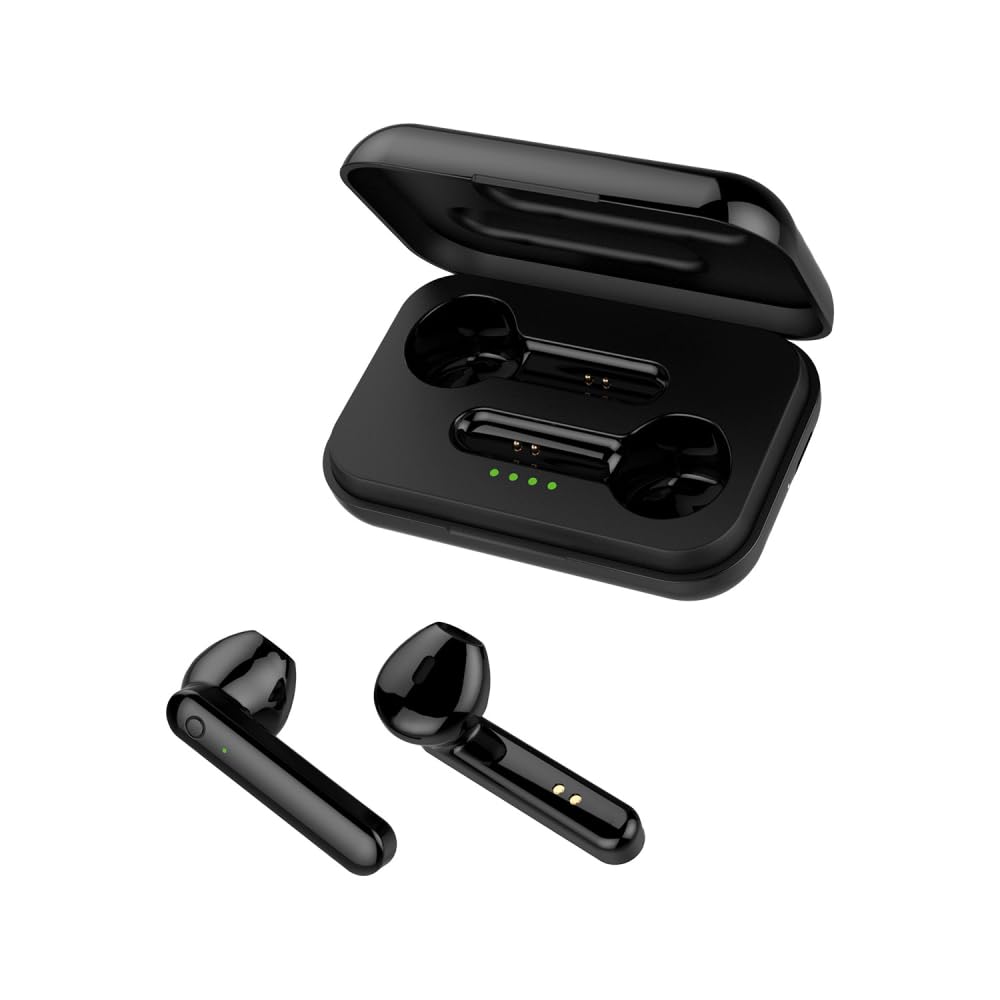
Image: FOREVER TWE-110 EARP Bluetooth Earbuds and Charging Case. This image displays the two black earbuds positioned above their matching black charging case, illustrating the complete product set.

Image: FOREVER TWE-110 EARP earbuds inside the open charging case, showing LED indicators. The image shows the black earbuds nestled in their open charging case, with small green LED lights visible, indicating charging status or battery level.

Image: Infographic highlighting features like sound quality, automatic pairing, 9-hour battery life, and LED indicators for FOREVER TWE-110 EARP. This graphic visually represents key features of the earbuds, including excellent sound quality, automatic power on/off and pairing, up to 9 hours of autonomy with the case, and LED battery level display.
5. Configuració
5.1 Càrrega dels auriculars i l'estoig
Abans del primer ús, carregueu completament els auriculars i l'estoig de càrrega.
- Col·loca els auriculars a l'estoig de càrrega. Assegura't que estiguin correctament col·locats.
- Connecteu el cable de càrrega USB al port de càrrega de la carcassa i a una font d'alimentació USB (per exemple, un ordinador, un adaptador de paret).
- The LED indicators on the case will show the charging status. Once fully charged, the indicators may turn solid or turn off, depending on the model.
- Charging time is approximately 3 hours for a full charge of the case and earbuds.
5.2 Emparellament amb un dispositiu Bluetooth
The earbuds use Bluetooth 5.1 for stable wireless connectivity.
- Open the charging case. The earbuds will automatically power on and enter pairing mode. The LED indicator on one earbud will flash, indicating it's ready to pair.
- Al dispositiu (telèfon intel·ligent, tauleta, ordinador portàtil), activeu el Bluetooth.
- Cerca available Bluetooth devices. You should see "TWE-110" in the list.
- Select "TWE-110" to connect. Once connected, the LED indicator on the earbud will stop flashing.
- Els auriculars es tornaran a connectar automàticament a l'últim dispositiu emparellat quan es treguin de l'estoig, si el Bluetooth està activat al dispositiu.

Image: Smartphone displaying Bluetooth settings connected to 'TWE-110', next to a pink FOREVER TWE-110 EARP charging case, illustrating Bluetooth 5.1 connectivity. This image shows a smartphone screen with Bluetooth settings open, indicating a successful connection to 'TWE-110', positioned beside an open pink charging case with earbuds inside.
6. Instruccions de funcionament
6.1 Encès/Apagat
- Encès: Obriu la funda de càrrega i els auriculars s'encendran automàticament.
- Apagar: Torneu a col·locar els auriculars a l'estoig de càrrega i tanqueu la tapa. S'apagaran automàticament i començaran a carregar-se.
6.2 Controls tàctils
The TWE-110 EARP earbuds feature intuitive touch controls on each earbud.
| Funció | Acció |
|---|---|
| Reproducció/pausa de música | Un sol toc a qualsevol dels auriculars |
| Pista següent | Toqueu dues vegades l'auricular dret |
| Pista anterior | Toqueu dues vegades l'auricular esquerre |
| Respondre/Finalitzar la trucada | Un sol toc a qualsevol dels auriculars |
| Rebutja la trucada | Manteniu premut qualsevol dels auriculars durant 2 segons |
| Activa l'Assistent de veu | Toqueu tres vegades a qualsevol dels auriculars |

Image: Black FOREVER TWE-110 EARP earbuds and charging case, with green sound waves, indicating hands-free calling. This image features the black earbuds and their case, with visual cues of sound waves emanating from the earbuds, symbolizing their hands-free calling capability.
7. Manteniment
7.1 Neteja
- Netegeu suaument els auriculars i l'estoig de càrrega amb un drap suau, sec i sense borrissol.
- No utilitzeu netejadors abrasius, alcohol ni dissolvents químics.
- Assegureu-vos que els contactes de càrrega estiguin nets i lliures de brutícia.
7.2 Emmagatzematge
When not in use, store the earbuds in their charging case to protect them and keep them charged. Store in a cool, dry place away from direct sunlight.
8. Solució De Problemes
Si teniu problemes, consulteu les solucions habituals següents:
- Auriculars que no s'emparellan: Ensure both earbuds are out of the case and in pairing mode. Turn off and on your device's Bluetooth. Try resetting the earbuds (refer to manufacturer's weblloc web per obtenir instruccions específiques de restabliment si cal).
- Sense so: Check the volume on your device and on the earbuds. Ensure the earbuds are properly connected to your device.
- Problemes de càrrega: Assegureu-vos que el cable de càrrega estigui ben connectat i que la font d'alimentació estigui activa. Netegeu els contactes de càrrega tant dels auriculars com de la funda.
- Connexió intermitent: Ensure there are no obstructions between the earbuds and your device. Move closer to your device. Avoid environments with strong electromagnetic interference.
9. Especificacions
| Característica | Detall |
|---|---|
| Nom del model | TWE-110 |
| Marca | PER SEMPRE |
| Tecnologia de connectivitat | Sense fil (Bluetooth 5.1) |
| Col·locació de l'orella | In-orella |
| Mètode de control | Toca |
| Característiques especials | Touch Control, Built-in Microphone |
| Bateria recarregable | Yes (1 Lithium-ion included) |
| Temps de càrrega | Aproximadament 3 hores |
| Operating Time (Earbuds) | Fins a 3 hores |
| Temps de funcionament (amb estoig de càrrega) | Fins a 9 hores |
| Dispositius compatibles | Smart Speaker, Motorcycle, Computer, Laptop, Car Audio System, Tablet, Mobile Phone, Television |
| Material | Faux Leather (referring to case finish or accents) |
10. Garantia i Suport
10.1 Informació de la garantia
FOREVER products are covered by a manufacturer's warranty. Please refer to the warranty card included in your package or visit the official FOREVER weblloc web per obtenir informació detallada sobre els termes i condicions de la garantia. Conserveu el comprovant de compra per a reclamacions de garantia.
10.2 Atenció al client
For technical assistance, troubleshooting, or product inquiries, please contact FOREVER customer support through their official weblloc web o la informació de contacte que es proporciona a l'embalatge del producte.


